Preparing your learning space...
50% through OSI Model tutorials
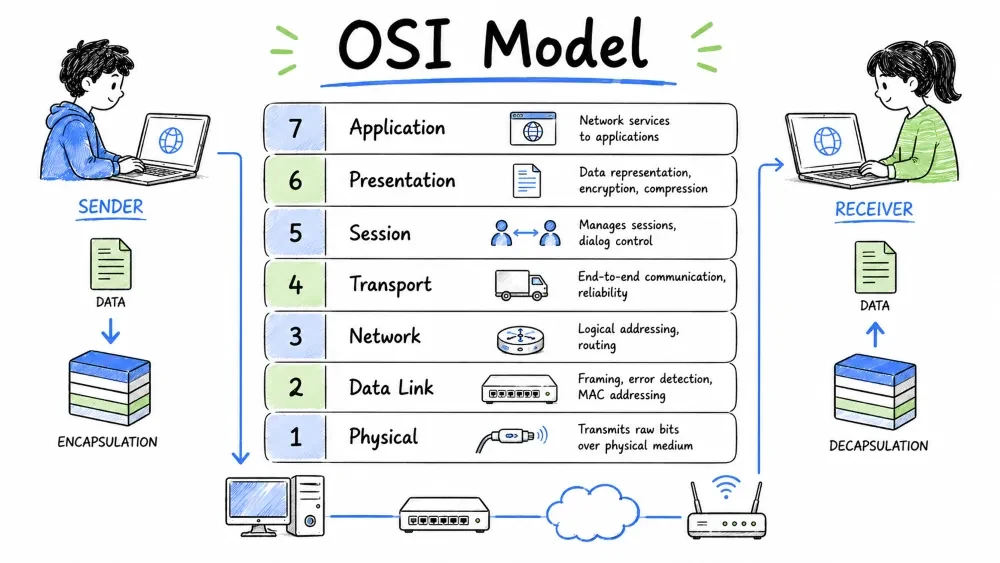
A conceptual framework that divides network communication into 7 distinct layers — each with specific functions, protocols, and responsibilities.
The OSI (Open Systems Interconnection) Model is a conceptual framework used to understand how data communication occurs between devices on a network. It divides the entire networking process into 7 distinct layers, with each layer responsible for specific functions.
┌──────────────────────────────────────────────────┐
│              OSI MODEL — 7 Layers                │
├──────────────────────────────────────────────────┤
│  7. Application Layer     │  (User Interaction)  │
├───────────────────────────┤                      │
│  6. Presentation Layer    │  (Data Formatting)   │
├───────────────────────────┤                      │
│  5. Session Layer         │  (Session Mgmt)      │
├───────────────────────────┤                      │
│  4. Transport Layer       │  (End-to-End)        │
├───────────────────────────┤                      │
│  3. Network Layer         │  (Routing)           │
├───────────────────────────┤                      │
│  2. Data Link Layer       │  (Framing)           │
├───────────────────────────┤                      │
│  1. Physical Layer        │  (Bits/Signals)      │
└──────────────────────────────────────────────────┘
The OSI model solves vendor incompatibility, simplifies troubleshooting, enables modular technology upgrades, and makes networking easier to teach and learn.
| Problem | Solution via OSI Model |
|---|---|
| Different vendors make incompatible devices | Standardized layers ensure interoperability |
| Network troubleshooting is complex | Each layer has clear responsibilities |
| New technologies emerge constantly | Layers abstract changes — add new tech in one layer without affecting others |
| Teaching networking is hard | Breaking into 7 layers makes learning step-by-step possible |
Developed by ISO between 1977-1984 — the OSI model aimed to create a universal networking standard for multi-vendor interoperability.
A visual breakdown of all 7 OSI layers from Application to Physical, their functions, data units, and protocols.
Each layer serves its upper layer and provides services to the layer below.
| Layer | Name | Function | Data Unit | Devices / Protocols |
|---|---|---|---|---|
| 7 | Application | User-facing apps, network services | Data | HTTP, FTP, DNS, SMTP |
| 6 | Presentation | Encryption, compression, data formatting | Data | SSL/TLS, JPEG, GIF, ASCII |
| 5 | Session | Session creation, maintenance, termination | Data | NetBIOS, RPC, PPTP |
| 4 | Transport | End-to-end delivery, reliability, flow control | Segment | TCP, UDP |
| 3 | Network | Logical addressing, routing, path selection | Packet | IP, ICMP, ARP, Routers |
| 2 | Data Link | Framing, MAC addressing, error detection | Frame | Ethernet, Switch, MAC |
| 1 | Physical | Bit transmission, signals, cables | Bits | Hub, Repeater, Cable |
Easy memory aids to recall the 7 layers in correct order from top to bottom or bottom to top.
Remember the 7 layers from top to bottom or bottom to top:
| Direction | Mnemonic | Meaning |
|---|---|---|
| Top → Bottom | All People Seem To Need Data Processing | Application → Physical |
| Bottom → Top | Please Do Not Throw Sausage Pizza Away | Physical → Application |
The process of adding headers as data moves down the layers (encapsulation) and removing headers as data moves up the layers (decapsulation).
When data travels from one device to another over a network, each layer adds its own header (and sometimes trailer) — this is called encapsulation. The receiving device strips headers layer by layer — this is decapsulation.
The step-by-step addition of headers from each layer as application data travels down the OSI stack.
Sender Side (Encapsulation):

┌───────────────────────────────────────────────────┐
│                User Data (e.g. "Hello")           │
├───────────────────────────────────────────────────┤
│  Layer 7-5  │  AH  │         Data                 │
├─────────────┼──────┴──────────────────────────────┤
│  Layer 4    │  TH  │  AH  │       Data            │  ← Segment
├─────────────┼──────┴──────────────────────────────┤
│  Layer 3    │  NH  │ TH  │ AH  │    Data          │  ← Packet
├─────────────┼──────┴──────────────────────────────┤
│  Layer 2    │  FH  │ NH │ TH │ AH │ Data │ FT     │  ← Frame
├─────────────┼──────┴──────────────────────────────┤
│  Layer 1    │        010101101010...              │  ← Bits
└─────────────┴─────────────────────────────────────┘

AH = Application/Upper Header   TH = Transport Header
NH = Network Header             FH = Frame Header
FT = Frame Trailer
Key Insight: Each layer ONLY understands its own header — it reads its header, processes it, then passes the rest to the next layer.
The specific name given to data at each OSI layer — Bits, Frames, Packets, Segments, and Data.
| Layer | PDU Name |
|---|---|
| Application (7) | Data |
| Presentation (6) | Data |
| Session (5) | Data |
| Transport (4) | Segment (TCP) / Datagram (UDP) |
| Network (3) | Packet |
| Data Link (2) | Frame |
| Physical (1) | Bits |
A comparison between the conceptual 7-layer OSI model and the practical 4-layer TCP/IP model used on the internet.
The TCP/IP model is the practical model used on the internet. The OSI model is the conceptual/reference model.
OSI Model                  TCP/IP Model
─────────                  ────────────
┌─────────────────┐       ┌─────────────────┐
│  Application    │       │                 │
│  Presentation   ├──────►│   Application   │
│  Session        │       │                 │
├─────────────────┤       ├─────────────────┤
│  Transport      ├──────►│   Transport     │
├─────────────────┤       ├─────────────────┤
│  Network        ├──────►│   Internet      │
├─────────────────┤       ├─────────────────┤
│  Data Link      ├──────►│   Network       │
│  Physical       │       │   Access        │
└─────────────────┘       └─────────────────┘
| Feature | OSI Model | TCP/IP Model |
|---|---|---|
| Layers | 7 | 4 (or 5) |
| Developed by | ISO | IETF |
| Year | 1984 | 1970s |
| Usage | Reference/Teaching | Practical/Internet |
| Protocol focus | Protocol-independent | TCP/IP specific |
| Popularity | Learning & theory | Real-world networking |
Each OSI layer has different security threats and defenses — understanding all 7 layers enables comprehensive "defense in depth."
Understanding the OSI model is critical for cybersecurity professionals because:
| Security Concern | OSI Layer |
|---|---|
| Phishing / Web attacks | Application (L7) |
| Encryption / SSL stripping | Presentation (L6) |
| Session hijacking | Session (L5) |
| Port scanning / DoS | Transport (L4) |
| IP spoofing / Routing attacks | Network (L3) |
| MAC spoofing / ARP spoofing | Data Link (L2) |
| Wireless jamming / Physical tampering | Physical (L1) |
In cybersecurity, you secure each layer differently. A firewall at L4 won't stop an L7 SQL injection attack. Defense in depth means securing ALL 7 layers.
Key terminology used across the OSI model — encapsulation, decapsulation, PDU, protocols, and interfaces.
| Term | Definition |
|---|---|
| Encapsulation | Adding headers as data moves down the layers |
| Decapsulation | Removing headers as data moves up the layers |
| PDU | Protocol Data Unit — data at each layer has a specific name |
| Peer-to-Peer Communication | Each layer communicates with its counterpart on the other device |
| Interface | The boundary between two adjacent layers |
| Service | What a layer provides to the layer above |
| Protocol | A set of rules for communication at a specific layer |
A complete cheat sheet summarizing all 7 OSI layers, their functions, protocols, and mnemonics for quick recall.
┌─────────────────────────────────────────────────────────┐
│                   OSI MODEL CHEAT SHEET                 │
├─────────────────────────────────────────────────────────┤
│                                                         │
│  L7: APPLICATION ─── HTTP, DNS, SMTP, FTP, DHCP         │
│       ↑                                                 │
│  L6: PRESENTATION ── SSL/TLS, JPEG, MPEG, Encryption    │
│       ↑                                                 │
│  L5: SESSION ─────── NetBIOS, RPC, Session Mgmt         │
│       ↑                                                 │
│  L4: TRANSPORT ───── TCP (Reliable), UDP (Fast)         │
│       ↑                                                 │
│  L3: NETWORK ─────── IP, ICMP, Routers, Routing         │
│       ↑                                                 │
│  L2: DATA LINK ───── Ethernet, Switch, MAC, Frames      │
│       ↑                                                 │
│  L1: PHYSICAL ────── Cables, Hubs, Bits, Signals        │
│                                                         │
│  Mnemonic: All People Seem To Need Data Processing      │
│            Please Do Not Throw Sausage Pizza Away       │
└─────────────────────────────────────────────────────────┘
Test your understanding of the OSI Model foundation with these review questions.
Save your progress and earn XP for completing tutorials.
Technology
Cyber Security & Networking
Lesson group
OSI Model
Progress
50% complete

