Preparing your learning space...
73% through Projects tutorials
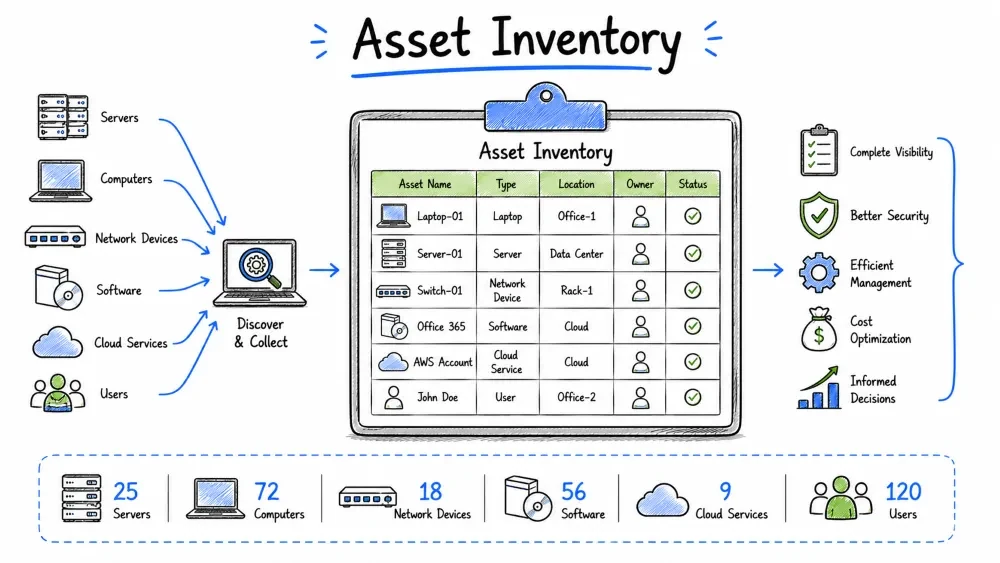
In this project, you will build a comprehensive asset inventory for a medium-sized organization. You'll learn to discover, classify, and document all IT assets including hardware, software, data, and network devices. A complete asset inventory is the foundation of any security program.
Summit Healthcare, a regional healthcare provider with 200 employees, needs a complete IT asset inventory. They've never had a formal inventory process. You must:
💡 Free Lab Setup: All tools needed are completely free:
- Nmap — Network discovery (free, open source)
- Snipe-IT — Full asset management system (free, self-hosted)
- PowerShell — Windows automation (built-in, free)
- Google Sheets / Excel — For manual tracking (free tier available)
- Rumble — Network discovery (free tier available)
No paid licenses needed! Practice on your home network or a virtual lab.
📋 Your Step-by-Step Task:
- Read the Summit Healthcare scenario (below)
- Perform a network scan using Nmap:
nmap -sn 192.168.1.0/24- Document all discovered devices in a spreadsheet
- Classify each asset by type, criticality, and data sensitivity
- Build an asset database — use Snipe-IT (free) or Google Sheets
- Assign asset tags using your organization scheme
- Create a lifecycle management plan (EOL dates, refresh schedule)
- Generate an inventory dashboard/report
- Establish ongoing maintenance procedures
- Complete the deliverables checklist and take the quiz
After completing this project, you will be able to:
"You can't protect what you don't know you have."

An asset inventory is the starting point for:
  ─ Vulnerability Management: Knowing what needs patching
  ─ Risk Assessment: Knowing which assets are critical
  ─ Incident Response: Knowing what systems are affected
  ─ Compliance: Demonstrating control over assets
  ─ License Management: Avoiding over/under licensing
  ─ Budget Planning: Knowing what needs replacement
  ─ Disaster Recovery: Knowing what to restore first
  ─ Change Management: Understanding impact of changes
| Problem | Impact |
|---|---|
| Shadow IT | Unauthorized devices/services on network |
| Unpatched systems | Missed critical vulnerabilities |
| Orphaned assets | Paying for unused licenses/services |
| Breach response gaps | Not knowing all affected systems |
| Compliance violations | Failed audits, regulatory fines |
| Data loss | Unknown data stores not backed up |
| Security blind spots | No visibility into rogue devices |
HARDWARE:
  ┌─────────────────────────────┬──────────────────┐
  │ Category                    │ Examples         │
  ├─────────────────────────────┼──────────────────┤
  │ Servers                     │ Physical, virtual │
  │ Workstations                │ Desktops, laptops │
  │ Mobile Devices              │ Tablets, phones   │
  │ Network Equipment           │ Routers, switches │
  │ Security Appliances         │ Firewalls, IDS    │
  │ Peripherals                 │ Printers, scanners│
  │ Storage                     │ NAS, SAN, DAS     │
  │ Infrastructure              │ UPS, HVAC, racks  │
  └─────────────────────────────┴──────────────────┘

SOFTWARE:
  ┌─────────────────────────────┬──────────────────┐
  │ Category                    │ Examples         │
  ├─────────────────────────────┼──────────────────┤
  │ Operating Systems           │ Windows, Linux    │
  │ Business Applications       │ ERP, CRM, Email   │
  │ Security Software           │ AV, EDR, SIEM     │
  │ Development Tools           │ IDEs, CI/CD tools │
  │ Database Systems            │ SQL, Oracle, MongoDB│
  │ Cloud Services              │ SaaS, PaaS, IaaS  │
  └─────────────────────────────┴──────────────────┘

DATA:
  ┌─────────────────────────────┬──────────────────┐
  │ Category                    │ Examples         │
  ├─────────────────────────────┼──────────────────┤
  │ Structured Data             │ Databases         │
  │ Unstructured Data           │ Files, documents  │
  │ Intellectual Property       │ Patents, source   │
  │ PII/PHI                     │ Personal data     │
  │ Configuration Data          │ Configs, passwords│
  │ Backups                     │ All data types    │
  └─────────────────────────────┴──────────────────┘

PEOPLE & OTHER:
  ┌─────────────────────────────┬──────────────────┐
  │ Category                    │ Examples         │
  ├─────────────────────────────┼──────────────────┤
  │ Personnel                   │ Employees, contractors│
  │ Accounts                    │ System, service accounts│
  │ Certificates                │ SSL/TLS, code signing │
  │ Vendor Relationships        │ Third-party services  │
  │ Facilities                  │ Offices, data centers │
  └─────────────────────────────┴──────────────────┘
Phase 1: PLANNING
  └─ Scope, objectives, tools, stakeholders

Phase 2: DISCOVERY
  └─ Automated scanning, manual checking, document review

Phase 3: DATA COLLECTION
  └─ Asset details: IP, location, owner, configuration

Phase 4: CLASSIFICATION
  └─ Tag, categorize, assign criticality and data sensitivity

Phase 5: DOCUMENTATION
  └─ Build inventory database, create records

Phase 6: MAINTENANCE
  └─ Update procedures, regular scans, audits
SCOPE:
  [ ] Which locations are included?
  [ ] Which departments?
  [ ] Virtual/cloud assets included?
  [ ] Mobile devices included?
  [ ] Software licenses included?
  [ ] Data assets included?
  [ ] Third-party managed devices?

OBJECTIVES:
  [ ] Complete hardware inventory
  [ ] Software license tracking
  [ ] Data classification
  [ ] Security baseline for all assets
  [ ] Lifecycle management data
  [ ] Budget/replacement planning

TIMELINE:
  Start date: [Date]
  Discovery phase: Week 1-2
  Data collection: Week 2-3
  Classification: Week 3-4
  Documentation: Week 4-5
  Review: Week 5
| Method | Speed | Accuracy | Coverage | Cost | Best For |
|---|---|---|---|---|---|
| Automated Scanning | Fast | High | Network-connected | Low-Medium | Network devices |
| Network Discovery | Fast | Medium | All network devices | Low | Initial sweep |
| Agent-based | Fast | Very High | Installed endpoints | Medium | Managed devices |
| Manual Walkthrough | Slow | High | Physical devices | High | Physical verification |
| Document Review | Medium | Low-Medium | Known assets | Low | Starting point |
| Procurement Records | Slow | Medium | Purchased assets | Low | Baseline |
| CMDB Integration | Fast | Very High | Managed assets | High | ITSM integration |
HYBRID APPROACH:
  1. DOCUMENT REVIEW — Gather existing procurement, HR, and IT records
  2. AUTOMATED SCAN — Use tools to discover network-connected devices
  3. AGENT DEPLOYMENT — Install agents on managed endpoints
  4. MANUAL VERIFICATION — Physically verify server rooms and closets
  5. INTERVIEWS — Ask department heads for department-specific assets
  6. RECONCILIATION — Cross-reference all sources, resolve conflicts
BY CRITICALITY (Business Impact if Lost):
  Critical (C)  — Essential for operations, no acceptable downtime
  High (H)      — Important, brief acceptable downtime (<4 hours)
  Medium (M)    — Useful, acceptable downtime (<24 hours)
  Low (L)       — Convenience, acceptable downtime (>24 hours)

BY DATA SENSITIVITY:
  Restricted (R)   — PII, PHI, trade secrets, financial data
  Confidential (C) — Internal data, would cause some harm
  Internal (I)     — General business data
  Public (P)       — No harm if disclosed

BY LOCATION:
  Site-01  — Main Office (123 Main St)
  Site-02  — Branch Office (456 Oak Ave)
  Site-03  — Data Center (789 Tech Blvd)
  Remote   — Home office / field
  Cloud    — AWS, Azure, GCP, M365

BY STATUS:
  Active         — In production use
  Spare          — Available, not in use
  Retired        — Decommissioned, not disposed
  Pending-Disposal — Awaiting secure disposal
  Lost/Stolen    — Reported missing
Asset ID Format: [Type]-[Location]-[###]
  Example:  SRV-MAIN-001  (Server at Main Office, #001)
            WKS-BRCH-042  (Workstation at Branch Office, #042)
            SW-CLOUD-001  (Software Cloud, #001)

Recommended Fields:
  ┌────────────────────┬─────────────────────────────────┐
  │ Field              │ Example                         │
  ├────────────────────┼─────────────────────────────────┤
  │ Asset ID           │ SRV-MAIN-001                    │
  │ Asset Name         │ DC01                            │
  │ Asset Type         │ Server (Physical)                │
  │ Status             │ Active                          │
  │ Criticality        │ Critical                        │
  │ Data Sensitivity   │ Restricted                      │
  │ Location           │ Main Office - Server Room        │
  │ Department         │ IT Operations                   │
  │ Owner              │ Jane Smith                      │
  │ IP Address         │ 10.0.1.5/24                     │
  │ MAC Address        │ AA:BB:CC:DD:EE:01               │
  │ OS/Version         │ Windows Server 2022             │
  │ Manufacturer       │ Dell                            │
  │ Model              │ PowerEdge R740                  │
  │ Serial Number      │ ABC123XYZ                       │
  │ Purchase Date      │ 2024-03-15                      │
  │ Warranty Expiry    │ 2027-03-15                      │
  │ EOL Date           │ 2029-03-15                      │
  │ Software Installed │ DB: SQL Server 2022, AV: Defender│
  │ Notes              │ Primary domain controller        │
  └────────────────────┴─────────────────────────────────┘
🆓 All tools listed here are FREE! No paid licenses required for this project.
| Tool | Type | Platform | Cost | Discovery Method |
|---|---|---|---|---|
| Snipe-IT | Open source ITAM | Web-based | Free | Manual import |
| GLPI | Full ITSM + inventory | Web-based | Free | Agent + network |
| Rumble | Network discovery | Cross-platform | Free tier | Network scan |
| Nmap | Network scanning | Cross-platform | Free | Network scan |
| NetBox | DCIM/IPAM | Web-based | Free | Manual + API |
| SpiceWorks | Helpdesk + inventory | Cloud | Free | Agent + manual |
| Lansweeper | Full inventory | Windows | Free (up to 100 assets) | Network scan + agent |
| Excel/Sheets | Manual tracking | Cross-platform | Free | Manual |
1. PRIMARY: Lansweeper or Snipe-IT (free, comprehensive)
2. SCANNING: Nmap + Rumble for network discovery
3. MANUAL: Google Sheets for offline assets
4. INTEGRATION: Connect inventory to ticketing system
# Discover all live hosts on subnet
nmap -sn 10.0.1.0/24

# OS detection
nmap -O 10.0.1.5

# Service/port scan
nmap -sV 10.0.1.5

# Full scan with scripts
nmap -A 10.0.1.0/24

# Scan multiple subnets
nmap -sn 10.0.1.0/24 10.0.2.0/24 192.168.1.0/24

# Save output
nmap -oA summit_discovery 10.0.1.0/24
# Get all computers in AD domain
Get-ADComputer -Filter * -Properties * |
  Select-Object Name, OperatingSystem, LastLogonDate |
  Export-Csv ad_computers.csv

# Get local installed software
Get-WmiObject Win32_Product |
  Select-Object Name, Version, Vendor |
  Export-Csv installed_software.csv

# Get hardware info
Get-WmiObject Win32_ComputerSystem |
  Select-Object Manufacturer, Model, TotalPhysicalMemory

# Get disk info
Get-WmiObject Win32_LogicalDisk -Filter "DriveType=3" |
  Select-Object DeviceID, @{N='SizeGB';E={$_.Size/1GB -as [int]}},
  @{N='FreeGB';E={$_.FreeSpace/1GB -as [int]}}
#!/bin/bash
# Linux asset inventory collection script

echo "=== SYSTEM INFO ==="
hostname
echo "OS: $(cat /etc/os-release | grep PRETTY_NAME | cut -d'"' -f2)"
echo "Kernel: $(uname -r)"
echo "Uptime: $(uptime -p)"

echo "=== HARDWARE ==="
echo "CPU: $(lscpu | grep 'Model name' | cut -d: -f2)"
echo "Memory: $(free -h | grep Mem | awk '{print $2}')"
echo "Disks:"
lsblk -o NAME,SIZE,TYPE,MOUNTPOINT | grep -v loop

echo "=== NETWORK ==="
ip addr show | grep -E 'inet |link/ether'
echo "Default Gateway: $(ip route | grep default | awk '{print $3}')"
echo "DNS: $(grep nameserver /etc/resolv.conf | awk '{print $2}')"

echo "=== SERVICES ==="
systemctl list-units --type=service --state=running --no-legend |
  awk '{print $1}' | head -20

echo "=== INSTALLED PACKAGES ==="
dpkg -l | grep '^ii' | wc -l
echo "Total packages installed"

echo "=== USERS ==="
awk -F: '{ if($3>=1000) print $1 }' /etc/passwd
TAGGING METHODS:
  ┌──────────────────────┬──────────┬────────────────────┐
  │ Method               │ Durability│ Best For           │
  ├──────────────────────┼──────────┼────────────────────┤
  │ Asset Tag (Sticker)  │ Medium   │ Quick labeling      │
  │ Barcode Label        │ Medium   │ Inventory scanning  │
  │ QR Code Label        │ Medium   │ Links to records    │
  │ RFID Tag             │ High     │ Automated tracking  │
  │ Engraving            │ Very High│ Permanent marking   │
  │ Spreadsheet          │ N/A      │ Free, start today   │
  └──────────────────────┴──────────┴────────────────────┘

RECOMMENDATION: Use QR code labels that link to inventory record
  - Print durable, laminated QR codes
  - Attach to visible location on device
  - QR code encodes Asset ID (e.g., SRV-MAIN-001)
  - Mobile app scans QR → opens inventory record
# Phase 1: Quick discovery — find ALL live hosts
nmap -sn 10.0.0.0/16 -oA quick_scan
# Result: List of all responding IPs across network

# Phase 2: Port scan all discovered hosts
nmap -sS -sV -p 1-10000 -iL quick_scan.gnmap -oA service_scan

# Phase 3: OS detection
nmap -O -iL quick_scan.gnmap -oA os_scan

# Phase 4: Vulnerability scan (if applicable)
nmap --script vuln -iL quick_scan.gnmap -oA vuln_scan
Discovered Assets — Summit Healthcare Main Office
─────────────────────────────────────────────────────
IP Address    | Hostname        | OS              | Open Ports
──────────────┼─────────────────┼─────────────────┼────────────────
10.0.1.1      | router-main     | Cisco IOS       | 22, 23, 443
10.0.1.2      | firewall-main   | pfSense         | 22, 443, 8080
10.0.1.5      | dc01            | Windows Server 2022 | 53, 88, 135, 389, 443, 445, 3389
10.0.1.10     | sql-cluster-01  | Windows Server 2022 | 1433, 5022, 445, 3389
10.0.1.20     | fileserver-01   | Ubuntu 22.04    | 22, 80, 443, 445, 2049
10.0.1.50-100 | DHCP Range      | Various         | Various
10.0.1.101    | ws-jdoe         | Windows 11 Pro  | Various (ephemeral)
10.0.1.102    | ws-asmith       | Windows 11 Pro  | Various
10.0.1.200    | printer-01      | HP LaserJet     | 80, 443, 515, 9100
10.0.1.201    | printer-02      | Brother MFC     | 80, 443, 515, 9100
10.0.1.250    | switch-01       | Cisco CBS350    | 22, 23, 80, 443, 161
10.0.1.251    | ap-01           | TP-Link EAP610  | 22, 80, 443
-- Example schema for Snipe-IT or custom database

CREATE TABLE assets (
    id INT PRIMARY KEY AUTO_INCREMENT,
    asset_tag VARCHAR(50) UNIQUE NOT NULL,
    name VARCHAR(255) NOT NULL,
    asset_type ENUM('server','workstation','network','printer',
                    'mobile','tablet','other','virtual') NOT NULL,
    status ENUM('active','spare','retired','pending-disposal',
                'lost') NOT NULL DEFAULT 'active',

    -- Classification
    criticality ENUM('critical','high','medium','low') NOT NULL,
    data_sensitivity ENUM('restricted','confidential','internal','public'),

    -- Location
    location_id INT,
    department_id INT,
    room VARCHAR(100),
    rack_position VARCHAR(50),

    -- Ownership
    owner_id INT,  -- References employee
    managed_by INT,

    -- System Details
    hostname VARCHAR(255),
    ip_address VARCHAR(45),
    mac_address VARCHAR(17),
    operating_system VARCHAR(255),
    os_version VARCHAR(50),
    manufacturer VARCHAR(255),
    model VARCHAR(255),
    serial_number VARCHAR(255) UNIQUE,

    -- Hardware Specs
    cpu VARCHAR(255),
    ram_gb INT,
    storage_gb INT,
    storage_type ENUM('SSD','HDD','NVMe','Hybrid'),

    -- Lifecycle
    purchase_date DATE,
    purchase_cost DECIMAL(10,2),
    warranty_expiry DATE,
    eol_date DATE,
    last_audit_date DATE,

    -- Virtual (if applicable)
    hypervisor VARCHAR(255),
    vcpu_count INT,
    vram_gb INT,

    -- Software
    notes TEXT,
    created_at TIMESTAMP DEFAULT CURRENT_TIMESTAMP,
    updated_at TIMESTAMP DEFAULT CURRENT_TIMESTAMP ON UPDATE CURRENT_TIMESTAMP
);

CREATE TABLE installed_software (
    id INT PRIMARY KEY AUTO_INCREMENT,
    asset_id INT NOT NULL,
    software_name VARCHAR(255) NOT NULL,
    version VARCHAR(100),
    vendor VARCHAR(255),
    license_key VARCHAR(255),
    install_date DATE,
    FOREIGN KEY (asset_id) REFERENCES assets(id)
);
asset_tag,name,type,status,criticality,data_sensitivity,location,department,owner,hostname,ip_address,mac_address,os,manufacturer,model,serial_number,purchase_date,warranty_expiry,notes
SRV-MAIN-001,DC01,server,active,critical,restricted,Main Office - Server Room,IT,Jane Smith,dc01,10.0.1.5,AA:BB:CC:DD:EE:01,Windows Server 2022,Dell,PowerEdge R740,ABC123,2024-01-15,2027-01-15,Primary DC
SRV-MAIN-002,SQLCLUSTER01,server,active,critical,restricted,Main Office - Server Room,IT,Jane Smith,sql-01,10.0.1.10,AA:BB:CC:DD:EE:02,Windows Server 2022,Dell,PowerEdge R750,DEF456,2024-03-01,2027-03-01,SQL Cluster Node 1
WKS-MAIN-042,ws-jdoe,workstation,active,medium,confidential,Main Office - 2nd Floor,Sales,John Doe,ws-jdoe,10.0.1.101,,Windows 11 Pro,Dell,Latitude 5540,GHI789,2024-06-01,2027-06-01,
┌──────────┐     ┌──────────┐     ┌──────────┐     ┌──────────┐     ┌──────────┐
│ PLANNING │────→│PROCUREMENT│────→│DEPLOYMENT│────→│OPERATIONS│────→│RETIREMENT│
└──────────┘     └──────────┘     └──────────┘     └──────────┘     └──────────┘

PHASE DETAILS:

1. PLANNING
   - Business need identified
   - Budget approved
   - Specifications defined
   - Security requirements documented

2. PROCUREMENT
   - Vendor selection
   - Purchase order
   - Asset tag assigned (pre-provisioned)
   - Invoice/Receipt recorded

3. DEPLOYMENT
   - System build and configuration
   - Security baseline applied
   - Connected to network
   - User/application assigned
   - Inventory record created/activated

4. OPERATIONS
   - Regular maintenance
   - Patches and updates
   - Monitoring and alerts
   - License renewals
   - Performance tracking
   - Incident management
   - Periodic audit verification

5. RETIREMENT
   - Data sanitization (NIST 800-88)
   - Certificate/access revocation
   - Decommission from network
   - Physical disposal/recycling
   - Inventory record archived
EOL MANAGEMENT STRATEGY:
  ┌─────────────┬──────────────┬──────────────────────────┐
  │ Asset Type  │ Typical EOL  │ Refresh Strategy         │
  ├─────────────┼──────────────┼──────────────────────────┤
  │ Server      │ 4-5 years    │ Replace at 4 years       │
  │ Workstation │ 3-4 years    │ Replace at 3 years       │
  │ Laptop      │ 3-4 years    │ Replace at 3 years       │
  │ Network Sw. │ 7-10 years   │ Replace at 7 years       │
  │ Firewall    │ 5-7 years    │ Replace at 5 years       │
  │ Mobile      │ 2-3 years    │ Replace at 2 years       │
  │ Printer     │ 3-5 years    │ Replace at 4 years       │
  │ UPS         │ 3-5 years    │ Replace battery at 3 yrs │
  └─────────────┴──────────────┴──────────────────────────┘

UPCOMING EOL ALERTS:
  ┌────────────────────┬──────────┬──────────┬─────────────────┐
  │ Asset              │ EOL Date │ Days Remaining│ Action Required│
  ├────────────────────┼──────────┼──────────────┼─────────────────┤
  │ SRV-MAIN-001 (DC)  │ 2028-01  │ 548          │ Budget for 2027 │
  │ WKS-BRCH-015 (HR)  │ 2026-09  │ 60           │ 🔴 REPLACE SOON│
  │ SW-001 (SQL Lic)   │ 2027-06  │ 365          │ Renewal notice  │
  └────────────────────┴──────────┴──────────────┴─────────────────┘
ASSET INVENTORY SUMMARY
═══════════════════════════════════════════
Organization: Summit Healthcare
Location: Main Office + 2 Branch + Data Center
Total Assets: 347
Last Updated: July 22, 2026

───────────────────────────────────────────
BY TYPE:
  Servers (Physical):       12
  Servers (Virtual):        18
  Workstations:            145
  Laptops:                  42
  Mobile Devices:           35
  Network Equipment:        22
  Printers/MFPs:            15
  Security Appliances:       5
  IoT/Medical Devices:      28
  Other:                    25

BY STATUS:
  Active:                  321
  Spare:                    18
  Retired/Pending:           8

BY CRITICALITY:
  Critical:                 38  (11%)
  High:                     85  (24%)
  Medium:                  168  (48%)
  Low:                      56  (16%)

BY DATA SENSITIVITY:
  Restricted (PHI/PII):     52  (15%)
  Confidential:              98  (28%)
  Internal:                 132  (38%)
  Public:                    65  (19%)

BY LOCATION:
  Main Office:              212
  Branch 1:                  65
  Branch 2:                  42
  Data Center:               28
CRITICAL ASSETS REPORT
═══════════════════════════════════════════

These assets are CRITICAL to operations and require highest protection.

ID              | Name          | Type    | Data         | Location
────────────────┼───────────────┼─────────┼──────────────┼────────────
SRV-MAIN-001    | DC01          | Server  | AD, DNS      | DC
SRV-MAIN-002    | SQL-CLUSTER   | Server  | Patient Records| DC
SRV-MAIN-003    | EHR-APP       | Server  | Medical Records| DC
SRV-MAIN-004    | EMAIL-EXCH    | Server  | Email         | DC
SRV-MAIN-005    | FILE-SRV      | Server  | PHI Documents | DC
FW-MAIN-001     | Firewall      | Security| N/A          | DC
SW-MAIN-001     | Backup-App    | Server  | Backups      | DC
MED-MAIN-01     | PACS System   | Storage | Medical Images| DC
NET-MAIN-01     | Core Switch   | Network | N/A          | DC
CLD-MAIN-01     | M365 Tenant   | Cloud   | Email, Docs   | Cloud
CLD-MAIN-02     | AWS Prod      | Cloud   | Web App      | Cloud
1. ASSET COUNT BY TYPE
   ── Pie chart showing distribution of asset types
   ── Helps with budget and resource planning

2. ASSET BY DEPARTMENT
   ── Bar chart showing which departments have most assets
   ── Helps with cost allocation and audit

3. ASSET BY CRITICALITY
   ── Heat map showing critical vs non-critical distribution
   ── Focuses security resources

4. EOL / WARRANTY EXPIRY
   ── Timeline of upcoming expirations
   ── Drives replacement budget planning

5. UNMANAGED / SHADOW IT
   ── Devices found in network scan not in inventory
   ── Security risk indicator

6. SOFTWARE LICENSE STATUS
   ── License count vs deployed count
   ── Compliance tracking

7. AUDIT TRAIL / CHANGES
   ── Recent changes to inventory records
   ── Accountability tracking

8. COMPLIANCE GAPS
   ── Assets missing security baselines
   ── Assets with outdated OS/software
┌─────────────────────────────────────────────────────────────────────┐
│                    ASSET INVENTORY DASHBOARD                        │
│                    Summit Healthcare                   July 2026    │
├─────────────────────────────────────────────────────────────────────┤
│                                                                    │
│ TOTAL ASSETS: 347               UNMANAGED: 12 (3.4%) ↑            │
│ ACTIVE: 321                     EOL WITHIN YEAR: 28               │
│ RETIRED: 18                     OVERDUE AUDIT: 15                 │
│                                                                    │
├─────────────┬──────────────┬──────────────┬───────────────────────┤
│ BY TYPE     │ BY CRITICAL  │ BY LOCATION   │ STATUS              │
│             │              │               │                      │
│ 🖥️ Servers:30│ 🔴 Crit: 38 │ 🏢 Main: 212  │ ✅ Active: 321     │
│ 💻 WS:   145│ 🟠 High: 85  │ 🏢 Br1: 65    │ ⏸️ Spare: 18      │
│ 💼 Laptop:42│ 🟡 Med: 168  │ 🏢 Br2: 42    │ 🔄 Pending: 8     │
│ 📱 Mobile:35│ 🟢 Low: 56   │ ☁️ DC: 28    │                     │
│ 🌐 Network:22│              │               │                     │
├─────────────┴──────────────┴──────────────┴───────────────────────┤
│                                                                    │
│ UPCOMING ACTIONS (Next 30 Days)                                    │
│ ┌──────────────────────────────────────────────────────────────┐   │
│ │ 🔴 Critical: 5 servers need security patching                │   │
│ │ 🟠 High: 12 workstations running unsupported OS              │   │
│ │ 🟡 Medium: 8 assets overdue for physical audit               │   │
│ └──────────────────────────────────────────────────────────────┘   │
│                                                                    │
│ RECENT CHANGES                                                     │
│ ┌──────────────────────────────────────────────────────────────┐   │
│ │ 07/20 — WKS-MAIN-042 reassigned to Sales Dept (John)        │   │
│ │ 07/19 — SRV-MAIN-008 added (new backup server)              │   │
│ │ 07/18 — 5 workstations marked as retired (replaced)         │   │
│ └──────────────────────────────────────────────────────────────┘   │
└─────────────────────────────────────────────────────────────────────┘
| Frequency | Task | Responsibility |
|---|---|---|
| Daily | Automated discovery scan (new devices) | System |
| Weekly | Review new device alerts, add to inventory | IT Staff |
| Monthly | Software inventory update | System |
| Monthly | Review and approve inventory changes | IT Manager |
| Quarterly | Physical spot-check (10% of assets) | IT Staff |
| Semi-annually | Full physical audit | IT + Department Reps |
| Annually | Complete inventory reconciliation | IT Manager |
| Annually | Data classification review | Security Team |
| As needed | Asset transfers, disposal, add new assets | IT Staff |
QUARTERLY SPOT-CHECK PROCEDURE:
  1. Generate random sample of 10% of active assets
  2. Locate each asset physically (or verify virtually)
  3. Check asset tag is attached and readable
  4. Verify inventory record matches physical asset
  5. Check user assignment is current
  6. Note any damage or issues
  7. Update inventory with findings
  8. Report discrepancies to IT manager

SAMPLE AUDIT FORM:
  ┌─────────────────────────────────────────────────────┐
  │ PHYSICAL ASSET AUDIT CHECKLIST                       │
  │ Date: ___________  Auditor: ___________              │
  ├─────────────────────────────────────────────────────┤
  │ Asset ID: _________  Location: ____________          │
  │                                                      │
  │ ☐ Asset tag present and readable                    │
  │ ☐ Asset matches inventory record                    │
  │ ☐ Assigned user matches record                      │
  │ ☐ Physical condition: Good / Fair / Poor            │
  │ ☐ Connected to network as expected                  │
  │ ☐ No signs of tampering or damage                   │
  │                                                      │
  │ Comments:                                            │
  │ _______________________________________________     │
  └─────────────────────────────────────────────────────┘
ASSET CHANGE REQUEST:
  1. Requester identifies need (transfer, decom, add)
  2. Approver authorizes (IT Manager)
  3. IT staff performs physical change
  4. Inventory record updated within 24 hours
  5. Verification by supervisor within 7 days
  6. Documentation archived

CHANGE TYPES:
  - New asset deployed: Add record, assign asset tag
  - Asset transferred: Update owner, location, department
  - Asset decommissioned: Mark as retired, schedule disposal
  - Asset disposed: Mark as disposed, archive record
  - Asset lost/stolen: Mark as lost, initiate security process
Before marking this project complete:
Save your progress and earn XP for completing tutorials.
Technology
Cyber Security & Networking
Lesson group
Projects
Progress
73% complete

