Preparing your learning space...
9% through Projects tutorials
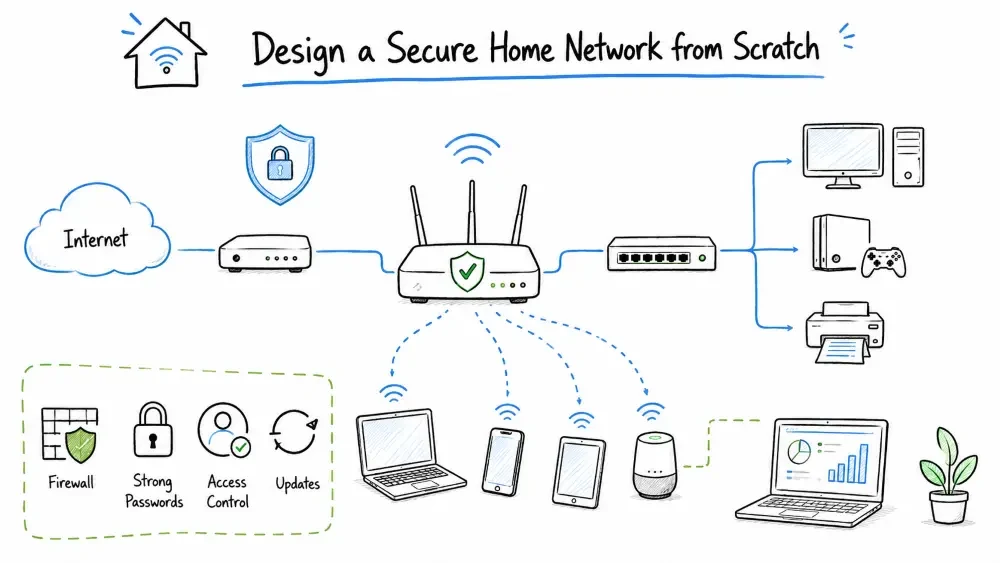
In this project, you will design a complete home network from scratch. You'll plan the topology, select appropriate hardware, design an IP addressing scheme, implement security measures, and create professional documentation. This project simulates a real-world scenario where you are asked to design a network for a family of 4-5 people with varying device needs.
The Chen family lives in a 3-bedroom house (2,400 sq ft). They have:
Your task: Design a secure, reliable, and high-performance home network that meets their needs.
** Free Lab Setup**: This entire project can be completed for free using Cisco Packet Tracer (free registration required). No physical hardware needed! Use Packet Tracer's virtual router, switches, PCs, and access points to design and test your network. Diagrams can be created with draw.io (free). Budget section is for reference only if you ever build the real network.
** Your Step-by-Step Task:**
- Read the scenario and understand the family's needs (below)
- Gather requirements — list all devices, bandwidth needs, and coverage areas
- Select hardware using the comparison table (or use Packet Tracer virtually)
- Design IP addressing scheme — subnets, DHCP, reservations
- Create a network topology diagram using draw.io (free)
- Configure security — firewall rules, WiFi encryption, VLANs
- Test your design — verify connectivity, coverage, and isolation
- Build a budget (or skip this if using simulation)
- Complete the deliverables checklist
- Take the quick quiz
After completing this project, you will be able to:
Before starting this project, you should understand:
A home network connects all digital devices within a household to each other and to the internet. Modern home networks have evolved from simple single-router setups to complex systems supporting various device types, security requirements, and performance needs.
| Component | Function | Example |
|---|---|---|
| Modem | Connects to ISP, converts signals | Cable/DSL/Fiber modem |
| Router | Routes traffic between networks, NAT, DHCP, firewall | Consumer router, EdgeRouter, pfSense |
| Switch | Provides wired connectivity to devices | 8-port/16-port Gigabit switch |
| Access Point (AP) | Provides wireless connectivity | Standalone AP, mesh node |
| Firewall | Filters traffic based on security rules | Built-in router firewall, dedicated appliance |
Start by documenting all requirements:
User Requirements Table:
| User | Devices | Usage Pattern | Priority | Bandwidth Need |
|---|---|---|---|---|
| Parent 1 | Laptop, Phone | Video conferencing, VPN, email | High | 25 Mbps |
| Parent 2 | Laptop, Phone | Remote desktop, file transfers | High | 30 Mbps |
| Teen 1 | Gaming PC, Console, Phone | Online gaming, 4K streaming | Medium | 40 Mbps |
| Teen 2 | Laptop, Console, Phone | Streaming, social media | Medium | 25 Mbps |
| Grandparent | Tablet, Phone | Video calls, browsing | Low | 10 Mbps |
| Shared | Smart TV, Smart Home | 4K streaming, IoT devices | Varies | 30 Mbps |
Total Estimated Bandwidth Need: 160 Mbps (recommend ISP plan: 300+ Mbps)
Map the house layout:
+--------------------------------------------------+
|  Master Bedroom        |  Teen Room 1            |
|  (Parent 1/2 office)   |  (Gaming PC, Console)   |
|                        |                         |
+------------------------+-------------------------+
|  Living Room            |  Teen Room 2           |
|  (Smart TV, Streaming)  |  (Laptop, Console)     |
+------------------------+-------------------------+
|  Kitchen                |  Grandparent Room      |
|  (Smart home hub)       |  (Tablet, Phone)       |
+------------------------+-------------------------+
|  Garage / Utility       |  Hallway               |
|  (Modem/Router here)    |  (Central location)    |
+------------------------+-------------------------+
| Option | Description | Best For |
|---|---|---|
| Packet Tracer Router-PT | Simulated router — configure VLANs, NAT, ACLs, DHCP | Students (100% free) |
| DIY router (pfSense) | Free open-source firewall OS — runs on any old PC | Enthusiasts (free) |
| Consumer router | All-in-one device (router+switch+AP) | Home users |
| Prosumer (Ubiquiti/TP-Link) | Separate components for better performance | Advanced setups |
🆓 For this project: Use a virtual router in Cisco Packet Tracer — 100% free, no hardware needed.
      [Modem]
         |
      [Router] --- [Switch (wired devices)]
      /     \
     /       \
[AP1 Living]  [AP2 Hallway]
WiFi Coverage Planning:
| AP Location | Coverage Area | Channel (2.4GHz) | Channel (5GHz) |
|---|---|---|---|
| Living Room | Living room, kitchen | 1 | 36 |
| Hallway | Bedrooms, office area | 6 | 149 |
| Mesh node (optional) | Garage, backyard | 11 | 52 |
All hardware can be simulated for free in Cisco Packet Tracer:
| Virtual Item | Simulated As | Configures |
|---|---|---|
| Modem | Cloud-PT | WAN connection |
| Router | Router-PT (2911) | VLANs, routing, DHCP, firewall |
| Switch | Switch-PT (2960) | VLANs, port security, trunking |
| Access Point | AccessPoint-PT | WiFi SSIDs, WPA2/3, channels |
| UPS | Not needed | Skip in simulation |
| Subnet | Network Address | Subnet Mask | Usable Range | Purpose |
|---|---|---|---|---|
| Main LAN | 192.168.1.0/24 | 255.255.255.0 | 192.168.1.1-254 | General devices |
| Guest | 192.168.2.0/24 | 255.255.255.0 | 192.168.2.1-254 | Guest WiFi |
| IoT | 192.168.3.0/24 | 255.255.255.0 | 192.168.3.1-254 | Smart home devices |
| Management | 192.168.100.0/24 | 255.255.255.0 | 192.168.100.1-254 | Network equipment |
| Device | IP Address | MAC Address (example) | Reason |
|---|---|---|---|
| Router | 192.168.1.1 | — | Gateway |
| NAS/Server | 192.168.1.10 | AA:BB:CC:DD:EE:01 | Static for file sharing |
| Printer | 192.168.1.20 | AA:BB:CC:DD:EE:02 | Always at same address |
| Gaming PC | 192.168.1.30 | AA:BB:CC:DD:EE:03 | Port forwarding for gaming |
| Parent 1 Laptop | 192.168.1.50 | AA:BB:CC:DD:EE:04 | VPN configuration |
| Parent 2 Laptop | 192.168.1.51 | AA:BB:CC:DD:EE:05 | VPN configuration |
                     INTERNET
                         |
                     [ISP Modem]
                    192.168.100.1
                         |
                  [Router/Firewall]
                  192.168.1.1 (LAN)
                  192.168.2.1 (Guest)
                  192.168.3.1 (IoT)
                  192.168.100.254 (MGMT)
                         |
              +----------+----------+
              |                     |
        [Switch 8-port]        [PoE Switch]
        192.168.1.2            192.168.1.3
              |                     |
    +----+----+----+       +----+----+----+
    |         |            |              |
[Parent 1] [Gaming]   [AP Living]   [AP Hallway]
 Laptop     PC         192.168.1.4   192.168.1.5
 .1.50      .30
| Rule # | Source | Destination | Port/Protocol | Action | Purpose |
|---|---|---|---|---|---|
| 1 | IoT (192.168.3.0/24) | Main LAN (192.168.1.0/24) | Any | DENY | Isolate IoT devices |
| 2 | IoT (192.168.3.0/24) | Internet | Any | ALLOW | IoT needs internet |
| 3 | Guest (192.168.2.0/24) | Main LAN (192.168.1.0/24) | Any | DENY | Protect main network |
| 4 | Guest (192.168.2.0/24) | Internet | 80, 443 | ALLOW | Guest browsing only |
| 5 | WAN | LAN | Established only | ALLOW | Prevent inbound attacks |
For parents working from home:
VPN Setup Options:
1. Router-based VPN (OpenVPN/WireGuard) — All traffic routed through work
2. Split tunneling — Only work traffic through VPN
3. Client VPN on work laptop — Managed by employer

Recommended: Use router-based WireGuard VPN for performance
2.4 GHz Band:
5 GHz Band:
6 GHz (WiFi 6E/7):
| Setting | Recommendation | Reason |
|---|---|---|
| SSID | Separate for 2.4/5 GHz or same | Same for modern devices (band steering) |
| Channel Width 2.4GHz | 20 MHz | Prevents overlap, better stability |
| Channel Width 5GHz | 80 MHz | Best balance of speed and interference |
| Transmit Power | Medium-High (depending on AP density) | Coverage without overlapping |
| Beacon Interval | 100 ms (default) | Standard setting |
| DTIM Interval | 3 (default) | Balance of power saving and performance |
Enable band steering to encourage dual-band devices to connect to 5 GHz for better performance. 2.4 GHz remains available for older devices and longer range.
| VLAN ID | Name | Subnet | Wireless SSID | Devices |
|---|---|---|---|---|
| 10 | Main | 192.168.1.0/24 | Home-Main | Computers, phones, tablets |
| 20 | Guest | 192.168.2.0/24 | Home-Guest | Visitor devices |
| 30 | IoT | 192.168.3.0/24 | Home-IoT | Smart bulbs, sensors, cameras |
| 99 | Management | 192.168.100.0/24 | (hidden) | Network equipment management |
Main → Internet:          ALLOW
Main → IoT:               ALLOW (limited, management only)
Main → Guest:             BLOCK
IoT → Internet:           ALLOW (limited ports)
IoT → Main:               BLOCK
Guest → Internet:         ALLOW (web only)
Guest → Main/IoT:         BLOCK
Management → All:         ALLOW
All → Management:         BLOCK
1. Connect to router via web interface (default: 192.168.0.1)
2. Set WAN interface to DHCP (gets IP from ISP modem)
3. Configure LAN interface:
   - IP: 192.168.1.1
   - Subnet: 255.255.255.0
   - DHCP Range: 192.168.1.100 - 192.168.1.200
4. Create VLANs 10, 20, 30, 99 with corresponding subnets
5. Set up firewall rules as per the table above
6. Configure DNS: Primary 1.1.1.1, Secondary 8.8.8.8
7. Enable DHCP reservations for fixed devices
8. Set up OpenVPN/WireGuard server for remote access
9. Enable system logging to a syslog server (optional)
1. Adopt APs via controller software (OC200 or software controller)
2. Create SSIDs:
   - Home-Main (VLAN 10, WPA3)
   - Home-Guest (VLAN 20, WPA2, isolated)
   - Home-IoT (VLAN 30, WPA2-PSK)
3. Configure radio settings:
   - 2.4GHz: Channel 6, 20MHz width, Medium power
   - 5GHz: Channel 36/149, 80MHz width, High power
4. Enable band steering
5. Set minimum RSSI for better roaming (-70 dBm)
6. Enable PMF (Protected Management Frames)
7. Schedule auto-reboot weekly (Monday 4 AM)
Create a heat map using tools like:
Record signal strength at key points:
| Location | Signal (dBm) | Speed (Mbps) | Notes |
|---|---|---|---|
| Living Room | -35 dBm | 450 Mbps | Excellent |
| Kitchen | -55 dBm | 300 Mbps | Good |
| Master Bedroom | -45 dBm | 380 Mbps | Good |
| Teen Room 1 | -50 dBm | 340 Mbps | Good |
| Garage | -65 dBm | 150 Mbps | Acceptable |
| Backyard | -75 dBm | 50 Mbps | Weak — consider outdoor AP |
NETWORK NAME: Chen Residence Network
DATE: [Current Date]
VERSION: 1.0

=== NETWORK OVERVIEW ===
ISP: [ISP Name]
Plan: 300 Mbps Download / 20 Mbps Upload
Public IP: [Dynamic / Static X.X.X.X]

=== HARDWARE INVENTORY ===
1. Modem: ARRIS SB8200 (Firmware: vX.X)
2. Router: TP-Link ER605 (Firmware: vX.X)
3. Switch: TP-Link TL-SG108 (Unmanaged)
4. AP1: TP-Link EAP610 (Living Room, Ceiling)
5. AP2: TP-Link EAP610 (Hallway, Ceiling)

=== IP SCHEME ===
VLAN 10 Main: 192.168.1.0/24 (Gateway: .1)
VLAN 20 Guest: 192.168.2.0/24 (Gateway: .1)
VLAN 30 IoT: 192.168.3.0/24 (Gateway: .1)
VLAN 99 Mgmt: 192.168.100.0/24

=== DHCP SCOPE ===
Range: 192.168.1.100-200 (Main)
Exclusions: 192.168.1.1-99 (Reservations)

=== WIFI SSIDS ===
Home-Main: WPA3, VLAN 10
Home-Guest: WPA2, VLAN 20, Guest isolation
Home-IoT: WPA2, VLAN 30

=== ADMIN CREDENTIALS ===
[Store securely in password manager]
Router Admin: [Username] / [Password]
AP Controller: [Username] / [Password]
Create a professional network diagram using:
| Aspect | Design Decision |
|---|---|
| ISP Plan | 500 Mbps fiber (future-proof) |
| Router | TP-Link ER605 wired router |
| Switch | TP-Link TL-SG108 (8-port gigabit) |
| Access Points | 2x TP-Link EAP610 (WiFi 6) |
| Wired Connections | Gaming PC, Smart TV, Work Laptops |
| WiFi SSIDs | 3 SSIDs (Main, Guest, IoT) |
| Security | WPA3, VLANs, Firewall, VPN |
| Management | TP-Link Omada SDN Controller |
| UPS | APC Back-UPS 600VA |
Internet (500 Mbps)
    |
    v
Router (QoS enabled)
    |
    +-- Work Devices: 60% priority (300 Mbps)
    +-- Gaming/Streaming: 30% (150 Mbps)
    +-- IoT/Guest: 10% (50 Mbps)
🆓 This project is FREE! All work can be done in Cisco Packet Tracer at no cost. No hardware purchase needed.
If you were to build this network for real, a rough estimate would be $0 using Packet Tracer for practice. Only spend money if you're actually deploying a physical network.
Before marking this project complete, ensure you have:
Save your progress and earn XP for completing tutorials.
Technology
Cyber Security & Networking
Lesson group
Projects
Progress
9% complete

