Preparing your learning space...
18% through Projects tutorials
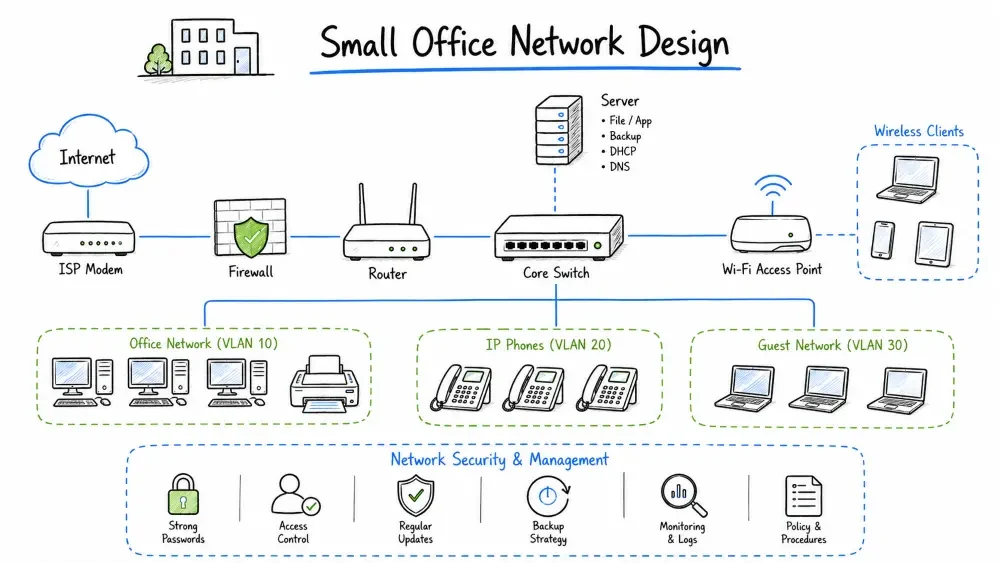
This project guides you through designing a complete network for a small office environment. You'll plan for multiple departments, shared services, internet connectivity, security requirements, and future growth. The scenario reflects a real-world small business networking project.
Company: NovaTech Solutions — A growing technology consulting firm
** Free Lab Setup**: No need to buy expensive Cisco hardware! Simulate this entire network for free using Cisco Packet Tracer (free registration). Configure VLANs, inter-VLAN routing, ACLs, DHCP, and test all scenarios virtually. For advanced routing, use EVE-NG Community Edition (free) or GNS3 (free). All budget/equipment sections are for real-world reference only.
📋 Your Step-by-Step Task:
- Read the business scenario and requirements (below)
- Design the network topology using draw.io (free)
- Plan IP addressing and subnetting for all 9 VLANs
- Configure VLANs, trunking, and inter-VLAN routing (in Packet Tracer)
- Implement security — ACLs, firewall rules, port security
- Configure QoS, DHCP, and network services
- Test connectivity between all VLANs; verify ACLs block correctly
- Document the entire network (diagrams, configs, IP scheme)
- Complete the deliverables checklist
- Take the quick quiz
After completing this project, you will be able to:
CEO / Management (3 people)
├── IT Department (8) — Developers, Sysadmins
├── Sales Department (6) — Account managers, SDRs
├── Admin/HR (4) — Reception, HR staff
└── Finance (4) — Accountants, CFO
| Department | Desktops | Laptops | Phones (VoIP) | Printers | Other |
|---|---|---|---|---|---|
| Management | 3 | 5 | 3 | 1 (shared) | 3 tablets |
| IT/Dev | 2 | 8 | 8 | 0 | 3 test servers |
| Sales | 3 | 6 | 6 | 1 (shared) | 0 |
| Admin/HR | 4 | 3 | 4 | 2 | 1 scanner |
| Finance | 4 | 2 | 4 | 1 (secured) | 0 |
| Total | 16 | 24 | 25 | 5 | 7 |
| Requirement | Specification | Priority |
|---|---|---|
| Internet Bandwidth | 500 Mbps (primary), 100 Mbps (failover) | Critical |
| Network Uptime | 99.9% (8.76 hours downtime/year max) | Critical |
| WiFi Standards | WiFi 6 (802.11ax) | High |
| Wired Connectivity | Gigabit to desktop, 10G backbone | High |
| VoIP Quality | <150ms latency, <30ms jitter | Critical |
| VPN Access | 10 concurrent remote users | High |
| Backup Internet | 4G LTE failover | Medium |
| Guest WiFi | Isolated, rate-limited | Medium |
| Security Compliance | PCI DSS for finance subnet | High |
                    INTERNET (Primary: Fiber 500Mbps)
                        |
                    [ISP Modem]
                        |
                    [Edge Firewall]  ← pfSense/OPNSense/Cisco
                       / \
                      /   \
                [Core Switch] ——— [4G LTE Failover]
               /    |    |    \
              /     |    |     \
        [Access Switches]    [Server Switch]
         /    |    |    \         |
        /     |    |     \        |
    [Dept] [Dept] [Dept] [APs]  [Servers]
     PCs    PCs    PCs
| Layer | Function | Equipment |
|---|---|---|
| Core | Routing, firewall, internet edge, inter-VLAN routing | Router/Firewall appliance |
| Distribution | Aggregation, VLAN routing, QoS, ACLs | Layer 3 switch |
| Access | End-user connectivity, PoE for APs/Phones | Layer 2 PoE switches |
| Decision | Choice | Rationale |
|---|---|---|
| Routing | Router-on-a-stick vs Layer 3 switch | Use L3 switch for performance |
| Firewall | Dedicated vs integrated | Dedicated appliance for security |
| AP management | Controller-based vs standalone | Controller for centralized management |
| Cabling | CAT6A or CAT6 | CAT6A for 10G backbone ready |
| VLAN | Department | Network | Subnet Mask | Usable IPs | Gateway |
|---|---|---|---|---|---|
| 10 | Management | 10.0.10.0/24 | 255.255.255.0 | 254 | 10.0.10.1 |
| 20 | IT/Dev | 10.0.20.0/24 | 255.255.255.0 | 254 | 10.0.20.1 |
| 30 | Sales | 10.0.30.0/24 | 255.255.255.0 | 254 | 10.0.30.1 |
| 40 | Admin/HR | 10.0.40.0/24 | 255.255.255.0 | 254 | 10.0.40.1 |
| 50 | Finance | 10.0.50.0/28 | 255.255.255.240 | 14 | 10.0.50.1 |
| 60 | Servers | 10.0.60.0/24 | 255.255.255.0 | 254 | 10.0.60.1 |
| 70 | VoIP | 10.0.70.0/24 | 255.255.255.0 | 254 | 10.0.70.1 |
| 80 | Management (Network) | 10.0.80.0/28 | 255.255.255.240 | 14 | 10.0.80.1 |
| 90 | Guest WiFi | 172.16.0.0/24 | 255.255.255.0 | 254 | 172.16.0.1 |
| Scope | Network | Pool Range | Lease | Options |
|---|---|---|---|---|
| Management | 10.0.10.0/24 | 10.0.10.100-200 | 7 days | DNS, Domain, NTP |
| IT/Dev | 10.0.20.0/24 | 10.0.20.100-200 | 1 day | DNS, Domain, NTP |
| Sales | 10.0.30.0/24 | 10.0.30.100-200 | 7 days | DNS, Domain, NTP |
| Admin/HR | 10.0.40.0/24 | 10.0.40.100-200 | 7 days | DNS, Domain, NTP |
| Finance | 10.0.50.0/28 | 10.0.50.10-14 | 7 days | DNS, Domain, NTP |
| Servers | 10.0.60.0/24 | Reserved (static) | — | — |
| VoIP | 10.0.70.0/24 | 10.0.70.50-200 | 12 hours | Option 150 (TFTP) |
| Guest | 172.16.0.0/24 | 172.16.0.10-250 | 4 hours | Guest portal DNS |
| Device | IP Address | VLAN |
|---|---|---|
| Core Switch | 10.0.80.2 | 80 |
| Access Switch 1 | 10.0.80.3 | 80 |
| Access Switch 2 | 10.0.80.4 | 80 |
| AP Controller | 10.0.80.10 | 80 |
| File Server | 10.0.60.10 | 60 |
| Print Server | 10.0.60.20 | 60 |
| Domain Controller | 10.0.60.5 | 60 |
| Backup Server | 10.0.60.30 | 60 |
🆓 100% Free Alternative: You do NOT need to buy any hardware! All configurations in this tutorial can be completed in Cisco Packet Tracer (free download — just need a free Cisco account). Packet Tracer includes virtual routers, switches, PCs, and servers. Everything you need to practice VLANs, routing, ACLs, and network services is included for free.
For the free simulation approach (recommended for students):
| Virtual Device | Packet Tracer Equivalent | What You'll Configure |
|---|---|---|
| Edge Firewall | Router 2911 with ACLs | NAT, firewall rules, DHCP |
| Core L3 Switch | Switch 3560-24PS | VLANs, inter-VLAN routing, ACLs |
| Access Switches | Switch 2960-24TT | VLAN access ports, port security, trunking |
| Server | Server-PT | DNS, HTTP, Email, DHCP services |
| PCs | PC-PT | DHCP clients, web browsing, email |
| WiFi | AccessPoint-PT | WPA2, SSIDs, wireless security |
All configurations in this tutorial use standard Cisco IOS commands that work perfectly in Packet Tracer.
The hardware list below is for professionals who plan to purchase equipment. As a student, you can skip this entirely and use Packet Tracer for free.
! Create VLANs
vlan 10
 name Management
vlan 20
 name IT_Dev
vlan 30
 name Sales
vlan 40
 name Admin_HR
vlan 50
 name Finance
vlan 60
 name Servers
vlan 70
 name VoIP
vlan 80
 name Network_Mgmt
vlan 90
 name Guest
 exit

! Configure trunk ports
interface gigabitethernet1/0/1
 description Trunk to Firewall
 switchport mode trunk
 switchport trunk allowed vlan 10,20,30,40,50,60,70,80,90

interface gigabitethernet1/0/2
 description Trunk to Access Switch 1
 switchport mode trunk
 switchport trunk allowed vlan 10,20,70

interface gigabitethernet1/0/3
 description Trunk to Access Switch 2
 switchport mode trunk
 switchport trunk allowed vlan 30,40,50,70

! Configure access ports (example)
interface gigabitethernet1/0/24
 description IT_Dev_PC
 switchport mode access
 switchport access vlan 20
 spanning-tree portfast
! Voice + Data on same port (phone passes through to PC)
interface gigabitethernet1/0/5
 description Sales_Desk
 switchport mode access
 switchport access vlan 30      ! Data VLAN
 switchport voice vlan 70       ! VoIP VLAN
 spanning-tree portfast
 mls qos trust cos
! Configure SVIs (Switch Virtual Interfaces)
interface vlan 10
 ip address 10.0.10.1 255.255.255.0
 no shutdown

interface vlan 20
 ip address 10.0.20.1 255.255.255.0
 no shutdown

interface vlan 30
 ip address 10.0.30.1 255.255.255.0
 no shutdown

interface vlan 40
 ip address 10.0.40.1 255.255.255.0
 no shutdown

interface vlan 50
 ip address 10.0.50.1 255.255.255.240
 no shutdown

interface vlan 60
 ip address 10.0.60.1 255.255.255.0
 no shutdown

interface vlan 70
 ip address 10.0.70.1 255.255.255.0
 no shutdown

interface vlan 80
 ip address 10.0.80.2 255.255.255.240
 no shutdown

interface vlan 90
 ip address 172.16.0.1 255.255.255.0
 no shutdown

! Default route to firewall
ip route 0.0.0.0 0.0.0.0 10.0.80.1
WAN Interface:
  - Connection: DHCP from ISP modem
  - Block RFC1918 private IPs
  - Block bogon networks

LAN Interface:
  - IP: 10.0.80.1/28
  - Manage via web GUI

VLAN Interfaces:
  - VLAN 10: 10.0.10.1/24 (Management)
  - VLAN 20: 10.0.20.1/24 (IT/Dev)
  - VLAN 30: 10.0.30.1/24 (Sales)
  - VLAN 40: 10.0.40.1/24 (Admin/HR)
  - VLAN 50: 10.0.50.1/28 (Finance)
  - VLAN 60: 10.0.60.1/24 (Servers)
  - VLAN 70: 10.0.70.1/24 (VoIP)
  - VLAN 90: 172.16.0.1/24 (Guest)

DHCP Server:
  - Enable on all VLANs except 80 (network mgmt)
  - Configure DNS: Primary 1.1.1.1, Secondary 8.8.8.8
  - Configure NTP: pool.ntp.org
! Finance department — restrict access (PCI DSS)
ip access-list extended FINANCE_IN
 permit ip 10.0.50.0 0.0.0.15 10.0.60.0 0.0.0.255  ! Access to servers
 permit tcp 10.0.50.0 0.0.0.15 any eq 443             ! HTTPS outbound
 permit tcp 10.0.50.0 0.0.0.15 any eq 587             ! Email submission
 deny   ip any any log

! Guest network — internet only
ip access-list extended GUEST_IN
 permit udp any any eq 53         ! DNS only
 permit tcp any any eq 80         ! HTTP
 permit tcp any any eq 443        ! HTTPS
 deny   ip any any log

! Apply ACLs to VLANs
interface vlan 50
 ip access-group FINANCE_IN in

interface vlan 90
 ip access-group GUEST_IN in
| Rule # | Interface | Source | Destination | Protocol | Action | Log |
|---|---|---|---|---|---|---|
| 1 | LAN | Any | Any | Any | Allow | No |
| 2 | VLAN 10-70 | Any | WAN | Any | Allow | No |
| 3 | VLAN 90 | 172.16.0.0/24 | WAN | TCP 80,443 | Allow | Yes |
| 4 | VLAN 90 | 172.16.0.0/24 | LAN/VLANs | Any | Deny | Yes |
| 5 | VLAN 50 | 10.0.50.0/28 | 10.0.60.0/24 | TCP 445,443 | Allow | Yes |
| 6 | WAN | Any | VPN Pool | UDP 1194 | Allow | Yes |
| 7 | WAN | Any | Any | Any | Deny | Yes |
1. Port Security
interface range gigabitethernet1/0/1-24
 switchport port-security
 switchport port-security maximum 2
 switchport port-security violation shutdown
 switchport port-security mac-address sticky

2. DHCP Snooping
ip dhcp snooping vlan 10,20,30,40,50,70,90
ip dhcp snooping
interface gigabitethernet1/0/1
 ip dhcp snooping trust

3. Dynamic ARP Inspection
ip arp inspection vlan 10,20,30,40,50,70,90
ip arp inspection validate src-mac dst-mac ip

4. Storm Control
interface range gigabitethernet1/0/1-24
 storm-control broadcast level 20
 storm-control multicast level 50
 storm-control action shutdown
OpenVPN Configuration:
  - Protocol: UDP (port 1194)
  - Encryption: AES-256-GCM
  - Authentication: SHA-256 certificate + 2FA
  - Tunnel Network: 10.255.0.0/24
  - DNS Push: Internal domain controller
  - Split Tunneling: Enabled (only internal traffic goes through VPN)
  - Concurrent Users: 10
  - Idle Timeout: 30 minutes
| Traffic Type | DSCP | CoS | Priority | Bandwidth Guarantee |
|---|---|---|---|---|
| VoIP | EF (46) | 5 | Highest | 10% |
| Video Conference | AF41 (34) | 4 | High | 20% |
| Interactive (SSH/RDP) | AF21 (18) | 3 | Medium | 10% |
| Business Critical | AF31 (26) | 3 | Medium | 30% |
| Bulk Data | AF11 (10) | 2 | Low | 20% |
| Guest/Best Effort | 0 (BE) | 0 | Lowest | 10% |
! Classify traffic
class-map match-all VOIP
 match ip dscp ef
class-map match-all VIDEO_CONF
 match ip dscp af41
class-map match-all BUSINESS_CRITICAL
 match ip dscp af31

! Create policy
policy-map QOS_POLICY
 class VOIP
  priority percent 10
  police cir 10m bc 1m5
 class VIDEO_CONF
  bandwidth percent 20
 class BUSINESS_CRITICAL
  bandwidth percent 30
 class class-default
  fair-queue
  random-detect

! Apply to WAN interface
interface gigabitethernet1/0/1
 service-policy output QOS_POLICY
Server Role: Active Directory Domain Controller
Hostname: DC01
IP: 10.0.60.5/24 (Static)
DNS: 127.0.0.1, 10.0.60.5
Services:
  - Active Directory Domain Services
  - DNS Server
  - DHCP Server (failover)
  - NTP Server
  - Certificate Services (for VPN)

Domain: novatech.local
Site: Head Office
Server Role: File and Print Server
Hostname: FS01
IP: 10.0.60.10/24 (Static)
Storage:
  - System: 2x240GB SSD (RAID 1)
  - Data: 4x4TB HDD (RAID 10) = 8TB usable

Shares:
  \\FS01\Shared\Public — Everyone (Read)
  \\FS01\Shared\Department — Department groups (Read/Write)
  \\FS01\Shared\Finance — Finance only (Read/Write)
  \\FS01\UserBackups\ — Per-user (personal)
Server Role: Print Server
Printer Pool:
  1. HP LaserJet M404 (Admin) — VLAN 40
  2. HP Color LaserJet (Sales) — VLAN 30
  3. HP LaserJet M404 (Finance) — VLAN 50 (secured)
  4. Brother MFC (Management) — VLAN 10

Configuration:
  - Deploy printers via Group Policy
  - Enable secure printing (PIN release)
  - Log all print jobs
Primary: Fiber 500 Mbps (WAN1)
Failover: 4G LTE USB modem (WAN2)

pfSense Failover Configuration:
  - Gateway monitoring: Ping 8.8.8.8 and 1.1.1.1
  - Failure detection: 5 lost pings (25 seconds)
  - Trigger action: Switch to WAN2
  - Recovery: Ping restored for 10 consecutive checks
  - Load balancing: Disabled (active/passive only)
UPS 1 — Server Room:
  - Servers: DC01, FS01
  - Core network equipment
  - Runtime: 45 minutes at full load
  - Auto-shutdown: Graceful shutdown at 20% battery

UPS 2 — Wiring Closet:
  - Access switches
  - Firewall
  - PoE devices (APs)
  - Runtime: 30 minutes at full load
| Backup Type | Frequency | Retention | Target | Data |
|---|---|---|---|---|
| Full | Weekly (Sunday 2AM) | 4 weeks | NAS (Synology) | All servers |
| Incremental | Daily (11PM) | 7 days | NAS (Synology) | Changed files |
| Offsite | Real-time | 30 days | Cloud (Backblaze) | Critical data |
| System State | Weekly | 3 months | NAS | AD, configs |
Automated network device backup:
  - Tool: RANCID or oxidized
  - Schedule: Daily at 3AM
  - Storage: NAS backup share
  - Retention: 30 versions per device
  - Notification: Email on config change detected
| Test | Tool/Command | Expected Result |
|---|---|---|
| Cable integrity | Cable tester | All wires pass |
| Switch power-up | Visual | All LEDs normal |
| Firmware versions | Show version | Latest stable |
| POE output | Test device | Device powers on |
Test 1: Basic Connectivity
  PC (VLAN 10) → Gateway (10.0.10.1): ping ✓
  PC (VLAN 10) → PC (VLAN 20): ping ✓ (inter-VLAN routing)
  PC (VLAN 50) → PC (VLAN 10): should fail (ACL) ✓

Test 2: DHCP
  PC on each VLAN: ipconfig /all
  Verify: Correct IP, subnet, gateway, DNS

Test 3: DNS Resolution
  nslookup novatech.local → 10.0.60.5
  nslookup google.com → External resolution works

Test 4: Internet Access
  curl https://google.com — Returns 200
  Speed test — 450+ Mbps (primary link)

Test 5: WiFi
  Signal survey: No dead zones (all areas -65 dBm or better)
  Roaming: seamless handoff between APs (<100ms)
  Guest isolation: Guest cannot ping internal addresses

Test 6: VoIP
  Call test between extensions: <30ms jitter
  Call test during backup: No degradation (QoS working)

Test 7: VPN
  Remote client connects: Gets 10.255.0.x IP
  Access internal resource: \\FS01\Shared accessible
  Internet still works (split tunnel)
| Test | Target | Acceptable | Result |
|---|---|---|---|
| WAN Throughput | 500 Mbps | >450 Mbps | |
| LAN Throughput | 1 Gbps | >900 Mbps | |
| WiFi Speed (5GHz) | 500 Mbps | >300 Mbps | |
| Inter-VLAN Routing | 1 Gbps | >900 Mbps | |
| DNS Resolution | <10ms | <50ms | |
| VPN Throughput | 100 Mbps | >50 Mbps | |
| VoIP MOS Score | 4.2-4.5 | >4.0 |
Network Overview Document
Technical Configuration Guide
User Guide
Administration Guide
| Phase | Tasks | Duration |
|---|---|---|
| Planning | Requirements, design, hardware selection | 3 days |
| Procurement | Order equipment, wait for delivery | 5-7 days |
| Pre-configuration | Configure devices before deployment | 2 days |
| Deployment | Rack equipment, cable, power on | 1 day |
| Configuration | Apply full config, set up servers | 2 days |
| Testing | Full test suite, benchmark, fix issues | 1 day |
| Migration | Cut over from old network | 1 day (weekend) |
| Handover | Documentation, training, sign-off | 1 day |
| Total | 16-18 days |
This project is completely free using Packet Tracer. No hardware purchase needed.
| Resource | Cost with Simulation | Notes |
|---|---|---|
| Network Hardware | $0 (FREE ) | Use Packet Tracer virtual devices |
| Servers | $0 (FREE ) | Use Packet Tracer Server-PT |
| All other costs | $0 (FREE ) | Everything simulated in software |
Before project sign-off, ensure:
Save your progress and earn XP for completing tutorials.
Technology
Cyber Security & Networking
Lesson group
Projects
Progress
18% complete

