Preparing your learning space...
33% through Routing & switching tutorials
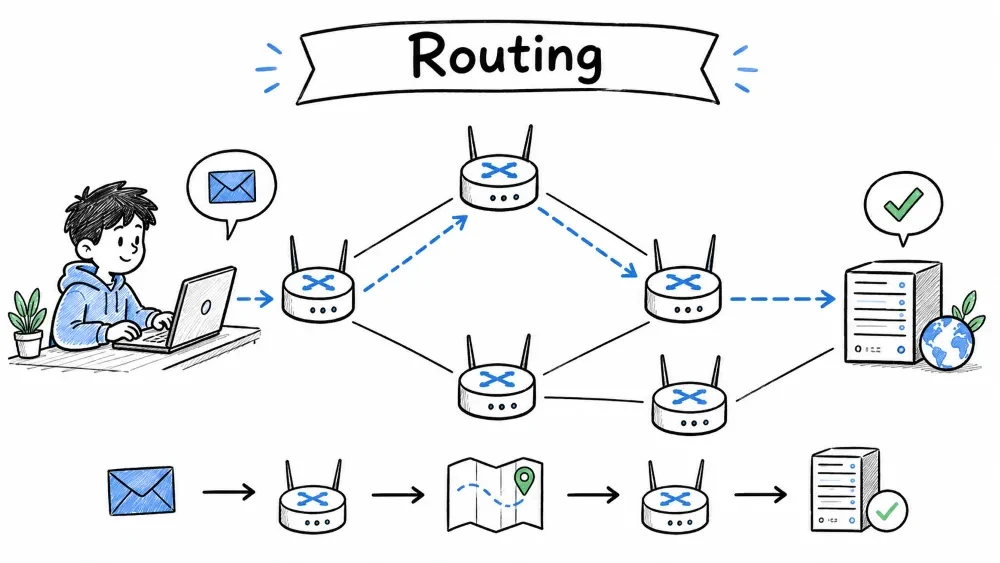
Routing is the process of selecting a path for traffic across one or more networks. In simpler terms — it's how data finds its way from one device to another across the internet or any interconnected network.
A real-world comparison to understand how routing works in everyday terms.
Think of routing like the postal system:
| Network Concept | Postal Analogy |
|---|---|
| Packet | A letter/envelope |
| Source IP | Return address |
| Destination IP | Delivery address |
| Router | Post office sorting facility |
| Routing Table | Postal route map |
| Default Gateway | Your local post office drop-off |
Just as a letter passes through multiple post offices to reach its destination, data packets hop through multiple routers to reach their target.
Key differences between Layer 3 routers and Layer 2 switches in a network.
| Feature | Router | Switch |
|---|---|---|
| Layer | Layer 3 (Network) | Layer 2 (Data Link) |
| Decision Basis | IP Addresses | MAC Addresses |
| Connects | Different networks | Devices within same network |
| Key Feature | Routing / NAT | MAC learning / Forwarding |
How a packet travels from source to destination through multiple routers.
[PC A] ---> [Router 1] ---> [Router 2] ---> [Router 3] ---> [PC B]
 10.0.0.5     10.0.0.1      172.16.0.1      192.168.0.1     192.168.0.5
              +----------+  +----------+  +----------+
              |  ROUTER  |  |  ROUTER  |  |  ROUTER  |
              |   TABLE  |  |   TABLE  |  |   TABLE  |
              |10.0.0.0/24|  |172.16.0.0|  |192.168.0.0|
              |172.16.0.0|  |192.168.0.0|  |10.0.0.0/24|
              +----------+  +----------+  +----------+
Each router makes an independent forwarding decision based only on its own routing table. It doesn't know the full path — just the next hop.
A database in a router that stores known network paths and next-hop information.
A routing table is a data structure stored in a router (or a host) that lists the routes to particular network destinations. Think of it as a map the router uses to decide where to send packets.
+--------------+--------------+--------------+--------------+
| Destination  |  Next Hop    |   Interface  |    Metric    |
|   Network    |    (IP)      |              |              |
+--------------+--------------+--------------+--------------+
| 0.0.0.0/0    | 10.0.0.1     | eth0         | 0            |
| 10.0.0.0/24  | Direct       | eth0         | 0            |
| 172.16.0.0/24| 10.0.0.2     | eth0         | 1            |
| 192.168.0.0/24| 10.0.0.3    | eth0         | 2            |
| 192.168.1.0/24| Direct      | eth1         | 0            |
+--------------+--------------+--------------+--------------+
Explanation of each column in a routing table entry.
| Field | Description | Example |
|---|---|---|
| Destination Network | The target network (IP + subnet mask) | 192.168.1.0/24 |
| Next Hop | The IP address of the next router to forward to | 10.0.0.2 |
| Interface | Which port to send the packet out of | eth0, eth1 |
| Metric / Cost | How far/expensive this route is (lower = better) | 0 (direct), 1 (one hop) |
| Administrative Distance | Trustworthiness of the route source | 0 (connected), 1 (static), 120 (RIP) |
Routing entries are classified as directly connected, static, or dynamic.
192.168.1.0/24 is directly connected, eth1Step-by-step process a router follows when deciding where to forward a packet.
+----------------------------------+
|   Packet arrives with dest IP    |
|          192.168.1.50            |
+------------+---------------------+
             |
             v
    Does routing table have        --NO--> Use Default Route (0.0.0.0/0)
    a matching entry?                         |
             |YES                          [Drop / Forward to ISP]
             |
    +------------------+
    |  Longest Prefix   |
    |  Match Rule       |
    +------------------+
             |
    More specific = better match
             |
         Example:
  192.168.0.0/16  -> matches, but /24 is better
  192.168.1.0/24  -> matches, most specific
  192.168.1.128/25-> does NOT match
             |
             v
    Forward packet to Next Hop
When multiple routes match, the most specific network prefix is selected.
When multiple routes match, the most specific (smallest network) wins:
| Destination | Prefix Length | Match Level |
|---|---|---|
0.0.0.0/0 | 0 bits | Default (last resort) |
192.168.0.0/16 | 16 bits | General match |
192.168.1.0/24 | 24 bits | Most specific |
The default gateway is the router that a device uses when it needs to send traffic outside its own network. It's the "exit door" to the rest of the world.
+----------------------------------------------------+
|                    HOME NETWORK                     |
|                                                     |
|  +------+    +------+    +------+                   |
|  | PC 1 |    | PC 2 |    | PC 3 |                   |
|  |.2    |    |.3    |    |.4    |                   |
|  +--+---+    +--+---+    +--+---+                   |
|     |           |           |                       |
|  +--+-----------+-----------+--+                    |
|  |       SWITCH                |                    |
|  +----------+-----------------+                     |
|             |                                       |
|     +-------+--------+       Network: 192.168.1.0/24|
|     |  DEFAULT GW    |         GW IP: 192.168.1.1   |
|     |  (Router) .1   |                              |
|     +-------+--------+                              |
+-------------+--------------------------------------+
              |
      +-------+--------+
      |   INTERNET     |
      +----------------+
+---------------------------------------------------------+
| 1. PC wants to reach 8.8.8.8                            |
| 2. PC checks: Is 8.8.8.8 on my network (192.168.1.0/24)?|
| 3. NO -> sends packet to Default Gateway 192.168.1.1    |
| 4. Router at 192.168.1.1 receives and forwards onward   |
+---------------------------------------------------------+
ipconfig
Look for Default Gateway under your network adapter.
ip route | grep default
# or
route -n
default via 192.168.1.1 dev wlan0
The default gateway appears in routing tables as the default route:
0.0.0.0/0 via 192.168.1.1 dev eth0
0.0.0.0/0 means "any destination"| Term | Definition |
|---|---|
| Hop | A passage through one router |
| Next Hop | The immediate router a packet is sent to |
| Metric | A value used to compare routes (fewer hops, faster links, etc.) |
| Administrative Distance (AD) | Trust level of a route source (0 = most trusted, 255 = unreachable) |
| Connected Route | A network directly attached to a router's interface |
| Static Route | A manually configured route |
| Dynamic Route | A route learned via a routing protocol |
| Route Summarization | Combining multiple networks into one entry (CIDR) |
| Floating Static Route | A backup static route with higher AD, used if the primary fails |
| Route Source | AD |
|---|---|
| Directly Connected | 0 |
| Static Route | 1 |
| EIGRP Summary | 5 |
| External BGP | 20 |
| Internal EIGRP | 90 |
| OSPF | 110 |
| RIP | 120 |
| External EIGRP | 170 |
| Unknown / Unreliable | 255 |
        +----------+                    +----------+
        |  Router  |   172.16.0.0/30    |  Router  |
        |    R1    |<------------------>|    R2    |
        |          |  .1            .2  |          |
        +--+-------+                    +---+------+
           |                                |
     10.0.0.0/24                      192.168.1.0/24
           |                                |
      +----+----+                     +-----+-----+
      |  PC A   |                     |  PC B     |
      |10.0.0.10|                     |192.168.1.10|
      +---------+                     +-----------+
| Destination | Next Hop | Interface | Metric | Type |
|---|---|---|---|---|
| 10.0.0.0/24 | -- | eth0 | 0 | Connected |
| 172.16.0.0/30 | -- | eth1 | 0 | Connected |
| 192.168.1.0/24 | 172.16.0.2 | eth1 | 1 | Static |
| Destination | Next Hop | Interface | Metric | Type |
|---|---|---|---|---|
| 172.16.0.0/30 | -- | eth0 | 0 | Connected |
| 192.168.1.0/24 | -- | eth1 | 0 | Connected |
| 10.0.0.0/24 | 172.16.0.1 | eth0 | 1 | Static |
1. PC A (10.0.0.10 -> 192.168.1.10)
   -> Dest not local, send to Default Gateway
   -> Sends to R1 (10.0.0.1)

2. R1 receives packet
   -> Checks routing table for 192.168.1.10
   -> Match: 192.168.1.0/24 via 172.16.0.2
   -> Forwards packet to R2 (172.16.0.2)

3. R2 receives packet
   -> Checks routing table for 192.168.1.10
   -> Match: 192.168.1.0/24 directly connected on eth1
   -> ARP for 192.168.1.10 -> forwards to PC B
interface eth0
 ip address 10.0.0.1 255.255.255.0
 no shutdown

interface eth1
 ip address 172.16.0.1 255.255.255.252
 no shutdown

ip route 192.168.1.0 255.255.255.0 172.16.0.2
interface eth0
 ip address 172.16.0.2 255.255.255.252
 no shutdown

interface eth1
 ip address 192.168.1.1 255.255.255.0
 no shutdown

ip route 10.0.0.0 255.255.255.0 172.16.0.1
You are the network administrator for a small company. Router R1 has the following routing table:
R1 Routing Table:
Destination         Next Hop           Interface    Metric
0.0.0.0/0           203.0.113.1        eth2         0
10.0.0.0/8          10.0.0.1           eth0         0
10.10.0.0/16        172.16.0.2         eth1         5
10.10.10.0/24       172.16.0.3         eth1         10
172.16.0.0/16       Direct             eth1         0
203.0.113.0/24      Direct             eth2         0
Packet arrives with destination IP 10.10.10.50
Packet arrives with destination IP 10.10.5.5
Packet arrives with destination IP 8.8.8.8
Packet arrives with destination IP 203.0.113.25
Link to 172.16.0.3 goes down
10.10.10.50
10.10.10.0/24 -- longest prefix match (24 bits)10.10.5.5
10.10.0.0/16 -- 16-bit prefix (10.10.5.5 is within 10.10.0.0/16)8.8.8.8
0.0.0.0/0 -- no other specific route matches203.0.113.25
203.0.113.0/24Link failure to 172.16.0.3
10.10.0.0/16 via 172.16.0.2, but 10.10.10.0/24 is a SUBNET of 10.10.0.0/16You have three routers connected as follows:
                    10.0.0.0/30
         +----------------------------------+
         |                                  |
    +----+-----+                     +------+---+
    |          |    172.16.0.0/30    |          |
    |   R1     |<------------------->|   R2     |
    |          |    .1           .2  |          |
    +----+-----+                     +------+---+
         | 192.168.1.0/24                   | 192.168.2.0/24
         |                                  |
    +----+-----+                      +-----+----+
    | PC-A     |                      | PC-B     |
    | 192.168. |                      | 192.168. |
    | 1.10/24  |                      | 2.10/24  |
    +----------+                      +----------+
| Router | Interface | IP Address | Connected To |
|---|---|---|---|
| R1 | eth0 | 192.168.1.1/24 | PC-A / LAN |
| R1 | eth1 | 10.0.0.1/30 | R2 eth0 |
| R1 | eth2 | 172.16.0.1/30 | R2 eth1 |
| R2 | eth0 | 10.0.0.2/30 | R1 eth1 |
| R2 | eth1 | 172.16.0.2/30 | R1 eth2 |
| R2 | eth2 | 192.168.2.1/24 | PC-B / LAN |
Task A: Write the static route commands for R1 so that PC-A can reach:
Task B: Write the static route commands for R2 so that PC-B can reach:
Task C: Configure a floating static route as a backup:
Task D: PC-A (192.168.1.10) pings PC-B (192.168.2.10).
Task A -- R1 Static Routes
ip route 192.168.2.0 255.255.255.0 10.0.0.2        ! Primary to PC-B's network
ip route 0.0.0.0 0.0.0.0 10.0.0.2                 ! Default route to Internet
Task B -- R2 Static Routes
ip route 192.168.1.0 255.255.255.0 172.16.0.1     ! Primary to PC-A's network
ip route 0.0.0.0 0.0.0.0 172.16.0.1              ! Default route to Internet
Task C -- Floating Static Route (Backup)
ip route 192.168.2.0 255.255.255.0 172.16.0.2 10 ! AD 10 = backup
Task D -- Packet Trace (PC-A -> PC-B)
Save your progress and earn XP for completing tutorials.
Technology
Cyber Security & Networking
Lesson group
Routing & switching
Progress
33% complete

