Preparing your learning space...
67% through Routing & switching tutorials
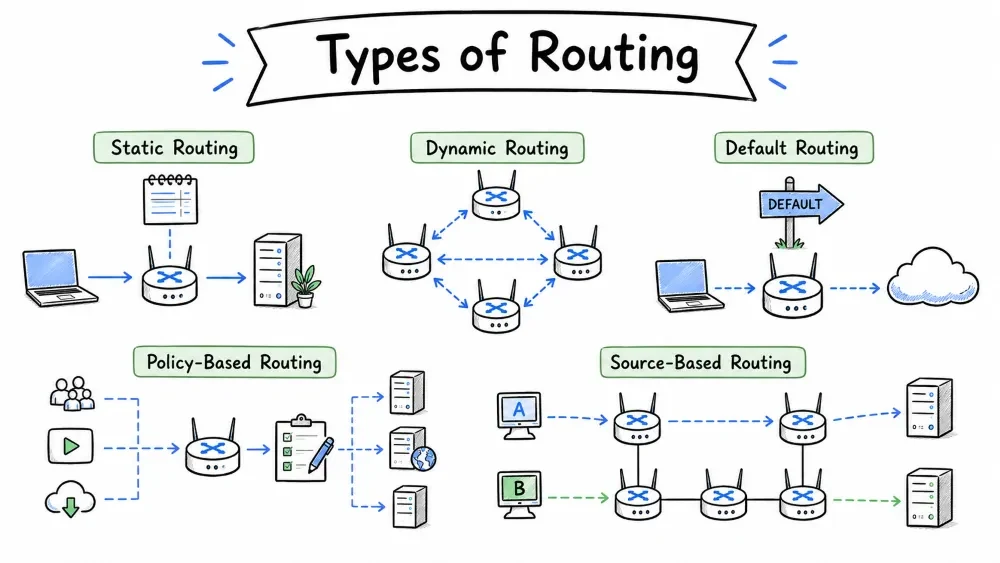
Routing is broadly categorized into two main types:
                   +---------------------------------+
                   |           ROUTING                |
                   +----------+----------------------+
                              |
              +---------------+---------------+
              |                               |
        +-----+-----+                  +------+------+
        |  STATIC   |                  |   DYNAMIC   |
        |  ROUTING  |                  |   ROUTING   |
        +-----------+                  +------+-------+
                                              |
                        +---------------------+---------------------+
                        |                     |                     |
                    +---+---+           +-----+-----+         +----+----+
                    |  RIP  |           |   OSPF    |         |  EIGRP  |
                    |(v1/v2/|           |  (Link-   |         | (Cisco  |
                    |  v3)  |           |  State)   |         |Hybrid)  |
                    +-------+           +-----------+         +---------+
Distinguishing routing inside an organization (IGP) versus between organizations (EGP).
| Type | Scope | Protocols |
|---|---|---|
| IGP (Interior Gateway Protocol) | Inside one organization / AS | RIP, OSPF, EIGRP |
| EGP (Exterior Gateway Protocol) | Between different organizations | BGP (Border Gateway Protocol) |
Static routing uses routes that are manually configured by a network administrator. The router does not discover these routes -- they are fixed entries in the routing table.
+--------------------------------------------------+
|  Administrator types:                            |
|  ip route 192.168.2.0 255.255.255.0 10.0.0.2     |
|                                                  |
|  Router adds entry to routing table:             |
|  S   192.168.2.0/24 [1/0] via 10.0.0.2           |
|       ^ Static marker     ^ AD/Metric            |
+--------------------------------------------------+
Benefits of using static routing in a network.
| Advantage | Explanation |
|---|---|
| No overhead | No routing protocol = no bandwidth used for updates |
| Secure | No advertisements = harder to attack |
| Predictable | Routes never change unless manually updated |
| Low resource | Minimal CPU/RAM usage on router |
| Simple | Easy to configure in small networks |
Limitations and drawbacks of static routing.
| Disadvantage | Explanation |
|---|---|
| No fault tolerance | If a link fails, the static route breaks unless manually fixed |
| Manual effort | Every route must be typed in by hand |
| Not scalable | In a network with 100+ routers, static routing becomes unmanageable |
| Human error prone | Typing mistakes can cause outages |
Scenarios where static routing is the best choice over dynamic protocols.
A static route with higher administrative distance, used only when the primary route is unavailable.
A floating static route is a backup that only activates when the primary route fails:
Primary:   ip route 10.0.0.0/24 172.16.0.2          (AD = 1)
Backup:    ip route 10.0.0.0/24 172.16.1.2 10       (AD = 10)
                                          ^ Higher AD = backup
ip route add 192.168.2.0/24 via 10.0.0.2 dev eth0
ip route 192.168.2.0 255.255.255.0 10.0.0.2
route add 192.168.2.0 mask 255.255.255.0 10.0.0.2
Dynamic routing uses routing protocols that automatically discover and share network information. Routers exchange updates and build routing tables without manual intervention.
Routers form neighbor relationships and exchange routing information dynamically.
+----------+           +----------+           +----------+
| Router A |---Hello-->| Router B |<--Hello---| Router C |
|          |<--Update--|          |---Update--|          |
+----------+           +----------+           +----------+
     |                      |                      |
     v                      v                      v
+-------------+     +-------------+         +-------------+
|   Routing   |     |   Routing   |         |   Routing   |
|   Table     |     |   Table     |         |   Table     |
|  (built     |     |  (built     |         |  (built     |
|  from       |     |  from       |         |  from       |
|  updates)   |     |  updates)   |         |  updates)   |
+-------------+     +-------------+         +-------------+
Benefits of using dynamic routing protocols.
| Advantage | Explanation |
|---|---|
| Auto-failover | Routes update automatically when links fail |
| Scalable | Works in networks with hundreds of routers |
| Low maintenance | No manual route entries needed |
| Adaptive | Can choose the best path based on current conditions |
Drawbacks of dynamic routing protocols.
| Disadvantage | Explanation |
|---|---|
| Overhead | Protocol messages consume bandwidth and CPU |
| Convergence time | Takes time for all routers to agree after a change |
| Security exposure | Route advertisements can be intercepted/spoofed |
| Complexity | Requires understanding of protocol configuration |
Classification of dynamic routing into Distance Vector, Link State, and Hybrid.
DYNAMIC ROUTING PROTOCOLS
|
+-- DISTANCE VECTOR
|   +-- RIP (v1, v2, v3)
|       +-- "I know the direction and distance"
|
+-- LINK STATE
|   +-- OSPF
|       +-- "I have a complete map of the network"
|
+-- HYBRID (Advanced Distance Vector)
    +-- EIGRP
        +-- "I know the best route and have backup info"
Important terminology used across all dynamic routing protocols.
| Term | Definition |
|---|---|
| Convergence | The time it takes for all routers to update their tables after a change |
| Routing Loop | Packets looping endlessly between routers |
| Hop Count | Number of routers a packet passes through |
| Metric | The cost/value used to compare routes |
| AD (Administrative Distance) | Trust level of the routing protocol |
RIP is a distance vector protocol that routes based on hop count, best for small networks.
RIP is one of the oldest routing protocols. It's a Distance Vector protocol that uses hop count as its metric.
| Property | Value |
|---|---|
| Type | Distance Vector |
| Metric | Hop Count (max 15) |
| AD | 120 |
| Port | UDP 520 (v1/v2), UDP 521 (v3) |
| Update Interval | 30 seconds |
| Convergence | Slow (minutes) |
| Best for | Small networks |
Router A --- Router B --- Router C --- Router D
Network X                        Network Y

Each router tells its neighbors:
+-----------------------------------------------------+
| Every 30 seconds:                                    |
| "Hey neighbor! Here's my routing table..."           |
|                                                      |
| Router B tells Router A:                             |
|   I know how to reach Network Y (2 hops away)        |
|                                                      |
| Router A adds route:                                 |
|   Network Y -> via Router B -> 3 hops                |
+-----------------------------------------------------+
RIP cannot route across more than 15 hops — a fundamental limitation.
                    +-----+     +-----+     +-----+
--> R1 --> R2 --> R3 --> R4 --> R5 --> R6 --> R7 --> R8 --> ...
   1      2      3      4      5      6      7      8
                                                      ^
                                             Hop > 15 = UNREACHABLE
Important: RIP considers any route with a hop count of 16 or more as unreachable. This limits RIP to small networks.
Comparison of features across RIP version 1, 2, and 3 (RIPng for IPv6).
| Feature | v1 | v2 | v3 |
|---|---|---|---|
| Classful/Classless | Classful | Classless (CIDR) | Classless (CIDR) |
| Subnet Masks | No | Yes | Yes |
| Authentication | No | Yes | Yes |
| IPv6 Support | No | No | Yes |
| Multicast | Broadcast (255.255.255.255) | Multicast (224.0.0.9) | Multicast (FF02::9) |
router rip
 version 2
 network 10.0.0.0
 network 172.16.0.0
 no auto-summary
Time intervals that control how RIP updates, invalidates, and removes routes.
| Timer | Default | Purpose |
|---|---|---|
| Update | 30s | How often routes are advertised |
| Invalid | 180s | Time before a route is marked invalid (if no update received) |
| Holddown | 180s | Time to ignore better routes after an update |
| Flush | 240s | Time before a route is removed from the table |
OSPF is a link-state protocol that uses cost based on bandwidth for path selection.
OSPF is a Link State routing protocol that builds a complete map (LSDB) of the network and uses SPF (Dijkstra's Algorithm) to calculate the shortest path.
| Property | Value |
|---|---|
| Type | Link State |
| Metric | Cost (based on bandwidth: 10^8 / bandwidth) |
| AD | 110 |
| Protocol | IP (89) |
| Convergence | Fast (seconds) |
| Hierarchical | Yes (Areas) |
| VLSM/CIDR | Yes |
| Best for | Large networks |
Phase 1: Discover Neighbors
+-----------------------------------------------+
| Router sends HELLO packets every 10 seconds    |
| Neighbors respond -> adjacency formed          |
|                                                |
|  R1 --HELLO--> R2                              |
|  R1 <--HELLO-- R2                              |
|           Adjacent!                            |
+-----------------------------------------------+

Phase 2: Exchange Link State Advertisements (LSAs)
+-----------------------------------------------+
| Each router tells its neighbors about its      |
| directly connected links.                      |
|                                                |
| R1: "I have 10.0.0.0/24"                       |
| R2: "I have 172.16.0.0/24 and 192.168.0.0/24"  |
| R3: "I have 192.168.0.0/24"                    |
+-----------------------------------------------+

Phase 3: Build LSDB & Run SPF
+-----------------------------------------------+
| All routers have the SAME Link State Database |
|                                               |
|  +------+                                     |
|  | R1   |---10.0.0.0---+                      |
|  +------+              |                      |
|                        |                      |
|                   +----+----+                 |
|                   |   R2    |---172.16.0.0--- |
|                   +---------+                 |
|                        |                      |
|                   +----+----+                 |
|                   |   R3    |                 |
|                   +---------+                 |
|                                               |
| Each router runs Dijkstra's SPF algorithm     |
| -> Calculates shortest path tree              |
| -> Populates routing table                    |
+-----------------------------------------------+
Logical divisions in OSPF that reduce routing table size and isolate network changes.
OSPF uses a hierarchical design with areas to reduce computation and routing table size.
+--------------------------------------------------+
|                   BACKBONE                       |
|                  AREA 0                          |
|  +----------+  +----------+  +----------+        |
|  |   ABR    |  |   ABR    |  |   ABR    |        |
|  +----+-----+  +----+-----+  +----+-----+        |
|       |              |              |            |
|  +----+-----+  +----+-----+  +----+-----+        |
|  | AREA 1   |  | AREA 2   |  | AREA 3   |        |
|  | (STUB)   |  | (NORMAL) |  | (NSSA)   |        |
|  +----------+  +----------+  +----------+        |
+--------------------------------------------------+
| Area Type | Description |
|---|---|
| Area 0 (Backbone) | All areas must connect to this |
| Standard Area | Normal area with full LSDB |
| Stub Area | Blocks external routes (reduces table size) |
| Totally Stubby | Blocks external + inter-area (except default) |
| NSSA | Like stub but allows limited external routes |
OSPF uses interface bandwidth to calculate path cost — lower cost means better path.
Cost = Reference Bandwidth / Interface Bandwidth
      (Reference = 100 Mbps by default)

Interface     Bandwidth    Cost
Gigabit       1000 Mbps    100/1000 = 1
Fast Ethernet  100 Mbps    100/100 = 1
Ethernet        10 Mbps    100/10 = 10
T1             1.544 Mbps  100/1.544 ~ 64
DSL/56K        0.056 Mbps  100/0.056 ~ 1785
Modern networks often change the reference bandwidth:
auto-cost reference-bandwidth 100000(for 100 Gbps)
router ospf 1
 router-id 1.1.1.1
 network 10.0.0.0 0.255.255.255 area 0
 network 172.16.0.0 0.0.0.255 area 1
 auto-cost reference-bandwidth 10000

interface eth0
 ip ospf cost 10      ! Manually set cost (overrides auto)
The sequence of stages two OSPF routers go through to form an adjacency.
DOWN --> ATTEMPT/INIT --> 2-WAY --> EXSTART --> EXCHANGE --> LOADING --> FULL
   |          |              |                                            |
   +----------+--------------+--------------------------------------------+
                           |
                     DR/BDR Election occurs here
                     (on multi-access networks)
Different roles a router can have in an OSPF network based on its position and function.
| Router Type | Role |
|---|---|
| Internal Router | All interfaces in one area |
| ABR (Area Border Router) | Connects two or more areas |
| ASBR (Autonomous System Boundary Router) | Connects OSPF to another routing protocol |
| Backbone Router | Has at least one interface in Area 0 |
EIGRP is an advanced distance vector protocol with fast convergence and backup routes.
EIGRP is Cisco's proprietary hybrid routing protocol -- combining the best of distance vector and link state. It's often called an Advanced Distance Vector protocol.
| Property | Value |
|---|---|
| Type | Advanced Distance Vector (Hybrid) |
| Metric | Composite (bandwidth + delay + load + reliability) |
| AD | 90 (internal) / 170 (external) |
| Protocol | IP (88) |
| Convergence | Very fast (instant backup routes) |
| VLSM/CIDR | Yes |
| Best for | Cisco-only medium-large networks |
R1 --HELLO--> R2  (multicast 224.0.0.10, every 5 seconds)
R1 <--HELLO-- R2
        Neighbors
R1 sends full routing table to R2 (only once)
Subsequent updates are PARTIAL (only changes)
EIGRP uses the Diffusing Update Algorithm (DUAL) for loop-free path selection.
EIGRP calculates route cost using bandwidth, delay, load, and reliability with adjustable K-values.
Metric = [K1 * BW + (K2 * BW) / (256 - Load) + K3 * Delay] * 256

Default K-values:
  K1 = 1 (Bandwidth)
  K2 = 0 (Load)
  K3 = 1 (Delay)
  K4 = 0 (Reliability)
  K5 = 0 (MTU)

Simplified Default Formula:
Metric = (Bandwidth + Delay) * 256
Important terms unique to EIGRP's DUAL algorithm and topology table.
| Term | Definition |
|---|---|
| FD (Feasible Distance) | Best metric to a destination |
| AD (Advertised Distance) | Metric reported by the neighbor |
| FS (Feasibility Condition) | Neighbor's AD < our FD |
| Successor | Primary route (lowest FD) |
| Feasible Successor | Backup route (meets feasibility condition) |
| Topology Table | All routes learned from neighbors |
| Route States | Passive (stable) / Active (recalculating) |
+-------------------------------------------------------------+
|  Topology Table for 192.168.1.0/24                          |
|                                                             |
|  P - Passive (stable)                                       |
|                                                             |
|  P 192.168.1.0/24, 1 successors, FD is 28160                |
|     via 172.16.0.2 (28160/2560), eth0  <- SUCCESSOR         |
|     via 172.16.1.2 (30720/5120), eth1  <- FEASIBLE SUCCESSOR|
|                                            (backup)         |
+-------------------------------------------------------------+
The backup (Feasible Successor) is instant -- no convergence time if the primary fails!
router eigrp 100
 network 10.0.0.0
 network 172.16.0.0
 no auto-summary
EIGRP uses three separate databases — Neighbor, Topology, and Routing tables.
EIGRP maintains three separate tables:
+-----------------+
| NEIGHBOR TABLE  |  --  "Who am I talking to?"
|                 |
| Neighbor  IP    |
| R2        10.0.0.2|
| R3        10.0.0.3|
+-----------------+
        |
        v
+-----------------+
| TOPOLOGY TABLE  |  --  "What do I know?"
|                 |
| Dest     FD   AD|
| 192.168.1.0     |
|   via R2   ...  |
|   via R3   ...  |
+-----------------+
        |
        v
+-----------------+
| ROUTING TABLE   |  --  "Which path am I using?"
|                 |
| Only successors |
| (best routes)   |
+-----------------+
| Factor | Static Routing | Dynamic Routing |
|---|---|---|
| Configuration | Manual | Automatic via protocol |
| Scalability | Poor (small networks only) | Excellent (any size) |
| Security | High (no advertisements) | Lower (protocols can be attacked) |
| Bandwidth Usage | None | Uses bandwidth for updates |
| CPU/RAM Usage | Minimal | Higher |
| Fault Tolerance | None (unless floating static) | Automatic failover |
| Predictability | Fully predictable | Depends on network state |
| Convergence | Instant (no change) | Varies (seconds to minutes) |
| Complexity | Low | Medium to High |
| Best For | Small/Stub/Default routes | Medium to large networks |
Is the network small (2-5 routers)?     --> Static
Is there only one path to the internet? --> Static
Is it a stub network?                    --> Static
Do you need absolute control?            --> Static

Is the network large?                    --> Dynamic
Do you need automatic failover?          --> Dynamic
Is it growing / changing often?          --> Dynamic
Multiple paths between locations?        --> Dynamic (OSPF/EIGRP)
Many networks use both: Static for default routes and stub networks, Dynamic (OSPF/EIGRP) for the internal core.
| Feature | RIP | OSPF | EIGRP |
|---|---|---|---|
| Type | Distance Vector | Link State | Advanced DV |
| Metric | Hop Count | Cost (Bandwidth) | Composite (BW+Delay) |
| Max Hop Count | 15 | Unlimited | Unlimited |
| Convergence | Slow | Fast | Very Fast |
| AD | 120 | 110 | 90 / 170 |
| VLSM/CIDR | v2/v3 | Yes | Yes |
| IPv6 | v3 | Yes | Yes |
| Hierarchical | No | Yes (Areas) | No (but supports summarization) |
| Authentication | v2/v3 | Yes | Yes |
| Load Balancing | Equal-cost | Equal-cost | Unequal-cost (variance) |
| Update Type | Full table every 30s | Triggered (LSA) | Partial/Triggered |
| Vendor | Standard | Standard | Cisco (now open standard) |
| Scalability | Small | Large | Medium-Large |
| CPU Intensive | No | Yes (SPF recalc) | Moderate |
                    Which protocol to use?
                            |
                +-----------+-----------+
                |                       |
            Small net?            Large net?
                |                       |
                v                       v
         +------------+         +------------------+
         |    RIP     |         |  Cisco or Mixed?  |
         +------------+         +--------+---------+
                                         |
                           +-------------+-------------+
                           |                           |
                        Cisco?                    Mixed/Vendor-neutral
                           |                           |
                           v                           v
                     +----------+               +----------+
                     |  EIGRP   |               |   OSPF   |
                     +----------+               +----------+
You are a network consultant. For each scenario below, recommend the best routing protocol (or static routing) and justify your choice.
| Factor | Scenario A | Scenario B | Scenario C | Scenario D | Scenario E |
|---|---|---|---|---|---|
| Network size | 3 routers | 50 routers | 200 routers | 20 routers | 10 routers |
| Vendor | Cisco-only | Mixed | Mixed | Cisco-only | Mixed |
| Bandwidth | Low (T1) | High (10G) | Mixed | High (1G) | Low (DSL) |
| Staff skill | Low (junior) | Medium | Expert | Medium | Low |
| Convergence need | Not critical | < 10 sec | < 5 sec | Instant | Not critical |
| Budget | Minimal | Moderate | High | Moderate | Minimal |
| Future growth | None | 2x in 2 years | 3x in 5 years | 50% growth | None |
Scenario A -- Static Routing
Scenario B -- OSPF
Scenario C -- OSPF
Scenario D -- EIGRP
Scenario E -- Static Routing
You have four routers connected in a mesh topology. All links are Gigabit Ethernet (1000 Mbps).
                        +------+
                +-------| R1   |--------+
                |       +------+        |
                | 10.0.0.0/30     | 10.0.1.0/30
                |                       |
           +----+-----+           +-----+----+
           |   R2      |           |   R3     |
           +----+-----+           +-----+----+
                | 10.0.2.0/30           | 10.0.3.0/30
                |                       |
                +-----------+-----------+
                            |
                       +----+----+
                       |   R4    |
                       +---------+
| Link | Network | Connected | Speed |
|---|---|---|---|
| R1-R2 | 10.0.0.0/30 | R1 eth0, R2 eth0 | 1000 Mbps |
| R1-R3 | 10.0.1.0/30 | R1 eth1, R3 eth0 | 1000 Mbps |
| R2-R4 | 10.0.2.0/30 | R2 eth1, R4 eth0 | 100 Mbps |
| R3-R4 | 10.0.3.0/30 | R3 eth1, R4 eth1 | 10 Mbps |
Additional attached networks:
OSPF reference bandwidth = 100 Mbps (default).
Task A: Calculate the OSPF cost for each link:
Task B: What is the shortest path cost from R1 to each destination:
Task C: Traffic reaches R4 from R1 -- which path does OSPF choose and why?
Task D (Challenge): If you change the OSPF reference bandwidth to 10000 Mbps (10 Gbps):
Task E: If R2 advertises 192.168.1.0/24 with a manually configured cost of 50, how does this affect routing from R1?
Task A -- Link Costs (Reference = 100 Mbps)
| Link | Speed | Calculation | Cost |
|---|---|---|---|
| R1-R2 | 1000 Mbps | 100 / 1000 = 0.1 -> 1 (minimum) | 1 |
| R1-R3 | 1000 Mbps | 100 / 1000 = 0.1 -> 1 (minimum) | 1 |
| R2-R4 | 100 Mbps | 100 / 100 = 1 | 1 |
| R3-R4 | 10 Mbps | 100 / 10 = 10 | 10 |
Task B -- Shortest Path Costs from R1
| Destination | Possible Paths | Best Path | Total Cost |
|---|---|---|---|
| 192.168.1.0/24 | R1->R2 (direct) | R1->R2 | 1 |
| 192.168.2.0/24 | R1->R3 (direct) | R1->R3 | 1 |
| 192.168.3.0/24 | R1->R2->R4 = 1+1 = 2 | ||
| R1->R3->R4 = 1+10 = 11 | |||
| Best: R1->R2->R4 | 2 |
Task C -- R1 to R4 Path
Task D -- Reference Bandwidth Changed to 10000 Mbps
| Link | Speed | New Calculation | New Cost |
|---|---|---|---|
| R1-R2 | 1000 Mbps | 10000 / 1000 = 10 | 10 |
| R1-R3 | 1000 Mbps | 10000 / 1000 = 10 | 10 |
| R2-R4 | 100 Mbps | 10000 / 100 = 100 | 100 |
| R3-R4 | 10 Mbps | 10000 / 10 = 1000 | 1000 |
Task E -- Manual Cost Override on R2
Save your progress and earn XP for completing tutorials.
Technology
Cyber Security & Networking
Lesson group
Routing & switching
Progress
67% complete

