Preparing your learning space...
100% through AI Automation tutorials
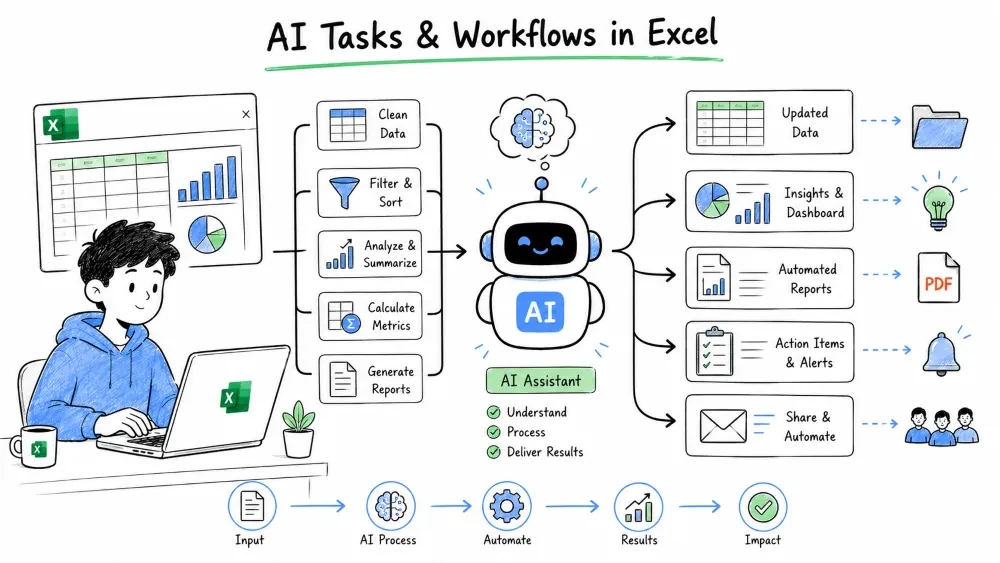
Learn how to automate individual tasks inside Excel and design complete AI-powered workflows using Copilot and ChatGPT as your automation assistants.
Task automation means using Excel features, formulas, and AI to eliminate repetitive manual work — data cleaning, formatting, calculations, and validation.
Why it matters: Repetitive Excel tasks drain productivity and invite mistakes. Automating them frees you for analysis and decision-making.
Raw data is messy. AI can clean it for you.
Using Copilot:
Using ChatGPT:
Paste messy data into ChatGPT with instructions:
"Clean this data: standardize the date format to YYYY-MM-DD, trim extra spaces, and convert the Amount column to numbers."
ChatGPT returns cleaned data you can paste back. For recurring tasks, ask:
"Write an Excel formula to remove leading zeros from a product ID in column A."
Response:
=VALUE(A1)
Or for text:
=TEXT(VALUE(A1), "0")
Instead of manually coloring cells, let AI generate the rules.
Copilot prompt:
"Highlight all cells in the Revenue column that are above 10,000 in green and below 1,000 in red."
Copilot creates the conditional formatting rules automatically.
ChatGPT prompt:
"Write a conditional formatting formula for Excel that highlights rows where the Status column equals 'Overdue' and the Due Date is before today."
Response:
=AND($B2="Overdue", $C2<TODAY())
Apply it to your range: Home → Conditional Formatting → New Rule → Use a formula.
Complex calculations become readable when AI structures them.
Ask ChatGPT:
"I need to calculate commission: 5% on sales up to $10,000, 7% on sales between $10,001 and $50,000, and 10% on sales above $50,000. Write an Excel formula."
Response:
=IF(A1<=10000, A1*0.05, IF(A1<=50000, 10000*0.05+(A1-10000)*0.07, 10000*0.05+40000*0.07+(A1-50000)*0.1))
Name this cell Commission and reuse it across your workbook.
Prevent bad data entry with AI-generated validation rules.
ChatGPT prompt:
"Create an Excel data validation rule that only allows dates in the current year."
Response steps:
=YEAR(A1)=YEAR(TODAY())
Now users cannot enter dates from other years.
An AI workflow is a sequence of steps where human tasks and AI assistance alternate to complete a business process from start to finish.
Why it matters: Individual task automation is powerful, but connecting those tasks into a workflow transforms how work gets done. AI workflows in Excel can ingest data, clean it, analyze it, generate insights, and distribute reports — all with minimal human input.
Example: End-to-End Sales Reporting Workflow
┌─────────────┐    ┌─────────────┐    ┌─────────────┐    ┌─────────────┐
│ 1. IMPORT   │ → │ 2. CLEAN    │ → │ 3. ANALYZE  │ → │ 4. DELIVER  │
│  Data in    │    │  with AI    │    │  with AI    │    │  via Email  │
│  Excel      │    │             │    │             │    │  or Share   │
└─────────────┘    └─────────────┘    └─────────────┘    └─────────────┘
Step 1 — Import data automatically
Step 2 — Clean with AI
Step 3 — Analyze with AI
Step 4 — Deliver automatically
Describe your full process to ChatGPT and let it map the Excel workflow.
Example prompt:
"I receive a CSV of sales transactions every morning. I need to: import it into Excel, remove duplicates, calculate daily totals, flag orders over $5,000, create a summary chart, and email the summary to my team. Design a complete workflow using Excel, Power Query, and Power Automate."
ChatGPT returns:
You follow the steps once, save the file, and the workflow runs forever.
Copilot excels at on-the-fly workflow adjustments.
Scenario: Your manager asks for a new metric mid-project.
"Add a column that calculates the number of days between Order Date and Ship Date, then highlight any shipment that took longer than 5 days."
Copilot:
=ShipDate-OrderDate formula.No manual formula writing. No searching help docs.
Every workflow should be documented so teammates (or future you) understand it.
Create a Workflow sheet in your workbook:
| Step | Action | Tool | Automated? |
|---|---|---|---|
| 1 | Import CSV from email | Power Query | Yes — refreshes on open |
| 2 | Remove duplicates | Power Query | Yes |
| 3 | Calculate KPIs | Excel formulas | Yes |
| 4 | Generate summary | Copilot / formulas | Semi |
| 5 | Email to team | Power Automate | Yes — daily at 9 AM |
This documentation turns your Excel file into a maintainable business process.
Save your progress and earn XP for completing tutorials.
3 questions · Pass with 70%+
1To highlight rows where Status = "Overdue" and Due Date is before today, the conditional formatting formula is:
2In an AI workflow, which built-in Excel tool records data-cleaning steps that replay automatically on every refresh?
3 A beginner mistake when using SUMIFS for region totals is:
Technology
Excel with AI
Lesson group
AI Automation
Progress
100% complete

