Preparing your learning space...
50% through AI Engineering for FDEs tutorials
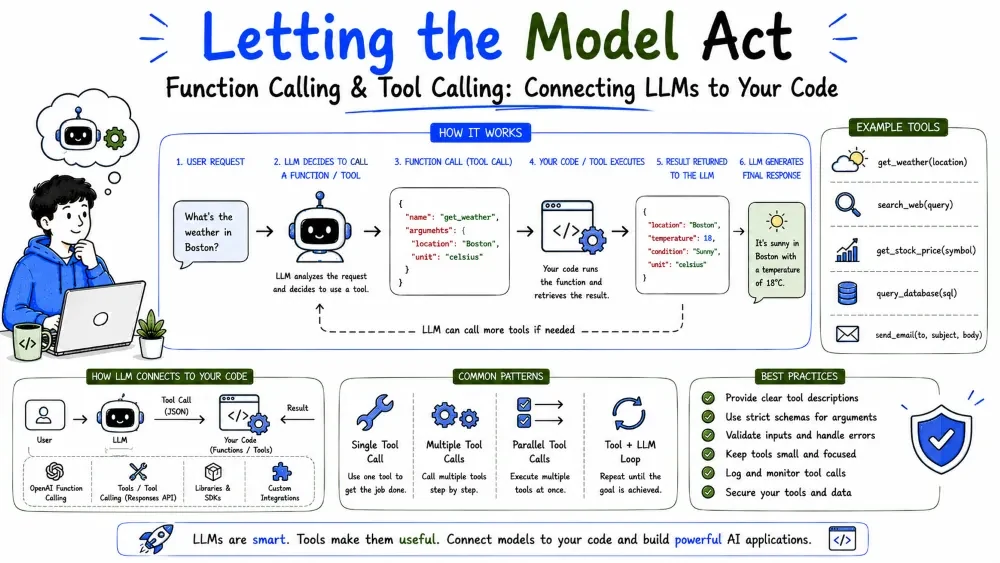
A model alone can only produce text. Function calling (also called tool calling) lets it decide to use your functions — look up a database, call an API, run a calculation — and hand the result back to you. This is the mechanism that turns an LLM from a chatbox into an agent that can take action.
Function calling is a feature where the model, instead of only writing an answer, can emit a structured request to call one of your functions. It returns the function name and the arguments it wants — your code actually runs the function and feeds the result back to the model.
Why it matters: it's how an LLM gets access to live data and actions it can't derive from training. "Check this customer's account" becomes a real lookup, not a guess.
These two terms describe the same underlying capability; providers name them differently.
tools API). A "tool" can be a function, a web search, a file reader, or an external service.Tool = anything the model can invoke: a function (code you wrote), a web search, an API call, a database query. Function calling = the specific case where the tool is a code function.
For an FDE, treat them as one skill: give the model tools, let it request them, run them, and feed results back.
The interaction is a loop, not a single call. There are two rounds (or more):
You -> [request + tool definitions]        -> Model
Model -> {tool: "lookup_order", args: {id: 8821}} -> You
You -> [run lookup_order(8821) = {total: 149.50}] -> Model
Model -> "Your order total is $149.50."            -> You
Explanation: the model never executes anything itself. It requests; your code executes; the result returns to the model. Control always stays with you.
You describe each tool to the model with a name, a description, and a JSON schema for its inputs. The description is what helps the model decide to use it.
tools = [{
    "name": "lookup_order",
    "description": "Look up an order by its ID and return its total.",
    "input_schema": {
        "type": "object",
        "properties": {
            "order_id": {"type": "integer", "description": "The order number."}
        },
        "required": ["order_id"]
    }
}]
Explanation: the model reads the schema to learn the function exists, what it does, and what arguments to pass. The clearer the description, the more likely the model uses it at the right moment.
Here's the loop wired up. The model may emit a tool call; you run the real function and hand the result back.
resp = client.messages.create(
    model="claude-sonnet-5",
    max_tokens=300,
    tools=tools,
    messages=[{"role": "user", "content": "What was the total for order 8821?"}],
)

for block in resp.content:
    if block.type == "tool_use":
        result = lookup_order(order_id=block.input["order_id"])   # you run it

        final = client.messages.create(
            model="claude-sonnet-5",
            max_tokens=300,
            tools=tools,
            messages=[
                {"role": "user", "content": "What was the total for order 8821?"},
                {"role": "assistant", "content": resp.content},       # include the tool call
                {"role": "user", "content": [{"type": "tool_result", "tool_use_id": block.id, "content": str(result)}]},
            ],
        )
        print(final.content[0].text)
Explanation: you detect the tool_use block, call lookup_order yourself, then make a second call that includes the original request, the model's tool call, and the tool result. The model reads the result and answers.
Best Practice: Never let the model call your functions directly. Always inspect the requested arguments and run the function in your own trusted code.
The model decides when to use a tool. It will do so when the request needs information or an action it can't produce from text alone — and when you've exposed the right tool with a clear description.
"Total for order 8821"  -> calls lookup_order (needs live data)
"Write me a haiku"      -> no tool, just answers
Explanation: a factual lookup triggers the tool; a pure language task doesn't. Giving the model a tool does not force it to use it — it simply makes the option available.
Note: You can also force a specific tool with a parameter, which is useful when you always want a particular function called (e.g., "classify this, always").
Tools are a UX for the model. Clear, focused definitions lead to correct calls:
lookup_order tool is better than a grab-bag do_stuff tool.order_id is required, say so.Good: lookup_order(order_id: int) -> total: number Good: get_customer_by_email(email: string) -> {name, plan, status} Avoid: process(order_id, name, flag, notes, ...)
Explanation: narrow tools with clear signatures are easier for the model to call correctly and easier for you to validate. Vague, overloaded tools cause wrong arguments.
Save your progress and earn XP for completing tutorials.
4 questions · Pass with 70%+
1In tool calling, who actually runs the function?
2What does the loop look like when a model calls a tool?
3 How do you describe a tool to the Anthropic API?
4Why should tool descriptions be specific?
Technology
Forward Deployed Engineer
Lesson group
AI Engineering for FDEs
Progress
50% complete

