Preparing your learning space...
60% through AI Engineering for FDEs tutorials
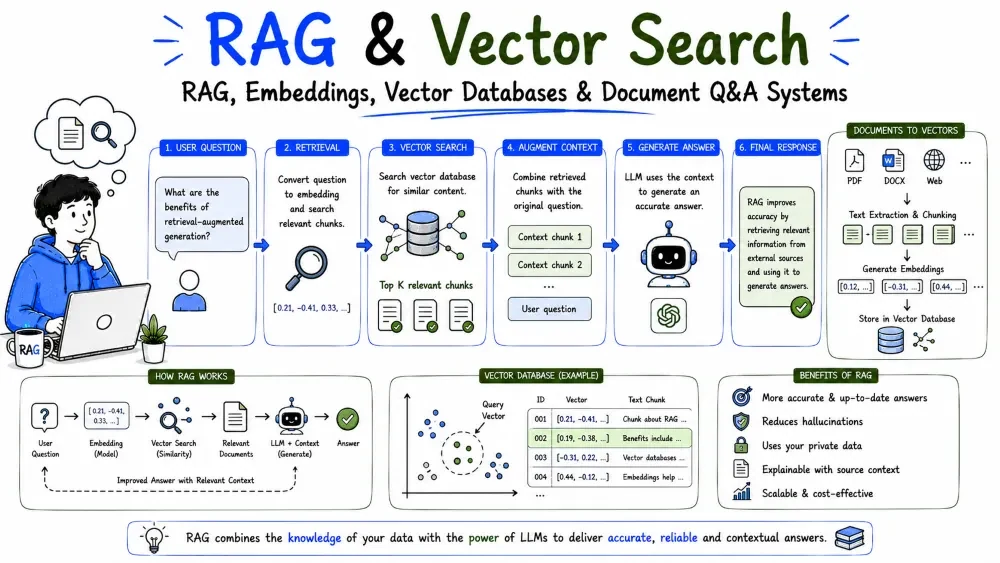
A model can't know your customer's private documents — unless you give it a way to look them up. Retrieval-Augmented Generation (RAG) is the pattern that does exactly that: pull the relevant documents, stuff them into the prompt, and let the model answer from them. This tutorial walks the whole stack: embeddings, vector databases, RAG itself, and a working document Q&A system.
An LLM only knows what it saw during training. Your customer's contracts, policies, tickets, and internal wikis are not in there. You have three options:
RAG is usually the right call for FDE work: no retraining, always current, and you can point it at any customer's documents.
RAG has two phases. Indexing happens once, ahead of time. Querying happens per user question.
INDEXING (offline, once):
   Documents -> chunk -> embed -> store vectors in a vector DB

QUERYING (online, per question):
   Question -> embed -> search nearest vectors -> fetch matching text
            -> build prompt: [instructions + retrieved text + question]
            -> model answers from the retrieved text
Explanation: indexing prepares the documents for search; querying finds the relevant pieces and hands them to the model. The model never sees the whole library — only the matched passages.
An embedding is a list of numbers (a vector) that captures the meaning of a piece of text. Similar meanings get similar vectors — close in space means close in meaning.
"the CEO approved the budget"  ->  [0.21, -0.84, 0.55, ...]
"finance accepted the budget"  ->  [0.19, -0.81, 0.52, ...]   (close)
"how to bake a cake"           ->  [-0.45, 0.62, 0.10, ...]   (far)
An embedding model produces these vectors. You embed a chunk once (during indexing) and embed the user's question at query time.
import voyageai

vo = voyageai.Client()   # reads VOYAGE_API_KEY
result = vo.embed(
    ["the CEO approved the budget"],
    model="voyage-3-lite",
)
print(result.embeddings[0][:3])  # [0.21, -0.84, 0.55, ...]
Explanation: embedding is a separate service from chat — you use a dedicated embedding model (here Voyage's voyage-3-lite) via its own SDK. vo.embed turns the text into a vector. The exact numbers don't matter — what matters is that related text lands close together in the vector space.
A vector database stores embeddings and answers the question "which stored vectors are most similar to this one?" That similarity search is how retrieval finds relevant documents in milliseconds.
Why a special database? Normal SQL can store vectors but can't search them fast at scale. A vector DB indexes them (via approximate nearest-neighbor) for instant "closest meaning" lookups.
import chromadb

client = chromadb.PersistentClient(path="./my_vectors")
col = client.get_or_create_collection("contracts")

# Index a chunk (embedding computed by the embedding model)
col.upsert(
    ids=["c1"],
    embeddings=[[0.21, -0.84, 0.55]],
    documents=["the CEO approved the budget"],
)

# Query: which stored chunk is closest to this question?
hits = col.query(query_embeddings=[[0.19, -0.81, 0.52]], n_results=1)
print(hits["documents"])
Explanation: you upsert chunks with their embeddings, then query with an embedding to get the closest stored documents back. You read the retrieved text into the prompt.
Note: Many tools (Pinecone, Weaviate, pgvector, Chroma) wrap this same idea. Pick one you can run near your data.
You don't embed whole books — you split them into chunks (paragraphs or small sections). Chunks are the unit of search: too big and they're vague; too small and they lack context.
def chunk_text(text, size=500, overlap=50):
    words = text.split()
    for i in range(0, len(words), size - overlap):
        yield " ".join(words[i:i + size])
Explanation: this generator yields overlapping chunks so a topic split across a chunk boundary still appears in full in at least one chunk. Chunk size is a tuning knob — start around 300–500 tokens and adjust.
Best Practice: Keep a small overlap so sentences and meaning don't get sliced in half. Chunk on paragraph or section boundaries when you can, not mid-sentence.
Retrieval turns a question into a handful of relevant passages. Good retrieval is the difference between a smart answer and a confident guess.
q_vec = vo.embed([question], model="voyage-3-lite").embeddings[0]
hits = col.query(query_embeddings=[q_vec], n_results=3)
passages = "\n\n".join(hits["documents"][0])
Explanation: embed the question, find the 3 closest chunks, and concatenate them into a passages string. That string becomes the context you hand to the model. Retrieving only the top few keeps the prompt small and focused.
Best Practice: Retrieve a few more candidates than you need, then filter or rank them. Sometimes the best chunk is the second or third nearest.
Now wire it together: retrieve, prompt, answer. The model is told to answer only from the retrieved context — that's what grounds it and prevents hallucinating from training memory.
resp = client.messages.create(
    model="claude-sonnet-5",
    max_tokens=300,
    system=(
        "Answer the question using ONLY the provided context. "
        "If the context doesn't contain the answer, say: 'I couldn't find that in the documents.'"
    ),
    messages=[{
        "role": "user",
        "content": f"CONTEXT:\n{passages}\n\nQUESTION:\n{question}",
    }],
)
print(resp.content[0].text)
Explanation: the retrieved passages are placed in the prompt as CONTEXT, and the system prompt forces the model to stay within them. If the answer isn't there, it says so instead of inventing one — the whole point of grounding.
Best Practice: Make the "I don't know" fallback explicit. A grounded system that admits gaps beats a fluent one that fabricates.
Save your progress and earn XP for completing tutorials.
4 questions · Pass with 70%+
1What problem does RAG solve?
2What is an embedding?
3Why use a vector database instead of a normal SQL table?
4In a document Q&A system, what tells the model to answer only from the context?
Technology
Forward Deployed Engineer
Lesson group
AI Engineering for FDEs
Progress
60% complete

