Preparing your learning space...
100% through AI Engineering for FDEs tutorials
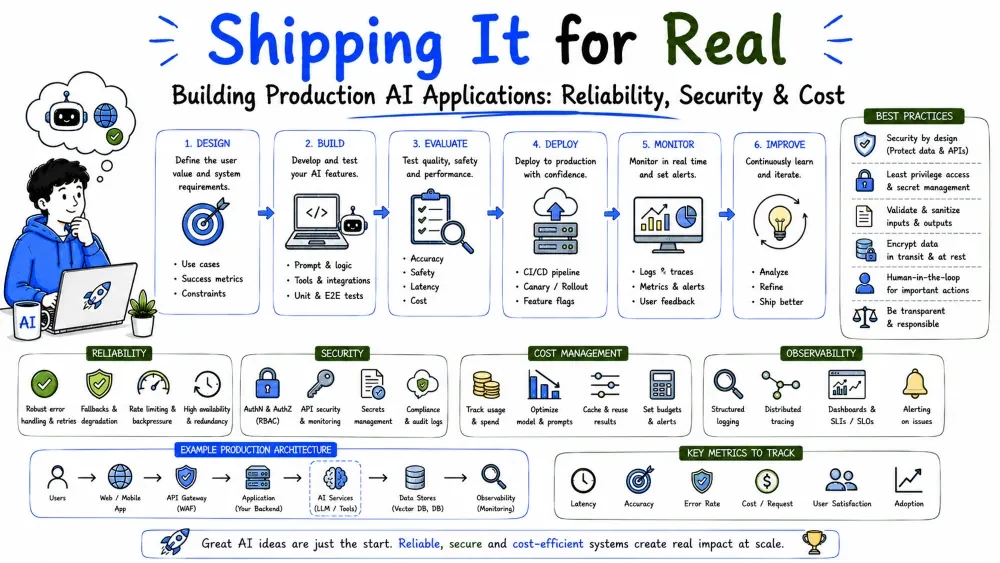
Everything so far — APIs, prompts, structured outputs, tools, RAG, agents, guardrails — comes together here. A production AI application is one that's reliable, observable, secure, and cost-aware enough to run in a real business every day. This tutorial ties the whole category into a single build.
A demo answers a question. A production application answers it correctly, safely, at scale, for real users, all day — and keeps working when the model is slow, flaky, or wrong. Production is not a feature set; it's the surrounding engineering: reliability, observability, security, and cost control wrapped around the model.
The whole category has been leading here: structured outputs for reliability, RAG for grounding, guardrails for safety, evaluation for quality. This tutorial assembles them.
Before building, pick the simplest pattern that solves the problem. Complexity is a tax — only pay it when needed.
| Problem | Pattern |
|---|---|
| One-shot language task | Single prompt call |
| Needs live data / private docs | RAG |
| Needs external actions, multi-step | Agent |
| Fixed, repeatable process | AI workflow automation |
| Fuzzy task with a fixed order | Workflow with AI steps |
"Summarize a paragraph"    -> one prompt
"Answer from our KB"       -> RAG
"Resolve a ticket end-to-end" -> agent + tools
Best Practice: Start with the least complex pattern that works. Add RAG, tools, or agents only when a simpler approach fails a real requirement.
A production AI app typically layers these components:
Frontend / API  ->  Orchestrator  ->  Model (LLM)
                         |                 |
                         +-- tools / RAG / databases
                         +-- guardrails & validation
                         +-- logging & evaluation
                         +-- secrets & auth
The orchestrator is your code: it assembles the prompt, calls the model, runs tools, validates output, applies guardrails, and handles failures. The model is one component in the middle — not the whole app.
Models are network services; they fail. Production code expects that. Three tools:
import backoff

@backoff.on_exception(backoff.expo, anthropic.APIError, max_tries=3)
def ask(question):
    return client.messages.create(
        model="claude-sonnet-5",
        max_tokens=200,
        messages=[{"role": "user", "content": question}],
    )

try:
    answer = ask(question)
except anthropic.APIError:
    answer = "I couldn't reach the assistant. Please try again."
Explanation: the decorator retries transient API errors with exponential backoff; if it still fails, the app returns a friendly fallback instead of crashing or hanging. Your users get a graceful experience, not a timeout.
Best Practice: Distinguish transient errors (retry) from persistent ones (fail fast). Rate limits and network blips retry; bad requests don't.
You can't fix what you can't see. Every production AI app logs what it did, at what cost, and how well it performed.
Log at minimum:
log(
    model="claude-sonnet-5",
    prompt_tokens=1200, output_tokens=80, latency_ms=900,
    validated=True, grounded=True, cost_usd=0.004,
)
Explanation: structured logs let you answer questions like "what did we spend this month?" and "why did users report bad answers yesterday?" without guesswork. Instrument every model call.
Best Practice: Log prompt and output. Without the prompt, you can't reproduce or debug a bad model response later.
Customer data flowing through an LLM is a serious responsibility. Handle it with the same rigor as any sensitive system:
def safe_prompt(user_text):
    redacted = redact_pii(user_text)     # strip emails, phone numbers, keys
    return f"Answer using only the context.\n{redacted}"
Explanation: the user input is redacted before it reaches the model, so sensitive data isn't sent or logged unnecessarily. Model output is validated as untrusted before it touches any system.
Best Practice: Default to not sending sensitive data unless a feature explicitly requires it — and get sign-off when it does.
Per-token pricing means costs scale with usage, and runaway prompts or loops get expensive fast. Control the levers:
Prompt length x calls x price = monthly cost
Shrink the prompt, cut the calls, cap the loops.
Best Practice: Budget for the worst case (largest prompt, most calls) as well as the average. One runaway loop can exceed a month's expected spend in minutes.
Before you call it done, walk this list:
If any box is empty, you've built a demo, not a production application.
Save your progress and earn XP for completing tutorials.
4 questions · Pass with 70%+
1What makes an AI app "production" vs. a demo?
2A model API call fails temporarily (rate limit). What should you do?
3Which is the minimum you should log per model call?
4How should sensitive customer data flow through your app?
Technology
Forward Deployed Engineer
Lesson group
AI Engineering for FDEs
Progress
100% complete

