Preparing your learning space...
30% through AI Engineering for FDEs tutorials
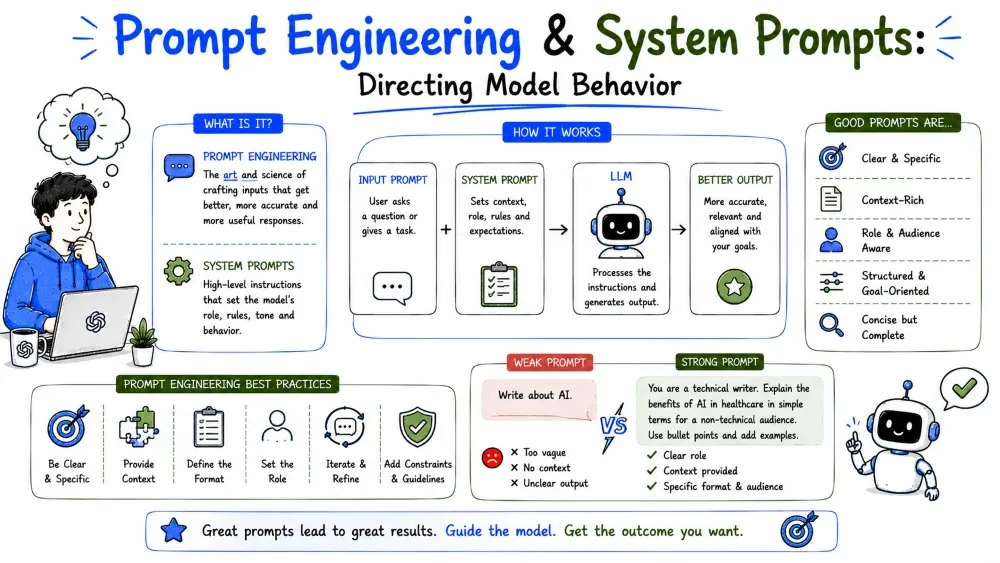
A prompt is the text you send to the model to steer what it does. It can be a question, a task, an instruction, or a whole document of rules. Everything the model produces is a response to a prompt, so the prompt is your primary control surface.
Why it matters: the same model with the same knowledge produces very different — and very different quality — results depending on how you ask.
Most effective prompts share four parts. You don't always need all four, but adding them as needed improves results:
You are a billing specialist.                     <- role
Summarize the following invoice.                  <- task
INVOICE: """<paste invoice here>"""               <- context
Reply with total due, due date, and one sentence. <- format
Explanation: each line removes ambiguity. The role sets tone and knowledge, the task states the goal, the context gives the material, and the format pins the shape so the output is usable.
A few techniques reliably improve output:
Weak:     "Explain our API."
Strong:   "Explain our API in under 100 words for a non-technical customer,
           list 3 things it can do, and say 'unknown' if you don't know."
Explanation: the strong version adds length, audience, structure, and a fallback. Small changes, outsized effect on usefulness.
Few-shot prompting means giving examples in the prompt so the model mimics the pattern. One or two worked examples beat a long description for shaping style and format.
Classify each review as positive or negative.

Example:
"The printer jammed twice but support fixed it fast." -> positive

New review:
"Dashboard crashed every morning this week."          -> ?
Explanation: the example teaches the format and the label vocabulary. The model mirrors the demonstrated pattern rather than guessing a taxonomy you described in words.
Note: Keep examples representative. Give the model the kind of case you care about, including tricky ones, or it generalizes from your easy examples.
The system message (or system prompt) is a special, high-priority instruction that sets the model's overall behavior for the whole conversation — its role, rules, tone, and constraints. It sits apart from the user messages and applies to every turn.
Why it's powerful: it turns a generic model into a specialist assistant with a stable identity, without repeating instructions in every user message.
resp = client.messages.create(
    model="claude-sonnet-5",
    max_tokens=300,
    system="You are a support agent for Acme. Be concise, never invent "
           "policies, and always ask for the order number if it's missing.",
    messages=[{"role": "user", "content": "I never got my refund."}],
)
Explanation: the system prompt loads once and governs the entire exchange. The user message stays short and focused on the specific issue.
Good system prompts are written like operating rules, not marketing copy. Keep these principles in mind:
You are Acme's billing assistant.
- Answer from the customer's plan and usage data only.
- Never invent charges or policies.
- If asked something outside billing, say: "I can only help with billing."
- Keep replies under 60 words.
Explanation: every line is a testable rule. You can check the finished assistant against each one — that's what makes a system prompt maintainable.
Best Practice: Version your system prompts. Store them as files, not string literals, so you can compare behavior across versions.
For complex prompts, structure matters. Use clear section markers and placeholders so you (or your code) can slot in data reliably.
SYSTEM_PROMPT = """You are a compliance reviewer.
Review the contract against these rules:
RULES:
{rules}
Return violations as a list. If none, return "NO ISSUES".
"""

user_msg = f"CONTRACT:\n{contract_text}"
Explanation: the {rules} and the appended CONTRACT: block separate the fixed instructions from the variable content. This keeps the template stable while the data changes every call.
Best Practice: Delimit variable data with clear markers (RULES:, CONTRACT:). Long unmarked pasted text can leak into the instructions and confuse the model.
Save your progress and earn XP for completing tutorials.
4 questions · Pass with 70%+
1Which four building blocks make a strong prompt?
2What does few-shot prompting mean?
3Where should stable rules like "never invent policies" live?
4Your prompt has no fallback instruction. What's the risk?
Technology
Forward Deployed Engineer
Lesson group
AI Engineering for FDEs
Progress
30% complete

