Preparing your learning space...
20% through AI Engineering for FDEs tutorials
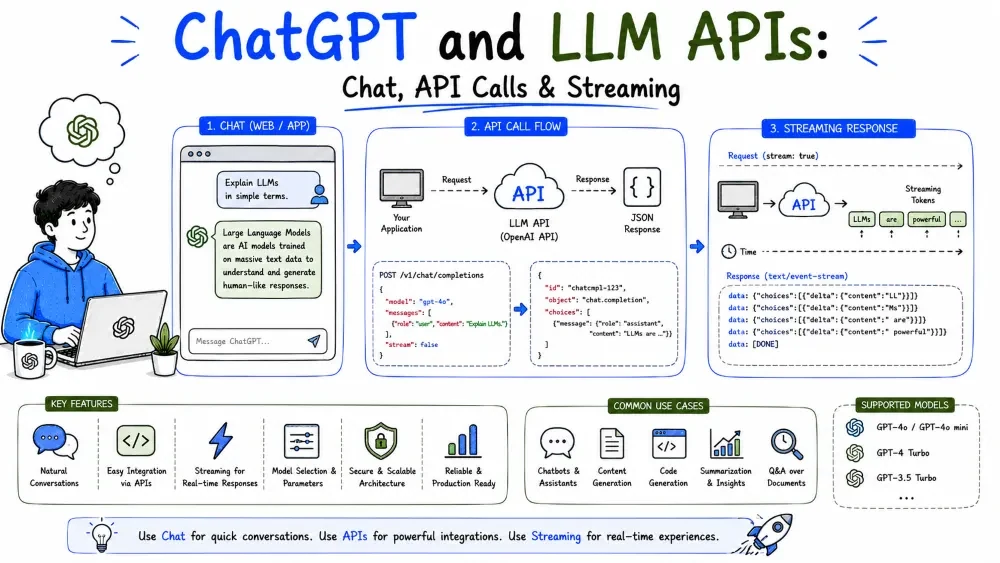
You don't need to run a model to build with one. Every major lab exposes its models through two surfaces: chat products you click on (ChatGPT, Claude.ai) and programmatic APIs your code calls. This tutorial covers both and shows you how to make your first real API call.
A chat product (ChatGPT, Claude.ai) is a finished UI wrapping an API. You type, the model replies. An API is the raw interface your own application calls — no UI, just a request and a response you parse in code.
| Chat product | LLM API | |
|---|---|---|
| Used by | People in a browser | Your software, programmatically |
| Cost | Subscription | Pay per token |
| Automation | Manual clicks | Full control, repeatable |
| Persistence | UI handles history | You manage the conversation |
For an FDE, chat is great for prototyping and quick questions. The API is what ships inside the solution.
Most modern LLM APIs follow one shape: you send a list of messages plus parameters, and get back the model's generated message. The API is stateless — every call stands alone, so you send the full conversation history each time.
You send:   model + list of messages + parameters
You get:    the model's reply message + usage (token counts)
The conversation is a list of messages, each tagged with a role:
[system]   "You are a support assistant. Be brief."
[user]     "What's our refund policy?"
[assistant]"Our refunds are processed within 5 business days."
[user]     "How do I request one?"
Explanation: you replay the history so the model can answer the latest question in context. Drop the earlier turns and it forgets the thread.
Here's a minimal call using the Anthropic SDK (anthropic). The pattern is the same for OpenAI and other providers — different client, same shape.
import anthropic

client = anthropic.Anthropic()  # reads ANTHROPIC_API_KEY from env

resp = client.messages.create(
    model="claude-sonnet-5",
    max_tokens=200,
    messages=[
        {"role": "user", "content": "Summarize this bug report in one line."}
    ],
)

print(resp.content[0].text)
Explanation: create the client, call messages.create, pass the model, a token cap, and the user message. The reply comes back in resp.content[0].text. The key is read from the environment, never typed in code.
Best Practice: Pick the model at one place in your config, not scattered through code — you'll upgrade it without editing everywhere.
Real users notice the first token quickly, and long answers feel broken if nothing appears for 20 seconds. Streaming returns text as it's generated, token by token.
with client.messages.stream(
    model="claude-sonnet-5",
    max_tokens=500,
    messages=[{"role": "user", "content": "Write a short changelog."}],
) as stream:
    for text in stream.text_stream:
        print(text, end="")
Explanation: stream.text_stream yields chunks as they arrive. You render each chunk to the user instead of waiting for the whole reply. The final assembled text is also available on the stream.
Best Practice: Use streaming for any user-facing response; reserve non-streaming for background jobs where latency doesn't matter.
A few knobs control cost, speed, and randomness:
resp = client.messages.create(
    model="claude-sonnet-5",
    max_tokens=100,
    temperature=0.2,          # low for deterministic extraction
    system="Extract the customer name and order ID from the text.",
    messages=[{"role": "user", "content": "Order #8821 for Dana Reyes."}],
)
Explanation: the low temperature and the extraction instruction make the output predictable — the right settings when you're feeding a reply into downstream logic.
Note: temperature is not a reliability switch. Even at 0, models can drift. Determinism is bought with structure and evaluation, not just a low knob.
API keys are credentials that bill you. Treat them like passwords: never hard-code them, never commit them to git, never paste them into logs.
# Never this
client = anthropic.Anthropic(api_key="sk-ant-...")   # secret in code!

# Do this — load from the environment
import os
key = os.environ["ANTHROPIC_API_KEY"]
Why useful: a leaked key means someone else bills you and may hit your rate limits. Keeping it in the environment (or a secrets manager) also makes the same code run on your laptop and in production unchanged.
Best Practice: Add .env and any key files to .gitignore; store secrets in the platform's secret manager in production.
Save your progress and earn XP for completing tutorials.
4 questions · Pass with 70%+
1What is the difference between a chat product and an API?
2Which role message tells the model how to behave overall?
3Why must you resend the full conversation history each turn?
4How should you handle your API key in code?
Technology
Forward Deployed Engineer
Lesson group
AI Engineering for FDEs
Progress
20% complete

