Preparing your learning space...
29% through Automation for FDEs tutorials
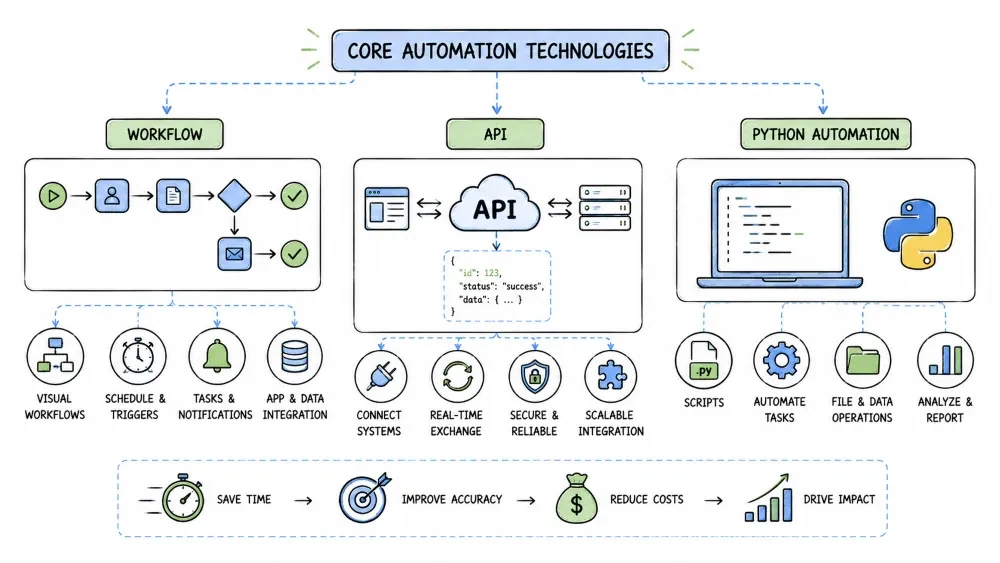
Core automation technologies provide the essential tools and methods for building automated systems. This tutorial covers workflow automation, API automation, and Python automation—three foundational approaches that often work together in real-world automation solutions.
Workflow automation involves designing, executing, and automating processes where tasks, information, or documents are passed between participants according to defined rules.
Why it is useful: Workflow automation streamlines business processes, reduces manual handoffs, ensures consistency, and provides visibility into process execution.
TRIGGER: New expense report submitted
ACTION: Extract data from report
CONDITION: Amount > $1000?
  YES: Route to manager for approval
  NO: Auto-approve and notify finance
ACTION: If approved, process payment and close ticket
API automation involves using Application Programming Interfaces (APIs) to programmatically interact with software systems, enabling data exchange and process automation between different applications.
Why it is useful: API automation allows systems to communicate directly without human intervention, enabling real-time data synchronization and process integration across platforms.
import requests
import os

def post_tweet(message):
    bearer_token = os.getenv("TWITTER_BEARER_TOKEN")
    headers = {
        "Authorization": f"Bearer {bearer_token}",
        "Content-Type": "application/json"
    }
    payload = {"text": message}

    response = requests.post(
        "https://api.twitter.com/2/tweets",
        json=payload,
        headers=headers
    )

    if response.status_code == 201:
        print("Tweet posted successfully!")
        return response.json()
    else:
        print(f"Error: {response.status_code}")
        return None

# Usage
post_tweet("Learning API automation is exciting! #Python #Automation")
Python automation leverages Python's simplicity and extensive library ecosystem to automate tasks ranging from simple file operations to complex data processing and web interactions.
Why it is useful: Python's readability, vast standard library, and third-party packages make it ideal for automation scripts that need to be reliable, maintainable, and scalable.
import os
import shutil
from pathlib import Path

def organize_downloads(download_folder):
    # Define file type categories
    file_types = {
        'Images': ['.jpg', '.jpeg', '.png', '.gif', '.bmp'],
        'Documents': ['.pdf', '.doc', '.docx', '.txt', '.rtf'],
        'Videos': ['.mp4', '.avi', '.mkv', '.mov'],
        'Audio': ['.mp3', '.wav', '.flac', '.aac'],
        'Archives': ['.zip', '.rar', '.7z', '.tar', '.gz']
    }

    # Create category folders if they don't exist
    for category in file_types:
        Path(download_folder).joinpath(category).mkdir(exist_ok=True)

    # Process each file in downloads folder
    for file_path in Path(download_folder).iterdir():
        if file_path.is_file():
            file_ext = file_path.suffix.lower()

            # Find matching category
            moved = False
            for category, extensions in file_types.items():
                if file_ext in extensions:
                    destination = Path(download_folder) / category / file_path.name
                    shutil.move(str(file_path), str(destination))
                    print(f"Moved {file_path.name} to {category}")
                    moved = True
                    break

            # Handle uncategorized files
            if not moved:
                other_folder = Path(download_folder) / "Others"
                other_folder.mkdir(exist_ok=True)
                shutil.move(str(file_path), str(other_folder / file_path.name))
                print(f"Moved {file_path.name} to Others")

# Usage
organize_downloads("/Users/username/Downloads")
Save your progress and earn XP for completing tutorials.
4 questions · Pass with 70%+
1Which API method is typically used to CREATE a new resource?
2Why should API keys never be hardcoded into source code?
3What is the purpose of handling API rate limits in automation?
4Which Python library is BEST suited for manipulating Excel files?
Technology
Forward Deployed Engineer
Lesson group
Automation for FDEs
Progress
29% complete

