Preparing your learning space...
100% through Data Engineering for FDEs tutorials
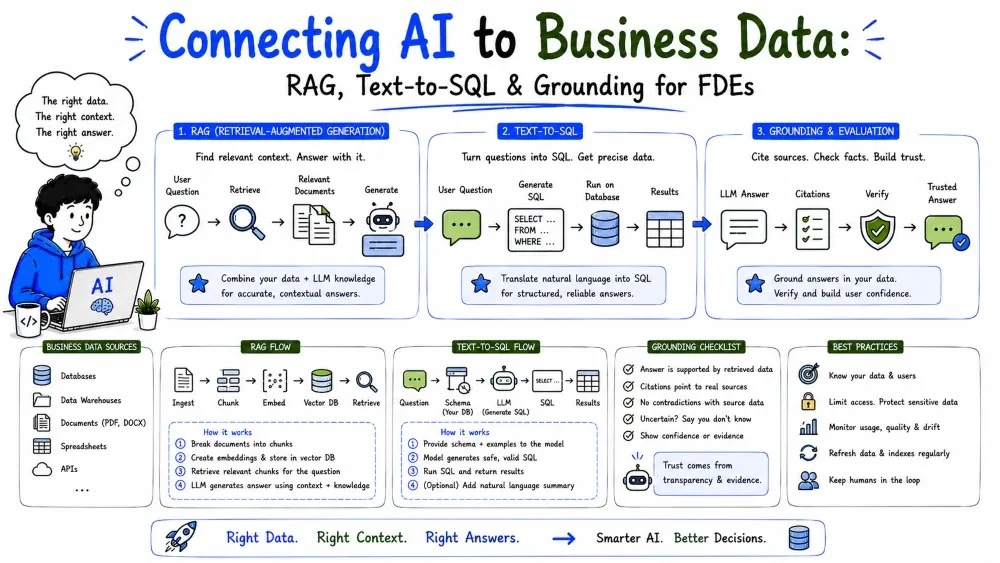
The payoff of everything in this category: getting a customer's business data into an AI system so the model can answer real questions about it. This is the FDE's bridge between messy tables and a working copilot. We cover making data AI-ready, retrieval (RAG), and letting an LLM query your database — without repeating what AI Engineering Tutorial 6 already taught.
An LLM knows language, not your customer's data. To make it useful you must connect it to that data. The FDE does three things:
AI Engineering Tutorial 6 covers embeddings and vector stores in depth. Here we focus on the data-engineering side: shaping business data so retrieval and query tools actually work.
AI consumes text and structure, not raw database rows. Before any AI use, turn business data into retrievable, well-labeled units.
import pandas as pd

df = pd.read_csv("orders.csv")
# One clean "document" per order, with context the model needs
def to_doc(r):
    return (
        f"Order {r.order_id} for customer {r.customer_id}: "
        f"${r.amount}, status {r.status}, placed {r.order_date}."
    )

docs = df.apply(to_doc, axis=1).tolist()
Explanation: each order becomes a sentence a model can read. This step — shaping rows into natural-language units with the right context — is pure data engineering and decides retrieval quality.
Note: clean first (Tutorial 4). Feeding dirty data means the model confidently answers from wrong numbers.
RAG = retrieve the few relevant pieces of data, then give them to the LLM as context so it answers from them, not from memory. (Embeddings/vector DB details: AI Engineering Tutorial 6.)
The data-engineering job in RAG is the index: what you store and how you label it.
# Build the corpus the retriever will search
corpus = [
    {"id": r.order_id, "text": to_doc(r), "customer_id": r.customer_id,
     "date": str(r.order_date), "amount": float(r.amount)}
    for r in df.itertuples()
]
Explanation: each item carries text (for embedding/retrieval) and metadata (customer_id, date, amount). Metadata lets you filter retrieval ("only this customer's orders") — a data-design choice that hugely improves relevance.
source, customer_id, date, type to every chunk so retrieval can filter and the answer can cite.chunk = {
"text": "Refund policy: orders within 30 days are refundable...",
"metadata": {"source": "policy.pdf", "customer_id": "acme",
"updated": "2026-07-01", "type": "policy"}
}
Best Practice: retrieval that filters on metadata beats retrieval that searches everything. Design chunks around how the question will be asked.
Sometimes the best "retrieval" is a live SQL query. Text-to-SQL lets the LLM write a query against your schema (see AI Engineering Tutorial 5 on function/tool calling — the LLM calls a query tool).
# The LLM returns a SQL string; you run it safely (read-only role!)
def run_sql(question: str) -> str:
    sql = llm.generate_sql(question, schema=SCHEMA)   # model writes SQL
    # CRITICAL: execute with a read-only DB role (Tutorial 6)
    with read_only_conn() as c:
        return pd.read_sql_query(sql, c).to_markdown()
Explanation: the model turns "total revenue per customer last quarter" into SQL; you run it on a read-only connection. This reuses all the SQL from Tutorial 2.
Guardrails (must have):
DROP or UPDATE.; DROP, DELETE).When you need the model to return data your pipeline can use (not prose), demand structured output (AI Engineering Tutorial 4). Pair it with validation (Tutorial 6).
from pydantic import BaseModel

class OrderSummary(BaseModel):
    customer_id: int
    total: float
    risk: str

summary = llm.extract_into(OrderSummary, text=report_text)
# now `summary` is a typed object you can load into a table
Explanation: instead of free text, the model returns a validated object — directly loadable. Validation (Tutorial 6) catches model mistakes before they reach the store.
The core risk: the model sounds right but is wrong. Grounding means tying every answer to retrieved/queried data so it can be checked.
answer = llm.answer(question, context=retrieved_docs)
return {"answer": answer, "sources": [d["id"] for d in retrieved_docs]}
Best Practice: a confident, sourced "I don't know" beats a fluent hallucination. Surface the sources.
Putting it together (embeddings handled by your vector store — AI Engineering Tutorial 6):
def ask(question: str):
    # 1) retrieve relevant, well-labeled chunks
    hits = vector_store.search(question, filter={"customer_id": "acme"}, k=4)
    # 2) ground the prompt in retrieved text
    context = "\n".join(h["text"] for h in hits)
    # 3) answer from context only
    answer = llm.answer(question, context=context)
    return {"answer": answer, "sources": [h["id"] for h in hits]}
Explanation: retrieve (filtered by metadata) → ground the prompt in those chunks → answer citing sources. This is the loop an FDE builds on top of cleaned, structured business data.
Save your progress and earn XP for completing tutorials.
4 questions · Pass with 70%+
1RAG (Retrieval-Augmented Generation) works by:
2Why attach metadata (customer_id, date, type) to each retrieved chunk?
3The critical safety rule for text-to-SQL is to:
4When retrieval finds nothing relevant, the model should:
Technology
Forward Deployed Engineer
Lesson group
Data Engineering for FDEs
Progress
100% complete

