Preparing your learning space...
29% through Data Engineering for FDEs tutorials
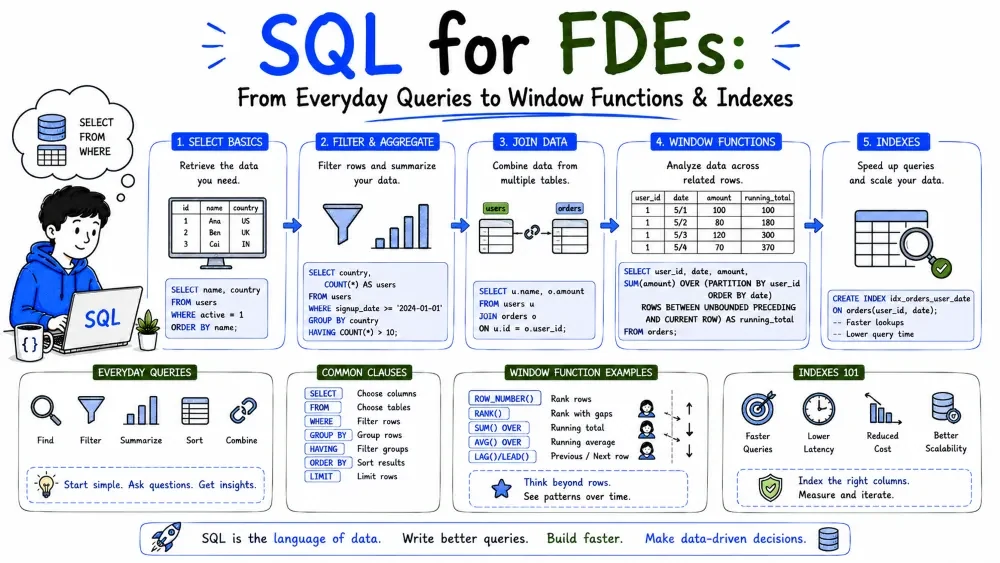
SQL (Structured Query Language) is the universal language for relational databases, and relational databases hold most business data an FDE meets. This tutorial goes from the everyday queries (select, filter, join) all the way to the techniques that power real reporting — subqueries, CTEs, window functions, and indexing.
SQL is a declarative language: you describe what data you want, and the database figures out how to fetch it. You don't write loops; you write a statement like "give me all orders over $100."
Two broad parts:
SELECT to read data.CREATE, INSERT, UPDATE, DELETE to shape and change data.We'll use a tiny orders and customers table throughout:
customers                 orders
-----------               --------------------------------
id | name                 id | customer_id | amount | status
1  | Acme                  101| 1           | 240.00 | paid
2  | Globex                102| 2           | 19.99  | refunded
3  | Initech               103| 1           | 88.50  | paid
The core of every query: which columns, from which table.
SELECT id, name
FROM customers;
Explanation: SELECT lists the columns you want; FROM names the table. Use SELECT * to grab every column, but prefer naming columns — it's clearer and survives schema changes better.
WHERE keeps only rows that match a condition.
SELECT id, amount
FROM orders
WHERE status = 'paid';
Common operators:
| Operator | Meaning | Example |
|---|---|---|
= | equals | status = 'paid' |
<> / != | not equal | amount != 0 |
> < >= <= | compare | amount > 100 |
AND OR | combine | status='paid' AND amount>50 |
IN (...) | in a set | status IN ('paid','pending') |
LIKE | pattern | name LIKE 'A%' (starts with A) |
Note: text values go in single quotes; numbers don't. status = 'paid' (text) vs amount > 50 (number).
ORDER BY sorts the result (DESC for descending, ASC default); LIMIT caps how many rows return.
SELECT * FROM orders
ORDER BY amount DESC
LIMIT 10;
Explanation: the 10 highest-value orders. Use LIMIT while exploring a big table instead of dumping millions of rows.
GROUP BY collapses rows that share a value and lets you compute totals with aggregate functions: COUNT, SUM, AVG, MIN, MAX.
SELECT customer_id, SUM(amount) AS total_spent
FROM orders
WHERE status = 'paid'
GROUP BY customer_id;
Explanation: rows are grouped by customer_id, then SUM(amount) adds up each customer's paid orders. AS total_spent renames the output column.
Note: every column in SELECT that isn't inside an aggregate function must appear in GROUP BY.
Joins combine rows from two tables using a shared key. The classic case: an orders row knows its customer_id, and you want the customer's name.
SELECT o.id, c.name, o.amount
FROM orders AS o
JOIN customers AS c
  ON o.customer_id = c.id;
Explanation: JOIN (short for INNER JOIN) returns only rows with a match on both sides. AS o / AS c are short aliases so you don't repeat the full table name.
| Join | Returns |
|---|---|
INNER JOIN | Only matched rows (both sides) |
LEFT JOIN | All left rows + matches (nulls if none) |
RIGHT JOIN | All right rows + matches |
FULL JOIN | All rows from both sides |
SELECT c.name, o.amount
FROM customers c
LEFT JOIN orders o ON o.customer_id = c.id;
This shows every customer, with NULL amount if they have no orders — useful for finding "customers who never bought."
Reading is most of your work; the write commands matter when you load or fix data.
INSERT INTO customers (id, name) VALUES (4, 'Umbrella');
UPDATE orders SET status = 'paid' WHERE id = 102;
DELETE FROM orders WHERE status = 'refunded';
Common Mistake: running UPDATE or DELETE with no WHERE. That changes every row. Always write the WHERE, test with a SELECT first, then swap to the write.
A subquery is a SELECT nested inside another query. Often used in WHERE to filter by a computed value.
SELECT name
FROM customers
WHERE id IN (
  SELECT customer_id
  FROM orders
  WHERE amount > 100
);
Explanation: the inner query finds customers with a big order; the outer query returns their names. Read it inside-out.
Note: subqueries get hard to read fast. When they do, reach for a CTE (next section).
A CTE is a named, temporary result you define with WITH and reuse in the query that follows. It reads top-to-bottom instead of inside-out.
WITH big_orders AS (
  SELECT customer_id, amount
  FROM orders
  WHERE amount > 100
)
SELECT c.name, b.amount
FROM big_orders b
JOIN customers c ON c.id = b.customer_id;
Explanation: big_orders is computed once, named, then treated like a table in the main query. CTEs make multi-step logic readable and are the standard style for reporting. You can chain several:
WITH paid AS (
  SELECT customer_id, SUM(amount) AS spent
  FROM orders WHERE status = 'paid'
  GROUP BY customer_id
),
ranked AS (
  SELECT customer_id, spent,
         RANK() OVER (ORDER BY spent DESC) AS r
  FROM paid
)
SELECT * FROM ranked WHERE r <= 3;   -- top 3 spenders
A window function computes a value across a set of rows related to the current row, without collapsing them like GROUP BY does. That's the key difference: GROUP BY reduces rows; window functions keep every row and add a column.
Syntax: function() OVER (PARTITION BY ... ORDER BY ...)
SELECT customer_id, amount,
       SUM(amount) OVER (PARTITION BY customer_id) AS customer_total
FROM orders;
Explanation: PARTITION BY customer_id resets the sum for each customer. Every order row stays, but now carries its customer's total. Unlike GROUP BY, you still see each individual order.
These window functions assign positions within a partition:
SELECT name, amount,
       ROW_NUMBER() OVER (ORDER BY amount DESC) AS row_num,
       RANK()       OVER (ORDER BY amount DESC) AS rank_val,
       DENSE_RANK() OVER (ORDER BY amount DESC) AS dense_val
FROM orders;
| Function | Behavior on ties |
|---|---|
ROW_NUMBER | Unique 1,2,3,4… (ties broken arbitrarily) |
RANK | 1,2,2,4… (leaves gaps) |
DENSE_RANK | 1,2,2,3… (no gaps) |
Common use: "top N per group" — e.g., each customer's most recent order:
WITH ranked AS (
  SELECT *,
         ROW_NUMBER() OVER (
           PARTITION BY customer_id
           ORDER BY id DESC
         ) AS rn
  FROM orders
)
SELECT * FROM ranked WHERE rn = 1;
Window functions shine for cumulative values using an ordered frame:
SELECT id, amount,
       SUM(amount) OVER (
         ORDER BY id
         ROWS BETWEEN UNBOUNDED PRECEDING AND CURRENT ROW
       ) AS running_total
FROM orders
ORDER BY id;
Explanation: ROWS BETWEEN UNBOUNDED PRECEDING AND CURRENT ROW means "from the first row up to this one" — a running total. Swap the frame for a moving average:
AVG(amount) OVER (
  ORDER BY id
  ROWS BETWEEN 2 PRECEDING AND CURRENT ROW
) AS moving_avg
That averages the current row and the two before it.
CASE is SQL's if/else — compute a value based on conditions.
SELECT id, amount,
       CASE
         WHEN amount > 200 THEN 'large'
         WHEN amount > 50  THEN 'medium'
         ELSE 'small'
       END AS size_band
FROM orders;
Explanation: each row gets a size_band label. Great for bucketing in reports and for flagging data during validation.
An index is a hidden lookup structure that lets the database find rows without scanning the whole table — like the index of a book.
CREATE INDEX idx_orders_customer
ON orders (customer_id);
Explanation: this index speeds up any query filtering or joining on customer_id. But indexes aren't free — they speed up reads and slow down writes (every insert/update maintains the index).
Best Practice: index the columns you join and filter on most (foreign keys, frequent WHERE columns). Don't index everything. To see if a query uses indexes, prefix it with EXPLAIN and look for "Seq Scan" (slow, full table) vs "Index Scan" (fast).
EXPLAIN SELECT * FROM orders WHERE customer_id = 1;
SELECT * in production code.WHERE; use LIMIT and COUNT(*) before heavy queries.o, c); prefer CTEs over nested subqueries.EXPLAIN before optimizing.Save your progress and earn XP for completing tutorials.
4 questions · Pass with 70%+
1Which query returns customers who have at least one order over $100?
2What does GROUP BY do to the rows of a query?
3Which function assigns unique positions and breaks ties arbitrarily?
4The danger of DELETE FROM orders with no WHERE clause is that it:
Technology
Forward Deployed Engineer
Lesson group
Data Engineering for FDEs
Progress
29% complete

