Preparing your learning space...
43% through Data Engineering for FDEs tutorials
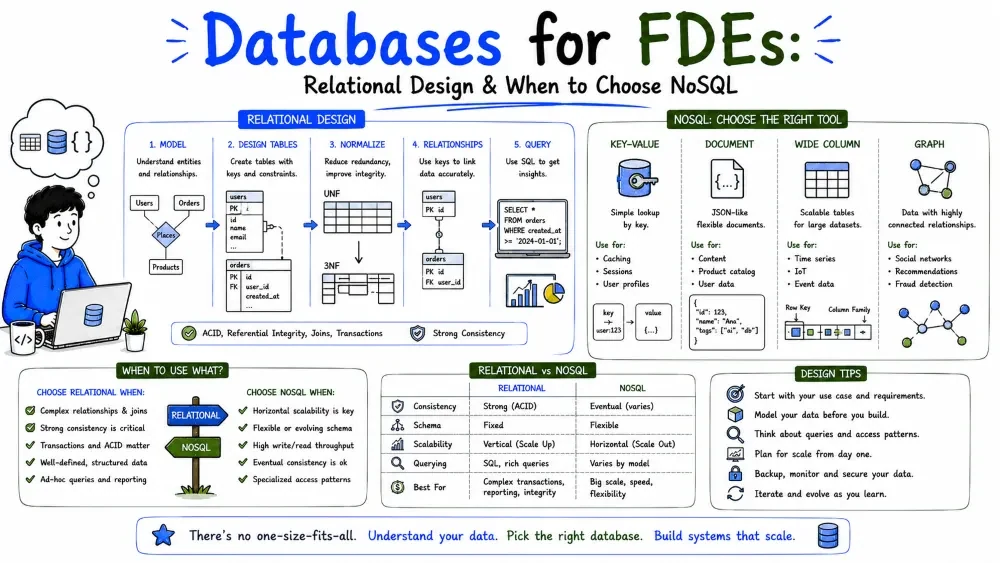
Data has to live somewhere, and how you design that "somewhere" shapes everything downstream. This tutorial covers both ends of the store spectrum: designing solid relational schemas (keys, normalization, DDL), then the NoSQL families and when each fits an FDE's problem.
A relational database is a set of tables (relations). Each table has rows (records, like one customer), columns (attributes, like email), and relationships (links between tables via shared keys).
The power is in the relationships: you store each fact once, and link it, instead of copying data everywhere.
id.customers(id PK) ──< orders(customer_id FK → customers.id)
Explanation: orders.customer_id is a foreign key referencing customers.id. This says "every order belongs to exactly one customer." The database can enforce it so you can't insert an order for a non-existent customer.
Note: pick stable primary keys (auto-increment integers or UUIDs). Don't use a business value like email as a PK — emails change, and then every reference breaks.
| Relationship | Shape | How to model |
|---|---|---|
| One-to-many | One customer, many orders | FK on the "many" side |
| Many-to-many | One product, many categories | A join table with two FKs |
| One-to-one | A user, one profile | Rare; often just one table |
Many-to-many needs a bridge table:
products ──< product_tags >── categories
product_tags(product_id, category_id) holds pairs. No column on either side could hold "many," so the join table does the job.
Constraints enforce rules at the database level — your safety net when application code is buggy.
| Constraint | What it does |
|---|---|
PRIMARY KEY | Unique + not null |
NOT NULL | Column must have a value |
UNIQUE | No duplicate values in the column |
CHECK | Value must satisfy a condition |
DEFAULT | Value used when none given |
FOREIGN KEY | Value must exist in the referenced table |
amount NUMERIC(10,2) NOT NULL CHECK (amount >= 0)
Explanation: NUMERIC(10,2) stores money precisely (10 digits, 2 decimals); NOT NULL forbids blank; CHECK rejects negative amounts.
DDL (Data Definition Language) creates structure. Here's a small but realistic schema:
CREATE TABLE customers (
  id        SERIAL PRIMARY KEY,
  name      TEXT NOT NULL,
  email     TEXT UNIQUE NOT NULL,
  created_at TIMESTAMPTZ NOT NULL DEFAULT NOW()
);

CREATE TABLE orders (
  id          SERIAL PRIMARY KEY,
  customer_id INTEGER NOT NULL REFERENCES customers(id),
  amount      NUMERIC(10,2) NOT NULL CHECK (amount >= 0),
  status      TEXT NOT NULL DEFAULT 'pending',
  created_at  TIMESTAMPTZ NOT NULL DEFAULT NOW()
);

CREATE INDEX idx_orders_customer ON orders (customer_id);
Explanation: SERIAL auto-increments the id; REFERENCES customers(id) is the foreign key; the index speeds up lookups by customer. TIMESTAMPTZ stores time with timezone (store UTC — see Tutorial 1).
Normalization removes redundancy so each fact lives in one place. You rarely need beyond 3NF for everyday work.
1NF — atomic values, no repeating groups.
Bad: one row holding phones = "123, 456". Good: one phone per row in a phones table.
2NF — no partial dependency (matters for composite keys; non-key columns depend on the whole key). Usually solved by splitting tables.
3NF — no derived/transitive dependency. A column shouldn't depend on another non-key column.
Example of a 3NF violation:
orders: id | customer_id | customer_name | amount
customer_name depends on customer_id, not on the order id — so it's transitive. Fix by dropping customer_name from orders and joining to customers. Now a customer's name is stored once.
Why normalize: updating a name changes it in one place; storage is smaller; contradictions can't arise.
Normalization isn't free — heavy reporting queries join many tables. Sometimes you copy a value into a reporting table for speed. This is denormalization, and it's legitimate when:
customer_total refreshed nightly, not on every read.Best Practice: normalize by default; denormalize only for a measured performance need, and document that the copied value is a cache, not the source of truth.
"NoSQL" is an umbrella, not one technology. The common thread: these stores relax the rigid table-and-join model of relational databases to gain flexibility or scale. Most are schemaless — each record carries its own structure — which means you validate the shape in code (Tutorial 6).
Note: NoSQL doesn't mean "no querying." It means a different, often simpler, query model than SQL joins.
Store data as documents — usually JSON or BSON. Each document is self-contained and can have different fields from its siblings.
Best at: data whose shape evolves, nested records, and fast per-record reads/writes. Example: a user_profile where one user has preferences, another has devices, and they don't share a fixed column set.
{
  "user_id": "u_1",
  "name": "Ada",
  "preferences": { "theme": "dark", "notifications": true },
  "devices": ["phone", "laptop"]
}
Explanation: the whole profile is one document — no joins needed to read it. A second user could omit devices entirely without breaking anything.
The simplest model: a key maps to a blob of value. You look up by key, you get the value. Nothing more.
Best at: caching, sessions, leaderboards, any "give me X by its ID, fast." Examples: Redis, DynamoDB.
key:        "session:u_1"
value:      "{ 'token': 'abc', 'expires': 1724... }"
Explanation: there's no structure to query inside the value — you fetch the whole thing by key. That simplicity is why it's so fast.
Store data in wide rows of column families, optimized for writing and reading huge volumes across many machines.
Best at: massive-scale event/log data, time-series-ish workloads where you append constantly and scan ranges. Examples: Cassandra, Bigtable. Less common for typical FDE builds than document or key–value.
Store nodes and edges (relationships) as first-class citizens. Queries follow connections.
Best at: highly connected data — social graphs, fraud rings, org hierarchies — where relational joins would explode into many self-joins. Examples: Neo4j.
(Ada) -[FRIEND]-> (Lin) -[WORKS_AT]-> (Acme)
Explanation: "who are Ada's friends' coworkers?" is a short traversal, not a painful multi-join.
| If your data is… | Reach for |
|---|---|
| Varied/evolving records, nested, read-by-id | Document (MongoDB) |
| Sessions, caches, leaderboards, ID lookups | Key–value (Redis) |
| Enormous append-heavy volumes | Column-family (Cassandra) |
| Deeply connected (friends, fraud, paths) | Graph (Neo4j) |
| Structured, relational, transactional, reportable | Relational (PostgreSQL) |
Best Practice: when in doubt, use PostgreSQL. It now supports JSON columns (jsonb), so you get document flexibility and relational safety in one store. Add a specialist NoSQL only for a specific, proven need.
from pymongo import MongoClient

db = MongoClient("mongodb://localhost:27017")["shop"]

# Insert — no schema required
db.users.insert_one({
    "user_id": "u_1",
    "name": "Ada",
    "preferences": {"theme": "dark"}
})

# Query by any field
doc = db.users.find_one({"name": "Ada"})
print(doc["preferences"])
Explanation: insert_one stores the dict as a document; find_one retrieves by a field. There's no CREATE TABLE — the collection accepts any shape.
# Add a field to one user without touching others
db.users.update_one({"user_id": "u_1"}, {"$set": {"loyalty_tier": "gold"}})
Note: because there's no schema, validate documents in your code before insert (Tutorial 6).
import redis, json

r = redis.Redis(host="localhost", port=6379, decode_responses=True)

# Store a session, auto-expire in 1 hour
r.set("session:u_1", json.dumps({"token": "abc"}), ex=3600)

# Read it back by key
session = json.loads(r.get("session:u_1"))
print(session["token"])
Explanation: set(..., ex=3600) writes the value with a one-hour time-to-live; Redis deletes it automatically. Perfect for sessions you don't want to manage by hand.
Save your progress and earn XP for completing tutorials.
4 questions · Pass with 70%+
1Which column correctly models a many-to-many relationship?
2A primary key must be:
3Splitting a table so each fact lives in one place, avoiding redundancy, is called:
4You need fast lookups by a customer's ID and don't need to query inside the stored value. Which store fits best?
Technology
Forward Deployed Engineer
Lesson group
Data Engineering for FDEs
Progress
43% complete

