Preparing your learning space...
86% through Enterprise AI Deployment tutorials
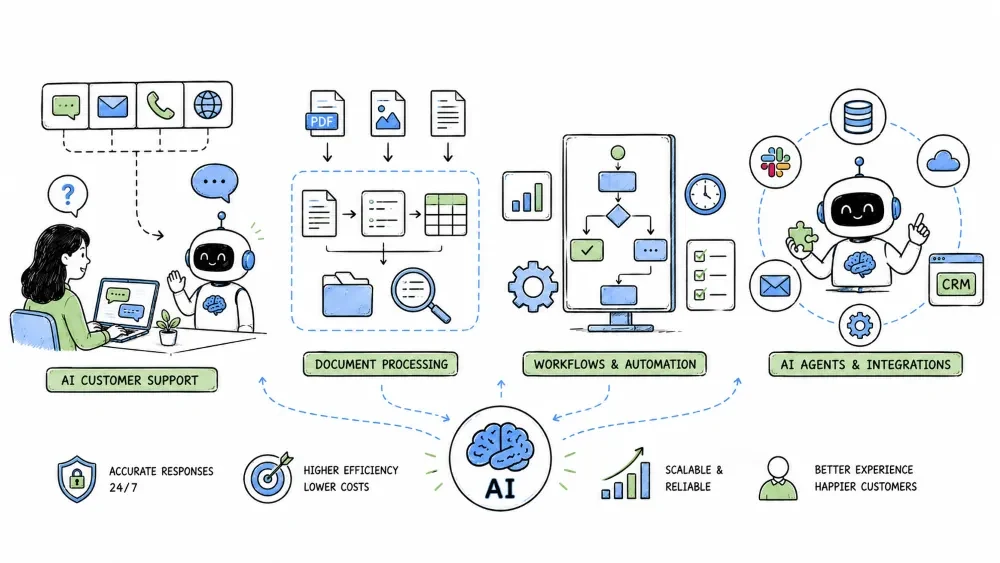
This chapter covers the four most common hands-on enterprise AI applications: AI-powered customer support, AI document processing, AI-driven workflow automation, and AI agents that can plan and execute across tools. They share the same stack (data → RAG/retrieval → model → workflow), but each serves a different need. Learn the pattern for each, and when to choose one.
The four application patterns in this chapter share a stack but serve different needs:
Support:     classify + retrieve + answer  (reactive, question in)
Docs:        OCR + extract + classify      (reactive, file in)
Workflows:   decide + dispatch + act        (event driven)
Agents:      plan + act + replan           (goal driven)
Read the section that matches your problem; the shared stack means you'll reuse pipelines.
Support is the most deployed enterprise AI: it deflects simple tickets, drafts replies, and summarizes conversations so humans work faster. It is not about replacing humans; it is about letting them focus on the hard cases.
Classic:  every ticket → human agent (slow, inconsistent)
With AI:  simple tickets resolve automatically,
          hard ones reach a human faster with context.
Ticket → classify route → retrieve KB → answer or draft → qualify
        → escalate if needed → log → measure
First decide what kind of request it is and who should handle it.
def classify(text):
    return intent_model(text)   # "billing", "password", "refund", ...

if intent == "refund" and amount > limit:
    route_to("finance_team")
else:
    route_to("ai_deflection")
Accurate routing is the backbone: everything after it assumes the ticket is understood.
For safe intents, answer directly from your knowledge base using retrieval (RAG).
kb = retrieve(question, user)            # permission-filtered retrieval
if not kb:
    return "I don't have that info — let me connect you to an agent."
return llm_answer(question, kb, cite_sources=True)
Grounded answers with citations deflect tickets you're confident about and hand the rest to a person.
Knowing when the AI gives up is as valuable as answering well.
Support isn't only about deflection. AI also helps agents mid-conversation:
def coach(conversation):
    return {
        "summary": summarize(conversation),
        "suggested_reply": draft_reply(conversation),
        "risk_flag": sentiment(conversation_messages),
    }
Measure outcomes, not just usage:
Good:  deflection up, CSAT stable or up, handle time down.
Bad:   deflection up but CSAT down (AI answering, customers angry).
Businesses drown in unstructured files — contracts, invoices, forms, and reports. AI document processing reads them, extracts the fields you need, and routes them into your systems.
Receive → OCR/parse → extract structure → classify fields →
validate → route → store with confidence → reject or accept
A document must first become text. Printed digital files are parsed directly; scanned files need OCR to turn pixels into characters.
from document_ai import parse

doc = parse("invoice_2024.pdf")      # handles PDF text or OCR as needed
lines = doc.pretty_text()
print(lines[:10])
A page is more than its words — it has headers, tables, and sections. Detecting structure tells the model where numbers should belong.
Block detection:   which regions are titles, paragraphs, tables.
Table parse:       turn a price table into rows + columns.
Reading order:     reconstruct the logical flow top-to-bottom.
Give the model the structure and ask for the fields you need.
fields = extract(doc, schema={
    "vendor":   "str",
    "amount":   "number",
    "due_date": "date",
    "line_items": ["str"],
})

if fields["amount"] and fields["amount"] >= 10000:     # route
    route_to("finance_approval", fields)
A schema tells the model exactly what to pull, making output predictable.
Before extracting, know what you're looking at. Classify to route to the right workflow.
kind = classify(doc, ["invoice", "purchase_order", "receipt", "contract"])
dispatch = {"invoice": "ap_pipeline",
            "purchase_order": "po_pipeline",
            "contract": "legal_review"}[kind]
Real files are messy: smudged scans, cursive, rotated pages, and multi-page uploads.
Never trust a blind field. Attach a confidence score and trigger human review when a field is uncertain.
required_fields = ("amount", "vendor", "due_date")
for f, val, conf in extract_including_conf(doc):
    if f in required_fields and conf < 0.95:
        enqueues_human_review(f, val)
Reject or defer low-confidence documents for human eyes, then let them flow.
A workflow is a series of steps where some are model-driven and some are system-driven. The model decides what to do next; the plumbing moves data.
A script runs line-by-line; a workflow branches based on model output. A workflow can stop, wait, and resume when a human responds.
Script: pull invoices → process every one → exit.
Workflow: pull invoices → for each, run model → branch on model → may pause for human → resume.
Start with a clear trigger.
trigger:
  type: "new_file"
  source: "s3://incoming/claims"
  filter: "filename ends with .pdf"
The model sits at a step, reads the data, and emits a structured decision.
def decide_next(data):
    classification = llm.classify(
        system="You classify a claim as approve, deny, or review.",
        data=data,
    )
    if classification == "approve":
        return "post_to_erp"
    elif classification == "deny":
        return "send_denial_email"
    else:
        return "route_to_manager"
When the model cannot decide with confidence, it pauses and gives a clear choice.
Model: confidence 0.55 on "approve"
Human UI: Approve / Deny / Review more data
Human selects: Deny
Workflow: send_denial() → complete
Design these prompts as short, plain-language decisions, not a research question.
A chatbot waits for a question. An agent plans a path to a goal, calls tools, reads the results, and keeps going until it is done.
An agent iterates through four stages each step:
Goal → Plan → Act (call a tool) → Observe result → Replan → next step
The loop ends when the goal is satisfied, the agent decides it can't proceed, or it hits a hard stop.
while not goal_complete() and not stop_requested():
    plan = planner.think(goal, history, tools)
    action = select_action(plan, tools, history)
    result = action.execute()
    history.add(action, result)
    if stop_signal(result): break

`history` is a mutable list or object that records every (action, result) pair so the agent can replan from prior context. It is passed to `planner.think` and `select_action` each turn, and updated after each action.
Agents act through tools — functions, APIs, search, file reads, or database queries.
tools = {
    "lookup_order":   order_api,
    "issue_refund":   payment_api,
    "escalate_ticket": ticketing_api,
}

def select_action(plan, tools, history):
    return tool_call_from_model(plan, tools, history)
The model's job is not to "do" things directly; it is to choose a tool and supply arguments based on what it has learned. Keep tools' inputs constrained (JSON schemas) and outputs well-defined.
A good agent reasons about the goal, then acts. A great agent replans when the world changes.
Plan: refund order → call lookup_order → order already refunded → replan: notify customer, log
Plan failures are normal; plan recovery is what distinguishes an agent from a scripted multi-step call.
Agents in a company face stricter guardrails:
MAX_TURNS = 15
MAX_TOOL_CALLS = 12
turn = 0
tool_calls = 0

while turn < MAX_TURNS and tool_calls < MAX_TOOL_CALLS and not goal_complete():
    ...
    tool_calls += 1
    turn += 1
When your input is a question or a file, and the answer is bounded → start with support or document processing.
When your work spans several systems on a schedule and the decision is a small enum → workflow automation.
When the goal is open-ended and the steps aren't known in advance, and the cost of a wrong turn is low → an agent.
The stack (data → retrieval → model → action) is shared, so choose the pattern that matches the shape of the problem and the risk of being wrong.
Save your progress and earn XP for completing tutorials.
4 questions · Pass with 70%+
1Which pattern fits processing thousands of invoices/day into structured fields?
2In an AI agent loop, the four stages per step are:
3The history variable in the agent loop is passed to both planner.think() and select_action(). What does it store?
4Which is a critical guardrail for enterprise AI agents?
Technology
Forward Deployed Engineer
Lesson group
Enterprise AI Deployment
Progress
86% complete

