Preparing your learning space...
80% through FDE Programming Foundations tutorials
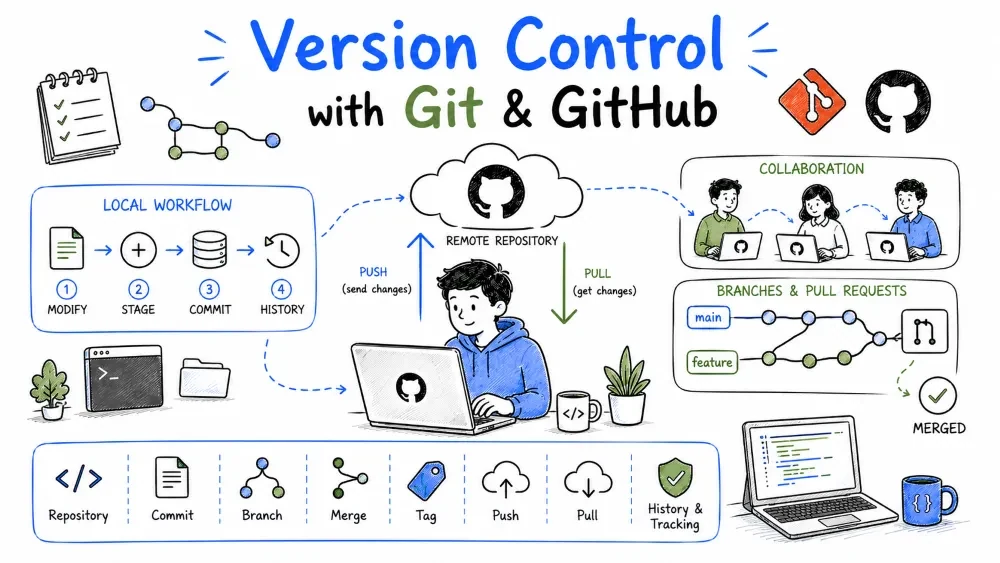
FDEs rarely work alone — code goes to customers, gets reviewed, and must be recoverable. Git tracks changes; GitHub hosts the repo and adds collaboration. This tutorial covers the essentials every FDE needs.
Git records every change with a message and author, so you can revert a bad customer tweak or show what you changed. GitHub adds a shared home for the code, reviews, and issue tracking.
Why useful: When you edit a customer's integration live, Git is your undo button and your audit trail.
git init            # start tracking a folder
git add .           # stage changes
git commit -m "Add ticket summarizer"
git push            # send to GitHub
Explanation: init starts tracking; add stages files; commit saves a snapshot with a message; push uploads it. Each commit is a restorable point.
Common Mistake: Committing secrets or large data files. Use .gitignore for .env and outputs.
git checkout -b feature/summarizer   # new branch
# ... make changes ...
git commit -m "Add summarizer"
git push -u origin feature/summarizer
Explanation: a branch is an isolated line of work. You open a Pull Request (PR) on GitHub to propose merging it — teammates or the customer review before it lands.
Best Practice: One feature per branch; keep PRs small so reviews are fast.
main and breaking the shared baseline.Save your progress and earn XP for completing tutorials.
4 questions · Pass with 70%+
1What does git commit do?
2Why use branches and Pull Requests?
3Why should you use .gitignore?
4What is a common mistake with Git?
Technology
Forward Deployed Engineer
Lesson group
FDE Programming Foundations
Progress
80% complete

