Preparing your learning space...
100% through FDE with AI Coding Tools tutorials
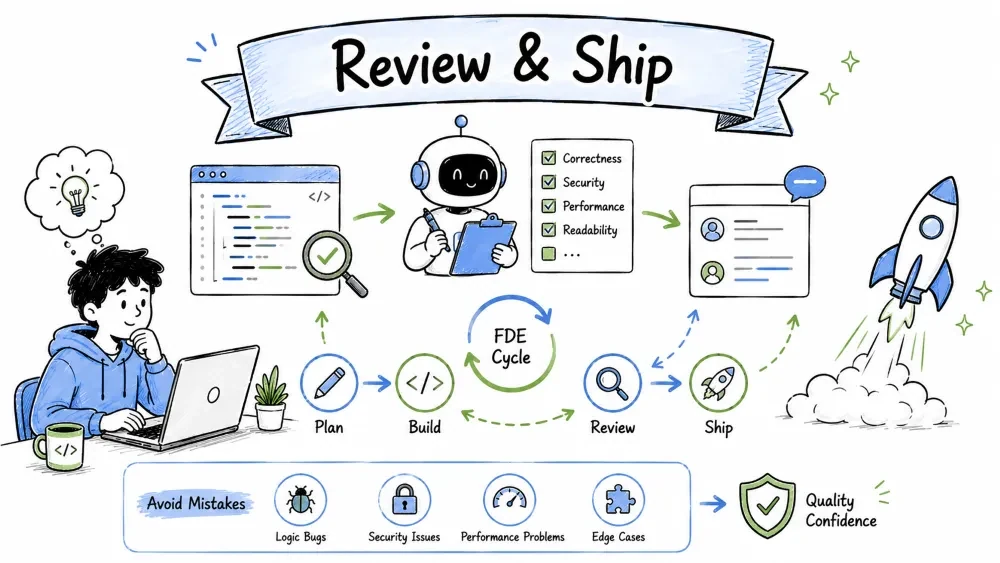
This is the capstone. It covers the skills that decide whether you ship something robust or something that breaks in production: reviewing AI code like a senior engineer, avoiding the common mistakes that trip everyone up, and finally pulling everything in this course into one repeatable, end-to-end workflow for a Forward Deployed Engineer. Everything before this tutorial gave you speed; this one keeps it safe.
AI writes code fast, but fast isn't the same as correct. Reviewing AI-generated code is the skill that decides whether you ship something robust or something that breaks in production. You don't trust the output because it looks right — you check it because software is unforgiving.
AI answers confidently, and confidence is not evidence of correctness. It can subtly mis-handle an edge case, use an insecure pattern, or misunderstand your intent — and it will never tell you it's unsure. Approach AI output the same way you'd review a teammate's merge request: curious but skeptical.
Confirm the code actually matches your request.
| Question | Why it matters |
|---|---|
| Does it solve the problem I described? | AI sometimes answers a similar problem. |
| Does it use the language/framework I asked for? | It may drift to its favorite default. |
| Does it respect the constraints I gave? | Limits you set are easy to miss. |
Prompt for this step:
Compare this code to my original request and list any place it does
something I didn't ask for, or skips one of my requirements.
The most dangerous bugs hide in unusual inputs — the ones the happy path never triggers.
| Edge case to probe | Example |
|---|---|
| Empty input | an empty list, string, or form |
| Very large input | a huge list or file |
| Wrong type | a None, a string where a number is expected |
| Boundary values | exactly 0, exactly a limit, exactly max |
| Duplicates | repeated values that should be collapsed or handled |
Prompt for this step:
Find edge cases this code does not handle and show me exactly what
fails. Then add handling for the important ones.
AI won't always flag insecure patterns. Check these specifically — especially if the code touches user input, databases, or the web.
| Risk | What to look for |
|---|---|
| Injections | user input built into a SQL query or shell command (should be parameterized) |
| Exposed secrets | API keys or passwords hard-coded in the code |
| Unsafe input | trusting data from users or APIs without validation |
| Missing auth | endpoints that should require login but don't |
Prompt for this step:
Security-check this code. Is it vulnerable to injection, does it
expose secrets, or does it trust untrusted input unsafely?
You have a powerful trick available: hand the AI's work to the AI as a reviewer. Because it's impartial about its own output, it often spots real problems.
Prompt:
Act as a strict senior engineer reviewing this code before merge.
List every bug, edge case, and security issue you can find, from
most to least serious. Do not flatter me — be harsh.
Then take its list and verify each point yourself — the AI can be wrong in review too, but it's a fast first sweep.
AI coding tools are powerful, but they come with a predictable set of traps — and nearly every developer falls into at least one. Knowing what goes wrong is half the battle; the other half is knowing the simple habits that keep you out of trouble.
The single biggest mistake is treating AI output as fact. AI sounds confident, and confident output feels right — but it can be subtly wrong, or wrong in ways you only discover in production. The escape: always verify. Run the code, check the logic, review it (Part A).
AI knows nothing about your project unless you tell it. A vague prompt like "fix my code" makes the AI guess your language, your assumptions, and your goals — and the guess often misses. The escape: paste the actual code, the error, the relevant file, and describe the expected behavior (Tutorial 01 covers the full recipe).
Blindly copying code you don't understand means you can't debug it, can't explain it, and don't learn — so your next prompt is just as vague. Relatedly, in-editor tools suggest code constantly; accepting without thinking turns your codebase into a patchwork of guesses. The escape: ask the AI to explain the code first (Tutorial 02), then use it; accept a suggestion only when you've read it and it fits your intent.
Three mistakes that compound:
Now pull all of it together into one repeatable process you can run on any real project. This is the FDE way: an end-to-end loop that takes an idea, turns it into a working feature, verifies it, and ships it — with AI accelerating every step and you steering.
A Forward Deployed Engineer (FDE) builds software close to the customer — they go where the problem is, understand the real need, and deploy a working solution quickly. Where a traditional engineer might wait for a full spec, an FDE works iteratively: understand, prototype, ship, learn, repeat. Why AI is essential: the FDE model depends on shipping fast, and AI collapses the time it takes to read unfamiliar code, generate new code, and iterate.
Here's the whole workflow at a glance — the Tutorial 01 loop (Ask → Get → Verify → Refine) expanded into a full project cycle:
┌─────────────────────────────────────────────────────────────┐
│ 1. UNDERSTAND the problem     ← ask the AI to break it down │
│ 2. EXPLORE the codebase       ← Tutorial 02                 │
│ 3. PROTOTYPE the solution     ← Tutorial 02                 │
│ 4. BUILD and refine           ← Tutorials 02, 03            │
│ 5. VERIFY and review          ← Tutorials 03, 06 (Part A/B) │
│ 6. DOCUMENT and test          ← Tutorial 04                 │
│ 7. SHIP and learn             ← cycle back to 1             │
└─────────────────────────────────────────────────────────────┘
Every stage uses AI, and every stage loops back to an earlier one as you learn.
Stage 1 — Understand the Problem. Clarify before building. Use AI to interrogate the need.
Act as a product expert. The stakeholder wants "a dashboard for
support tickets." Ask me the 5 most important clarifying questions
missing before I build anything.
The AI surfaces the assumptions hiding in a vague request (who uses it, what data, what success looks like) so you build the right thing.
Stage 2 — Explore the Codebase. Learn what already exists so you don't rebuild or clash with it.
Here is the project structure: [list folders/files]. Give me the
2-3 files most relevant to adding a ticketing dashboard, and tell me
where new code should live.
Use Tutorial 02 techniques to map the existing patterns before touching anything.
Stage 3 — Prototype the Solution. Prove the approach cheaply before real effort.
Build a minimal end-to-end prototype of the dashboard: a page that
loads sample tickets and shows a count by status. One small app.
Keep it rough — I'll test the idea before expanding it.
If it flops, you learned early and wasted little.
Stage 4 — Build and Refine. Turn the validated prototype into real code — generate, debug, refactor.
- "Generate the real API endpoint that returns tickets from the database."
- "This query returns the wrong count for closed tickets. Debug it."
- "Refactor the dashboard so the table rendering is a shared function."
Move iteratively: one feature at a time, verifying as you go.
Stage 5 — Verify and Review. Run the safety checks: edge cases, security, skeptical review.
Strictly review the code I'll ship. List every bug, edge case, and
security issue from most to least serious. Give me the fix for each.
Verify each finding yourself — run tests, try the edge cases, confirm the fixes hold.
Stage 6 — Document and Test. Make it maintainable.
- "Document each endpoint in this API reference format."
- "Generate tests covering normal cases, edge cases, and one failure path."
Now you have docs for the next developer and tests that let you refactor safely later.
Stage 7 — Ship and Learn. Deploy, watch real users, and improve.
Looking at this feature as shipped, what are the likely failure points
in production I should watch, and what should I prioritize improving
next based on the original requirements?
Then cycle back to Stage 1 — the FDE loop never really ends. Each cycle makes the solution fit the real need better.
Save your progress and earn XP for completing tutorials.
4 questions · Pass with 70%+
1Why review AI code even when it looks correct?
2Which input is most dangerous to pass into a SQL query without validation?
3What's the first stage of the FDE workflow?
4How does an FDE differ from a traditional engineer?
Technology
Forward Deployed Engineer
Lesson group
FDE with AI Coding Tools
Progress
100% complete

