Preparing your learning space...
57% through Solution Design tutorials
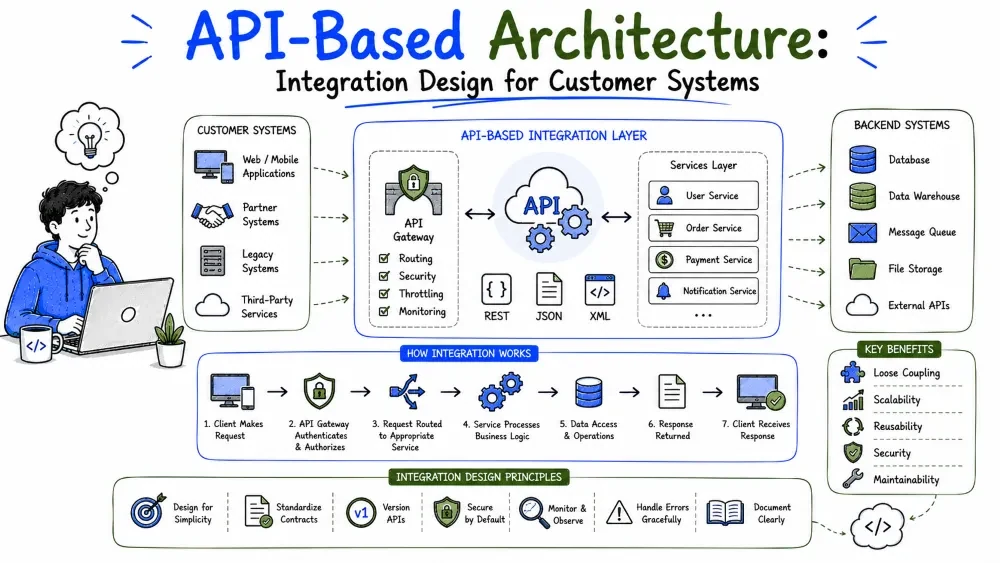
Almost no FDE solution stands alone — it plugs into the customer's existing systems, and the plug is nearly always an API. This tutorial covers how API-based systems are structured, then the patterns for connecting your solution to everything else in the customer's world.
An API (Application Programming Interface) is a contract: one program exposes a set of operations, and other programs call them without knowing how they're implemented. In practice, "API" almost always means a web API — you send an HTTP request, you get a structured response back.
GET https://api.example.com/deliveries/4821

→ 200 OK
{
  "id": 4821,
  "status": "delivered",
  "driver": "M. Osei",
  "delivered_at": "2026-08-18T14:32:00Z"
}
APIs are the reason modern systems can be assembled instead of built as one block: each system owns its data and offers operations on it, and everyone else calls instead of reaching in.
An API-based architecture separates the system into layers that talk over HTTP:
[ Web app ]  [ Mobile app ]  [ Partner systems ]
      \           |              /
       ▼          ▼             ▼
      ┌────────────────────────────┐
      │           API              │   ← one contract, many consumers
      │  (auth, validation, logic) │
      └─────────────┬──────────────┘
                    ▼
             [ Database ]
The payoff: the API is the single front door. Add a mobile app, a dashboard, or a partner integration without touching the core logic — they all speak the same contract.
The two most common API styles:
| Style | How it works | Best for |
|---|---|---|
| REST | Resources at URLs, HTTP verbs (GET/POST/PUT/DELETE) | Most CRUD-style systems; the safe default |
| Webhooks | The other side calls you when something happens | Event notifications ("order shipped") |
GraphQL and gRPC exist too, but REST plus webhooks covers the large majority of FDE work.
Whether you're building an API or judging someone else's, the same qualities matter:
GET    /deliveries          → list deliveries
GET    /deliveries/4821     → one delivery
POST   /deliveries          → create
PATCH  /deliveries/4821     → update
DELETE /deliveries/4821     → remove
200 OK, 201 created, 400 bad request, 401 not authenticated, 403 not allowed, 404 not found, 429 too many requests. Codes are part of the contract — don't return 200 for everything.{
"error": "validation_failed",
"message": "status must be one of: pending, in_transit, delivered",
"field": "status"
}
/v1/deliveries) is the simplest approach.GET /deliveries?page=2&limit=50.Best Practice: design the API from the consumer's point of view. Write down the calls a dashboard or integration would want to make, then build endpoints to match. APIs designed from the database outward are awkward to use.
Every connection between two systems is one of two kinds:
Request → response. Simple, immediate, but the caller is blocked and shares the callee's fate: if the other system is slow or down, you are too.Sync: [Order service] ──"charge card?"──▶ [Payments] ──"yes/no"──▶ back (waits; fails if Payments is down) Async: [Order service] ──"order placed"──▶ [Queue] ──▶ [Email worker] ──▶ [Analytics worker] (moves on; workers catch up when they can)
The rule of thumb: use sync when the caller needs the answer now (checking stock, validating a login); use async when the work can happen later (sending email, updating analytics, syncing to an ERP).
Integration architecture is the design of how your solution exchanges data with the customer's existing systems — ERPs, CRMs, accounting tools, legacy databases, spreadsheets with a prayer. In FDE work this is often most of the project: the new feature is easy; making it coexist with fifteen years of existing software is the job.
Every integration design answers four questions:
| Pattern | Mechanism | Timing | Use when |
|---|---|---|---|
| Direct API call | You call their API (or they call yours) | Real-time, sync | The other system has a good API and you need the answer now |
| Webhook | They call your URL when something happens | Real-time, push | You need to react to their events and they support webhooks |
| Scheduled sync (batch) | A job runs every N minutes/hours | Periodic | Real-time isn't required, or their system has no API events |
| File exchange | CSV/XML dropped in a folder or SFTP | Periodic | Legacy systems with no API — more common than you'd hope |
| Message queue / events | Both sides read/write a shared bus | Real-time, async | Many consumers need the same events; decoupling matters |
| Shared database | Two systems read/write the same tables | Real-time | Almost never — it couples systems at the worst level. Avoid. |
Note: legacy systems dictate the pattern more often than preference does. If the customer's 2008-era ERP only exports CSV files to a folder at midnight, your integration is a nightly file job — and that's a legitimate architecture.
Work through the questions in order:
1. Does the other system have an API?
   No  → file exchange or shared export; schedule it.
   Yes ↓
2. Do you need the data instantly?
   No  → scheduled sync is simpler and more robust. Done.
   Yes ↓
3. Who initiates?
   You need their events  → webhook (if supported)
   You need their data    → direct API call
   Many systems need it   → publish to a queue/event bus
Best Practice: when real-time and batch both satisfy the requirement, choose batch. A sync job that runs every 15 minutes is dramatically easier to build, debug, and explain than a real-time pipeline — and "within 15 minutes" is good enough for most business processes.
Integrations fail more than anything else you'll build, because they depend on systems you don't control. Design for it:
import time

def call_with_retry(fn, attempts=5):
    for i in range(attempts):
        try:
            return fn()
        except Exception:
            if i == attempts - 1:
                raise
            time.sleep(2 ** i)   # 1s, 2s, 4s, 8s
Back to the delivery solution: every confirmed delivery must reach the customer's ERP for invoicing. Facts from discovery:
Applying the decision path: API exists ✓ → real-time not needed → scheduled sync.
[ Deliveries DB ]
       │
       ▼  every 15 minutes
[ Sync job ] ── reads undelivered-to-ERP confirmations
       │        (flag: erp_synced = false)
       ▼
[ ERP API: POST /invoice-records ]
       │
       ├── success → set erp_synced = true
       └── failure → retry with backoff; after 5 tries,
                     leave flag false + alert the team
Why this design holds up: the flag makes the job idempotent and resumable — rerunning it after an ERP outage just picks up the unsynced rows. Sunday maintenance causes a 15-minute delay, not data loss. And the whole integration is one small job that anyone can understand.
erp.create_invoice(...), never the vendor SDK directly — so the vendor stays swappable.Save your progress and earn XP for completing tutorials.
4 questions · Pass with 70%+
1What are the two most common API styles covered in the tutorial?
2What does the tutorial identify as the "safe default" API style?
3When should you use synchronous communication between systems?
4What is the primary concern when designing APIs according to the tutorial?
Technology
Forward Deployed Engineer
Lesson group
Solution Design
Progress
57% complete

