Preparing your learning space...
71% through Solution Design tutorials
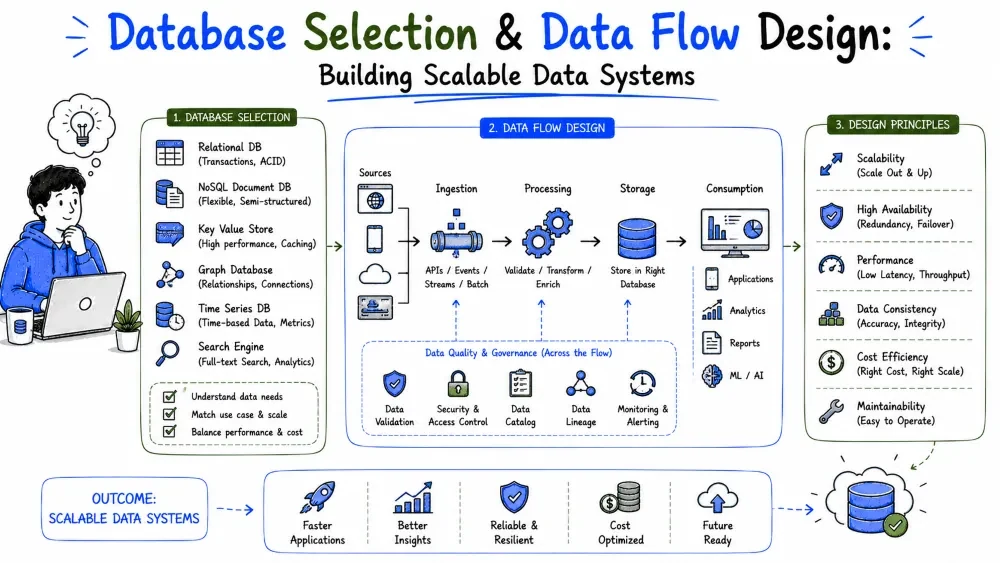
Data is the one thing every solution has, and the database is the decision you live with longest. This tutorial covers how to pick the right kind of store for the job, then how to design the paths data travels — from entry to transformation to storage to consumption.
The database is the hardest component to change later. You can swap a frontend framework in a week; migrating a production database with months of customer data in it is a project of its own. The choice also shapes everything downstream — query speed, scaling strategy, backup plans, and how easily reports get built.
The good news: the decision is mostly about fit, not about which database is "best." Match the store to how the data is actually accessed, and the rest follows.
| Family | How data is organized | Strong at | Examples |
|---|---|---|---|
| Relational (SQL) | Tables with rows, fixed schema, relationships | Structured data, transactions, joins, reporting | PostgreSQL, MySQL, SQL Server |
| Document (NoSQL) | JSON-like documents, flexible schema | Varied/evolving records, fast iteration | MongoDB, CouchDB |
| Key–value | Simple key → value pairs | Caching, sessions, huge simple lookups | Redis, DynamoDB |
| Column-family | Wide rows, massive scale | Very large volumes, time-series-ish workloads | Cassandra, Bigtable |
| Object storage | Files/blobs addressed by key | Documents, images, backups, exports | S3, Azure Blob, GCS |
| Search engine | Indexed documents for text queries | Full-text search, filtering | Elasticsearch, OpenSearch |
Note: a relational database — usually PostgreSQL — is the right answer for the large majority of FDE solutions. Business data is structured, relationships matter, and SQL is the universal reporting language. Start there, and add a specialist store only when a specific requirement demands it.
The reliable way to choose is to list how the data will actually be read and written, then match:
| If your access pattern is… | Lean toward |
|---|---|
| Records with relationships ("orders have items, items have products") | Relational |
| Money or inventory, where two updates must both succeed or both fail | Relational (transactions) |
| "We don't know the shape yet, it changes weekly" | Document |
| Millions of tiny reads/writes by ID, no joins | Key–value |
| Storing PDFs, images, CSV exports | Object storage (+ a DB row pointing at them) |
| Users typing search boxes | Search engine |
Example for the delivery solution:
Access pattern                              → Store
-----------------------------------------------------------------
Delivery records, drivers, routes, joins    → PostgreSQL
Live driver location, refreshed every 30s   → PostgreSQL (fine at this scale)
Session data and hot dashboard counts       → Redis cache
Signed proof-of-delivery photos             → Object storage, URL in Postgres
Notice the pattern: one primary store, specialists only where justified. Every additional store type is another thing to back up, monitor, and explain.
Common Mistake: choosing a database because it's trendy or because one requirement sounds exotic. "We might do ML someday" is not a reason to add three stores today.
For each store, decide who operates it:
| Managed (cloud service) | Self-hosted | |
|---|---|---|
| Ops work | Provider handles backups, patching, failover | All yours |
| Cost | Pay per use; can grow | Cheaper at steady scale, but includes your time |
| Control | Limited configuration | Full control |
| FDE default | ✅ Yes | Only when the customer requires on-premise |
For a small-team FDE build, managed wins almost by default — automated backups and point-in-time recovery alone are worth it. Self-hosting becomes the answer mainly when data must stay inside the customer's network.
A data flow is the path a piece of data travels: where it enters the system, what happens to it along the way, where it's stored, and who consumes it. If the database decision is about where data lives, data flow design is about how data moves.
Most data bugs are flow bugs: data arrives in the wrong format, gets transformed twice, lands in two places that disagree, or is consumed before it's complete. Drawing the flow is how you catch those on paper.
Every flow is a chain of four stages:
[ Ingest ] → [ Transform ] → [ Store ] → [ Serve ]
   enter        clean/shape     persist      read/report
Two design questions dominate:
Data quality is enforced at specific points in the flow, not "somewhere":
audit_log table prevents endless arguments.Best Practice: the earlier a quality problem is caught, the cheaper it is. A validation rule at ingest costs one function; the same problem discovered in the monthly report costs a reconciliation project.
Designing the full flow for the logistics solution:
INGEST        TRANSFORM              STORE                SERVE
─────────     ──────────────────     ─────────────────    ──────────────────
Driver app    Validate fields        PostgreSQL           Office dashboard
confirmation  Attach driver/route    (deliveries table,   (live status)
   │          Compute on-time flag    one source of
   │                                  truth)              Daily KPI report
   ▼                                    │                 (batch, 6am)
Sync API ────────────────────────────▶  │
                                        ▼                 ERP invoice sync
Proof photo ──▶ Object storage ──▶ URL stored in row      (every 15 min,
                                                          Tutorial 4)
The decisions, stage by stage:
| Stage | Decision | Why |
|---|---|---|
| Ingest | Sync API validates every confirmation; rejects unknown delivery IDs | Bad data never reaches storage |
| Transform | On-time flag computed once at ingest | Every consumer needs it; computing it three times invites three different answers |
| Store | PostgreSQL is the single source of truth; photo lives in object storage, referenced by URL | One authoritative copy; blobs don't belong in tables |
| Serve | Dashboard reads live; KPI report runs as a 6am batch; ERP sync every 15 min | Each consumer gets the freshness its business process actually needs — no more |
Failure plan: confirmations queue on the phone when offline (ingest can't fail in a dead zone); the ERP sync retries and leaves a flag on unsynced rows (Tutorial 4). Every stage has a defined behavior for "the next stage is down."
Save your progress and earn XP for completing tutorials.
4 questions · Pass with 70%+
1Which database family is identified as the "right answer for the large majority of FDE solutions"?
2What access pattern would lean toward a key–value store?
3When should you add specialist stores (cache, object storage, search) according to the tutorial?
4What does the tutorial recommend regarding storing files inside database rows?
Technology
Forward Deployed Engineer
Lesson group
Solution Design
Progress
71% complete

