Preparing your learning space...
14% through Solution Design tutorials
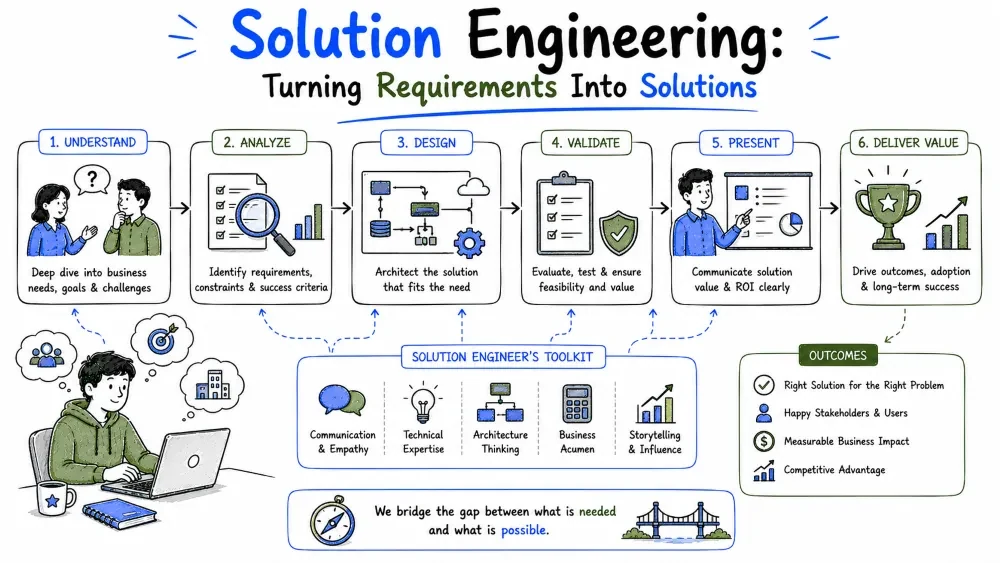
Solution engineering is the discipline of taking what a customer needs and turning it into a system that actually gets built, adopted, and used. It sits between the business conversation and the code. This tutorial defines the field and walks through its core move: turning requirements into solutions.
Solution engineering is the practice of designing and delivering technical solutions that fit a specific customer's problem, environment, and constraints. Instead of building one product for everyone, a solution engineer assembles, configures, and extends technology until it solves this customer's problem.
The keyword is fit. A technically brilliant system that ignores the customer's existing tools, team skills, or budget is a failed solution. Solution engineering optimizes for the whole picture: the problem, the people, and the platform.
Day to day, the work cycles through four activities:
Notice that coding is only one quarter of the job. The rest is judgment: choosing the right approach before any code is written.
| Product / Platform Engineer | Solution Engineer | |
|---|---|---|
| Builds for | Many unknown users | One known customer (or a few) |
| Optimizes for | Generality, scale | Fit, speed to value |
| Requirements come from | Product managers, data | Direct customer conversations |
| Success means | Adoption at scale | This customer's problem is solved |
A product engineer asks "what should everyone get?" A solution engineer asks "what does this customer need, and how fast can we get it working?"
A requirement is a statement about what the solution must do or what condition it must meet. Requirements are the raw material of solution engineering — everything you design is an answer to one.
Good requirements are testable: you can look at the finished solution and say yes or no.
Weak:   "The system should be fast."
Strong: "The dashboard loads in under 3 seconds for 95% of requests."

Weak:   "Users should be able to manage invoices."
Strong: "An accounts clerk can create, edit, approve, and export invoices
         without leaving the application."
The weak versions feel reasonable but can't be verified. The strong versions give you a target to design against and a test to pass at the end.
Requirements split into two families, and you need both to design a real solution:
| Type | Question it answers | Example |
|---|---|---|
| Functional | What does it do? | Generate a monthly PDF report |
| Performance | How fast? | Report generates in < 30 seconds |
| Reliability | How often can it fail? | Available 99.9% of business hours |
| Security | Who can access what? | Only finance staff see salary data |
| Scalability | How much growth? | Works at 10× current order volume |
Common Mistake: collecting only functional requirements. A solution that does everything but crashes daily or leaks data fails anyway. Always ask "and how well must each of these work?"
Turning requirements into a solution is a repeatable five-step process:
Step 5 is the one everyone skips and the one that saves the project. It catches misunderstandings while they're still cheap — on paper, not in production.
The heart of the process is step 4: a simple table that pairs every requirement with the component, service, or feature that satisfies it.
Requirement                          -> Solution piece
-----------------------------------------------------------------
Clerks create/approve invoices       -> Invoice web app (build)
Invoices sync to accounting system   -> Nightly integration job
Report in under 30 seconds           -> Pre-aggregated report table
Only finance sees salary data        -> Role-based access control
Works at 10x volume                  -> Queue-based processing
This table does three jobs at once:
Best Practice: keep this table alive for the whole engagement. When a stakeholder asks "why are we building X?", the answer should be a row in the table. If there's no row, don't build X.
A logistics customer hands you this after discovery:
1. Drivers must confirm deliveries from their phones.        (functional)
2. The office must see delivery status within 1 minute.      (performance)
3. Confirmations must not be lost in dead zones.             (reliability)
4. Only dispatchers can reassign deliveries.                 (security)
5. Volume triples during holiday season.                     (scalability)
Mapping each one:
| # | Requirement | Solution piece |
|---|---|---|
| 1 | Phone confirmations | Mobile app with offline mode |
| 2 | Status within 1 minute | Push sync to a live status dashboard |
| 3 | No lost confirmations | Offline queue on the phone, retry on reconnect |
| 4 | Only dispatchers reassign | Role-based access control |
| 5 | 3× holiday volume | Queue-based processing, extra workers at peak |
Read down the right column and you already have the outline of an architecture: a mobile client, a sync service, a queue, a dashboard, and access control. That's the whole trick of solution engineering — the solution falls out of the requirements when every requirement is concrete enough.
Save your progress and earn XP for completing tutorials.
4 questions · Pass with 70%+
1What is the key difference between a "weak" and "strong" requirement?
2When mapping requirements to solution pieces, what does the mapping table primarily help you achieve?
3In the working example from Tutorial 1, requirement #3 states: "Confirmations must not be lost in dead zones." What type of requirement is this?
4What is the core principle of solution engineering according to the quick recap?
Technology
Forward Deployed Engineer
Lesson group
Solution Design
Progress
14% complete

