Preparing your learning space...
100% through SQL Functions tutorials
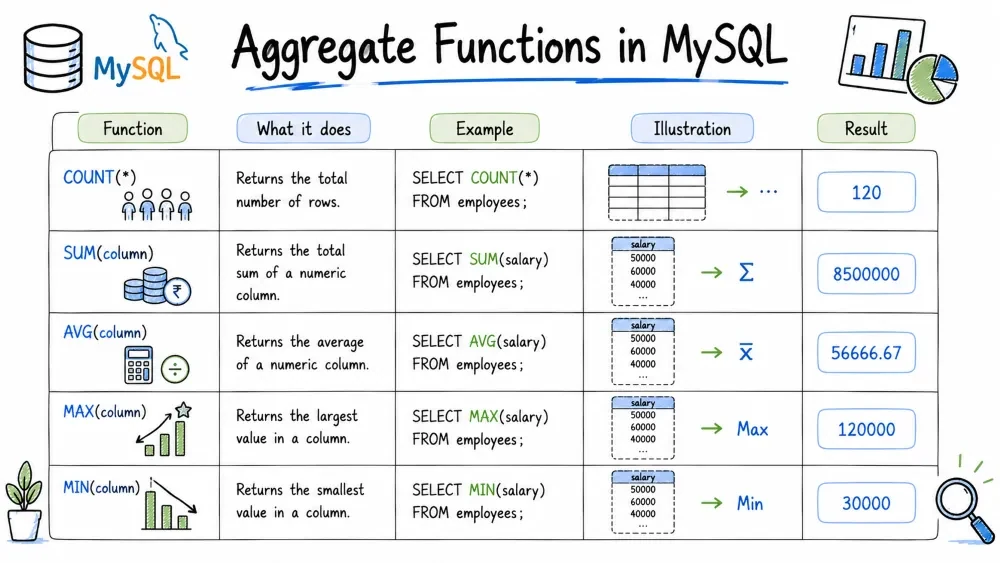
Aggregate functions in MySQL perform calculations across multiple rows and return a single summary value. They are the foundation of data summarization and reporting — allowing you to count, sum, average, find extremes, and concatenate grouped data. These functions are most commonly used with the GROUP BY clause.
Purpose: Returns the number of rows in a result set or the number of non-NULL values in a column.
Syntax:
COUNT(*)       -- counts all rows (including NULLs)
COUNT(column)  -- counts non-NULL values in the column
COUNT(DISTINCT column) -- counts unique non-NULL values
Example:
SELECT COUNT(*) AS total_employees FROM employees;
-- Result: 100

SELECT COUNT(department_id) AS employees_with_dept FROM employees;
-- Result: 95 (if 5 employees have NULL department_id)

SELECT COUNT(DISTINCT department_id) AS unique_depts FROM employees;
-- Result: 7

SELECT status, COUNT(*) AS count
FROM orders
GROUP BY status;
Common Mistake:
COUNT(column)ignores NULLs. If you want to count all rows regardless, useCOUNT(*).
Purpose: Returns the total sum of a numeric column.
Syntax:
SUM(column)
SUM(DISTINCT column)  -- sum of unique values only
Example:
SELECT SUM(amount) AS total_sales FROM orders;
-- Result: 125000.00

SELECT SUM(DISTINCT amount) AS unique_total FROM orders;
-- Result: 118500.00  (duplicates counted once)

SELECT department_id,
       SUM(salary) AS total_salary_cost
FROM employees
GROUP BY department_id;
Note:
SUMignores NULL values. If all values in a group are NULL,SUMreturns NULL.
Purpose: Returns the average (mean) value of a numeric column.
Syntax:
AVG(column)
AVG(DISTINCT column)
Example:
SELECT AVG(salary) AS avg_salary FROM employees;
-- Result: 65000.00

SELECT AVG(DISTINCT salary) AS avg_unique_salary FROM employees;
-- Result: 64850.00

SELECT department_id,
       AVG(salary) AS avg_dept_salary
FROM employees
GROUP BY department_id;
Common Mistake:
AVGignores NULLs in its calculation. If a column has10, 20, NULL, 30, the average is(10+20+30)/3 = 20, not60/4 = 15. UseCOALESCE(column, 0)if you want to treat NULLs as zero.
Purpose: Returns the minimum (smallest) value in a set.
Syntax:
MIN(column)
Example:
SELECT MIN(salary) AS min_salary FROM employees;
-- Result: 30000

SELECT MIN(hire_date) AS earliest_hire FROM employees;
-- Result: 2015-03-12

SELECT department_id,
       MIN(salary) AS lowest_salary
FROM employees
GROUP BY department_id;
Note:
MINworks with numbers, strings (alphabetical), and dates. For strings, it returns the value that comes first alphabetically.
Purpose: Returns the maximum (largest) value in a set.
Syntax:
MAX(column)
Example:
SELECT MAX(salary) AS max_salary FROM employees;
-- Result: 150000

SELECT MAX(hire_date) AS latest_hire FROM employees;
-- Result: 2026-05-20

SELECT department_id,
       MAX(salary) AS highest_salary
FROM employees
GROUP BY department_id;
Best Practice: Use
MINandMAXtogether to find the range of values:
SELECT department_id,
       MIN(salary) AS min_sal,
       MAX(salary) AS max_sal,
       MAX(salary) - MIN(salary) AS salary_range
FROM employees
GROUP BY department_id;
Purpose: Concatenates values from multiple rows into a single string, separated by a delimiter.
Syntax:
GROUP_CONCAT([DISTINCT] column
             [ORDER BY column]
             [SEPARATOR 'delimiter'])
Example:
SELECT department_id,
       GROUP_CONCAT(employee_name) AS employee_list
FROM employees
GROUP BY department_id;
-- Result: Marketing -> Alice,Bob,Charlie

SELECT department_id,
       GROUP_CONCAT(employee_name ORDER BY salary DESC SEPARATOR ' | ') AS sorted_list
FROM employees
GROUP BY department_id;

SELECT department_id,
       GROUP_CONCAT(DISTINCT employee_name ORDER BY employee_name SEPARATOR ', ') AS unique_names
FROM employees
GROUP BY department_id;
Note: The maximum length of the output is controlled by the
group_concat_max_lensystem variable (default: 1024). You can increase it:
SET SESSION group_concat_max_len = 10000;
Save your progress and earn XP for completing tutorials.
4 questions · Pass with 70%+
1COUNT(department_id) counts… ?
2A column holds 10, 20, NULL, 30. What does AVG(salary) return?
3Which clause filters the result of an aggregate (e.g. SUM(amount) > 1000)?
4GROUP_CONCAT(employee_name ORDER BY salary DESC SEPARATOR ' | ') does what?
Technology
MySQL
Lesson group
SQL Functions
Progress
100% complete

