Preparing your learning space...
75% through SQL Functions tutorials
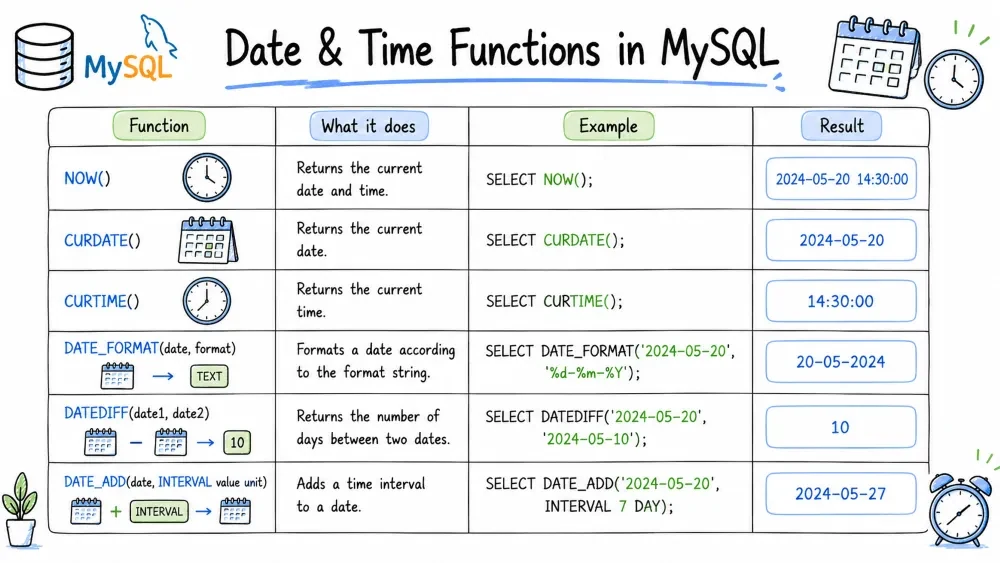
Date and time functions in MySQL allow you to capture current timestamps, extract components from dates, perform date arithmetic, and calculate differences between dates. These functions are critical for working with temporal data — whether you're generating reports, calculating age, filtering by date ranges, or scheduling future events.
Purpose: Returns the current date and time as a DATETIME value.
Syntax:
NOW()
Example:
SELECT NOW() AS current_datetime;
-- Result: 2026-07-29 14:30:45

INSERT INTO orders (customer_id, order_date)
VALUES (101, NOW());
Note:
NOW()returns the same value throughout a query execution, even if the query runs for a long time. UseSYSDATE()if you need the actual current time at each point of evaluation.
Purpose: Returns the current date only (without the time component).
Syntax:
CURDATE()
Example:
SELECT CURDATE() AS today;
-- Result: 2026-07-29

SELECT * FROM events
WHERE event_date >= CURDATE();
Purpose: Returns the current time only (without the date component).
Syntax:
CURTIME()
Example:
SELECT CURTIME() AS current_time;
-- Result: 14:30:45

SELECT * FROM logs
WHERE log_time >= CURTIME();
Purpose: Extracts the date portion from a DATETIME or TIMESTAMP value.
Syntax:
DATE(datetime_expression)
Example:
SELECT DATE('2026-07-29 14:30:45') AS date_part;
-- Result: 2026-07-29

SELECT DATE(NOW()) AS today_date;
-- Result: 2026-07-29

SELECT * FROM orders
WHERE DATE(order_datetime) = '2026-07-29';
Best Practice: When grouping by date across multiple days, use
DATE(order_datetime)in yourGROUP BYclause.
Purpose: Adds a specified time interval to a date.
Syntax:
DATE_ADD(date, INTERVAL value unit)
Example:
SELECT DATE_ADD('2026-07-29', INTERVAL 10 DAY) AS result;
-- Result: 2026-08-08

SELECT DATE_ADD('2026-07-29', INTERVAL 1 MONTH) AS result;
-- Result: 2026-08-29

SELECT DATE_ADD('2026-07-29', INTERVAL -3 DAY) AS result;
-- Result: 2026-07-26

SELECT DATE_ADD(NOW(), INTERVAL 7 DAY) AS reminder_date;
Valid Interval Units: DAY, MONTH, YEAR, HOUR, MINUTE, SECOND, WEEK, QUARTER, DAY_HOUR, DAY_MINUTE, etc.
Purpose: Subtracts a specified time interval from a date.
Syntax:
DATE_SUB(date, INTERVAL value unit)
Example:
SELECT DATE_SUB('2026-07-29', INTERVAL 5 DAY) AS result;
-- Result: 2026-07-24

SELECT DATE_SUB(CURDATE(), INTERVAL 1 YEAR) AS last_year_today;
-- Result: 2025-07-29

-- Find orders from the last 30 days
SELECT * FROM orders
WHERE order_date >= DATE_SUB(CURDATE(), INTERVAL 30 DAY);
Note:
DATE_ADDwith a negative interval is equivalent toDATE_SUBwith a positive one. Use whichever reads more clearly.
Purpose: Returns the number of days between two dates. Calculated as date1 - date2.
Syntax:
DATEDIFF(date1, date2)
Example:
SELECT DATEDIFF('2026-08-15', '2026-07-29') AS days_until;
-- Result: 17

SELECT DATEDIFF('2026-07-29', '2026-08-15') AS days_ago;
-- Result: -17

SELECT order_id,
       order_date,
       DATEDIFF(NOW(), order_date) AS days_since_order
FROM orders;
Common Mistake:
DATEDIFFonly considers dates, not times.DATEDIFF('2026-07-29 23:59', '2026-07-29 00:01')returns0.
Purpose: Returns the difference between two dates or datetimes in a specified unit.
Syntax:
TIMESTAMPDIFF(unit, datetime_expr1, datetime_expr2)
-- Result = datetime_expr2 - datetime_expr1 in the given unit
Example:
SELECT TIMESTAMPDIFF(YEAR, '2000-01-01', CURDATE()) AS age;
-- Result: 26

SELECT TIMESTAMPDIFF(MONTH, '2026-01-01', '2026-07-29') AS month_diff;
-- Result: 6

SELECT TIMESTAMPDIFF(HOUR, '2026-07-29 08:00:00', NOW()) AS hours_elapsed;
-- Result: 6 (or whatever the difference is)

SELECT employee_name,
       TIMESTAMPDIFF(YEAR, hire_date, CURDATE()) AS years_with_company
FROM employees;
Best Practice: Use
TIMESTAMPDIFFwhen you need differences in units other than days (years, months, hours, minutes, etc.).
Purpose: Extracts a single component (year, month, day, hour, etc.) from a date or datetime.
Syntax:
EXTRACT(unit FROM datetime_expression)
Example:
SELECT EXTRACT(YEAR FROM '2026-07-29') AS year_part;
-- Result: 2026

SELECT EXTRACT(MONTH FROM '2026-07-29') AS month_part;
-- Result: 7

SELECT EXTRACT(DAY FROM '2026-07-29') AS day_part;
-- Result: 29

SELECT EXTRACT(HOUR FROM NOW()) AS current_hour;
-- Result: 14 (depending on the current time)

-- Group sales by month
SELECT EXTRACT(YEAR_MONTH FROM order_date) AS year_month,
       SUM(amount) AS total_sales
FROM orders
GROUP BY EXTRACT(YEAR_MONTH FROM order_date);
Note:
EXTRACTis SQL standard. MySQL also offers shorthand functions:YEAR(date),MONTH(date),DAY(date),HOUR(time),MINUTE(time),SECOND(time). These are simpler and often preferred for readability.
Purpose: Returns the last day of the month for a given date.
Syntax:
LAST_DAY(date)
Example:
SELECT LAST_DAY('2026-07-29') AS end_of_month;
-- Result: 2026-07-31

SELECT LAST_DAY('2026-02-10') AS end_of_feb;
-- Result: 2026-02-28

-- Find the first day of the current month
SELECT DATE_SUB(LAST_DAY(CURDATE()), INTERVAL DAY(LAST_DAY(CURDATE())) - 1 DAY) AS first_of_month;
-- Simpler approach:
SELECT DATE_FORMAT(CURDATE(), '%Y-%m-01') AS first_of_month;

-- Get all orders from the current month
SELECT * FROM orders
WHERE order_date >= DATE_FORMAT(CURDATE(), '%Y-%m-01')
  AND order_date <= LAST_DAY(CURDATE());
Save your progress and earn XP for completing tutorials.
4 questions · Pass with 70%+
1Which function returns the current date only (no time)?
2DATE_ADD('2026-07-29', INTERVAL -3 DAY) is equivalent to… ?
3DATEDIFF('2026-07-29 23:59', '2026-07-29 00:01') returns… ?
4Which expression returns the last day of February 2026?
Technology
MySQL
Lesson group
SQL Functions
Progress
75% complete

