Preparing your learning space...
50% through SQL Functions tutorials
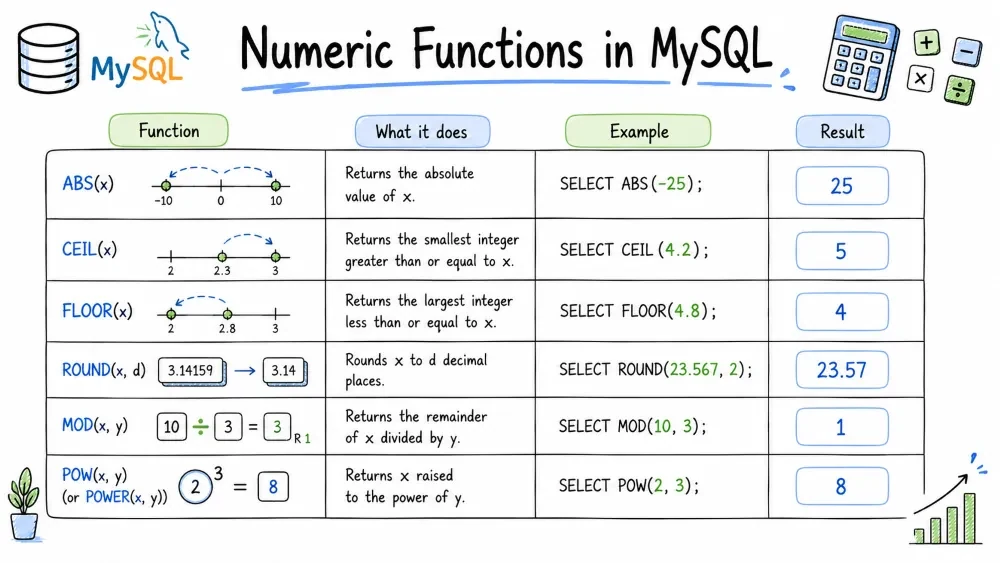
Numeric functions in MySQL perform mathematical and arithmetic operations on numeric data. They allow you to calculate absolute values, round numbers, generate random values, and perform exponentiation — all directly within your SQL queries. These functions reduce the need to fetch raw numbers and process them in your application layer.
Purpose: Returns the absolute (non-negative) value of a number.
Syntax:
ABS(number)
Example:
SELECT ABS(-10) AS abs_val;
-- Result: 10

SELECT ABS(15) AS abs_val;
-- Result: 15

SELECT product_name,
       price - 100 AS difference,
       ABS(price - 100) AS abs_difference
FROM products;
Best Practice: Use
ABSwhen you care about the magnitude of a difference, not the direction.
Purpose: Rounds a number to a specified number of decimal places.
Syntax:
ROUND(number, decimal_places)
Example:
SELECT ROUND(15.678, 2) AS rounded;
-- Result: 15.68

SELECT ROUND(15.678, 0) AS rounded;
-- Result: 16

SELECT ROUND(15.678, -1) AS rounded;
-- Result: 20  (negative places rounds to tens)

SELECT AVG(price) AS avg_price,
       ROUND(AVG(price), 2) AS rounded_avg
FROM products;
Common Mistake: Forgetting that
ROUNDwith 0 decimal places still returns a number, not an integer type — it may show as16.0depending on the column type.
Purpose: Rounds a number up to the nearest integer.
Syntax:
CEIL(number)
-- or CEILING(number)
Example:
SELECT CEIL(14.1) AS ceil_val;
-- Result: 15

SELECT CEIL(14.9) AS ceil_val;
-- Result: 15

SELECT CEIL(-14.1) AS ceil_val;
-- Result: -14  (moves toward zero for negatives)
Purpose: Rounds a number down to the nearest integer.
Syntax:
FLOOR(number)
Example:
SELECT FLOOR(14.9) AS floor_val;
-- Result: 14

SELECT FLOOR(14.1) AS floor_val;
-- Result: 14

SELECT FLOOR(-14.1) AS floor_val;
-- Result: -15  (moves away from zero for negatives)
Note:
CEILandFLOORalways return integers.CEIL(14.0)returns14, andFLOOR(14.0)also returns14.
Purpose: Returns the remainder (modulus) of a division.
Syntax:
MOD(dividend, divisor)
-- or dividend % divisor
Example:
SELECT MOD(10, 3) AS remainder;
-- Result: 1

SELECT 10 % 3 AS remainder;
-- Result: 1

-- Check for even/odd numbers
SELECT id, name,
       CASE WHEN MOD(id, 2) = 0 THEN 'Even' ELSE 'Odd' END AS parity
FROM employees;
Best Practice:
MODis useful for cycling through values, pagination, or partitioning logic.
Purpose: Raises a number to the power of another number.
Syntax:
POWER(base, exponent)
Example:
SELECT POWER(2, 3) AS result;
-- Result: 8

SELECT POWER(5, 2) AS result;
-- Result: 25

SELECT POWER(10, -1) AS result;
-- Result: 0.1
Purpose: Returns the square root of a non-negative number.
Syntax:
SQRT(number)
Example:
SELECT SQRT(25) AS result;
-- Result: 5

SELECT SQRT(2) AS result;
-- Result: 1.4142135623730951

SELECT SQRT(-4) AS result;
-- Result: NULL  (cannot compute square root of a negative number)
Note:
SQRTreturnsNULLfor negative inputs.
Purpose: Returns a random floating-point value between 0 and 1 (exclusive of 1).
Syntax:
RAND()
RAND(seed)  -- seeded version for repeatable sequences
Example:
SELECT RAND() AS random_val;
-- Result: 0.3748291043... (changes each time)

SELECT RAND(100) AS random_val;
-- Result: 0.715... (same every time with seed 100)

-- Select a random row
SELECT * FROM employees
ORDER BY RAND()
LIMIT 1;

-- Random sampling (10% of rows)
SELECT * FROM products
WHERE RAND() < 0.10;
Common Mistake: Using
ORDER BY RAND()on large tables is very slow — it evaluatesRAND()for every row and then sorts. For large datasets, consider alternative sampling methods.
Save your progress and earn XP for completing tutorials.
4 questions · Pass with 70%+
1What does ROUND(15.678, -1) return?
2CEIL(-14.1) returns… ?
3Which function checks whether a number is even or odd?
4What does RAND(100) return?
Technology
MySQL
Lesson group
SQL Functions
Progress
50% complete

