Preparing your learning space...
25% through SQL Functions tutorials
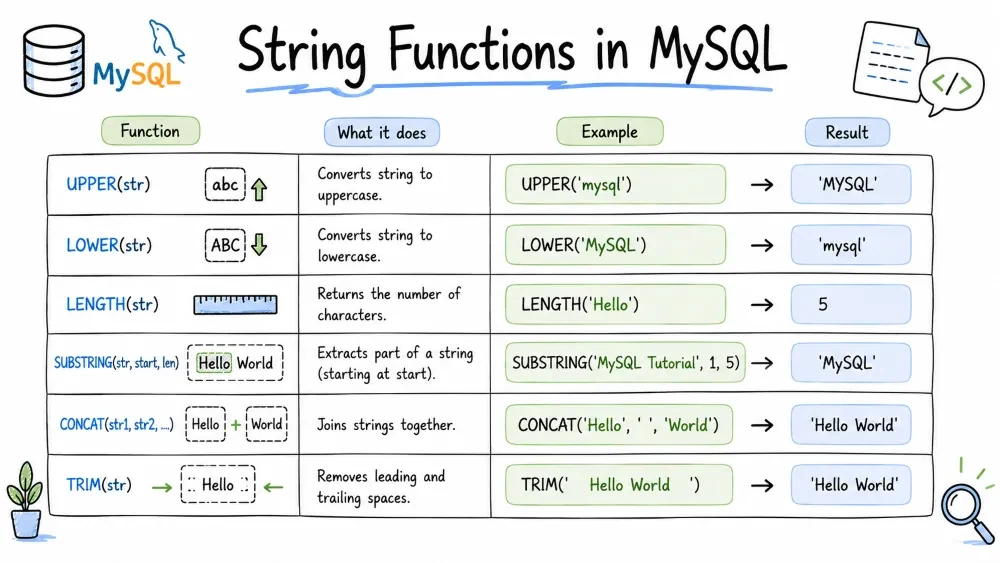
String functions in MySQL allow you to manipulate and transform text data efficiently. These functions are essential for cleaning, formatting, extracting, and analyzing string values directly in your SQL queries — saving you from having to process data in your application code.
Purpose: Joins two or more strings together.
Syntax:
CONCAT(string1, string2, ...)
Example:
SELECT CONCAT('Hello', ' ', 'World') AS greeting;
-- Result: Hello World

SELECT CONCAT(first_name, ' ', last_name) AS full_name
FROM employees;
Note: If any argument is
NULL,CONCATreturnsNULL. UseCONCAT_WS(Concatenate With Separator) for a safer alternative.
Purpose: Returns the length of a string in bytes.
Syntax:
LENGTH(string)
Example:
SELECT LENGTH('MySQL') AS byte_count;
-- Result: 5

SELECT LENGTH('café') AS byte_count;
-- Result: 5  (the 'é' takes 2 bytes in UTF-8)
Purpose: Returns the length of a string in characters (not bytes).
Syntax:
CHAR_LENGTH(string)
Example:
SELECT CHAR_LENGTH('MySQL') AS char_count;
-- Result: 5

SELECT CHAR_LENGTH('café') AS char_count;
-- Result: 4  (4 characters regardless of encoding)
Best Practice: Use
CHAR_LENGTHwhen you care about character count (e.g., username validation) andLENGTHwhen storage size matters.
Purpose: Converts all characters in a string to uppercase.
Syntax:
UPPER(string)
Example:
SELECT UPPER('hello world') AS uppercase;
-- Result: HELLO WORLD

UPDATE users SET email = UPPER(email);
Purpose: Converts all characters in a string to lowercase.
Syntax:
LOWER(string)
Example:
SELECT LOWER('HELLO WORLD') AS lowercase;
-- Result: hello world

SELECT * FROM products
WHERE LOWER(product_name) = LOWER('Laptop');
Best Practice: Use
LOWER(orUPPER) for case-insensitive comparisons to ensure consistent matching.
Purpose: Extracts a portion of a string.
Syntax:
SUBSTRING(string, start_position, length)
-- Position starts at 1
Example:
SELECT SUBSTRING('Hello World', 1, 5) AS extracted;
-- Result: Hello

SELECT SUBSTRING('Hello World', 7) AS extracted;
-- Result: World  (from position 7 to the end)

SELECT SUBSTRING('Hello World', -5, 3) AS extracted;
-- Result: Wor   (negative start counts from the end)
Purpose: Replaces all occurrences of a substring with a new substring.
Syntax:
REPLACE(string, from_substring, to_substring)
Example:
SELECT REPLACE('Hello World', 'World', 'MySQL') AS replaced;
-- Result: Hello MySQL

SELECT REPLACE('apple-apple-apple', 'apple', 'orange') AS replaced;
-- Result: orange-orange-orange
Purpose: Removes leading and trailing spaces (or specified characters) from a string.
Syntax:
TRIM([LEADING | TRAILING | BOTH] [removed_chars FROM] string)
Example:
SELECT TRIM('   Hello World   ') AS trimmed;
-- Result: Hello World

SELECT TRIM(LEADING '0' FROM '00012300') AS trimmed;
-- Result: 12300

SELECT TRIM(TRAILING '0' FROM '00012300') AS trimmed;
-- Result: 000123

SELECT TRIM(BOTH 'x' FROM 'xxxHelloxx') AS trimmed;
-- Result: Helloxx  (only removes leading/trailing x's, not internal ones)
Common Mistake:
TRIMonly removes from the beginning and end, not from within the string.
Purpose: Pads the left side of a string with a specified character(s) to reach a desired length.
Syntax:
LPAD(string, total_length, pad_string)
Example:
SELECT LPAD('5', 3, '0') AS padded;
-- Result: 005

SELECT LPAD('SQL', 10, '-') AS padded;
-- Result: -------SQL

SELECT LPAD(price, 10, ' ') AS formatted_price
FROM products;
Purpose: Pads the right side of a string with a specified character(s) to reach a desired length.
Syntax:
RPAD(string, total_length, pad_string)
Example:
SELECT RPAD('MySQL', 10, '*') AS padded;
-- Result: MySQL*****

SELECT RPAD('Name', 20, '.') AS name_col
FROM users;
Best Practice: Use
LPAD/RPADfor formatting output neatly — order numbers, IDs, or display columns.
Purpose: Extracts a specified number of characters from the left (beginning) of a string.
Syntax:
LEFT(string, number_of_chars)
Example:
SELECT LEFT('Hello World', 5) AS left_part;
-- Result: Hello

SELECT LEFT(phone_number, 3) AS area_code
FROM contacts;
Purpose: Extracts a specified number of characters from the right (end) of a string.
Syntax:
RIGHT(string, number_of_chars)
Example:
SELECT RIGHT('Hello World', 5) AS right_part;
-- Result: World

SELECT RIGHT(phone_number, 4) AS last_four
FROM contacts;
Purpose: Reverses a string.
Syntax:
REVERSE(string)
Example:
SELECT REVERSE('MySQL') AS reversed;
-- Result: LQSyM

-- Check for palindromes
SELECT word,
       CASE WHEN word = REVERSE(word) THEN 'Palindrome' ELSE 'Not' END AS type
FROM word_list;
Purpose: Formats a number with commas (group separator) and decimal places. Returns a string.
Syntax:
FORMAT(number, decimal_places)
Example:
SELECT FORMAT(1234567.891, 2) AS formatted;
-- Result: 1,234,567.89

SELECT FORMAT(50000, 0) AS formatted;
-- Result: 50,000

SELECT FORMAT(1234.5, 3) AS formatted;
-- Result: 1,234.500

SELECT product_name,
       FORMAT(price, 2) AS formatted_price
FROM products;
Note:
FORMATrounds the number to the specified decimal places and adds commas. The result is a string, not a number — do not use it in further calculations.
Save your progress and earn XP for completing tutorials.
4 questions · Pass with 70%+
1What does LENGTH('café') return?
2Which function extracts characters starting from the end of a string?
3What does TRIM(BOTH 'x' FROM 'xxxHelloxx') return?
4What does FORMAT(1234.5, 3) return?
Technology
MySQL
Lesson group
SQL Functions
Progress
25% complete

