Preparing your learning space...
42% through Real-World Projects tutorials
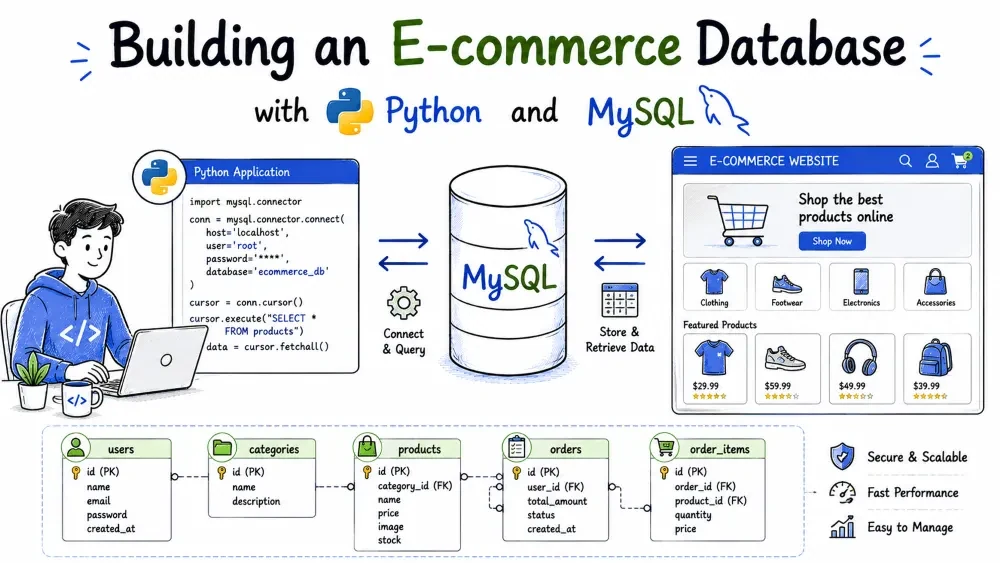
This tutorial builds the database behind a small online store. You will design five related tables, fill them with realistic data, and control them from a Python menu. Each feature is a separate function, and placing an order shows why transactions exist.
The program is a text-based store backend. A customer registers, staff add products, and customers place orders. Each order checks stock, records the order, stores the line items, and reduces inventory in one atomic step. Reporting queries show order details, order history, best-selling products, and total revenue.
Systems like this sit behind every online shop. The skills here - normalized tables, foreign keys, transactions, and safe queries from Python - transfer directly to real projects.
By the end, you will know how to plan a schema before writing code, why foreign keys protect data, why an order must be a transaction, and how placeholders prevent SQL injection.
mysql-connector-python package.input(), loops, tuples.Set up once before starting:
pip install mysql-connector-python
This installs the driver that lets Python talk to MySQL. Without it, import mysql.connector fails with ModuleNotFoundError.
Next, create the database by loading the SQL file. From the project folder run:
mysql -u root -p < database.sql
You will be prompted for your MySQL root password. You need a MySQL account that can log in from the command line; root is fine for learning. db_connection.py uses the same credentials, so keep your password handy.
ecommerce/
├── database.sql
├── db_connection.py
├── main.py
├── requirements.txt
└── README.md
database.sql creates the database and tables, then inserts seed data.db_connection.py has one function, get_connection(), that returns a MySQL connection.main.py holds the menu loop and every business operation.requirements.txt lists the package the project needs.README.md is a short description with the run commands.We are building the five tables that store categories, customers, products, orders, and order items.
A store has things (customers, products, orders) and relationships (an order belongs to one customer, an order has many products). Storing them in separate tables and linking with foreign keys prevents duplicates and broken references. The order_items table lets one order hold several products without repeating the order row.
Write the schema into database.sql.
CREATE DATABASE IF NOT EXISTS ecommerce_db;
USE ecommerce_db;

CREATE TABLE categories (
    category_id INT AUTO_INCREMENT PRIMARY KEY,
    category_name VARCHAR(50) NOT NULL UNIQUE,
    description VARCHAR(255)
);

CREATE TABLE customers (
    customer_id INT AUTO_INCREMENT PRIMARY KEY,
    first_name VARCHAR(50) NOT NULL,
    last_name VARCHAR(50) NOT NULL,
    email VARCHAR(100) NOT NULL UNIQUE,
    phone VARCHAR(20),
    created_at TIMESTAMP DEFAULT CURRENT_TIMESTAMP
);

CREATE TABLE products (
    product_id INT AUTO_INCREMENT PRIMARY KEY,
    product_name VARCHAR(100) NOT NULL,
    category_id INT NOT NULL,
    price DECIMAL(10, 2) NOT NULL,
    stock_quantity INT NOT NULL DEFAULT 0,
    FOREIGN KEY (category_id) REFERENCES categories(category_id)
);

CREATE TABLE orders (
    order_id INT AUTO_INCREMENT PRIMARY KEY,
    customer_id INT NOT NULL,
    order_date TIMESTAMP DEFAULT CURRENT_TIMESTAMP,
    status VARCHAR(20) NOT NULL DEFAULT 'placed',
    FOREIGN KEY (customer_id) REFERENCES customers(customer_id) ON DELETE CASCADE
);

CREATE TABLE order_items (
    order_item_id INT AUTO_INCREMENT PRIMARY KEY,
    order_id INT NOT NULL,
    product_id INT NOT NULL,
    quantity INT NOT NULL,
    price DECIMAL(10, 2) NOT NULL,
    FOREIGN KEY (order_id) REFERENCES orders(order_id) ON DELETE CASCADE,
    FOREIGN KEY (product_id) REFERENCES products(product_id)
);
The first two lines create the database and make it active, so every later statement runs inside ecommerce_db. The IF NOT EXISTS guard means you do not get an error if the database already exists.
Each table starts with an AUTO_INCREMENT PRIMARY KEY, so MySQL assigns IDs automatically and no two rows share one. UNIQUE on customers.email means the same email cannot be registered twice, and the program reports a duplicate clearly.
The foreign keys do the real work. products.category_id can only hold a category that exists. orders.customer_id references customers with ON DELETE CASCADE, so deleting a customer removes their orders too. order_items.order_id cascades the same way, which keeps the database from holding orphaned rows.
Money is stored as DECIMAL(10, 2) so prices keep exact cents instead of floating-point rounding. price also appears inside order_items on purpose: it stores the price at purchase time, so later price changes do not rewrite past orders.
We are adding sample rows so the program has data to read before any user action happens.
The reporting queries only produce useful output when there is something to report. Seed data lets you test every menu option immediately and makes the JOINs and totals easy to follow by hand.
Append the INSERT statements to database.sql.
INSERT INTO categories (category_name, description) VALUES
('Electronics', 'Gadgets, audio, wearables'),
('Fashion', 'Clothing and footwear'),
('Books', 'Printed and digital books'),
('Home & Kitchen', 'Kitchen appliances and home goods'),
('Sports', 'Fitness and outdoor equipment');

INSERT INTO customers (first_name, last_name, email, phone) VALUES
('Sarah', 'Johnson', 'sarah.johnson@example.com', '555-0101'),
('Mike', 'Chen', 'mike.chen@example.com', '555-0102'),
('Aisha', 'Patel', 'aisha.patel@example.com', '555-0103'),
('Tom', 'Rodriguez', 'tom.rodriguez@example.com', '555-0104'),
('Emily', 'Wilson', 'emily.wilson@example.com', '555-0105'),
('David', 'Okafor', 'david.okafor@example.com', '555-0106');

INSERT INTO products (product_name, category_id, price, stock_quantity) VALUES
('Wireless Headphones', 1, 89.99, 25),
('Smart Watch', 1, 199.99, 15),
('Cotton T-Shirt', 2, 24.50, 60),
('Running Shoes', 2, 79.00, 40),
('Python for Beginners', 3, 39.99, 30),
('Everyday Cookbook', 3, 29.95, 12),
('Coffee Maker', 4, 59.99, 20),
('Blender', 4, 49.50, 18),
('Yoga Mat', 5, 22.00, 35),
('Dumbbell Set', 5, 69.99, 10);

INSERT INTO orders (customer_id, status) VALUES
(1, 'completed'),
(2, 'completed'),
(3, 'completed'),
(4, 'completed'),
(5, 'cancelled'),
(6, 'completed');

INSERT INTO order_items (order_id, product_id, quantity, price) VALUES
(1, 1, 2, 89.99),
(2, 2, 1, 199.99),
(2, 4, 1, 79.00),
(3, 5, 2, 39.99),
(3, 9, 1, 22.00),
(4, 7, 1, 59.99),
(4, 6, 1, 29.95),
(5, 3, 1, 24.50),
(6, 1, 3, 89.99);
Each INSERT lists columns in parentheses and then supplies several rows in one statement. The categories get IDs 1 through 5 automatically, so products can reference them directly by number.
Orders reference customer_id, and order items reference both the order and the product. Order 5 is for Emily Wilson and is marked cancelled; the reporting queries later ignore cancelled orders, which shows how status filters real data. The headphones appear in two orders (two in order 1, three in order 6), which makes them the clear best seller in the top-five report.
One thing to notice: order_items.price repeats the product price even though products.price already holds it. That is intentional. Prices change, and a sale should remember what was actually charged.
We are building db_connection.py, a small module that returns a MySQL connection.
Every menu option needs a MySQL connection. Putting the connection in one function means the credentials live in a single place, and every operation uses the same setup. If the database name or password changes, you edit one file.
Create db_connection.py.
import mysql.connector


def get_connection():
    return mysql.connector.connect(
        host="localhost",
        user="root",
        password="your_password_here",
        database="ecommerce_db",
    )
The function imports the connector and returns a fresh connection every time it is called. host and user usually stay localhost and root during learning. Replace your_password_here with the real MySQL password you set up in Prerequisites. database tells MySQL which schema to use, so queries do not need a USE statement each time.
main.py imports this function and calls it at the start of every operation. Because a connection is a resource, each function closes its cursor and connection when it finishes. Leaking open connections is a common cause of "too many connections" errors later.
Two menu operations: register_customer() and add_product().
These are the two simplest INSERT operations, and they introduce the pattern every other function follows: connect, run a parameterized query, commit, handle errors, close.
Add these functions to main.py.
import mysql.connector
from db_connection import get_connection


def register_customer():
    print("\n--- Register a New Customer ---")
    first = input("First name: ").strip()
    last = input("Last name: ").strip()
    email = input("Email: ").strip()
    phone = input("Phone (optional): ").strip()
    phone = phone if phone else None

    conn = get_connection()
    cursor = conn.cursor()
    try:
        cursor.execute(
            "INSERT INTO customers (first_name, last_name, email, phone) "
            "VALUES (%s, %s, %s, %s)",
            (first, last, email, phone),
        )
        conn.commit()
        print(f"Customer registered with ID {cursor.lastrowid}.")
    except mysql.connector.Error as err:
        conn.rollback()
        print(f"Could not register customer: {err}")
    finally:
        cursor.close()
        conn.close()


def add_product():
    print("\n--- Add a New Product ---")
    name = input("Product name: ").strip()
    category = input("Category: ").strip()
    try:
        price = float(input("Price: "))
        stock = int(input("Stock quantity: "))
    except ValueError:
        print("Price and stock must be numbers. Product not added.")
        return

    conn = get_connection()
    cursor = conn.cursor()
    try:
        cursor.execute(
            "SELECT category_id FROM categories WHERE category_name = %s", (category,)
        )
        row = cursor.fetchone()
        if row is None:
            print(f"Category '{category}' does not exist. Create it in the database first.")
            return
        category_id = row[0]
        cursor.execute(
            "INSERT INTO products (product_name, category_id, price, stock_quantity) "
            "VALUES (%s, %s, %s, %s)",
            (name, category_id, price, stock),
        )
        conn.commit()
        print(f"Product added with ID {cursor.lastrowid}.")
    except mysql.connector.Error as err:
        conn.rollback()
        print(f"Could not add product: {err}")
    finally:
        cursor.close()
        conn.close()
Both functions collect input, open a connection, and run an INSERT. The %s placeholders matter: the user's text is sent as a separate parameter, never pasted into the SQL string. That is what blocks SQL injection, where a user types something like '; DROP TABLE customers; -- and breaks or hijacks the query.
conn.commit() is what actually saves the row. The connector starts with autocommit off, so without commit() the INSERT appears to succeed and then vanishes when the program exits. If the query fails, the except block rolls back and prints the error.
add_product does one extra lookup. It finds the category's ID by name first. The product table stores a category_id, not a name, so the function resolves the name to an ID before inserting. If the category is missing, the program stops early with a friendly message instead of hitting a foreign key error.
cursor.lastrowid gives the auto-assigned ID of the just-inserted row, which is how the program tells the user what got created.
place_order(): the most important function in the project. It checks stock, creates the order, adds the line items, and reduces stock.
Placing an order touches four tables or more. If the program crashed halfway - order created but items missing, or items recorded but stock not reduced - the store would have wrong data with no record of how it got that way. A transaction wraps all the writes so they commit together or roll back together. Partial orders become impossible.
Add place_order() to main.py.
def place_order():
    print("\n--- Place an Order ---")
    try:
        customer_id = int(input("Customer ID: "))
    except ValueError:
        print("Customer ID must be a number.")
        return

    items = []
    while True:
        product_id = input("Product ID (or 'done' to finish): ").strip()
        if product_id.lower() == "done":
            break
        try:
            product_id = int(product_id)
            quantity = int(input("Quantity: "))
        except ValueError:
            print("Product ID and quantity must be numbers.")
            continue
        items.append((product_id, quantity))

    if not items:
        print("No items entered. Order cancelled.")
        return

    conn = get_connection()
    cursor = conn.cursor()
    try:
        conn.autocommit = False

        cursor.execute(
            "SELECT customer_id FROM customers WHERE customer_id = %s", (customer_id,)
        )
        if cursor.fetchone() is None:
            print(f"Customer {customer_id} does not exist.")
            return

        for product_id, quantity in items:
            cursor.execute(
                "SELECT stock_quantity FROM products WHERE product_id = %s",
                (product_id,),
            )
            row = cursor.fetchone()
            if row is None:
                raise ValueError(f"Product {product_id} does not exist.")
            if row[0] < quantity:
                raise ValueError(
                    f"Not enough stock for product {product_id}. "
                    f"Available: {row[0]}, requested: {quantity}."
                )

        cursor.execute(
            "INSERT INTO orders (customer_id, status) VALUES (%s, 'placed')",
            (customer_id,),
        )
        order_id = cursor.lastrowid

        for product_id, quantity in items:
            cursor.execute(
                "SELECT price FROM products WHERE product_id = %s", (product_id,)
            )
            price = cursor.fetchone()[0]
            cursor.execute(
                "INSERT INTO order_items (order_id, product_id, quantity, price) "
                "VALUES (%s, %s, %s, %s)",
                (order_id, product_id, quantity, price),
            )
            cursor.execute(
                "UPDATE products SET stock_quantity = stock_quantity - %s "
                "WHERE product_id = %s",
                (quantity, product_id),
            )

        conn.commit()
        print(f"Order {order_id} placed successfully for customer {customer_id}.")
    except Exception as err:
        conn.rollback()
        print(f"Order failed, nothing was saved. Reason: {err}")
    finally:
        cursor.close()
        conn.close()
The function collects a customer ID and then keeps reading product IDs and quantities until the user types done. Each pair is stored in a list, which is validated after the loop.
Then the transaction begins. conn.autocommit = False is explicit, though the connector defaults to off anyway. From this point until commit(), every write is pending.
The stock check happens before anything is written. Each product's current quantity is compared with the requested quantity. A missing product or insufficient stock raises a ValueError, which jumps straight to the except block. Because nothing has been written yet, the rollback is technically a no-op here, but the pattern guarantees that even if a failure happened later, the database would stay untouched.
Only after all checks pass does the program write. It inserts the order row, grabs the new order ID, then loops through the items. For each one it reads the current price, inserts an order_items row, and decrements stock with an UPDATE. The price snapshot is taken at order time, matching the design decision from the schema.
The payoff is the commit() at the end. The order row, the item rows, and the stock updates either all become permanent together, or none do. If any single statement throws, the except block calls rollback() and prints a reason. You can test this: place an order with more quantity than stock exists, and the function reports failure while stock stays exactly where it was.
view_order() shows one order with its items using JOINs, and customer_history() lists all of a customer's orders with totals.
Order and item data live in different tables. JOINs recombine them for reading. These functions are the practical introduction to combining tables, and they give the user a reason to look at the data.
Add the two functions to main.py.
def view_order():
    print("\n--- View a Full Order ---")
    try:
        order_id = int(input("Order ID: "))
    except ValueError:
        print("Order ID must be a number.")
        return

    conn = get_connection()
    cursor = conn.cursor()
    try:
        cursor.execute(
            "SELECT o.order_id, o.order_date, o.status, "
            "c.first_name, c.last_name, c.email "
            "FROM orders o "
            "JOIN customers c ON o.customer_id = c.customer_id "
            "WHERE o.order_id = %s",
            (order_id,),
        )
        order = cursor.fetchone()
        if order is None:
            print(f"Order {order_id} not found.")
            return

        print(f"\nOrder #{order[0]} | {order[1]} | status: {order[2]}")
        print(f"Customer: {order[3]} {order[4]} ({order[5]})")
        print("-" * 50)

        cursor.execute(
            "SELECT p.product_name, oi.quantity, oi.price, "
            "(oi.quantity * oi.price) AS line_total "
            "FROM order_items oi "
            "JOIN products p ON oi.product_id = p.product_id "
            "WHERE oi.order_id = %s",
            (order_id,),
        )
        rows = cursor.fetchall()
        total = 0.0
        for name, quantity, price, line_total in rows:
            print(f"{name:<22} x{quantity:<4} {price:>8.2f}  {line_total:>9.2f}")
            total += line_total
        print("-" * 50)
        print(f"Order total: {total:.2f}")
    except mysql.connector.Error as err:
        print(f"Error: {err}")
    finally:
        cursor.close()
        conn.close()


def customer_history():
    print("\n--- Customer Order History ---")
    try:
        customer_id = int(input("Customer ID: "))
    except ValueError:
        print("Customer ID must be a number.")
        return

    conn = get_connection()
    cursor = conn.cursor()
    try:
        cursor.execute(
            "SELECT first_name, last_name FROM customers WHERE customer_id = %s",
            (customer_id,),
        )
        customer = cursor.fetchone()
        if customer is None:
            print(f"Customer {customer_id} not found.")
            return
        print(f"\nOrder history for {customer[0]} {customer[1]}:")

        cursor.execute(
            "SELECT o.order_id, o.order_date, o.status, "
            "SUM(oi.quantity * oi.price) AS total "
            "FROM orders o "
            "JOIN order_items oi ON o.order_id = oi.order_id "
            "WHERE o.customer_id = %s "
            "GROUP BY o.order_id, o.order_date, o.status "
            "ORDER BY o.order_date DESC",
            (customer_id,),
        )
        rows = cursor.fetchall()
        if not rows:
            print("  No orders yet.")
            return
        for order_id, order_date, status, total in rows:
            print(f"  Order #{order_id} | {order_date} | {status} | total: {total:.2f}")
    except mysql.connector.Error as err:
        print(f"Error: {err}")
    finally:
        cursor.close()
        conn.close()
view_order runs two queries. The first joins orders to customers to pull the buyer's name and email. The second joins order_items to products so each line shows a product name instead of a bare ID. The line total is computed in SQL with (oi.quantity * oi.price) and summed again in Python for the footer.
customer_history introduces aggregation. It joins orders to order items, groups by the order, and uses SUM(oi.quantity * oi.price) to total each order. The GROUP BY lists the columns from the SELECT that are not aggregated, and the results come back newest first. Aggregates and joins are the two tools behind almost every report.
Both functions use table aliases (o, c, oi, p) to keep the queries readable. The aliases also make it clear which column came from which table when two tables have a column with the same name.
Two reporting functions: top_selling() and revenue_report().
These are the management questions: what sells best and how much money is coming in. They aggregate across all order items and are the closest thing this project has to a dashboard.
Add the two functions to main.py.
def top_selling():
    print("\n--- Top 5 Selling Products ---")
    conn = get_connection()
    cursor = conn.cursor()
    try:
        cursor.execute(
            "SELECT p.product_name, SUM(oi.quantity) AS total_sold "
            "FROM order_items oi "
            "JOIN products p ON oi.product_id = p.product_id "
            "JOIN orders o ON oi.order_id = o.order_id "
            "WHERE o.status != 'cancelled' "
            "GROUP BY p.product_id, p.product_name "
            "ORDER BY total_sold DESC, p.product_name "
            "LIMIT 5"
        )
        rows = cursor.fetchall()
        if not rows:
            print("  No sales recorded yet.")
            return
        print(f"\n{'Product':<25}{'Units Sold':>12}")
        for name, total_sold in rows:
            print(f"{name:<25}{total_sold:>12}")
    except mysql.connector.Error as err:
        print(f"Error: {err}")
    finally:
        cursor.close()
        conn.close()


def revenue_report():
    print("\n--- Revenue Report ---")
    conn = get_connection()
    cursor = conn.cursor()
    try:
        cursor.execute(
            "SELECT c.category_name, SUM(oi.quantity * oi.price) AS revenue "
            "FROM order_items oi "
            "JOIN products p ON oi.product_id = p.product_id "
            "JOIN categories c ON p.category_id = c.category_id "
            "JOIN orders o ON oi.order_id = o.order_id "
            "WHERE o.status != 'cancelled' "
            "GROUP BY c.category_id, c.category_name "
            "ORDER BY revenue DESC"
        )
        rows = cursor.fetchall()
        if not rows:
            print("  No sales recorded yet.")
            return
        grand_total = 0.0
        print(f"\n{'Category':<20}{'Revenue':>12}")
        for name, revenue in rows:
            print(f"{name:<20}{revenue:>12.2f}")
            grand_total += revenue
        print("-" * 32)
        print(f"{'Total':<20}{grand_total:>12.2f}")
    except mysql.connector.Error as err:
        print(f"Error: {err}")
    finally:
        cursor.close()
        conn.close()
top_selling sums quantity per product across all order items, joins to orders so it can ignore cancelled rows, sorts by the sum descending, and keeps five. ORDER BY total_sold DESC, p.product_name gives a stable order when two products sell the same amount.
revenue_report multiplies quantity by the stored line price and groups by category. It needs a third join to reach the category name. The grand total is accumulated in Python and printed under a separator. Both reports treat cancelled orders as if they never happened, which matches how a real store would count sales.
Aggregations like these are read-only, so neither function needs a transaction. They use a fresh connection, run one SELECT, print, and close.
The menu loop in main() that ties all the functions together, plus the module guard.
A file full of functions does nothing by itself. The menu gives a user a way to pick an operation and keeps the program running until they choose to exit. Keeping the loop inside main() and guarded by if __name__ == "__main__" means the module can be imported without automatically starting the loop.
Add the menu and entry point to main.py.
def show_menu():
    print("\n================ E-COMMERCE STORE ================")
    print("1. Register a new customer")
    print("2. Add a new product")
    print("3. Place an order")
    print("4. View a full order")
    print("5. View customer order history")
    print("6. View top 5 selling products")
    print("7. View revenue report")
    print("8. Exit")
    print("==================================================")


def main():
    while True:
        show_menu()
        choice = input("Choose an option: ").strip()
        if choice == "1":
            register_customer()
        elif choice == "2":
            add_product()
        elif choice == "3":
            place_order()
        elif choice == "4":
            view_order()
        elif choice == "5":
            customer_history()
        elif choice == "6":
            top_selling()
        elif choice == "7":
            revenue_report()
        elif choice == "8":
            print("Goodbye!")
            break
        else:
            print("Invalid option. Choose a number from the menu.")


if __name__ == "__main__":
    main()
show_menu() just prints the options. main() runs an infinite loop that prints the menu, reads a choice, and dispatches to the matching function. The elif chain is simple to read and expand: adding a menu item means adding one print line and one elif. The else branch catches anything that is not a menu number. if __name__ == "__main__": runs main() only when the file is executed directly, not when imported elsewhere.
With this in place, the project is complete. Load the schema, run python main.py, and every option works.
-- Full schema and seed data for the e-commerce project
CREATE DATABASE IF NOT EXISTS ecommerce_db;
USE ecommerce_db;

CREATE TABLE categories (
    category_id INT AUTO_INCREMENT PRIMARY KEY,
    category_name VARCHAR(50) NOT NULL UNIQUE,
    description VARCHAR(255)
);

CREATE TABLE customers (
    customer_id INT AUTO_INCREMENT PRIMARY KEY,
    first_name VARCHAR(50) NOT NULL,
    last_name VARCHAR(50) NOT NULL,
    email VARCHAR(100) NOT NULL UNIQUE,
    phone VARCHAR(20),
    created_at TIMESTAMP DEFAULT CURRENT_TIMESTAMP
);

CREATE TABLE products (
    product_id INT AUTO_INCREMENT PRIMARY KEY,
    product_name VARCHAR(100) NOT NULL,
    category_id INT NOT NULL,
    price DECIMAL(10, 2) NOT NULL,
    stock_quantity INT NOT NULL DEFAULT 0,
    FOREIGN KEY (category_id) REFERENCES categories(category_id)
);

CREATE TABLE orders (
    order_id INT AUTO_INCREMENT PRIMARY KEY,
    customer_id INT NOT NULL,
    order_date TIMESTAMP DEFAULT CURRENT_TIMESTAMP,
    status VARCHAR(20) NOT NULL DEFAULT 'placed',
    FOREIGN KEY (customer_id) REFERENCES customers(customer_id) ON DELETE CASCADE
);

CREATE TABLE order_items (
    order_item_id INT AUTO_INCREMENT PRIMARY KEY,
    order_id INT NOT NULL,
    product_id INT NOT NULL,
    quantity INT NOT NULL,
    price DECIMAL(10, 2) NOT NULL,
    FOREIGN KEY (order_id) REFERENCES orders(order_id) ON DELETE CASCADE,
    FOREIGN KEY (product_id) REFERENCES products(product_id)
);

INSERT INTO categories (category_name, description) VALUES
('Electronics', 'Gadgets, audio, wearables'),
('Fashion', 'Clothing and footwear'),
('Books', 'Printed and digital books'),
('Home & Kitchen', 'Kitchen appliances and home goods'),
('Sports', 'Fitness and outdoor equipment');

INSERT INTO customers (first_name, last_name, email, phone) VALUES
('Sarah', 'Johnson', 'sarah.johnson@example.com', '555-0101'),
('Mike', 'Chen', 'mike.chen@example.com', '555-0102'),
('Aisha', 'Patel', 'aisha.patel@example.com', '555-0103'),
('Tom', 'Rodriguez', 'tom.rodriguez@example.com', '555-0104'),
('Emily', 'Wilson', 'emily.wilson@example.com', '555-0105'),
('David', 'Okafor', 'david.okafor@example.com', '555-0106');

INSERT INTO products (product_name, category_id, price, stock_quantity) VALUES
('Wireless Headphones', 1, 89.99, 25),
('Smart Watch', 1, 199.99, 15),
('Cotton T-Shirt', 2, 24.50, 60),
('Running Shoes', 2, 79.00, 40),
('Python for Beginners', 3, 39.99, 30),
('Everyday Cookbook', 3, 29.95, 12),
('Coffee Maker', 4, 59.99, 20),
('Blender', 4, 49.50, 18),
('Yoga Mat', 5, 22.00, 35),
('Dumbbell Set', 5, 69.99, 10);

INSERT INTO orders (customer_id, status) VALUES
(1, 'completed'),
(2, 'completed'),
(3, 'completed'),
(4, 'completed'),
(5, 'cancelled'),
(6, 'completed');

INSERT INTO order_items (order_id, product_id, quantity, price) VALUES
(1, 1, 2, 89.99),
(2, 2, 1, 199.99),
(2, 4, 1, 79.00),
(3, 5, 2, 39.99),
(3, 9, 1, 22.00),
(4, 7, 1, 59.99),
(4, 6, 1, 29.95),
(5, 3, 1, 24.50),
(6, 1, 3, 89.99);
import mysql.connector


def get_connection():
    return mysql.connector.connect(
        host="localhost",
        user="root",
        password="your_password_here",
        database="ecommerce_db",
    )
import mysql.connector
from db_connection import get_connection


def show_menu():
    print("\n================ E-COMMERCE STORE ================")
    print("1. Register a new customer")
    print("2. Add a new product")
    print("3. Place an order")
    print("4. View a full order")
    print("5. View customer order history")
    print("6. View top 5 selling products")
    print("7. View revenue report")
    print("8. Exit")
    print("==================================================")


def register_customer():
    print("\n--- Register a New Customer ---")
    first = input("First name: ").strip()
    last = input("Last name: ").strip()
    email = input("Email: ").strip()
    phone = input("Phone (optional): ").strip()
    phone = phone if phone else None

    conn = get_connection()
    cursor = conn.cursor()
    try:
        cursor.execute(
            "INSERT INTO customers (first_name, last_name, email, phone) "
            "VALUES (%s, %s, %s, %s)",
            (first, last, email, phone),
        )
        conn.commit()
        print(f"Customer registered with ID {cursor.lastrowid}.")
    except mysql.connector.Error as err:
        conn.rollback()
        print(f"Could not register customer: {err}")
    finally:
        cursor.close()
        conn.close()


def add_product():
    print("\n--- Add a New Product ---")
    name = input("Product name: ").strip()
    category = input("Category: ").strip()
    try:
        price = float(input("Price: "))
        stock = int(input("Stock quantity: "))
    except ValueError:
        print("Price and stock must be numbers. Product not added.")
        return

    conn = get_connection()
    cursor = conn.cursor()
    try:
        cursor.execute(
            "SELECT category_id FROM categories WHERE category_name = %s", (category,)
        )
        row = cursor.fetchone()
        if row is None:
            print(f"Category '{category}' does not exist. Create it in the database first.")
            return
        category_id = row[0]
        cursor.execute(
            "INSERT INTO products (product_name, category_id, price, stock_quantity) "
            "VALUES (%s, %s, %s, %s)",
            (name, category_id, price, stock),
        )
        conn.commit()
        print(f"Product added with ID {cursor.lastrowid}.")
    except mysql.connector.Error as err:
        conn.rollback()
        print(f"Could not add product: {err}")
    finally:
        cursor.close()
        conn.close()


def place_order():
    print("\n--- Place an Order ---")
    try:
        customer_id = int(input("Customer ID: "))
    except ValueError:
        print("Customer ID must be a number.")
        return

    items = []
    while True:
        product_id = input("Product ID (or 'done' to finish): ").strip()
        if product_id.lower() == "done":
            break
        try:
            product_id = int(product_id)
            quantity = int(input("Quantity: "))
        except ValueError:
            print("Product ID and quantity must be numbers.")
            continue
        items.append((product_id, quantity))

    if not items:
        print("No items entered. Order cancelled.")
        return

    conn = get_connection()
    cursor = conn.cursor()
    try:
        conn.autocommit = False

        cursor.execute(
            "SELECT customer_id FROM customers WHERE customer_id = %s", (customer_id,)
        )
        if cursor.fetchone() is None:
            print(f"Customer {customer_id} does not exist.")
            return

        for product_id, quantity in items:
            cursor.execute(
                "SELECT stock_quantity FROM products WHERE product_id = %s",
                (product_id,),
            )
            row = cursor.fetchone()
            if row is None:
                raise ValueError(f"Product {product_id} does not exist.")
            if row[0] < quantity:
                raise ValueError(
                    f"Not enough stock for product {product_id}. "
                    f"Available: {row[0]}, requested: {quantity}."
                )

        cursor.execute(
            "INSERT INTO orders (customer_id, status) VALUES (%s, 'placed')",
            (customer_id,),
        )
        order_id = cursor.lastrowid

        for product_id, quantity in items:
            cursor.execute(
                "SELECT price FROM products WHERE product_id = %s", (product_id,)
            )
            price = cursor.fetchone()[0]
            cursor.execute(
                "INSERT INTO order_items (order_id, product_id, quantity, price) "
                "VALUES (%s, %s, %s, %s)",
                (order_id, product_id, quantity, price),
            )
            cursor.execute(
                "UPDATE products SET stock_quantity = stock_quantity - %s "
                "WHERE product_id = %s",
                (quantity, product_id),
            )

        conn.commit()
        print(f"Order {order_id} placed successfully for customer {customer_id}.")
    except Exception as err:
        conn.rollback()
        print(f"Order failed, nothing was saved. Reason: {err}")
    finally:
        cursor.close()
        conn.close()


def view_order():
    print("\n--- View a Full Order ---")
    try:
        order_id = int(input("Order ID: "))
    except ValueError:
        print("Order ID must be a number.")
        return

    conn = get_connection()
    cursor = conn.cursor()
    try:
        cursor.execute(
            "SELECT o.order_id, o.order_date, o.status, "
            "c.first_name, c.last_name, c.email "
            "FROM orders o "
            "JOIN customers c ON o.customer_id = c.customer_id "
            "WHERE o.order_id = %s",
            (order_id,),
        )
        order = cursor.fetchone()
        if order is None:
            print(f"Order {order_id} not found.")
            return

        print(f"\nOrder #{order[0]} | {order[1]} | status: {order[2]}")
        print(f"Customer: {order[3]} {order[4]} ({order[5]})")
        print("-" * 50)

        cursor.execute(
            "SELECT p.product_name, oi.quantity, oi.price, "
            "(oi.quantity * oi.price) AS line_total "
            "FROM order_items oi "
            "JOIN products p ON oi.product_id = p.product_id "
            "WHERE oi.order_id = %s",
            (order_id,),
        )
        rows = cursor.fetchall()
        total = 0.0
        for name, quantity, price, line_total in rows:
            print(f"{name:<22} x{quantity:<4} {price:>8.2f}  {line_total:>9.2f}")
            total += line_total
        print("-" * 50)
        print(f"Order total: {total:.2f}")
    except mysql.connector.Error as err:
        print(f"Error: {err}")
    finally:
        cursor.close()
        conn.close()


def customer_history():
    print("\n--- Customer Order History ---")
    try:
        customer_id = int(input("Customer ID: "))
    except ValueError:
        print("Customer ID must be a number.")
        return

    conn = get_connection()
    cursor = conn.cursor()
    try:
        cursor.execute(
            "SELECT first_name, last_name FROM customers WHERE customer_id = %s",
            (customer_id,),
        )
        customer = cursor.fetchone()
        if customer is None:
            print(f"Customer {customer_id} not found.")
            return
        print(f"\nOrder history for {customer[0]} {customer[1]}:")

        cursor.execute(
            "SELECT o.order_id, o.order_date, o.status, "
            "SUM(oi.quantity * oi.price) AS total "
            "FROM orders o "
            "JOIN order_items oi ON o.order_id = oi.order_id "
            "WHERE o.customer_id = %s "
            "GROUP BY o.order_id, o.order_date, o.status "
            "ORDER BY o.order_date DESC",
            (customer_id,),
        )
        rows = cursor.fetchall()
        if not rows:
            print("  No orders yet.")
            return
        for order_id, order_date, status, total in rows:
            print(f"  Order #{order_id} | {order_date} | {status} | total: {total:.2f}")
    except mysql.connector.Error as err:
        print(f"Error: {err}")
    finally:
        cursor.close()
        conn.close()


def top_selling():
    print("\n--- Top 5 Selling Products ---")
    conn = get_connection()
    cursor = conn.cursor()
    try:
        cursor.execute(
            "SELECT p.product_name, SUM(oi.quantity) AS total_sold "
            "FROM order_items oi "
            "JOIN products p ON oi.product_id = p.product_id "
            "JOIN orders o ON oi.order_id = o.order_id "
            "WHERE o.status != 'cancelled' "
            "GROUP BY p.product_id, p.product_name "
            "ORDER BY total_sold DESC, p.product_name "
            "LIMIT 5"
        )
        rows = cursor.fetchall()
        if not rows:
            print("  No sales recorded yet.")
            return
        print(f"\n{'Product':<25}{'Units Sold':>12}")
        for name, total_sold in rows:
            print(f"{name:<25}{total_sold:>12}")
    except mysql.connector.Error as err:
        print(f"Error: {err}")
    finally:
        cursor.close()
        conn.close()


def revenue_report():
    print("\n--- Revenue Report ---")
    conn = get_connection()
    cursor = conn.cursor()
    try:
        cursor.execute(
            "SELECT c.category_name, SUM(oi.quantity * oi.price) AS revenue "
            "FROM order_items oi "
            "JOIN products p ON oi.product_id = p.product_id "
            "JOIN categories c ON p.category_id = c.category_id "
            "JOIN orders o ON oi.order_id = o.order_id "
            "WHERE o.status != 'cancelled' "
            "GROUP BY c.category_id, c.category_name "
            "ORDER BY revenue DESC"
        )
        rows = cursor.fetchall()
        if not rows:
            print("  No sales recorded yet.")
            return
        grand_total = 0.0
        print(f"\n{'Category':<20}{'Revenue':>12}")
        for name, revenue in rows:
            print(f"{name:<20}{revenue:>12.2f}")
            grand_total += revenue
        print("-" * 32)
        print(f"{'Total':<20}{grand_total:>12.2f}")
    except mysql.connector.Error as err:
        print(f"Error: {err}")
    finally:
        cursor.close()
        conn.close()


def main():
    while True:
        show_menu()
        choice = input("Choose an option: ").strip()
        if choice == "1":
            register_customer()
        elif choice == "2":
            add_product()
        elif choice == "3":
            place_order()
        elif choice == "4":
            view_order()
        elif choice == "5":
            customer_history()
        elif choice == "6":
            top_selling()
        elif choice == "7":
            revenue_report()
        elif choice == "8":
            print("Goodbye!")
            break
        else:
            print("Invalid option. Choose a number from the menu.")


if __name__ == "__main__":
    main()
mysql-connector-python
# E-commerce Database

A command-line store backend built with MySQL and Python. It manages customers,
products, orders, order history, top-selling products, and revenue reports.

## Setup

Run these commands from the project folder:

pip install mysql-connector-python
mysql -u root -p < database.sql
python main.py
Install the connector if you have not already:
pip install mysql-connector-python
Load the schema and seed data. From the folder that contains database.sql:
mysql -u root -p < database.sql
Type your MySQL password when prompted. If you ever want to start fresh, drop the database first with mysql -u root -p -e "DROP DATABASE ecommerce_db;" and then load the file again.
Run the program:
python main.py
Expected first-run output:
$ python main.py

================ E-COMMERCE STORE ================
1. Register a new customer
2. Add a new product
3. Place an order
4. View a full order
5. View customer order history
6. View top 5 selling products
7. View revenue report
8. Exit
==================================================
Choose an option: 6

--- Top 5 Selling Products ---

Product                    Units Sold
Wireless Headphones               5
Python for Beginners              2
Coffee Maker                      1
Cookbook                          1
Running Shoes                     1
The top-sellers report works immediately because of the seed data. The headphones lead with five units across two orders, and cancelled orders are already filtered out.
Test 1 - Place a successful order.
Input
Choose an option: 3
Customer ID: 1
Product ID (or 'done' to finish): 8
Quantity: 2
Product ID (or 'done' to finish): done
Expected Output
Order 7 placed successfully for customer 1.
Explanation
Order 7 is for customer 1 with two blenders. The transaction checked stock (blenders have 18), inserted the order row, inserted one order_items row at the current price of 49.50, and reduced blender stock from 18 to 16. All of this happened under one commit, so the order, the item, and the inventory now agree with each other.
Test 2 - Place an order that fails on stock.
Input
Choose an option: 3
Customer ID: 1
Product ID (or 'done' to finish): 1
Quantity: 100
Product ID (or 'done' to finish): done
Expected Output
Order failed, nothing was saved. Reason: Not enough stock for product 1. Available: 25, requested: 100.
Explanation
The stock check runs before any write. Headphones only have 25 in stock, so the function raises a ValueError and jumps to the rollback path. Nothing was inserted, and the stock count is untouched. Run option 4 afterwards to confirm no new order exists.
Test 3 - View an order with its items.
Input
Choose an option: 4
Order ID: 1
Expected Output
Order #1 | 2026-07-31 10:15:00 | status: completed
Customer: Sarah Johnson (sarah.johnson@example.com)
--------------------------------------------------
Wireless Headphones      x2       89.99      179.98
--------------------------------------------------
Order total: 179.98
Explanation
Two JOINs pull the customer name and the product name. The line total is 2 * 89.99, computed inside the SELECT. The order date is whatever the seed INSERT stored, so the timestamp will differ from the example, but the structure and total will match.
Test 4 - Run the top sellers report.
Input
Choose an option: 6
Expected Output
--- Top 5 Selling Products ---

Product                    Units Sold
Wireless Headphones               5
Python for Beginners              2
Coffee Maker                      1
Cookbook                          1
Running Shoes                     1
Explanation
The report aggregates order items grouped by product and keeps the five highest totals. Cancelled orders are excluded, so the T-shirt from order 5 does not appear. Run this again after placing new orders to watch the ranking change.
Problem: ModuleNotFoundError: No module named 'mysql.connector'
Reason: The connector package is not installed in the Python environment you are using.
Solution: Run pip install mysql-connector-python in the same terminal where you run python main.py. If you use multiple Python installations, check that pip and python point at the same one.
Problem: A new customer or order "disappears" after the program exits.
Reason: conn.commit() was never called. With the connector, autocommit is off by default, so INSERT and UPDATE statements only become permanent after commit().
Solution: Call conn.commit() after the DML statements inside the try block. This project does this in every write function, so check you did not remove it while experimenting.
Problem: mysql.connector.errors.DatabaseError: 1045 (28000): Access denied for user 'root'@'localhost'
Reason: The password in db_connection.py does not match the MySQL account, or the user does not have privileges.
Solution: Double-check the password value in db_connection.py. Verify you can log in manually with mysql -u root -p. Use that exact password.
Problem: mysql.connector.errors.ProgrammingError: 1064 (42000): ... near '%s' at line 1
Reason: The %s placeholder was wrapped in quotes (for example '%s'), or the value was formatted into the string. A quoted %s is treated as literal text, and a syntax error follows.
Solution: Write the query with bare %s placeholders and pass the values as a tuple argument to execute(). Never build SQL with f-strings.
Problem: mysql.connector.errors.IntegrityError: 1452 ... a foreign key constraint fails
Reason: An INSERT references an ID that does not exist, such as a product with an unknown category_id, or an order item with an unknown product.
Solution: Confirm the referenced row exists first. add_product looks up the category ID before inserting specifically to avoid this error. You can also query the parent table directly to check the ID.
Problem: ERROR 1050 (42S01): Table 'categories' already exists when re-running database.sql.
Reason: The tables were created on a previous run, and the file does not drop them first.
Solution: Run DROP DATABASE ecommerce_db; before loading the file again, then re-run mysql -u root -p < database.sql. The seed data resets to the original state.
order_history table.Add a reviews table that links a customer to a product with a rating from 1 to 5 and a comment. Write a menu option that shows the average rating per product.
Extend place_order to calculate shipping cost: add a flat 5.00 fee for orders under 50.00 and free shipping above that. Store the shipping fee on the order.
Write a report that shows each customer's total lifetime spending, sorted from highest to lowest. Handle customers who have no orders.
Add an "update stock" menu option that increases or decreases a product's stock with the reason recorded in a new stock_movements table.
Add a discount feature: products can have a discount percentage, and orders automatically apply it. Recalculate revenue to use the discounted price.
Save your progress and earn XP for completing tutorials.
Technology
MySQL
Lesson group
Real-World Projects
Progress
42% complete

