Preparing your learning space...
100% through Getting Started tutorials
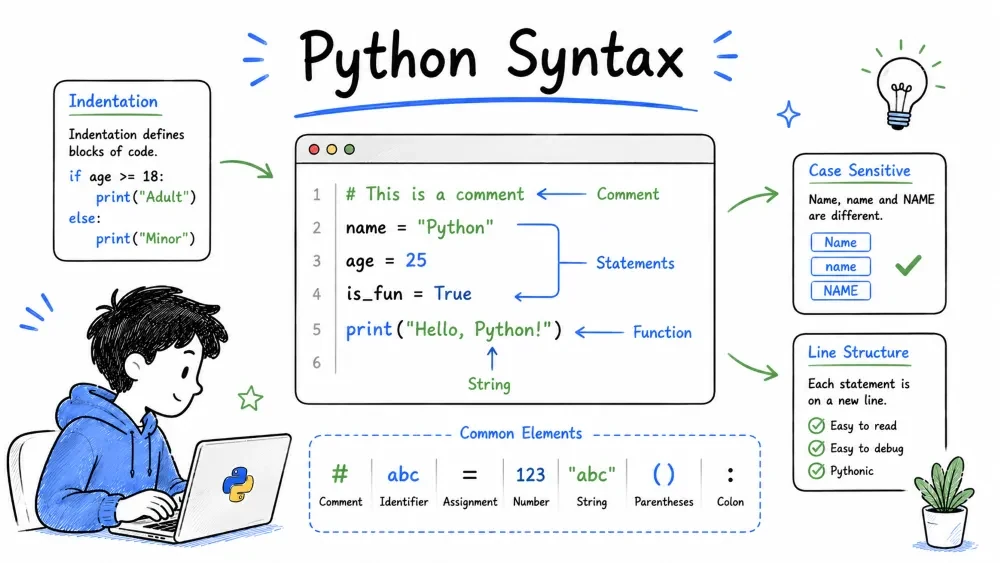
By now you've written a few lines of Python and run them. But let's take a step back and look at the bigger picture — how Python actually runs your code and what the rules of the language are.
Think of this as learning the grammar of Python. Once you know the rules, you can write anything.
Table of Contents
When you run a Python file, here's what happens behind the scenes:
This is why Python is called an interpreted language. Unlike C or Java, there's no separate "compilation" step you have to run. You just hit save and run.
Let me show you all the ways you can run Python, because each one has its place:
Method 1 — Directly in the Terminal
python filename.py
Simple. Effective. This is how you'll run most of your programs.
Method 2 — The Interactive Shell
python
Then type code directly. Perfect for testing small snippets.
Method 3 — Running Python with the -c Flag
python -c "print('Hello from the terminal!')"
This runs a one-liner without needing a file. Handy for quick tests.
Method 4 — Running a Module with -m
python -m http.server
This runs a module as a script. The example above starts a simple web server — try it!
Method 5 — Making Python Files Executable (Mac/Linux)
On Mac or Linux, you can add this as the very first line of your .py file:
#!/usr/bin/env python3
Then make the file executable:
chmod +x filename.py
./filename.py
On Windows, this doesn't work the same way. Stick to python filename.py.
Your program stops at the line where the error happens. Python prints a traceback that shows you exactly where things went wrong.
print("Hello"
Running this gives you:
  File "test.py", line 1
    print("Hello"
         ^
SyntaxError: '(' was never closed
Python is telling you: "Hey, line 1 — you forgot to close your parenthesis." The ^ points right at the problem.
Don't be scared of errors. Read the error message carefully — they're actually trying to help you.
Now let's dive into how Python expects you to write code.
Most programming languages use curly braces {} to group blocks of code. Python does things differently — it uses indentation (spaces at the start of a line) to show which code belongs together.
# Python — uses indentation
if True:
    print("Hello")
    print("World")
Both print() lines are indented, so they both run when the if condition is true.
Important rules:
In many languages, every line ends with a semicolon ;. Python doesn't need them.
# This is Python
print("Hello")
print("World")
You CAN put two statements on one line with a semicolon, but please don't:
print("Hello"); print("World") # Works, but ugly — don't do this
#Comments are ignored by Python. They're for humans.
# This is a comment
print("Hello")  # This is also a comment (after code)

# Multi-line comments are just multiple # lines
# Like this
# And this
Python doesn't have official multi-line comment syntax like /* */ in other languages. Triple quotes """ are sometimes used for multi-line comments, but they're actually docstrings — we'll talk about those later.
name, Name, and NAME are three different things.
name = "Alice"
Name = "Bob"
print(name)  # Alice
print(Name)  # Bob
This trips up a lot of beginners. If you get a "variable not defined" error, check your capitalization.
_)if, else, for, while, etc.)# Valid names
my_name = "Alice"
name2 = "Bob"
_count = 5
_private = "starts with underscore"
# Invalid names
2name = "error" # Can't start with a number
my-name = "error" # Hyphens aren't allowed
my name = "error" # Spaces aren't allowed
if = "error" # 'if' is a reserved keyword
These words are reserved — you can't use them as variable names:
False, None, True, and, as, assert, async, await, break,
class, continue, def, del, elif, else, except, finally,
for, from, global, if, import, in, is, lambda, nonlocal,
not, or, pass, raise, return, try, while, with, yield
Don't memorize them. You'll learn them naturally as you use Python.
Sometimes a line gets too long. You can break it up:
# Using a backslash
total = 1 + 2 + 3 + 4 + 5 + 6 \
        + 7 + 8 + 9 + 10

# Inside brackets — no backslash needed
names = ["Alice", "Bob", "Charlie",
         "David", "Eve", "Frank"]

result = (10 + 20 + 30 +
          40 + 50 + 60)
Technically allowed for simple cases, but avoid it:
# Don't do this
x = 5; y = 10; print(x + y)

# Do this instead
x = 5
y = 10
print(x + y)
Your code should be easy to read, not cleverly compact.
Here's a program that uses several syntax rules together:
# A program to check if a number is even or odd
# Save this as check_number.py

number = int(input("Enter a number: "))

if number % 2 == 0:                 # Colon at the end of if
    print(f"{number} is even!")     # Indented — inside the if block
    print("That means it's divisible by 2.")
else:                               # Colon at the end of else
    print(f"{number} is odd!")      # Indented — inside the else block
    print("That means it has a remainder of 1.")

print("Thanks for playing!")        # Not indented — outside the if/else block
Run it:
Enter a number: 7
7 is odd!
That means it has a remainder of 1.
Thanks for playing!
Notice how the indentation controls what runs and when. The last print() runs no matter what because it's at the same level as the if.
This is just a quick preview. Don't worry if it doesn't all make sense yet.
When your programs get bigger, you'll split code across multiple files using import. Think of it like organizing your notes into different folders.
# An example of using import with Python's built-in math module
import math

print(math.pi)         # Prints pi (3.14159...)
print(math.sqrt(16))   # Prints 4.0
For now, just know that import lets you bring in code from other files. We'll cover this properly in later tutorials.
You might hear about Python 2 in old tutorials or forums. Ignore everything about Python 2.
print "Hello" without parentheses — that's Python 2If you somehow have Python 2 installed, uninstall it and get Python 3. Seriously.
You've covered a lot of ground. Here's a quick recap of where you are:
You're ready for the next category — whatever that may be in your learning path. Keep coding, keep breaking things, and keep fixing them. That's how everyone learns.
Save your progress and earn XP for completing tutorials.
Technology
Python
Lesson group
Getting Started
Progress
100% complete

