Preparing your learning space...
67% through Python Basics tutorials
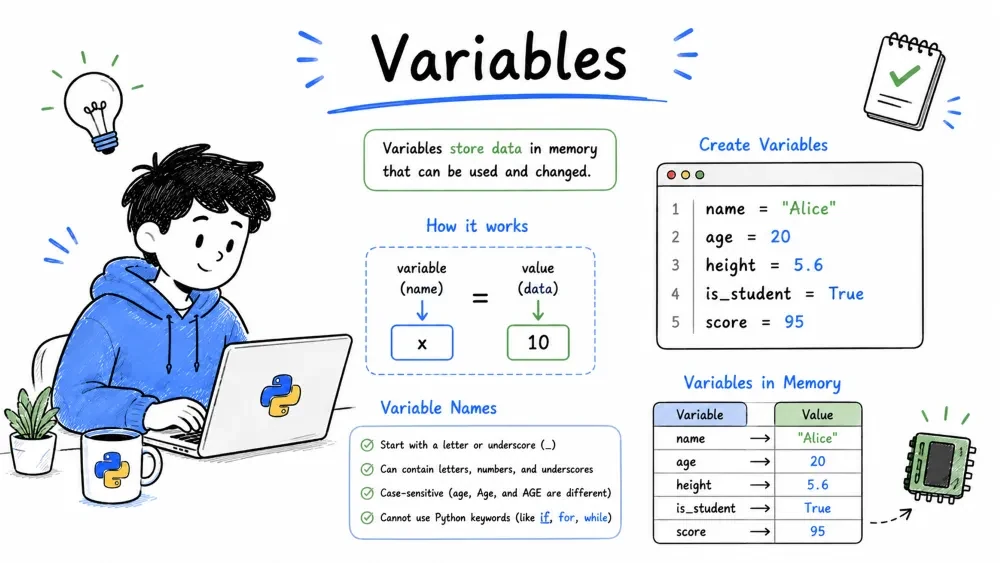
A variable is basically a container. You put something in it, give it a name, and later when you use that name, Python knows exactly what you are talking about.
Think of it like those labeled boxes in your kitchen. You have a box labeled "Sugar" and inside is... sugar. If you tell someone "pass me the sugar box", they know exactly what to grab. Same thing with variables.
In Python, you dont need to say "this is going to be a number" or "this is text". You just assign and Python figures it out:
name = "Alice"       # holds text
age = 25             # holds a number
pi = 3.14159         # holds a decimal
is_student = True    # holds a True/False value
If you ever wonder "what kind of thing is this variable holding?", Python has a function for that:
print(type(name))    # <class 'str'>
print(type(age))     # <class 'int'>
print(type(pi))      # <class 'float'>
print(type(is_student))  # <class 'bool'>
Dont worry about the <class> thing for now. Just know you can check anytime you're confused.
Here is something that trips up beginners. In programming, a variable can hold one value now and a completely different value later. It is not like math where x = 5 means x is 5 forever.
score = 10
print(score)    # 10

score = 15
print(score)    # 15

score = score + 5   # take the current score, add 5, save it back
print(score)    # 20
That score = score + 5 line confused me so much when I started. I remember staring at it thinking "how can score equal itself plus 5? thats impossible in math!" But in programming, the = means "assign", not "equals". Read it as: "take what score currently is, add 5, and put the result back into score."
Since changing variables by adding or subtracting is so common, Python has shortcuts:
x = 10
x += 5   # same as x = x + 5 -> 15
x -= 3   # same as x = x - 3 -> 12
x *= 2   # same as x = x * 2 -> 24
x /= 4   # same as x = x / 4 -> 6.0 (division always gives a float in Python 3!)
Once you get used to these, writing x += 1 feels way more natural than x = x + 1.
Here is something that surprised me coming from other languages. In Python, a variable can completely change its type:
value = 42           # its an int
print(type(value))

value = "now Im text"   # now its a string!
print(type(value))

value = 3.14         # now its a float
print(type(value))
This is called dynamic typing. Python doesnt lock a variable to one type. The type belongs to the value, not the variable name. Pretty flexible, but dont go crazy with it or your code will get confusing fast.
Python has some hard rules (break these and your code crashes) and some soft suggestions.
| Rule | Bad Example | Why |
|---|---|---|
| Must start with a letter or underscore | 1st_place | Starts with a number |
| Can only contain letters, numbers, underscore | my-var | Dashes are not allowed |
| Cant be a reserved keyword | class = 5 | class is a keyword |
| Case-sensitive | Name vs name | These are two different variables |
# These will work
user_name = "Bob"
_user_id = 42
name123 = "Test"
camelCaseExample = "Yep, this works too"

# These will crash
# 1st_user = "Bob"    # SyntaxError
# user-name = "Bob"   # SyntaxError
# class = "math"      # SyntaxError ('class' is reserved)
These are not enforced by Python, but every Python developer follows them. Seriously, everyone.
Use snake_case — lowercase words separated by underscores
user_name (good) vs userName (bad) — that camelCase stuff is for JavaScript folksUse descriptive names — dont be lazy
total_price (good) vs tp (bad)customer_email (good) vs ce (bad)Avoid confusing letters
l (lowercase L), O (uppercase o), or I (uppercase i) alone. They look like numbers 1 and 0.# Good names
first_name = "John"
last_name = "Doe"
total_items = 5
average_score = 87.5
# Bad names (they work but ugh)
a = "John"
b = "Doe"
c = 5
d = 87.5
Six months from now, you will thank yourself for using good names. I promise. Your future self will literally curse past you if you use single letters everywhere.
Python lets you assign multiple variables in one line. Looks neat:
a, b, c = 1, 2, 3
print(a, b, c)   # 1 2 3
The left and right sides just need to match in count. Python pairs them up in order — first with first, second with second, etc.
Want three variables all starting at zero?
x = y = z = 0
print(x, y, z)   # 0 0 0
Great for setting up counters before a loop.
In most programming languages, swapping two variables is a whole thing. You need a temporary third variable to hold one value while you swap. Python says nope, we dont need that:
a = 5
b = 10

a, b = b, a   # swap!

print(a)   # 10
print(b)   # 5
One line. No temp variable needed. This is actually used in real code all the time.
Got a list or tuple? You can unpack its values into separate variables:
coordinates = (10, 20, 30)
x, y, z = coordinates
print(f"x={x}, y={y}, z={z}")   # x=10, y=20, z=30
But what if the list has more items than variables? You get an error. Unless you use the star trick:
numbers = [1, 2, 3, 4, 5]
first, *middle, last = numbers
print(first)    # 1
print(middle)   # [2, 3, 4]
print(last)     # 5
The *middle just gobbles up everything in between. Handy when you only care about the first and last elements.
# Copy and run this whole block

# Basic variables
name = "Alex"
age = 28
height = 5.9
print(f"{name} is {age} years old and {height}ft tall")

# Variable reassignment
count = 0
count += 5
count *= 2
count -= 3
print(f"Count after operations: {count}")

# Multiple assignment and swap
x, y = 100, 200
print(f"Before swap: x={x}, y={y}")
x, y = y, x
print(f"After swap: x={x}, y={y}")

# Unpacking
scores = [88, 92, 85, 90, 87]
first, *middle, last = scores
print(f"First: {first}, Last: {last}, Middle: {middle}")
Save your progress and earn XP for completing tutorials.
Technology
Python
Lesson group
Python Basics
Progress
67% complete

