Preparing your learning space...
100% through Python Basics tutorials
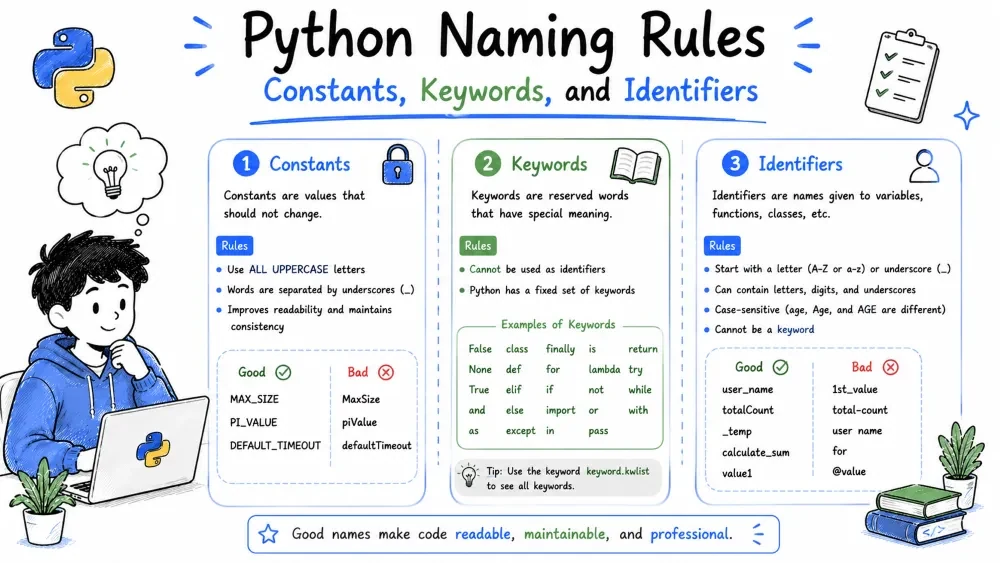
Here is the thing about Python and constants — Python doesnt really have them. Not real constants anyway. In many languages you can say "this value will NEVER change" and the language enforces it. Python just... trusts you.
What Python developers do instead is use ALL_CAPS variable names. Its a signal to anyone reading the code: "hey, this is a constant, please dont touch it."
PI = 3.14159
MAX_LOGIN_ATTEMPTS = 5
DATABASE_NAME = "my_app_db"
GST_RATE = 0.18
You can still change these. Python wont stop you. But every developer reading your code will know they shouldnt. Its an honor system and honestly, it works fine in practice.
Because magic numbers are the worst. Look at this:
# Bad — what is 0.18? Why 30 days?
total = price * 0.18
if days > 30:
    print("Overdue!")
If you come back to this a month later, you will sit there wondering what 0.18 is. Tax? Discount? A math error? Now look at this:
# Good — now its obvious
TAX_RATE = 0.18
MAX_CREDIT_DAYS = 30

total = price * TAX_RATE
if days > MAX_CREDIT_DAYS:
    print("Overdue!")
See the difference? Clear as day. Plus, if the tax rate changes, you update it in one place instead of hunting through your whole codebase.
Put them at the top of the file, right after imports. Thats the convention:
import os

# Constants
MAX_FILE_SIZE = 1024 * 1024 * 5  # 5MB
ALLOWED_EXTENSIONS = [".jpg", ".png", ".gif"]
API_ENDPOINT = "https://api.example.com/v1"

# Rest of the code...
Keywords are words that Python has reserved for itself. You cannot use them as variable names. You cannot use them as function names. They belong to Python.
Try using one as a variable and boom — error:
# These will ALL cause errors if used as variable names
# for = 5
# if = "something"
# class = "math"
# return = True
# while = "loop"
There are 35 keywords in Python 3. You dont need to memorize them. You will learn them naturally as you use Python. But here is a cheat sheet:
| Group | Keywords |
|---|---|
| Values | True, False, None |
| Loops | for, while, break, continue |
| Conditions | if, elif, else |
| Functions | def, return, lambda, yield |
| Classes | class |
| Exceptions | try, except, finally, raise, assert |
| Imports | import, from, as |
| Logic | and, or, not, in, is |
| Scope | global, nonlocal |
| Async | async, await |
| Others | pass, del, with, match, case |
Note:
matchandcasewere added in Python 3.10. If you are on an older version, they wont work. Actually in older Python you can use them as variable names, which confuses people who upgrade.
One more thing — self. You will see it everywhere in Python classes. But self is NOT a keyword. Its just a convention. The first parameter of a method is traditionally called self, but Python does not enforce it. You could call it this or me or banana if you really wanted to. Please dont though. Every other developer will hate you.
True, False, and None look like normal values, right? They are actually keywords. You cannot assign to them:
# This works
flag = True

# This crashes — True is a keyword, you cant assign to it
# True = False
pass keywordpass is Pythons way of saying "I will fill this in later". Python throws an error on empty blocks, so pass lets you leave placeholders:
if True:
    pass  # I will write this later

def not_implemented_yet():
    pass  # Placeholder function
"Identifier" is just a fancy word for "name". Any name you give to a variable, function, class, or module is an identifier.
# All these are identifiers
my_variable = 10
def my_function():
    pass
class MyClass:
    pass
Same rules as variable naming from the last tutorial:
_)User and user are two completely different identifiers# Valid identifiers
my_variable = 10
_user_id = 42
calculateTotal = 100
item1 = "hello"
VERY_LONG_CONSTANT_NAME = 3.14
# Invalid identifiers
# 2fast2furious — starts with a digit
# my-var — hyphen not allowed
# class — reserved keyword
# user name — space not allowed
Python has strong naming conventions. Here is the cheat sheet:
| Type | Convention | Example |
|---|---|---|
| Variable | snake_case | user_name |
| Function | snake_case | get_user() |
| Constant | ALL_CAPS | MAX_SIZE |
| Class | PascalCase | BankAccount |
| Private/internal | starts with _ | _internal_var |
| Name-mangled | starts with __ | __helper() |
A single underscore at the start signals "this is internal, dont use it from outside." Python wont stop you, but your teammates will know.
A double underscore (__) triggers name mangling — Python renames it internally to avoid accidental overrides in subclasses. Dont worry about it too much right now. You will rarely need it early on.
_In Python, _ is a valid identifier but conventionally used for throwaway values:
# We only need the first and last, not the middle three
first, _, _, _, last = [1, 2, 3, 4, 5]
print(first)  # 1
print(last)   # 5
You will also see _ in the Python REPL (the interactive console). It automatically holds the last result. Handy when you are experimenting.
# Copy and run this whole block

# Constants (by convention)
MAX_RETRIES = 3
TIMEOUT_SECONDS = 30
PI = 3.14159

print(f"MAX_RETRIES = {MAX_RETRIES}")
print(f"PI = {PI}")

# Keywords in action (cant use them as variable names, but can USE them)
for i in range(3):
    if i == 0:
        print(f"{i} — first iteration")
    elif i == 1:
        print(f"{i} — second iteration")
    else:
        print(f"{i} — last one")

# Identifiers — case sensitivity test
name = "alice"
Name = "bob"
NAME = "charlie"
print(name, Name, NAME)  # three different variables!

# The throwaway underscore
values = (10, 20, 30, 40, 50)
a, _, _, d, _ = values
print(f"a={a}, d={d}")   # middle values thrown away
Save your progress and earn XP for completing tutorials.
Technology
Python
Lesson group
Python Basics
Progress
100% complete

