Preparing your learning space...
100% through User Input tutorials
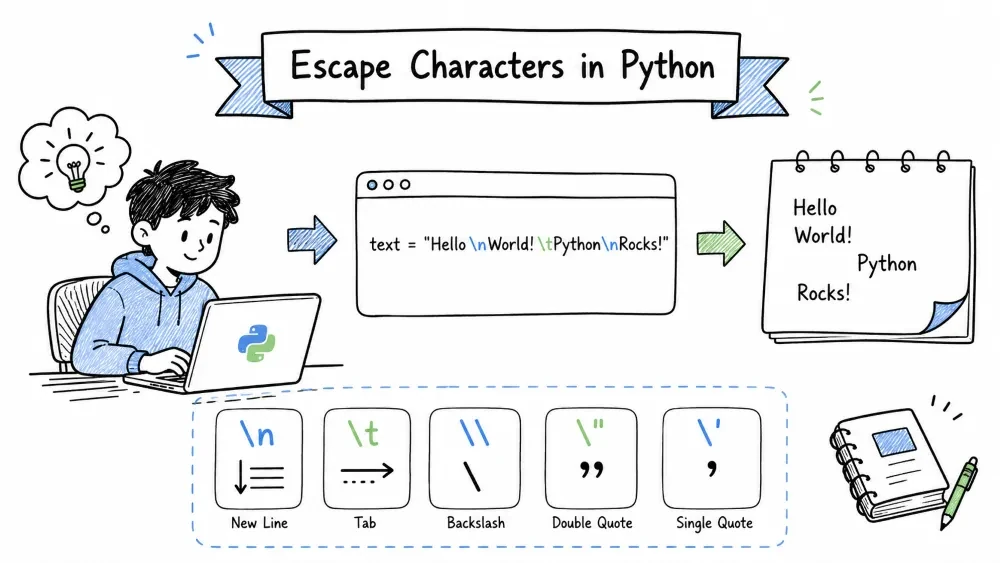
Sometimes you want to put special characters in a string — things that are hard to type directly. A new line, a tab, a backslash, or a quote inside a quoted string.
An escape character starts with a backslash \ followed by another character. Together they mean something special.
Think of it like a secret code: \n is not a backslash followed by n — it means "new line".
\n)The most common one. It tells Python to start a new line:
print("Line 1\nLine 2\nLine 3")
Output:
Line 1
Line 2
Line 3
Without \n, everything would be on one line:
print("Line 1")
print("Line 2")
print("Line 3")
That also prints three lines, but print() adds \n automatically at the end. Using \n inside a string lets you control exactly where the line breaks happen:
poem = "Roses are red\nViolets are blue\nPython is awesome\nAnd so are you"
print(poem)
\t)Adds a tab space (like pressing the Tab key):
print("Name\tAge\tCity")
print("Alice\t25\tLondon")
print("Bob\t30\tParis")
print("Charlie\t22\tBerlin")
Output:
Name    Age   City
Alice   25    London
Bob     30    Paris
Charlie 22    Berlin
Great for making simple tables in the terminal.
Since \ is used to start escape sequences, how do you print an actual backslash? Use two backslashes:
print("C:\\Users\\Documents\\file.txt")
# C:\Users\Documents\file.txt
If you used just one:
print("C:\Users\Documents\file.txt") # \U is not a valid escape — ERROR!
\' and \")If your string is wrapped in double quotes, you can put single quotes inside freely (and vice versa). But what if you need both?
# Using different quotes — works fine
print("It's a beautiful day")
print('He said "Hello"')

# But what if you need both in the same type of quotes?
print('It\'s a "beautiful" day')   # escape the single quote
print("He said \"Hello\"")          # escape the double quote
Or just use the other quote type to avoid escaping:
print("It's a beautiful day")       # double quotes outside, single inside
print('He said "Hello"')            # single quotes outside, double inside
Raw strings are a lifesaver when you have lots of backslashes (like file paths or regex patterns). Put an r before the opening quote, and Python treats backslashes as literal characters:
# Normal string — need double backslashes
path = "C:\\Users\\Name\\Documents\\file.txt"
print(path)

# Raw string — backslashes are literal
path = r"C:\Users\Name\Documents\file.txt"
print(path)
# C:\Users\Name\Documents\file.txt
Notice the r before the quote. Now every backslash is just a backslash. No escaping needed.
Raw strings are also super useful for regular expressions (you will learn about re module later):
# Regex pattern without raw string (painful)
pattern = "\\d+\\.\\d+"     # matches numbers like 3.14

# Same pattern with raw string (clean)
pattern = r"\d+\.\d+"
Escape sequences work inside f-strings too. Just remember that { and } are special in f-strings (they mark expression spots), so if you need literal curly braces, double them: {{ and }}.
name = "Alex"
age = 25

print(f"Name:\t{name}\nAge:\t{age}")

# Printing literal curly braces
print(f"{{name}} = {name}")    # {name} = Alex
| Escape | Meaning | Example Output |
|---|---|---|
\n | Newline (line break) | See above |
\t | Tab (horizontal) | See above |
\\ | Backslash | \ |
\' | Single quote | ' |
\" | Double quote | " |
\r | Carriage return (goes to start of line) | "Hello\rX" → Xello |
\b | Backspace | "Hello\bWorld" → HellWorld |
\0 | Null character | (invisible) |
\a | Bell/alert (beep sound on some terminals) | (sound) |
Copy and run this whole block in your editor:
print("=== Escape Characters Demo ===\n")

# Newlines
print("Line 1\nLine 2\nLine 3")

# Tabs for a table
print("\n--- Table ---")
print("Product\t\tPrice\tQty")
print("Laptop\t\t$999\t1")
print("Mouse\t\t$25\t2")
print("Keyboard\t$50\t1")

# Quotes
print("\n--- Quotes ---")
print("He said \"Python is amazing!\"")
print('She replied \'I know, right?\' ')
print("It's easy to mix quotes")

# Backslash
print("\n--- Paths ---")
print(r"Raw string: C:\Users\Name\folder")

# Combining escape sequences
print("\n--- Combined ---")
print("Name:\tJohn\nAge:\t30\nCity:\tNew York")

# Fun with \r (carriage return)
print("\n--- Carriage Return ---")
print("Loading......\rDone!     ")
Save your progress and earn XP for completing tutorials.
Technology
Python
Lesson group
User Input
Progress
100% complete

