Preparing your learning space...
67% through User Input tutorials
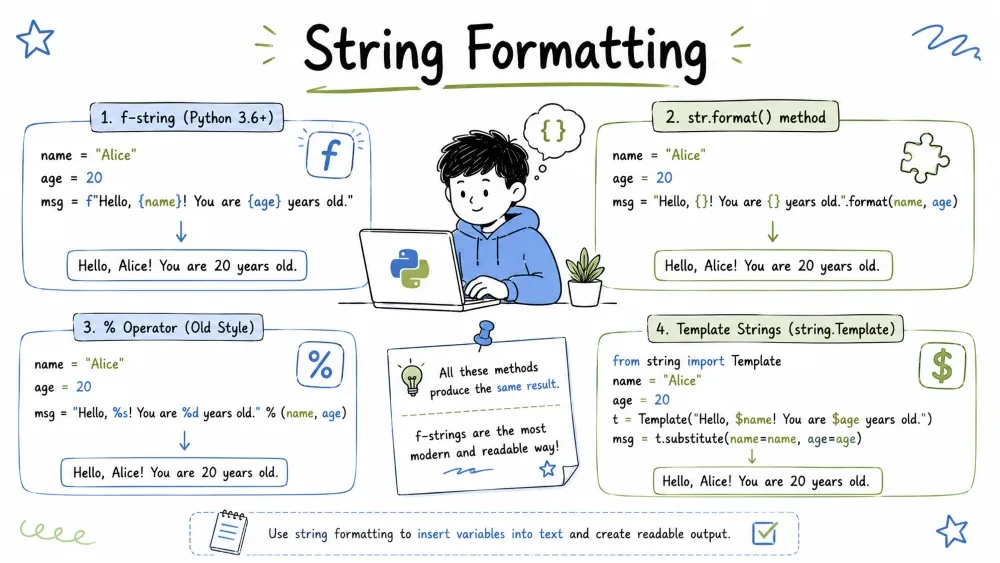
You have variables with values, and you want to build a string that includes those values in a clean, readable way. That is string formatting.
Instead of this messy approach:
name = "Alex"
age = 25
print("My name is", name, "and I am", age, "years old")
You can do this:
print(f"My name is {name} and I am {age} years old")
Much cleaner, right? Python gives you several ways to format strings. Let us look at all of them, from oldest to newest.
This is the original Python way, borrowed from the C programming language. You will see it in old code, but you probably won't use it much yourself.
You create a string with %s placeholders (or other specifiers), and then provide the values after a % symbol:
name = "Alice"
print("Hello, %s!" % name)         # Hello, Alice!

age = 25
print("%s is %s years old" % (name, age))   # Alice is 25 years old
| Specifier | Meaning |
|---|---|
%s | String (or anything — Python converts it) |
%d | Integer |
%f | Float (decimal number) |
%.2f | Float with 2 decimal places |
name = "Bob"
score = 87.45678

print("Name: %s" % name)           # Name: Bob
print("Score: %d" % score)         # Score: 87  (truncates decimal!)
print("Score: %f" % score)         # Score: 87.456780
print("Score: %.2f" % score)       # Score: 87.46  (rounded to 2 decimals)
Use parentheses (a tuple) when you have more than one value:
name = "Charlie"
age = 30
score = 92.5
print("%s is %d years old with a score of %.1f" % (name, age, score))
# Charlie is 30 years old with a score of 92.5
The % formatting works, but it gets messy with many variables. The order matters, and it is easy to make mistakes.
Python 3 introduced a nicer way — the .format() method on strings. You use curly braces {} as placeholders.
name = "Diana"
age = 28
print("My name is {} and I am {} years old".format(name, age))
# My name is Diana and I am 28 years old
You can use numbers (positions) or names inside the braces:
# Positional — order matters
print("{0} is {1} years old. {0} loves Python.".format("Eve", 22))
# Eve is 22 years old. Eve loves Python.

# Keyword — names matter, order doesn't
print("{name} is {age} years old.".format(name="Frank", age=35))
# Frank is 35 years old.
You can control number formatting, alignment, and more inside the curly braces by adding a colon : after the position/name:
pi = 3.14159265

print("{:.2f}".format(pi))        # 3.14  (2 decimal places)
print("{:.3f}".format(pi))        # 3.142 (3 decimal places)
print("{:10.2f}".format(pi))      # "      3.14"  (total width 10)
print("{:<10.2f}".format(pi))     # "3.14      "  (left-aligned)
print("{:>10.2f}".format(pi))     # "      3.14"  (right-aligned)
print("{:^10.2f}".format(pi))     # "  3.14    "  (center-aligned)
Let us see alignment with text:
print("{:<10} {:>10}".format("Left", "Right"))
# Left            Right

print("{:^20}".format("CENTER"))
#       CENTER
Python 3.6 introduced f-strings (formatted string literals), and honestly, they are the best. You put an f before the opening quote, then put any Python expression inside {}.
name = "Grace"
age = 32
print(f"My name is {name} and I am {age} years old")
# My name is Grace and I am 32 years old
Notice how much cleaner this is than .format() or %. The variable names go directly inside the braces.
You are not limited to just variable names. You can put any Python expression inside {}:
a = 10
b = 3
print(f"{a} + {b} = {a + b}")                 # 10 + 3 = 13
print(f"{a} divided by {b} is {a / b:.2f}")   # 10 divided by 3 is 3.33

name = "Alice"
print(f"Hello, {name.upper()}")                # Hello, ALICE

items = 3
price = 4.99
print(f"Total: ${items * price:.2f}")          # Total: $14.97
You can even use conditional expressions:
score = 85
print(f"Result: {'Pass' if score >= 60 else 'Fail'}")
# Result: Pass
F-strings use the same format specifiers as .format(), just inside the braces after a colon:
pi = 3.14159265
print(f"Pi to 2 decimals: {pi:.2f}")           # Pi to 2 decimals: 3.14
print(f"Pi to 4 decimals: {pi:.4f}")           # Pi to 4 decimals: 3.1416

big_number = 1234567
print(f"With commas: {big_number:,}")          # With commas: 1,234,567

percentage = 0.856
print(f"Percentage: {percentage:.1%}")         # Percentage: 85.6%
Here is what the format specifier inside {variable:specifier} means:
value = 12.3456
print(f"{value:.1f}")    # 12.3   — 1 digit after decimal
print(f"{value:.2f}")    # 12.35  — 2 digits after decimal
print(f"{value:10.2f}")  # "     12.35" — total width 10, 2 decimals
name = "Python"

print(f"{name:>10}")    # "    Python"  — right align
print(f"{name:<10}")    # "Python    "  — left align
print(f"{name:^10}")    # "  Python  "  — center
print(f"{name:*^20}")   # "*******Python********"  — center with * padding
text = "hello world"
print(f"{text.upper()}")          # HELLO WORLD
print(f"{text.title()}")          # Hello World
print(f"{len(text)} characters")  # 11 characters

price = 19.99
print(f"${price:.2f}")            # $19.99
name = "Isaac"
age = 29
city = "Berlin"

info = (
    f"Name: {name}\n"
    f"Age: {age}\n"
    f"City: {city}"
)
print(info)
# Name: Isaac
# Age: 29
# City: Berlin
| Method | When to Use |
|---|---|
% formatting | Only when maintaining old code. Avoid for new code. |
.format() | When you need the template string to be defined separately from variables (e.g., loaded from a file). |
| F-Strings | Everywhere else. They are faster, cleaner, and more readable. |
Rule of thumb: Use f-strings. They are the modern Python way and almost always the best choice.
Copy and run this whole block in your editor:
print("=== String Formatting Playground ===\n")

# === % Formatting ===
name = "Alice"
age = 30
print("[%% Formatting]")
print("%s is %d years old" % (name, age))
print("Pi: %.3f" % 3.14159)
print()

# === .format() Method ===
print("[.format() Method]")
print("{} is {} years old".format(name, age))
print("{0} is {1} years old. {0} loves Python.".format(name, age))
print("Pi: {:.3f}".format(3.14159))
print()

# === F-Strings (Modern) ===
print("[F-Strings - The Best]")
name = "Bob"
age = 25
city = "London"
print(f"My name is {name} and I am {age} years old from {city}")

# Expressions inside f-strings
a, b = 15, 4
print(f"{a} + {b} = {a + b}")
print(f"{a} / {b} = {a / b:.2f}")
print(f"Big number: {123456789:,}")

# Alignment
print(f"\nAlignment demo:")
print(f"{'Left':<10} | {'Center':^10} | {'Right':>10}")
print(f"{'A':<10} | {'B':^10} | {'C':>10}")
print(f"{'10':<10} | {'20':^10} | {'30':>10}")

# Padding
print(f"\nPadding demo:")
print(f"{'Hello':*^20}")
print(f"{'Hello':=>20}")
Save your progress and earn XP for completing tutorials.
Technology
Python
Lesson group
User Input
Progress
67% complete

