Preparing your learning space...
33% through User Input tutorials
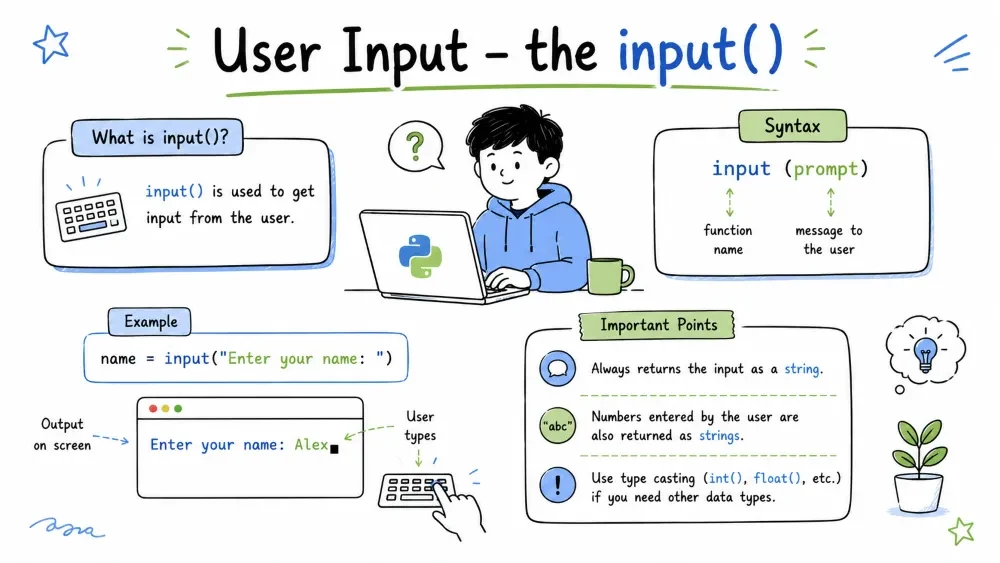
Most programs are boring if they just do the same thing every time. User input is what makes a program interactive — it lets the person using your program give it data, and the program responds based on that data.
Think of it like a conversation:
Without user input, your program would just... print the same thing forever. With input, every run can be different.
In Python, getting user input is incredibly simple. You use the input() function.
name = input()
print("You entered:", name)
When Python hits the input() line, it stops and waits. The user types something and presses Enter. Whatever they typed gets stored in the variable.
Try running this:
# Run this in your editor
name = input()
print("Hello,", name)
Wait for the cursor to blink — that is Python waiting for you. Type something and press Enter.
You almost always want to tell the user WHAT to type. Pass a string to input() and it shows that as a prompt:
name = input("Enter your name: ")
print("Hello,", name)
The prompt string is displayed on the screen, and the cursor waits right after it. The user types and presses Enter.
# Try this
age = input("How old are you? ")
print("You are", age, "years old")
Here is something that trips up EVERY beginner. Whatever the user types, input() returns it as a string. Even if they type a number.
number = input("Enter a number: ")
print(type(number))   # <class 'str'>  — surprise!
So if you try to do math directly with it, weird things happen:
number = input("Enter a number: ")
print(number + 5)     # ERROR! Can't add string and integer
Python will crash because you cannot add a string and a number. You need to convert it first.
Use int() to convert a string to a whole number:
age = input("Enter your age: ")
age = int(age)        # convert string to integer
print("Next year you will be", age + 1)

# Or do it in one line:
age = int(input("Enter your age: "))
print("Next year you will be", age + 1)
Use float() for decimal numbers:
price = float(input("Enter the price: "))
tax = price * 0.1
print("Tax is:", tax)
You can chain conversions right in the input call:
# One line — input and convert
age = int(input("Enter age: "))
height = float(input("Enter height in meters: "))
print(f"Age: {age}, Height: {height}")
What happens if the user types "hello" and you try int("hello")? Your program crashes with a ValueError. There is a way to handle this gracefully (you will learn about try/except later), but for now just remember: always enter the right kind of value when a program asks for a number.
# This will crash if you type "abc"
number = int(input("Enter a number: "))
print(number * 2)
So type actual numbers when asked!
You can call input() multiple times to get several pieces of information:
name = input("Enter your name: ")
age = int(input("Enter your age: "))
city = input("Enter your city: ")

print(f"{name} is {age} years old and lives in {city}")
Or collect them on one line using split():
# User types: Alex 25 Paris
data = input("Enter name, age, city (separated by space): ").split()
name = data[0]
age = int(data[1])
city = data[2]

print(f"{name} | {age} | {city}")
The split() method splits the input string wherever there is whitespace, and gives you back a list of pieces. Then you grab each piece by its position.
# A mini calculator
num1 = float(input("Enter first number: "))
num2 = float(input("Enter second number: "))

print(f"{num1} + {num2} = {num1 + num2}")
print(f"{num1} - {num2} = {num1 - num2}")
print(f"{num1} * {num2} = {num1 * num2}")
print(f"{num1} / {num2} = {num1 / num2}")
# A friendly greeter
name = input("What's your name? ")
age = int(input("How old are you? "))
year = 2026 - age

print(f"Nice to meet you, {name}!")
print(f"You were probably born around the year {year}.")
Copy and run this whole block in your editor:
print("=== Personal Info Collector ===\n")

# Get user info
name = input("What is your name? ")
age = int(input("How old are you? "))
height = float(input("What is your height in meters? "))
favorite_number = int(input("What is your favorite number? "))

# Calculate stuff
birth_year = 2026 - age
doubled = favorite_number * 2

# Display results
print("\n--- Your Profile ---")
print(f"Name: {name}")
print(f"Age: {age}")
print(f"Height: {height}m")
print(f"Birth Year (approx): {birth_year}")
print(f"Double your favorite number: {doubled}")
print("---------------------")
print("Thanks for chatting!")
Save your progress and earn XP for completing tutorials.
Technology
Python
Lesson group
User Input
Progress
33% complete

