Preparing your learning space...
33% through Cyber Security Basics tutorials
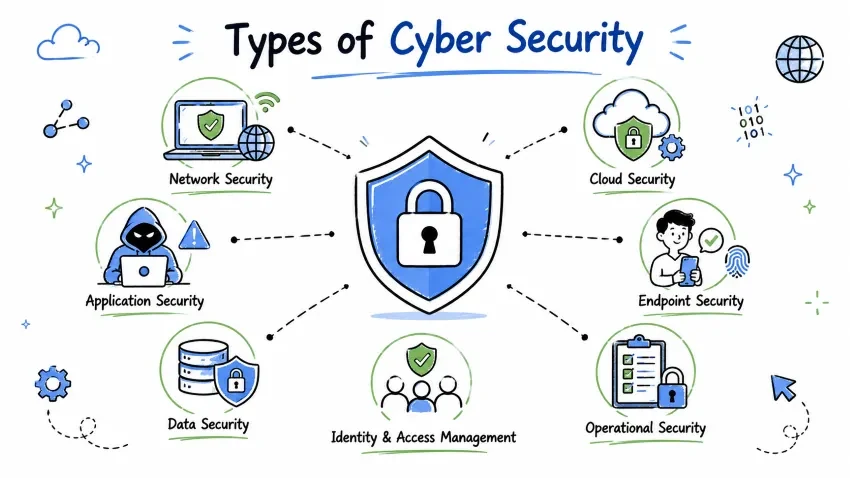
Cyber security is a broad field with multiple specialized domains. Each domain focuses on protecting different parts of the digital ecosystem.
Think of cyber security like securing a large building:
| Domain | Building Analogy |
|---|---|
| Network Security | Fence around the property, security at gates |
| Application Security | Lock on each room's door |
| Information Security | Safe inside the building for valuables |
| Endpoint Security | Guard checking everyone at the entrance |
| Cloud Security | Securing items stored in a remote warehouse |
| IAM | ID card system for all employees |
| Incident Response | Fire drill and emergency response plan |
| Compliance | Following building codes and regulations |
Because attackers target different parts of a system:
Attacker tries to:
  ├── Hack your WiFi → Network Security needed
  ├── Exploit app bug → Application Security needed
  ├── Steal database → Information Security needed
  ├── Infect your laptop → Endpoint Security needed
  ├── Breach cloud storage → Cloud Security needed
  ├── Steal your password → IAM needed
  └── Attack during response → Incident Response needed
Network security protects the data traveling across networks and the network infrastructure itself.
| Component | What's at Risk |
|---|---|
| Data in Transit | Emails, file transfers, browsing data |
| Network Infrastructure | Routers, switches, firewalls, cables |
| Communication Channels | WiFi, VPN connections, leased lines |
| Network Boundaries | Entry/exit points of your network |
| Tool | How It Works | Example |
|---|---|---|
| Firewalls | Filter traffic based on rules | Block traffic from suspicious IPs |
| IDS/IPS | Detect/Prevent intrusions | Alert when someone tries to brute-force SSH |
| VPN | Encrypt all network traffic | Secure connection from coffee shop WiFi |
| Network Segmentation | Divide network into zones | Guest WiFi separate from internal network |
| Proxy Servers | Act as intermediary | Filter web traffic, hide internal IPs |
| NAC (Network Access Control) | Verify devices before allowing connection | Only company-owned laptops can join network |
Scenario: You're working from a coffee shop.
- Without network security: Anyone on the same WiFi can intercept your data
- With VPN (network security): All your traffic is encrypted — even if someone intercepts it, they can't read it
| Practice | Why It Matters |
|---|---|
| Use WPA3 encryption for WiFi | Strongest available WiFi security |
| Change default router passwords | Default passwords are publicly known |
| Disable WPS on routers | WPS has known vulnerabilities |
| Monitor network traffic regularly | Detect anomalies early |
| Segment sensitive data on separate networks | Limit damage if one network is breached |
| Use 802.1X authentication | Ensures only authorized devices connect |
Application security focuses on keeping software and apps secure throughout their entire lifecycle — from design to deployment to maintenance.
| Component | Examples |
|---|---|
| Web Applications | Websites, e-commerce portals, banking apps |
| Mobile Apps | iOS and Android applications |
| APIs | REST APIs, GraphQL endpoints |
| Desktop Software | Operating systems, office suites |
| Third-Party Libraries | Open-source packages, SDKs |
Design  →  Develop  →  Test  →  Deploy  →  Maintain
  │          │          │        │          │
  ▼          ▼          ▼        ▼          ▼
Secure    Secure     Pen      Security   Patch
Design    Coding     Testing  Config     Management
Reviews   Standards           Review
| Practice | Description | Why It's Important |
|---|---|---|
| Secure Coding | Writing code without security flaws | Prevents vulnerabilities at the source |
| Penetration Testing | Ethically hacking your own app | Finds real-world exploitable weaknesses |
| Vulnerability Scanning | Using automated tools to find flaws | Catches known vulnerabilities quickly |
| Code Reviews | Peer review of code | Fresh eyes catch mistakes |
| Web Application Firewall (WAF) | Filters HTTP traffic | Blocks SQL injection, XSS attacks |
| Input Validation | Checking all user inputs | Prevents injection attacks |
Scenario: A banking app has a vulnerability in its login form.
- Without application security: Hackers can use SQL Injection to access the database and steal customer accounts
- With input validation (application security): The app rejects malicious inputs, blocking the attack
| Attack | What It Does | Prevention |
|---|---|---|
| SQL Injection | Injects malicious SQL queries | Parameterized queries, input validation |
| Cross-Site Scripting (XSS) | Injects malicious scripts into web pages | Output encoding, Content Security Policy |
| Cross-Site Request Forgery (CSRF) | Tricks users into performing actions | Anti-CSRF tokens |
| Insecure Direct Object References | Accesses unauthorized data | Proper access controls |
| Security Misconfiguration | Exploits default/weak settings | Regular security audits |
Information security protects data — whether stored digitally, in transit, or even on paper. It's about protecting the information itself, regardless of format.
| Data Type | Examples | Sensitivity |
|---|---|---|
| PII (Personally Identifiable Info) | Name, SSN, address, phone number | High |
| Financial Data | Credit cards, bank accounts, transactions | Very High |
| Health Records | Medical history, diagnoses, prescriptions | Very High |
| Intellectual Property | Patents, trade secrets, source code | High |
| Business Confidential | Strategy documents, contracts, emails | Medium-High |
| Public Information | Marketing materials, press releases | Low |
| Practice | How It Works | Real-World Example |
|---|---|---|
| Encryption at Rest | Scrambles stored data | BitLocker encrypts your hard drive |
| Encryption in Transit | Scrambles data being sent | HTTPS encrypts web traffic |
| Access Controls | Limits who can view/modify data | Only managers can view salary data |
| Data Classification | Labels data by sensitivity | "Confidential" watermarks on documents |
| Data Loss Prevention (DLP) | Prevents unauthorized data leaks | Blocks uploading customer data to personal cloud |
| Data Masking | Hides sensitive parts of data | Shows only last 4 digits of credit card |
| Data Retention Policies | Specifies how long to keep data | Delete customer data after 7 years |
| Level | Description | Examples | Handling |
|---|---|---|---|
| Public | No harm if exposed | Press releases, job postings | No special handling |
| Internal | Internal use only | Company policies, org charts | Access control required |
| Confidential | Sensitive, limited access | Customer PII, financial reports | Encryption + strict access |
| Restricted | Highly sensitive, need-to-know | Trade secrets, source code | Strong encryption + audit logging |
Remember: Information security is about protecting the data itself, not just the systems that hold it.
Endpoint security protects individual devices — the "endpoints" that connect to networks. Each endpoint is a potential entry point for attackers.
| Device Type | Examples | Risk Level |
|---|---|---|
| Desktop Computers | Windows PC, Mac, Linux workstation | High |
| Laptops | Business laptops, personal notebooks | Very High (portable) |
| Smartphones | iPhone, Android devices | High (always connected) |
| Tablets | iPad, Samsung Tab | Medium-High |
| Servers | Web servers, database servers | Critical |
| IoT Devices | Smart cameras, printers, smart TVs | Medium |
| USB Drives | Flash drives, external hard drives | High (easily lost/stolen) |
| Tool | Function | Example Products |
|---|---|---|
| Antivirus (AV) | Detects and removes known malware | Windows Defender, Norton, Bitdefender |
| EDR (Endpoint Detection & Response) | Monitors behavior, detects advanced threats | CrowdStrike, SentinelOne, Carbon Black |
| MDM (Mobile Device Management) | Manages and secures mobile devices | Intune, Jamf, VMware Workspace ONE |
| Disk Encryption | Encrypts entire device storage | BitLocker (Windows), FileVault (Mac) |
| Application Whitelisting | Only allows approved apps to run | Windows AppLocker |
| DLP Agent | Prevents data leaks from endpoints | Symantec DLP, Forcepoint |
Scenario: An employee loses their laptop at the airport.
- Without endpoint security: All data on the laptop is accessible to whoever finds it
- With full-disk encryption (endpoint security): The data is unreadable without the password
- With MDM: IT can remotely wipe the device
Cloud security protects data, applications, and infrastructure in cloud environments like AWS, Google Cloud, Microsoft Azure, and private clouds.
One of the most important concepts in cloud security:
┌──────────────────────────────────────────────────────┐
│          RESPONSIBILITY OF CLOUD PROVIDER            │
│  (AWS / Azure / Google Cloud)                       │
│  - Physical security of data centers                │
│  - Network infrastructure                           │
│  - Hypervisor security                              │
├──────────────────────────────────────────────────────┤
│          RESPONSIBILITY OF CUSTOMER                  │
│  (YOU / YOUR COMPANY)                               │
│  - Data encryption                                  │
│  - Access configurations                            │
│  - Application security                             │
│  - User access management                           │
└──────────────────────────────────────────────────────┘
| Challenge | Description | Solution |
|---|---|---|
| Misconfiguration | Wrong settings expose data | Regular cloud security audits |
| Data Breaches | Unauthorized access to cloud data | Encryption + access controls |
| Insecure APIs | Vulnerable cloud service interfaces | API security testing |
| Compliance | Meeting regulations in cloud | Cloud compliance tools (AWS Config, Azure Policy) |
| Account Hijacking | Stolen cloud credentials | MFA + strong IAM policies |
| Insider Threats | Employees misusing cloud access | Least privilege + monitoring |
Case: A company leaves an AWS S3 bucket (cloud storage) publicly accessible.
- Result: Anyone on the internet can read, download, or delete the data
- Real example: Accenture (2021) — 4TB of data exposed due to misconfigured cloud storage
- Lesson: Always double-check cloud configuration settings!
IAM manages who can access what — ensuring the right people have the right access to the right resources at the right time.
IAM
├── Identification (Who claims to be?)
├── Authentication (Prove it!)
├── Authorization (What can you do?)
└── Auditing (What did you do?)
| Concept | Description | Real-World Use |
|---|---|---|
| SSO (Single Sign-On) | One login for multiple apps | Log into Google once, access Gmail, Drive, YouTube |
| MFA (Multi-Factor Authentication) | Extra layer beyond password | Code from phone app + password |
| RBAC (Role-Based Access Control) | Access based on job role | Manager role vs Employee role |
| PAM (Privileged Access Management) | Managing admin access | Temporary admin rights for IT |
| Federation | Trust between organizations | Log into partner site with your company credentials |
| JIT (Just-In-Time) Access | Time-limited elevated access | 1-hour admin access window |
"Give users ONLY the permissions they absolutely need — and for ONLY as long as they need them."
| Scenario | Without Least Privilege | With Least Privilege |
|---|---|---|
| New employee | Full admin access | Only access to their department's shared folder |
| Temp contractor | Permanent account | Account expires after 30 days |
| IT support | Always has admin rights | Gets admin rights only when needed (JIT) |
Scenario: An employee's credentials are stolen.
- Without IAM: The attacker has access to everything the employee could access
- With IAM + Least Privilege: The attacker can only access the minimum resources, limiting damage
- With MFA enabled: The stolen password alone isn't enough — attacker can't log in
Incident response is the structured approach to handling security breaches when they happen — because despite all prevention, breaches can still occur.
   Preparation
       │
       ▼
   Detection & Analysis
       │
       ▼
   Containment
       │
       ▼
   Eradication
       │
       ▼
   Recovery
       │
       ▼
   Lessons Learned ◄───── Back to Preparation
| Phase | Activities | Goal |
|---|---|---|
| 1. Preparation | Create incident response team, develop playbooks, acquire tools | Be ready before an incident occurs |
| 2. Detection & Analysis | Monitor systems, analyze alerts, confirm incident | Find out what happened and how |
| 3. Containment | Isolate affected systems, block attacker access, preserve evidence | Stop the damage from spreading |
| 4. Eradication | Remove malware, patch vulnerabilities, clean systems | Eliminate the threat completely |
| 5. Recovery | Restore from backups, bring systems back online, monitor for issues | Return to normal operations |
| 6. Lessons Learned | Post-mortem analysis, update procedures, improve security | Prevent similar incidents in future |
| Role | Responsibility |
|---|---|
| Incident Manager | Overall coordination and communication |
| Security Analyst | Technical investigation and analysis |
| Forensics Expert | Evidence collection and preservation |
| Legal Counsel | Legal compliance and notification |
| Communications Lead | Internal and external communications |
| IT Operations | System restoration and recovery |
Scenario: Ransomware encrypts files on a company server.
- Detection: Alert from antivirus about encryption activity
- Containment: IT immediately disconnects the server from the network
- Analysis: Determine how ransomware entered (phishing email)
- Eradication: Remove ransomware, patch the entry point
- Recovery: Restore files from backup
- Lessons: Train employees on phishing awareness, improve email filtering
Ensuring the organization follows laws, regulations, and standards related to security and data protection.
| Regulation | Region | Focus | Penalty for Non-Compliance |
|---|---|---|---|
| GDPR | European Union | Personal data protection | Up to €20M or 4% of global revenue |
| HIPAA | United States | Healthcare data | Up to $1.5M per violation per year |
| PCI-DSS | Global | Credit card data | Fines + loss of ability to process cards |
| SOX | United States | Financial data | Criminal penalties for executives |
| CCPA | California (US) | Consumer privacy | Up to $7,500 per violation |
| LGPD | Brazil | Personal data | Up to 2% of revenue |
| PIPEDA | Canada | Personal data | Up to $100,000 per violation |
| Standard | Purpose |
|---|---|
| ISO 27001 | Information security management system (ISMS) |
| SOC 2 | Service organization security, availability, and confidentiality |
| NIST CSF | Cyber security framework — risk-based approach |
| CIS Controls | Prioritized set of security best practices |
| Aspect | Compliance | Security |
|---|---|---|
| Goal | Meet minimum legal requirements | Actually protect assets |
| Approach | Checklist-based | Risk-based |
| Mindset | "Check the box" | "Stay secure" |
| Result | Avoid fines | Prevent breaches |
Important: Being compliant does NOT mean you're secure. Compliance is the minimum baseline, not the goal.
Different security types don't work in isolation — they overlap and complement each other:
                    ┌──────────────────────┐
                    │    GOVERNANCE        │
                    │  (Rules & Compliance) │
                    └──────────────────────┘
                            ┌──────────────────────┐
                            │        IAM           │
                            │  (Who can do what?)  │
                            └──────────────────────┘
      ┌─────────────┬───────────────┬──────────────────┐
      │             │               │                  │
      ▼             ▼               ▼                  ▼
┌──────────┐ ┌───────────┐ ┌─────────────┐ ┌──────────────┐
│ NETWORK  │ │APPLICATION│ │ INFORMATION │ │  ENDPOINT    │
│ SECURITY │ │ SECURITY  │ │  SECURITY   │ │  SECURITY    │
└──────────┘ └───────────┘ └─────────────┘ └──────────────┘
      │             │               │                  │
      └─────────────┴───────────────┴──────────────────┘
                            │
                            ▼
                    ┌──────────────────────┐
                    │  INCIDENT RESPONSE   │
                    │  (When things go wrong)│
                    └──────────────────────┘
                            │
                            ▼
                    ┌──────────────────────┐
                    │    CLOUD SECURITY     │
                    │  (Protecting everything│
                    │   in the cloud)       │
                    └──────────────────────┘
| Security Need | Type(s) Involved |
|---|---|
| Employee login | IAM + Endpoint Security |
| Customer data stored | Information Security + Cloud Security |
| Website protection | Application Security + Network Security |
| Responding to breach | Incident Response |
| Meeting GDPR requirements | Compliance and Governance |
Many people use these terms interchangeably, but they have distinct meanings:
Information Security is the broader umbrella. Cyber Security is a subset focused on digital threats.
| Aspect | Cyber Security | Information Security |
|---|---|---|
| Scope | Focuses on digital threats | Covers all information (digital + physical + verbal) |
| Protects | Networks, systems, devices, digital data | Data in any form — digital, paper, verbal conversations |
| Focus | External threats (hackers, malware, ransomware) | Both internal and external threats |
| Examples | Firewalls, antivirus, encryption, IDS | Access controls, data classification, policies, shredding documents |
| Threats | Malware, phishing, DDoS, SQL injection | Data leaks, unauthorized access, information theft (any form) |
| Professionals | Security analysts, ethical hackers, network security engineers | InfoSec managers, compliance officers, data protection officers |
| Scenario | Falls Under |
|---|---|
| A hacker breaks into your email | Cyber Security + Information Security |
| An employee steals printed documents from the office | Information Security (not Cyber Security) |
| A ransomware attack encrypts your files | Cyber Security + Information Security |
| Someone overhears a confidential conversation | Information Security (not Cyber Security) |
| A DDoS attack takes down a website | Cyber Security |
Information Security = Protecting ALL information (any format) Cyber Security = Protecting digital information specifically
Think of it like:
| Aspect | Cyber Security | Networking |
|---|---|---|
| Primary Goal | Protect systems and data | Connect systems and enable communication |
| Focus | Security, threats, defenses, risk | Data transfer, protocols, infrastructure, speed |
| Key Tools | Firewalls, IDS/IPS, antivirus, SIEM | Routers, switches, cables, IP addressing, DNS |
| Concern | Unauthorized access, attacks, vulnerabilities | Speed, reliability, connectivity, bandwidth |
| Analogy | Security guard checking everyone | Road builder constructing highways |
| Mindset | "How can this be attacked?" | "How can this data reach its destination?" |
| Key Concepts | Threats, vulnerabilities, risk, controls | IP addresses, routing, switching, protocols |
Networking and cyber security are complementary — you need both:
A network engineer sets up a company's WiFi network; a security professional ensures that network is protected from hackers.
| Task | Who Does It |
|---|---|
| Setting up a router | Network Engineer |
| Configuring firewall rules on the router | Security Professional |
| Designing IP addressing scheme | Network Engineer |
| Monitoring for intrusions | Security Professional |
| Troubleshooting slow connection | Network Engineer |
| Investigating a data breach | Security Professional |
Networking = HOW data moves
Cyber Security = HOW to protect that moving data
You can't have good security without understanding networking, and a network isn't useful if it's not secure!
| Aspect | Cyber Security | Software Engineering |
|---|---|---|
| Primary Goal | Secure systems and data | Build functional software |
| Focus | Finding vulnerabilities, preventing attacks | Writing code, building features |
| Mindset | "How can this break?" | "How can this work?" |
| Key Activities | Penetration testing, risk assessment, monitoring | Development, testing, deployment |
| Output | Security policies, protections, incident reports | Applications, features, updates |
Modern development integrates security into the software development process — this is called DevSecOps:
Traditional:  Dev → Sec → Ops (Security at the end)
DevSecOps:    Dev + Sec + Ops (Security throughout)
| Domain | Protects | Key Tools | Example Scenario |
|---|---|---|---|
| Network Security | Data in transit, network infra | Firewalls, VPN, IDS/IPS | Blocking hackers from internal network |
| Application Security | Software, apps, APIs | WAF, pen testing, code review | Preventing SQL injection on a website |
| Information Security | Data (all forms) | Encryption, DLP, access controls | Protecting customer database |
| Endpoint Security | Devices (laptops, phones) | Antivirus, EDR, MDM | Scanning laptop for malware |
| Cloud Security | Cloud resources | CSPM, cloud IAM, encryption | Securing AWS S3 bucket |
| IAM | Identities, access | SSO, MFA, RBAC | Managing employee access rights |
| Incident Response | Post-breach recovery | SIEM, forensics tools, runbooks | Responding to ransomware attack |
| Compliance | Legal/regulatory adherence | Audit tools, policy management | Meeting GDPR requirements |
Save your progress and earn XP for completing tutorials.
4 questions · Pass with 70%+
1Which is a type of malware that locks files and demands payment?
2A self-replicating program that spreads without user action is a:
3Malware disguised as legitimate software is called a:
4Intercepting communication between a user and a server is known as:
Technology
Cyber Security & Networking
Lesson group
Cyber Security Basics
Progress
33% complete

