Preparing your learning space...
80% through Digital Safety tutorials
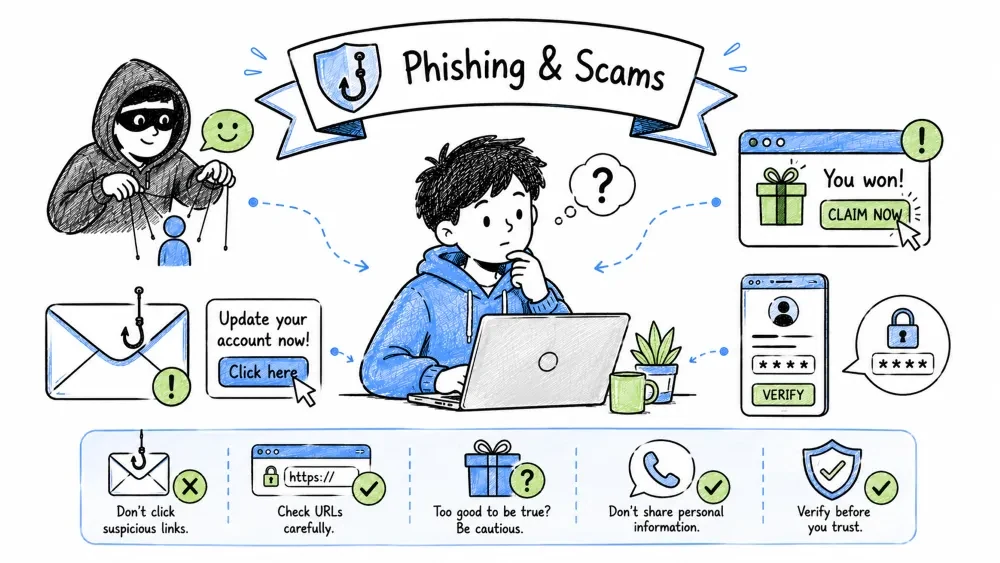
By the end of this tutorial, you will be able to:
Social Engineering: Manipulating people into divulging confidential information or performing actions that compromise security, by exploiting human psychology rather than technical vulnerabilities.
| Principle | Mechanism | Example |
|---|---|---|
| Authority | Compliance with perceived experts/officials | "IT Support needs your password" |
| Urgency/Scarcity | Bypass critical thinking with time pressure | "Account closes in 1 hour!" |
| Fear/Intimidation | Threat of loss/harm triggers fight-or-flight | "Police warrant for your arrest" |
| Greed/Reward | Promise of gain overrides skepticism | "You've won $10,000!" |
| Curiosity | Information gap demands closure | "You won't believe this video" |
| Social Proof | "Everyone else is doing it" | "10,000 people already claimed" |
| Reciprocity | Obligation to return favors | "Free gift, just pay shipping" |
| Liking/Similarity | Trust people like us | "Fellow veteran/parent/student" |
Attack Vector: The path or method an attacker uses to deliver a social engineering attack (e.g., email, phone, SMS, in-person).
┌─────────────────────────────────────────────────────────────────┐
│                    SOCIAL ENGINEERING CHANNELS                  │
├──────────────────┬──────────────────┬───────────────────────────┤
│   EMAIL          │   PHONE/VOICE    │   SMS/MESSAGING           │
│   (Phishing)     │   (Vishing)      │   (Smishing)              │
├──────────────────┼──────────────────┼───────────────────────────┤
│ • Spear phishing │ • Tech support   │ • Package delivery        │
│ • Whaling (execs)│ • Bank fraud     │ • Bank alerts             │
│ • BEC (Business  │ • IRS/government │ • 2FA code requests       │
│   Email Comp.)   │ • Kidnapping     │ • "Wrong number" scams    │
│ • Clone phishing │ • Romance        │ • App verification codes  │
└──────────────────┴──────────────────┴───────────────────────────┘
                              ↓
┌─────────────────────────────────────────────────────────────────┐
│                    IN-PERSON / PHYSICAL                         │
├─────────────────────────────────────────────────────────────────┤
│ • Tailgating (following into secure area)                       │
│ • Pretexting (fake identity: inspector, delivery, IT)           │
│ • Baiting (infected USB drives left in parking lot)             │
│ • Shoulder surfing (watching PIN/password entry)                │
│ • Dumpster diving (trash for documents)                         │
└─────────────────────────────────────────────────────────────────┘
Phishing: A social engineering attack using fraudulent communications (typically email) that appear to come from a trusted source to steal sensitive data like login credentials or financial information.
SLAM Method: A 4-step framework for analyzing suspicious messages — Sender, Links, Action, Message.
Sender Verification: The process of confirming the true origin of a message by analyzing email headers, domain authenticity, and authentication records (SPF/DKIM/DMARC).
## Email Header Analysis
1. Display Name ≠ Email Address
   - "Microsoft Security" <security@microsoft-services-xyz.com>
   - "Amazon" <orders@amazon.com> (but verify domain)

2. Check SPF/DKIM/DMARC (View Source → Headers)
   - Received-SPF: pass / fail / softfail
   - DKIM: pass / fail
   - DMARC: pass / fail

3. Domain Analysis
   - Subdomain spoofing: security.microsoft.com.phishersite.com
   - Typosquatting: micros0ft.com, amaz0n-services.com
   - Cousin domains: microsoft-security.com, amazon-payments.net
   - Legitimate: microsoft.com, amazon.com, google.com

4. Tools
   - MXToolbox.com — Email health check
   - DNSViz.com — DNSSEC validation
   - VirusTotal.com — Domain reputation
Link Analysis: Examining URLs without clicking to detect spoofing, redirection, obfuscation, or malicious destinations. Attachment Analysis: Assessing file types and content for malware risk before opening.
## Link Analysis (NEVER CLICK — HOVER/COPY)
1. Hover → Check actual URL in status bar
2. Copy link → Paste in text editor → Analyze
3. URL Structure:
   - https://legitimate.com.malicious.com/path → Goes to malicious.com
   - https://malicious.com/legitimate.com → Goes to malicious.com
   - https://legitimate.com → Goes to legitimate.com

4. Red Flags in URLs:
   - IP address: http://192.168.1.1/login
   - URL shorteners: bit.ly, tinyurl, t.co (hide destination)
   - @ symbol: https://user:pass@malicious.com@legitimate.com
   - Long random subdomains: https://x7k9m2.phisher.com
   - Data URIs: data:text/html,<script>...

5. Attachment Risks (High → Low):
   .exe .scr .bat .cmd .com .pif .msi .jar → EXECUTABLE
   .zip .rar .7z .iso .img → MAY CONTAIN EXECUTABLES
   .pdf .docx .xlsx .pptx → MACROS/EXPLOITS
   .txt .jpg .png .mp4 → GENERALLY SAFE (but not 100%)
Action Analysis: Identifying what the message wants you to do (click, download, reply, call, pay) and evaluating whether that request is legitimate, urgent, or a known high-risk pattern.
## High-Risk Actions (Verify Independently!)
 - "Log in to verify/secure your account"
 - "Update payment/billing information"
 - "Download attachment to view details"
 - "Reply with password/SSN/PIN/2FA code"
 - "Call this number immediately"
 - "Send money/gift cards/crypto"
 - "Grant remote access to your computer"
 - "Install this security update/software"
 - "Confirm personal information"
 - "Click to claim prize/refund/package"

## Legitimate Companies NEVER:
 - Ask for password via email/link
 - Ask for 2FA codes via phone/email
 - Demand immediate payment via gift cards/crypto
 - Threaten arrest/deportation/account closure
 - Send unsolicited attachments requiring macros
Message Content Analysis: Examining linguistic cues (greeting, grammar, urgency, emotional manipulation) and structural elements (branding, formatting, specificity) to detect deception.
## Linguistic Red Flags
 - Generic greeting: "Dear Customer", "Hello User", "Hi"
 - Poor grammar, spelling, capitalization (but sophisticated attacks are well-crafted)
 - Urgency/threat language: "Immediate action required", "Final notice"
 - Too good to be true: "Unexpected refund", "Inheritance", "Lottery win"
 - Emotional manipulation: Fear, greed, curiosity, sympathy
 - Vague details: No account numbers, order IDs, specific dates
 - Mismatched branding: Wrong logo, colors, formatting

## Sophisticated Attacks (Harder to Detect)
 - Spear phishing: Uses your name, role, recent activity
 - Clone phishing: Copies legitimate email, swaps link/attachment
 - BEC: Compromised executive email requesting wire transfer
 - Conversation hijacking: Replies to real email thread
Phishing Dissection: Step-by-step breakdown of real-world phishing attempts applying the SLAM framework to demonstrate how attackers craft convincing lures.
From: "Microsoft Security" <security@micros0ft-services.com>
Subject: Unusual sign-in activity — Action Required

Body:
Dear User,

We detected a sign-in from a new device in Moscow, Russia.
If this wasn't you, secure your account immediately:

[Secure My Account] → https://account.live.com.phishersite.com/login

This link expires in 24 hours.

Microsoft Security Team
Analysis:
| Check | Result |
|---|---|
| Sender Domain | micros0ft-services.com (typosquatting) |
| Link Destination | account.live.com.phishersite.com (subdomain spoof) |
| Urgency | 24-hour expiry |
| Greeting | "Dear User" |
| Action | Credential entry |
From: "John Smith, CEO" <john.smith@company.com> (COMPROMISED ACCOUNT)
To: Finance Department
Subject: Urgent: Wire Transfer Needed Today

Body:
Hi [Name],

I'm in a board meeting and need you to process an urgent wire transfer
for a confidential acquisition. Details:

Beneficiary: Global Tech Solutions LLC
Bank: Chase Bank
Routing: 021000021
Account: 9876543210
Amount: $47,500.00
Reference: Project Atlas - CONFIDENTIAL

Send confirmation once done. I'll explain later.

Sent from my iPhone
Analysis:
| Check | Result |
|---|---|
| Sender | Compromised legitimate account |
| Urgency | "Urgent", "Today", "in a meeting" |
| Secrecy | "Confidential", "explain later" |
| Action | Wire transfer to new beneficiary |
| Verification | No phone/in-person confirmation |
Defense: Mandatory out-of-band verification (call known number, in-person) for financial changes.
From: +1-555-0199
Body:
USPS: Your package has a delivery exception.
Update address: usps-delivery-update.com/abc123
Expires in 6 hours.
Analysis:
| Check | Result |
|---|---|
| Sender | Random phone number |
| Domain | usps-delivery-update.com (not usps.com) |
| Urgency | 6 hours |
| Context | Unsolicited, no tracking number |
Scam Category: A recurring pattern of fraud with consistent tactics, targets, and psychological triggers. Recognizing categories enables faster identification of new variants.
Tech Support Scam: Fraudsters pose as technical support from legitimate companies (Microsoft, Apple, antivirus vendors) to trick victims into granting remote access or paying for fake services.
## Pop-up / Cold Call / Search Result Ad
"You have a virus!" → Call 1-800-XXX-XXXX
"Microsoft detected malware" → Grant remote access
"Renew your antivirus" → Pay $299 for fake software

## Reality:
 - Microsoft/Google/Apple NEVER call you
 - Legitimate security alerts don't have phone numbers
 - Remote access = full control of your computer
 - Payment = financial loss + identity theft risk

## Response:
 - Close browser (Task Manager if frozen)
 - Don't call the number
 - Run legitimate antivirus scan
 - Report: FTC.gov/complaint, Microsoft scam report form
Romance Scam / Pig Butchering: Long-con fraud where attackers build fake romantic relationships to eventually introduce fraudulent investment schemes, "fattening" the victim before stealing funds.
## Pattern:
1. Match on dating app/social media/LinkedIn
2. Move to WhatsApp/Telegram/Signal (off-platform)
3. Build trust over weeks (love bombing)
4. Introduce "investment opportunity" (crypto, forex, gold)
5. Show fake profits on controlled platform
6. Victim invests more → Can't withdraw → Ghosted

## Red Flags:
 - Too perfect, fast emotional escalation
 - Refuses video call / broken camera excuses
 - Mentions investments, trading, "mentor", "uncle in finance"
 - Screenshots of profits, lifestyle photos
 - Pressure to invest more for "bonus" or "unlock"
 - Platform unknown, no regulation, withdrawal issues
Job/Task Scam: Fake employment offers that require upfront payments (equipment, training), involve money mule activities (reshipping, check fraud), or harvest personal data under the guise of hiring.
## Types:
## Legitimate Jobs:
 - "Data entry" / "Remote work" → Pay for equipment/training
 - "Mystery shopper" → Deposit fake check, wire back difference
 - "Reshipping" → Receive stolen goods, forward (money mule)
 - "Crypto trading" → Deposit to "company wallet"
 - "Interview via Telegram/Whisper" → Not legitimate platform

## Legitimate Jobs:
 - Company email domain (not @gmail.com)
 - Verifiable website, LinkedIn presence
 - No upfront payments ever
 - Interview on Zoom/Teams/phone with real people
 - Offer letter with details, background check
Investment/Crypto Scam: Fraudulent schemes promising guaranteed or outsized returns through fake trading platforms, "AI bots," celebrity endorsements, or recovery services — often irreversible due to crypto's nature.
## Patterns:

 - "Guaranteed returns" / "Risk-free" / "AI trading bot"
 - Celebrity endorsement (fake Elon Musk, etc.)
 - "Pump and dump" groups, "presale", "airdrop"
 - Fake exchanges/wallets (phishing for seed phrases)
 - "Recovery services" for lost crypto (scam on top of scam)

## Defense:
 - Not your keys, not your coins (self-custody)
 - Verify exchange: CoinMarketCap, CoinGecko, regulatory license
 - Never share seed phrase / private key / 2FA codes
 - If it sounds too good to be true — it is
Authority Impersonation Scam: Attackers pose as government agencies (IRS, SSA, police, FBI) using threats of arrest, fines, or legal action to coerce immediate payment via gift cards, wire, or crypto.
## IRS / Tax Scams:

 - "You owe back taxes, pay now or arrested"
 - Payment: Gift cards, wire, crypto
 - IRS NEVER: Calls demanding immediate payment, threatens arrest, asks for gift cards

## Social Security:

 - "Your SSN is suspended/frozen"
 - "We need to verify your SSN"
 - SSA NEVER: Threatens, demands payment, suspends SSN

## Police/FBI:

 - "Warrant for your arrest, pay fine"
 - "Your identity used in crime"
 - Law enforcement NEVER: Demands payment over phone, asks for gift cards
Verification Framework: A structured, repeatable process for independently confirming the legitimacy of a request before taking action, replacing trust with evidence.
STOP Method: A 4-step mental checkpoint — Stop, Think, Observe, Proceed — to interrupt automatic compliance and engage critical thinking before responding to any suspicious request.
S — STOP: Don't click, don't reply, don't call, don't pay
T — THINK: Does this make sense? Expected? Urgency tactic?
O — OBSERVE: Check sender, links, language, requests
P — PROCEED: Only after independent verification
Independent Verification: Confirming legitimacy through a separate, trusted channel (official website, known phone number, in-person) rather than using contact info or links provided in the suspicious message.
## For Emails:
 - Go directly to website (type URL, don't click link)
 - Log in to account directly → Check notifications
 - Call company on number from official website/statement
 - Check official app for alerts

## For Phone Calls:
 - Hang up → Call back on official number
 - Don't trust Caller ID (spoofed)
 - Ask for name/department → Call main line to verify

## For Messages (SMS/WhatsApp/Telegram):
 - Don't click links
 - Verify through official channel
 - Check if contact info matches known records

## For Websites:
 - Check URL carefully (HTTPS, correct domain, no subdomain tricks)
 - Look for contact info, physical address, privacy policy
 - Search "[company] scam" "[website] reviews"
 - Check domain age: whois.domaintools.com (new = suspicious)
 - SSL certificate: Click padlock → Valid? Issued to correct org?
BEC (Business Email Compromise) Defense: Organizational policies requiring out-of-band verification for financial changes, vendor updates, and executive requests to prevent wire fraud from compromised or spoofed emails.
## Mandatory Procedures:
 - All financial changes: Out-of-band verification (phone/video/in-person)
 - New vendor/bank details: Verify with known contact at vendor
 - Executive requests: Confirm via separate channel (not email reply)
 - Urgent/secret requests: Escalate to manager/security
 - Invoice changes: Three-way match (PO, receipt, invoice)
 - Wire transfers: Dual approval, verification callback
Reporting & Recovery: The process of notifying authorities/platforms about scams to protect others, and taking immediate steps to limit damage, recover accounts, and restore financial/identity security after a successful attack.
Reporting Channels: Official platforms and authorities (FTC, IC3, APWG, platform abuse teams) that collect phishing/scam data, take down malicious infrastructure, and support investigations. | Type | US | International | |------|-----|---------------| | Phishing Email | reportphishing@apwg.org, spam@uce.gov | National CERT | | Phishing Website | Google Safe Browsing, PhishTank | APWG, URLhaus | | SMS Spam | Forward to 7726 (SPAM) | Ofcom (UK), ACMA (AU) | | Identity Theft | IdentityTheft.gov | National equivalents | | Financial Fraud | IC3.gov (FBI), FTC.gov | Local police + financial regulator | | Tech Support Scam | FTC.gov/complaint, Microsoft report | Platform abuse forms | | Social Media Scam | Platform report tools | Platform report tools |
Victim Response Plan: Immediate containment (disconnect, change passwords, enable 2FA), financial protection (credit freeze, fraud alerts, bank notification), account recovery, and long-term monitoring.
## IMMEDIATE
 - Disconnect device from internet
 - Change passwords from clean device (email, banking, password manager)
 - Enable 2FA everywhere (authenticator app, not SMS)
 - Contact bank/credit cards — freeze cards, dispute charges
 - Run malware scan (Malwarebytes, Defender Offline)

## FINANCIAL
 - Credit freeze (all 3 bureaus)
 - Fraud alert on credit reports
 - Monitor accounts daily
 - File police report (get copy for creditors)
 - FTC Identity Theft Report (IdentityTheft.gov)

## ACCOUNT RECOVERY
 - Use account recovery forms (Google, Microsoft, Apple, Meta)
 - Check recovery email/phone not changed
 - Review connected apps/sessions — revoke all
 - Check forwarding rules/filters in email

## LONG-TERM
 - Credit monitoring (free: Credit Karma, Experian)
 - IRS Identity Protection PIN
 - SSA "my Social Security" account
 - Document everything: timeline, contacts, case numbers
From: "Netflix Support" <support@netflix-billing.com>
Subject: Payment Declined — Account on Hold

Dear Valued Customer,

We were unable to process your monthly payment of $15.99.
Your account will be suspended in 24 hours if not resolved.

Update your payment method now:
https://netflix.com.update-billing.info/secure/login

For billing questions, reply to this email.

Netflix Customer Service
Questions:
Red Flags:
Verification: Go to netflix.com directly in browser → Account → Billing Details. Or call Netflix from official site.
Call: "This is Microsoft Technical Support. We're seeing errors from your computer. I need to connect remotely to fix it. Go to teamviewer.com and give me the code."
Your Response: _________________
Correct Response: "Microsoft doesn't make unsolicited calls. I'll hang up and report this." → Hang up. Microsoft NEVER calls individuals. No legitimate tech support cold-calls.
SMS: "Chase Bank: Your debit card ending in 4567 has been locked. Verify identity: chase-verify.com/abc123"
Analyze: _________________
Red Flags:
Action: Delete. Check Chase app directly or call number on back of card.
Save your progress and earn XP for completing tutorials.
Technology
Cyber Security & Networking
Lesson group
Digital Safety
Progress
80% complete

