Preparing your learning space...
50% through Mobile Security tutorials
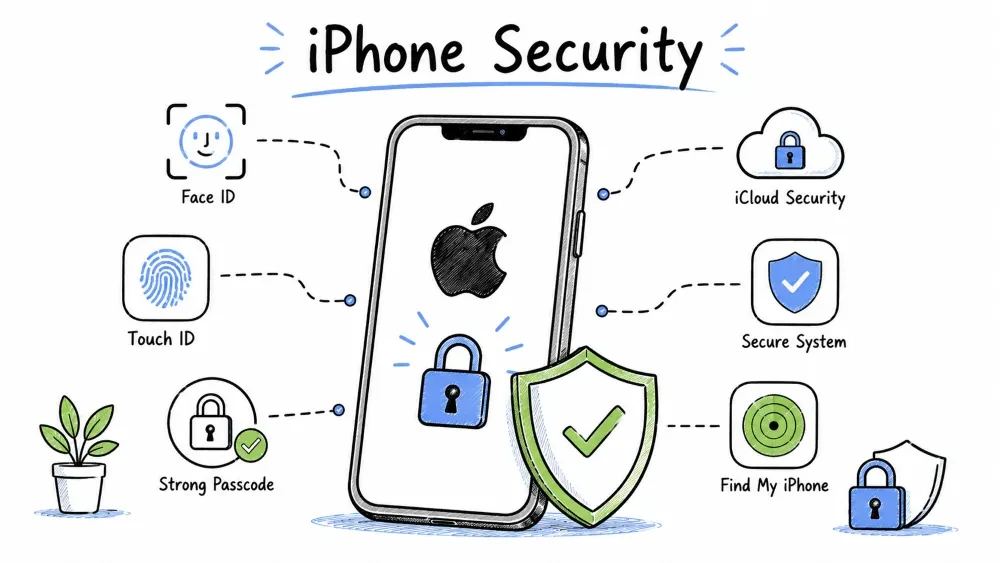
iOS is a closed-source operating system developed by Apple. Unlike Android, Apple controls both the hardware and the software — this tight integration gives iOS significant security advantages. From the Secure Enclave to the App Store review process, every layer is designed with security as a priority.
With roughly 28% of the global smartphone market, iPhones are disproportionately targeted by sophisticated attackers (state-sponsored spyware, targeted exploitation) because iOS users tend to be higher-value targets.
A detailed look at iOS's layered security model — from the Secure Enclave hardware to kernel protections.
The Secure Enclave is a dedicated hardware coprocessor found in all A7+ chips (iPhone 5s and newer). It is isolated from the main CPU — even iOS itself cannot directly access it.
┌──────────────────────────────────────────────────────┐
│                 A-Series / M-Series Chip              │
│                                                        │
│  ┌────────────────────────┐  ┌──────────────────────┐  │
│  │     MAIN CPU (AP)      │  │   SECURE ENCLAVE (SE) │  │
│  │                        │  │                      │  │
│  │  • Runs iOS            │  │  • Encryption keys   │  │
│  │  • Apps run here       │◄─►│  • Biometric data    │  │
│  │  • User data cached    │  │  • Passcode           │  │
│  │  • Internet accessible │  │  • Apple Pay tokens   │  │
│  │                        │  │  • NO internet access │  │
│  └────────────────────────┘  └──────────────────────┘  │
└──────────────────────────────────────────────────────┘
What the Secure Enclave protects:
Security properties:
Every iOS app runs in its own sandbox with strict limitations:
An app CANNOT access:
An app CAN access:
System files are on a separate read-only volume (since iOS 15+). This means even if an app finds a kernel exploit, it can't modify system files because the system volume is snapshotted and verified at boot.
Apple's app review is one of iOS's strongest security features.
What the review checks:
| Check Type | What They Look For |
|---|---|
| Malware scan | Automated — signatures, heuristics, suspicious patterns |
| Private API usage | Apps cannot use undocumented iOS APIs |
| Permission justification | Does the app provide a compelling reason for each permission? |
| Data collection disclosure | Accurate privacy label? |
| Policy compliance | Content, functionality, business model |
| Cryptography | Proper use of encryption APIs |
| Human review | A person actually looks at the app |
Review timeline: Average 24-48 hours (can be faster for updates).
But NOT perfect:
Certificate types:
| Type | Used For | Limits |
|---|---|---|
| Development | Developer testing on their own devices | 100 devices per account |
| Distribution | App Store apps | Must pass review |
| Enterprise | Internal company apps | No review, but abuse = revocation |
| Ad Hoc | Limited beta testing | 100 devices per build |
iOS encrypts files at rest using a hierarchy of keys:
Device UID (hardware, in Secure Enclave)
    └── Passcode-derived key (your passcode)
            └── Class keys (4 classes per file)
                    └── File keys (unique per file)
Protection classes:
| Class | When Accessible | Example Use |
|---|---|---|
| Complete Protection | Only when device unlocked | Messages, Health data, Keychain, Payment info |
| Protected Unless Open | Open file handle stays accessible; new opens need unlock | Background downloads, mail attachments |
| Protected Until First Auth | After first unlock (restarts: only emergency calls before unlock) | Most app data, settings, caches |
| No Protection | Always | Temp files, downloaded content in process |
Most sensitive data uses Complete Protection — even if the device is physically compromised, the data is unreadable until the user enters their passcode.
A hardware security feature on A12+ chips that prevents memory corruption exploits by signing pointers.
Swift's memory-safe design eliminates entire classes of vulnerabilities that plague C/C++ codebases.
A comprehensive reference of iOS security features and when they were introduced.
| Feature | Description | Available Since |
|---|---|---|
| Face ID | Secure facial recognition via TrueDepth camera | iPhone X (2017) |
| Touch ID | Fingerprint recognition | iPhone 5s (2013) |
| iMessage E2E Encryption | End-to-end encrypted messaging | iOS 5 (2011) |
| App Tracking Transparency | Apps must ask before tracking | iOS 14.5 (2021) |
| iCloud Keychain | End-to-end encrypted password manager | iOS 7 (2013) |
| Activation Lock | Device unusable without Apple ID | iOS 7 (2013) |
| Lockdown Mode | Extreme security against spyware | iOS 16 (2022) |
| Stolen Device Protection | Biometric requirement for sensitive actions | iOS 17.3 (2024) |
| USB Restricted Mode | Disables USB data when locked | iOS 11.4.1 (2018) |
| Privacy Report | Shows how apps access permissions | iOS 15.2 (2021) |
| iCloud Private Relay | VPN-like privacy for Safari (iCloud+) | iOS 15 (2021) |
| Advanced Data Protection | End-to-end encryption for most iCloud data | iOS 16.2 (2022) |
A side-by-side comparison of the two mobile operating systems across 12 security dimensions.
| Aspect | iOS | Android | Winner |
|---|---|---|---|
| OS Updates | 5-7 years, direct from Apple | 2-5 years, OEM-dependent | iOS |
| Update Adoption | 80%+ on latest within months | ~15% on latest after 6 months | iOS |
| App Sideloading | Not allowed (except EU) | Allowed with warnings | iOS (no malware vector) |
| App Review | Mandatory, human + automated | Automated only | iOS |
| Hardware Security | Secure Enclave (all devices) | Titan M (Pixel), TrustZone (others) | iOS (consistent) |
| Sandboxing | Excellent, read-only system | Good, SELinux enforced | Tie |
| Malware Risk | Very low | Low-moderate | iOS |
| Boot Security | Signed boot chain (unlockable) | Verified Boot (can unlock) | iOS (no unlock option) |
| User Control | Limited (less attack surface) | More flexibility | Android (if you trust yourself) |
| Privacy Controls | Excellent (ATT, Privacy Labels) | Good (Data Safety, Permission Manager) | Slight iOS lead |
| Customization | Limited | Extensive | Android (but more risk) |
| Cellular Security | Same (Qualcomm/Intel modems) | Same (Qualcomm/MediaTek modems) | Tie |
Threats that are particularly dangerous for iOS users — from state-sponsored spyware to SIM swapping.
What it is: State-sponsored spyware developed by NSO Group (Israel). Sold to governments for "counter-terrorism."
How it infects:
Who it targets:
How to protect against it:
How enterprise certificates meant for internal apps are abused to bypass App Store review.
Real-world examples:
Fake Apple ID login pages designed to steal your Apple account credentials — the #1 threat to iOS users.
Common tactics:
Why it works: Apple ID controls everything — iCloud backup, Find My iPhone, app purchases, Apple Pay. Losing Apple ID = losing control of your device.
Protection:
Malicious USB charging stations that can steal data or install malware while charging your phone.
What it is: Malicious USB charging stations that:
How to protect:
An attack where a thief tricks your carrier into transferring your phone number to their SIM card.
What it is: Attacker convinces your mobile carrier to transfer your phone number to a new SIM (or eSIM) that they control.
Why it's dangerous (especially for iPhone users):
Who's at risk:
Protection:
An optional extreme security mode that locks down attack vectors used by state-sponsored spyware.
Who should enable it:
Trade-offs: Many websites and web apps won't work properly. Some everyday functionality is reduced. Enable only if the threat model justifies it.
Practical steps organized by urgency — protect your iPhone starting today.
The most critical actions — complete these right now for immediate protection.
Update to the latest iOS:
Settings → General → Software Update
If available → Download & Install
Enable Find My iPhone (with Activation Lock):
Settings → [Your Name] → Find My → Find My iPhone → ON
ALSO: Find My Network → ON
ALSO: Send Last Location → ON (sends location when battery critically low)
Enable 2FA on Apple ID:
Settings → [Your Name] → Password & Security → Two-Factor Authentication → ON
Review what's on your lock screen:
Settings → Face ID & Passcode → Enter passcode
// Check "Allow Access When Locked" — disable anything sensitive
// Recommended: Turn off Today View, Notification Center, Control Center, USB Accessories
Important privacy and security configurations — schedule time this week to complete.
Review Privacy settings:
Settings → Privacy → Check each category
Which apps have camera, mic, location? Disable unnecessary access.
Check App Tracking Transparency:
Settings → Privacy → Tracking
Toggle OFF: "Allow Apps to Request to Track"
(This automatically denies all tracking requests)
Review iCloud Backup settings:
Disable USB Accessories when locked:
Settings → Face ID & Passcode → USB Accessories → OFF
(Prevents forensic USB tools from working when phone is locked)
Advanced security configurations for users who want maximum protection.
Enable Stolen Device Protection (iOS 17.3+):
Settings → Face ID & Passcode → Stolen Device Protection → ON
(Requires Face ID for sensitive actions + 1-hour delay for critical changes)
Review Apple ID devices:
Settings → [Your Name] → Scroll to bottom → See all devices
Remove any devices you don't recognize or no longer use.
Check for Configuration Profiles:
Settings → General → VPN & Device Management
Should show: "No profiles installed" (unless you're on a corporate device)
Unknown profile? Remove it immediately — could be spyware.
Enable Advanced Data Protection (iOS 16.2+):
Settings → [Your Name] → iCloud → Advanced Data Protection → ON
(End-to-end encryption for almost all iCloud data — even Apple can't read it)
⚠️ Requires all trusted devices to be updated to latest OS.
Use a security key for Apple ID (advanced users):
A handy lookup table for common iOS security settings and their navigation paths.
| Task | iOS Path |
|---|---|
| Check iOS version | Settings → General → About → iOS Version |
| Update iOS | Settings → General → Software Update |
| Enable Find My iPhone | Settings → [Name] → Find My → Find My iPhone |
| Enable Stolen Device Protection | Settings → Face ID & Passcode → Stolen Device Protection |
| Review permissions | Settings → Privacy → [Category] |
| Enable Advanced Data Protection | Settings → [Name] → iCloud → Advanced Data Protection |
| Check storage usage per app | Settings → General → iPhone Storage |
| Check battery health | Settings → Battery → Battery Health & Charging |
| Privacy Report | Settings → Privacy → App Privacy Report |
| Emergency SOS | Settings → Emergency SOS → Configure |
A historical look at major iOS vulnerabilities and how quickly Apple patched them.
| Year | Vulnerability | Impact | Patched In |
|---|---|---|---|
| 2014 | #gotofail (SSL bug) | HTTPS connections could be intercepted | iOS 7.0.6 |
| 2015 | XcodeGhost | Malicious apps in App Store (modified Xcode injected code) | Removed from store |
| 2016 | Pegasus (Trident) | Zero-click spyware via iMessage | iOS 9.3.5 |
| 2019 | Checkm8 | BootROM exploit (A5-A11) | Cannot be patched (hardware) |
| 2020 | SockPuppet | Kernel memory corruption | iOS 13.5 |
| 2021 | FORCEDENTRY | iMessage RCE (Pegasus variant) | iOS 14.8 |
| 2023 | Triangulation | 4 zero-day chain (Kaspersky discovered) | iOS 16.5.1 |
| 2024 | — | Ongoing zero-day discoveries | Latest iOS recommended |
Note: Apple is very responsive to reported vulnerabilities. CVEs (Common Vulnerabilities and Exposures) are typically patched within 1-2 months of responsible disclosure.
Quick answers to the most common questions about iOS security.
| Question | Answer |
|---|---|
| Do I need antivirus on iPhone? | No. iOS sandboxing and app review make traditional antivirus ineffective. |
| Is Face ID secure? | Yes, very. False positive rate is 1 in 1,000,000. It uses depth-sensing, not just a camera. |
| Can Apple read my iCloud data? | Some (iCloud Drive, photos) — unless Advanced Data Protection is enabled. iMessage, Health, Keychain are always E2E encrypted. |
| Is iMessage really secure? | Yes, E2E encrypted between Apple devices. To Android? Falls back to SMS (NOT secure). |
| Should I jailbreak? | No if you care about security. Jailbreaking bypasses ALL iOS security. |
| Is the EU DMA sideloading safe? | Apple has mitigations (notarization, disclosures). Still higher risk than App Store. |
| Can a thief reset my Apple ID? | With your passcode? Yes. With Stolen Device Protection (iOS 17.3+)? Much harder — Face ID required for critical changes. |
Bottom Line: iOS is the most secure mass-market mobile OS available. The Secure Enclave, sandboxing, App Store review, and Apple's tight hardware-software integration create an extremely strong defense. The remaining threats are:
- Phishing — The #1 threat to iOS users (Apple ID credentials).
- State-level spyware — Only if you're a high-value target (mitigate with Lockdown Mode).
- Physical theft with passcode observation — Mitigate with Stolen Device Protection.
- SIM swapping — Mitigate with SIM PIN and non-SMS 2FA.
For 99% of users: keep iOS updated, don't fall for phishing, enable Find My iPhone, and you're well protected.
Objective: Perform a comprehensive security audit on an iPhone.
Checklist — Fill in each:

[ ] iOS Version: _______________
    Latest available: _______________
    (Settings → General → Software Update)

[ ] Auto-Updates: ON / OFF
    (Settings → General → Software Update → Automatic Updates)

[ ] Find My iPhone: ON / OFF
    (Settings → [Name] → Find My)

[ ] Find My Network: ON / OFF

[ ] Send Last Location: ON / OFF

[ ] Stolen Device Protection: ON / OFF
    (Settings → Face ID & Passcode → Stolen Device Protection)
    (iOS 17.3+ only)

[ ] USB Accessories: ON / OFF
    (Settings → Face ID & Passcode → USB Accessories)
    Should be OFF for maximum security.

[ ] Lock Screen Access:
    What is accessible when locked?
    [ ] Today View [ ] Notification Center [ ] Control Center
    [ ] Wallet [ ] Return Missed Calls [ ] USB Accessories
    Recommended: Disable everything except Wallet (for transit pass)

[ ] Two-Factor Authentication: ON / OFF
    (Settings → [Name] → Password & Security)

Total security score: ___ / 9 checks passed
Objective: See how apps are actually using your permissions.
Step 1: Enable Privacy Report:
         Settings → Privacy → App Privacy Report → Turn ON

Step 2: Use your phone normally for 2-3 days.

Step 3: Review:
         Settings → Privacy → App Privacy Report

         Which app accessed location most? _______________
         Which app accessed the microphone unexpectedly? _______________
         Any app accessing data at strange hours (e.g., 3am)? _______________

Step 4: Revoke any unexpected permissions found.
Settings → Face ID & Passcode → Enter passcode →
Stolen Device Protection → Turn ON

Verify these are now protected:
  • Saved passwords — try to access via Settings → Passwords
    Does it ask for Face ID instead of just passcode? Yes / No
  • Verify the 1-hour delay is explained in the settings.
Step 1: Set a SIM PIN:
         iOS: Settings → Cellular → SIM PIN → Turn ON
         Set a strong PIN (NOT your phone passcode!)

Step 2: Call your carrier → Ask about "account PIN" for SIM transfer protection.

Step 3: Check your 2FA methods:
         Do you use SMS for 2FA on important accounts? Yes / No
         If YES → Consider switching to an authenticator app (less vulnerable to SIM swapping).
Save your progress and earn XP for completing tutorials.
Technology
Cyber Security & Networking
Lesson group
Mobile Security
Progress
50% complete

