Preparing your learning space...
60% through Network Security tutorials
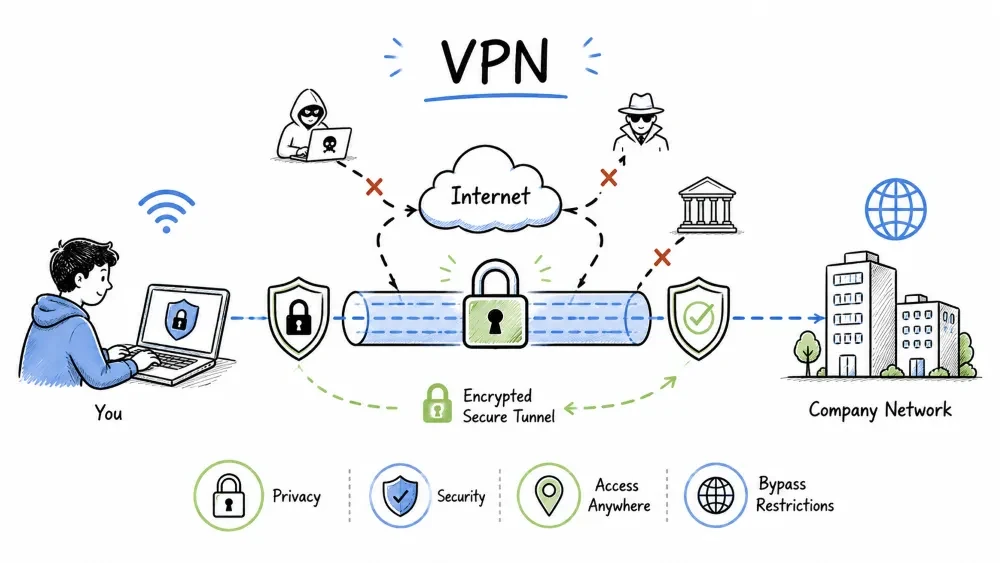
A Virtual Private Network (VPN) creates an encrypted, secure tunnel between a device and a network over the public internet. VPNs ensure privacy, data integrity, and authentication for data transmitted across untrusted networks.
A VPN extends a private network across a public network, enabling users to send and receive data as if their devices were directly connected to the private network.
A VPN creates a secure, encrypted tunnel between your device and a remote server, hiding your online activity from your ISP, hackers, and anyone else on the network.
      ↓                                      ↓
   Local ISP sees                      Target website sees
   encrypted data                      VPN server's IP
VPN protocols are the underlying technologies that define how data is encapsulated, encrypted, and transmitted through the VPN tunnel. Each protocol offers a different trade-off between security, speed, and compatibility.
| Protocol | Port | Encryption | Speed | Use Case |
|---|---|---|---|---|
| OpenVPN | 1194 UDP/TCP | AES-256 | Good | General, high security |
| WireGuard | 51820 UDP | ChaCha20 | Fastest | Modern, lightweight |
| IPsec IKEv2 | 500/4500 UDP | AES-256 | Fast | Mobile devices |
| L2TP/IPsec | 1701 TCP | AES-256 | Slow | Legacy systems |
| PPTP | 1723 TCP | MPPE-128 | Fast | DEPRECATED — insecure |
| SSTP | 443 TCP | AES-256 | Good | Windows, SSL-based |
Security:  WireGuard ≥ OpenVPN ≥ IKEv2 > L2TP > PPTP
Speed:     WireGuard > IKEv2 > OpenVPN > L2TP > PPTP
Setup:     WireGuard > PPTP > OpenVPN > IKEv2 > L2TP
WireGuard is the modern standard — faster, simpler, and audited. OpenVPN remains the most widely compatible.
Different use cases require different VPN architectures — from individual remote access to connecting entire branch offices.
Individual users connect to a corporate network from remote locations.
[Employee Laptop] → [Internet] → [VPN Gateway] → [Corporate Network]
Use Case: Remote workers accessing internal resources.
Connects entire networks to each other (branch to HQ).
[Branch Office A] ←→ [Internet] ←→ [Head Office]
     ↓                                       ↓
  [VPN Gateway]                         [VPN Gateway]
Use Case: Connecting branch offices across geographic locations.
Software installed on the user's device.
Examples: NordVPN, ExpressVPN, ProtonVPN, corporate VPN clients.
Accessed through a web browser — no client installation needed.
[User Browser] → [HTTPS] → [SSL VPN Gateway] → [Internal App]
Use Case: Quick access to web applications without client deployment.
VPN encryption uses a combination of symmetric encryption (for data), asymmetric encryption (for key exchange), and HMAC (for integrity) to ensure complete protection.
| Algorithm | Key Size | Status |
|---|---|---|
| AES-256 | 256-bit | Industry standard |
| ChaCha20 | 256-bit | Modern, fast (WireGuard) |
| 3DES | 168-bit | Deprecated |
Setting up a VPN requires configuring both the server and client with matching encryption keys, IP assignments, and connection parameters. Below are examples for WireGuard and OpenVPN.
[Interface]
PrivateKey = <client-private-key>
Address = 10.0.0.2/24
DNS = 1.1.1.1

[Peer]
PublicKey = <server-public-key>
Endpoint = vpn.example.com:51820
AllowedIPs = 0.0.0.0/0
PersistentKeepalive = 25
client
dev tun
proto udp
remote vpn.example.com 1194
resolv-retry infinite
nobind
persist-key
persist-tun
ca ca.crt
cert client.crt
key client.key
remote-cert-tls server
cipher AES-256-GCM
auth SHA256
verb 3
VPNs are used in many scenarios — from corporate security to personal privacy — each leveraging the core features of encryption and tunneling differently.
| Use Case | Benefit |
|---|---|
| Remote Work | Secure access to company resources from home |
| Public WiFi | Encrypt traffic on untrusted networks |
| Bypassing Geo-Restrictions | Access region-locked content |
| Privacy | Hide browsing activity from ISP |
| Secure File Transfer | Encrypted communication between offices |
Even the best VPN has weaknesses. Understanding these risks — from logging policies to DNS leaks — is essential for safe usage.
| Risk | Explanation |
|---|---|
| Logging Policy | Some VPN providers log your activity |
| DNS Leaks | DNS requests bypass the VPN tunnel |
| IP Leaks | IPv6 or WebRTC can reveal real IP |
| Slower Speed | Encryption overhead + routing through VPN server |
| Free VPNs | Often monetize by selling user data |
| Blocked VPNs | Some services actively block VPN IPs |
# Check DNS leak
nslookup google.com

# Check IP
curl ifconfig.me

# WebRTC leak test
# Visit: browserleaks.com/webrtc
Allows some traffic to go through the VPN while other traffic goes directly to the internet.
Split Tunneling ON:
[Work traffic] → [VPN Tunnel] → [Corporate Network]
[Streaming] → [Direct] → [Internet]
Pros: Saves bandwidth, reduces latency for non-sensitive traffic Cons: Less secure, potential data leakage
Objective: Choose the right VPN protocol for different real-world scenarios.
Task: For each scenario below, recommend the best VPN protocol (WireGuard, OpenVPN, IKEv2, or SSL VPN) and justify your choice.
| Scenario | Recommended Protocol | Why? |
|---|---|---|
| A remote employee connects from a coffee shop on their laptop | ||
| A mobile user switches between WiFi and cellular frequently | ||
| Two branch offices need a permanent encrypted link | ||
| A temp worker needs web access to a single internal app — no software install allowed | ||
| A security-conscious company handling classified data | ||
| A home user wants maximum speed for streaming |
Bonus: For each protocol you chose, note which port it uses and whether it requires client software.
Objective: Set up a VPN connection and verify it's working correctly with no leaks.
Connect to a VPN: If you have access to a VPN service (or can use a free trial), connect to it and run these checks:
# Before connecting — note your real IP
curl ifconfig.me

# After connecting
curl ifconfig.me
# Has the IP changed?
Test for DNS Leaks: Run this test while connected to the VPN:
# Check which DNS server you're using
nslookup google.com
Test for IPv6 Leaks: Visit https://test-ipv6.com while connected to your VPN.
Document Your Findings: Fill out this report:
| Test | Before VPN | After VPN | Leak? (Yes/No) |
|---|---|---|---|
| Public IP | — | ||
| DNS Server | |||
| IPv6 Address | |||
| WebRTC Leak | (check at browserleaks.com/webrtc) |
Follow-up: If you found leaks, research how to fix them (disable IPv6 in VPN config, use DNS leak protection, etc.)
Save your progress and earn XP for completing tutorials.
Technology
Cyber Security & Networking
Lesson group
Network Security
Progress
60% complete

