Preparing your learning space...
50% through AI Basics tutorials
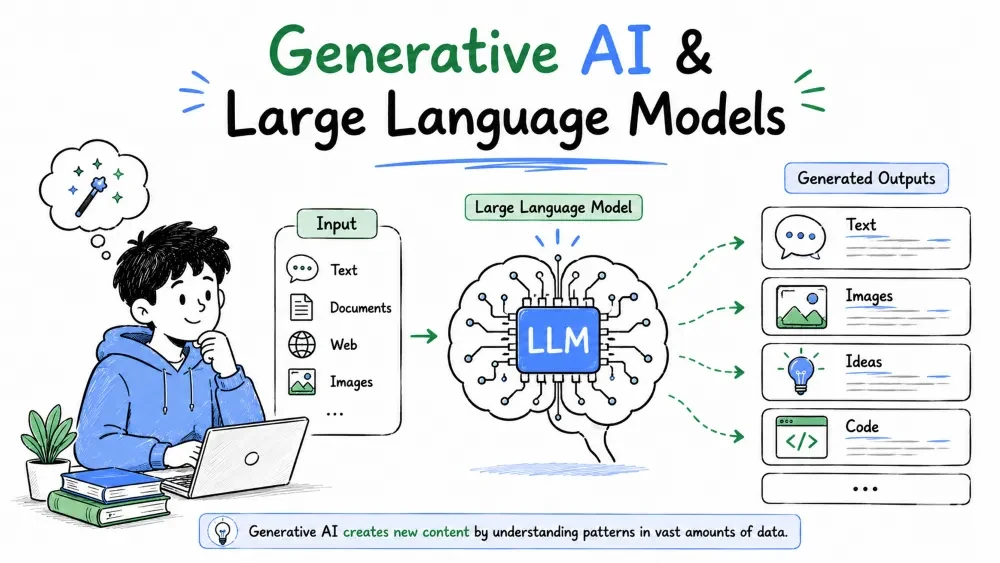
Generative AI is the branch of AI that creates new content — text, images, audio — instead of just analyzing what already exists. This tutorial explains what it is and zooms into the technology behind tools like ChatGPT and Claude: Large Language Models.
Generative AI is artificial intelligence that produces new content rather than sorting or summarizing existing content. You give it a description and it creates something that didn't exist before.
Older AI classified (is this email spam? is this photo a cat?). Generative AI generates — it writes a report, drafts an email, builds a formula, or draws an image from a text description.
Why it matters: this is the type of AI you'll actually talk to in Excel — the assistant that turns "make me a quarterly summary" into a finished piece of work.
Example — the difference:
| Task | Traditional AI | Generative AI |
|---|---|---|
| Flags it as spam or not spam | Writes a reply from scratch | |
| Photo | Tells you it contains a cat | Draws a new image of a cat |
| Excel | Suggests a chart from your data | Explains a formula in plain English or writes one from scratch |
Explanation: same input type, totally different job. One analyzes what's there; the other creates something new.
Generative AI is not one tool — it's a family of tools, each trained to create one kind of content:
Example in the Excel context:
You describe your goal — "I need a formula that calculates the growth rate between this year and last year" — and the tool writes the formula. That's generative AI creating something new from your description.
A Large Language Model (LLM) is a generative AI trained on enormous amounts of written text — books, articles, websites, documentation. From that, it learns how language works: how words relate, what answers usually follow which questions, and what a sensible response looks like.
"Large" refers to the size of the model — billions of parameters (the internal numbers the model tunes while learning). "Language model" means it models language: it has built a statistical map of how humans write.
Why it's useful: LLMs are the engine inside the chat assistants you'll use with Excel. When you understand what they're really doing, their strengths and weird mistakes both make sense.
Common misconception: the model isn't "trained on your workbook" and it isn't searching the internet live. It's applying patterns it learned during training.
Here's the single most useful mental model for an LLM: it predicts the next word (or token) in a sequence, one step at a time.
Give it "The cat sat on the," and it picks the most likely continuation — "mat" — based on everything it learned. It repeats this until the answer is complete.
Example — a tiny version:
Input:    "To calculate profit, subtract costs from"
Predicted: "revenue"  →  "To calculate profit, subtract costs from revenue."
Explanation: that's it — but done billions of times, with a context window that lets it keep track of what you said earlier in the conversation. When you ask an Excel question, it's not "looking up" the answer; it's generating the most probable useful response given your question and its training.
Why this explains the weird behavior: because it's predicting, it can sound confident even when wrong, and it tends to guess rather than say "I don't know."
You won't build an LLM — you'll use one. The common ones:
| Assistant | Made by | Typical use |
|---|---|---|
| ChatGPT | OpenAI | General chat, writing, analysis |
| Claude | Anthropic | Long documents, careful reasoning |
| Gemini | Integrated with Google Workspace | |
| Copilot | Microsoft | Built into Microsoft 365 and Excel |
Best Practice: the exact brand matters less than the skill of prompting. All of them do the same core job, and the techniques in the next tutorial work across all of them.
Because an LLM generates the most plausible answer — not a verified one — it sometimes produces fluent nonsense. This is called a hallucination: a confident-sounding answer that's wrong.
Common Mistakes:
Example — in Excel:
Ask an LLM for "the function to find the second-smallest value," and it may give a plausible but wrong function. The fix is the same as with any tool: verify. In the spreadsheet, that means pasting the formula into a test cell, not your live report.
Save your progress and earn XP for completing tutorials.
2 questions · Pass with 70%+
1To use Copilot in Excel, you need:
2What is the formula for a good prompt?
Technology
Excel with AI
Lesson group
AI Basics
Progress
50% complete

