Preparing your learning space...
75% through AI Basics tutorials
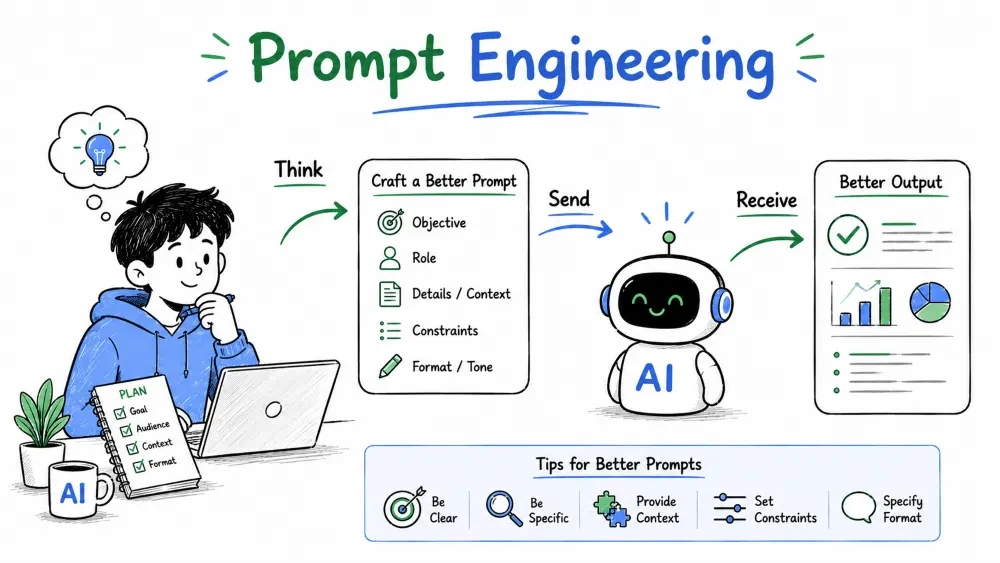
Prompt engineering is the skill of writing clear instructions so an AI gives you a useful answer the first time. It's the difference between "make me a report" and "summarize these monthly sales into a report with a summary line, top product, and growth percentage." This tutorial covers how to write prompts that work, especially for Excel.
A prompt is the instruction you give an AI. Prompt engineering is designing that instruction to get the best possible response.
It's not magic or a special code — it's the everyday skill of asking a precise, well-contextualized question. The same way you'd brief a new colleague ("here's my data, here's what I need, here's the format I want"), you brief the AI.
Why it matters: a vague prompt gives a vague or wrong answer. A specific prompt saves you rounds of back-and-forth.
Example — the same request, two ways:
| Vague prompt | Specific prompt |
|---|---|
| "Help me with my sales sheet" | "I have a sales sheet with columns Date, Region, Product, Units, Revenue. Write a formula to total Revenue for the East region only." |
Explanation: the second prompt gives the AI its job, its data, and its constraints. It can answer immediately; the first one would require ten follow-up questions.
The AI can't read your mind, your file, or your intent. Everything it knows about your task comes through the prompt.
With Excel especially, the AI hasn't opened your workbook. It knows nothing about your columns, your layout, or your numbers unless you tell it. A good prompt is the bridge between your spreadsheet and the model.
Best Practice: assume the AI has never seen your file. Every prompt should contain whatever context a smart colleague would need to help you.
A strong prompt has four parts. You don't need all four every time, but the more you use, the better the answer:
Example — a complete prompt using all four:
Act as an Excel expert. I have a sales table with columns:
Date, Region, Product, Units Sold, Revenue.

Task: write a formula for the total Revenue from the West region
in the last 90 days.

Format: give me the formula, a plain-English explanation of what
it does, and one note about what to change if the dates are in
text format.
Explanation: every part does a job. The role sets the tone, the context supplies your data, the task says exactly what to do, and the format tells the AI how to deliver it so you can use it immediately.
1. Be specific about your data. Name your columns, mention your data types, note where things get messy. "Column C has dates stored as text" is gold — it prevents a formula that won't work.
2. Give a role. "Act as a financial analyst," "act as a data-cleaner." Roles unlock the style and depth you want.
3. Provide examples (few-shot). Show the AI the kind of answer you want. For Excel, give a worked example: "Something like: =SUMIF(orders, A2:A50, "East", B2:B50)."
4. Ask for step-by-step reasoning. "Explain your reasoning step by step" makes complex answers more accurate, because the AI "thinks aloud" instead of jumping to a guess.
5. Specify the format. Formula first, then explanation. Or a table. Or bullet points. The AI will match whatever structure you name.
6. Constrain the scope. Tell it what not to do. "Only use base Excel functions, no macros," or "Don't summarize, just give the steps."
Example — the power of examples (few-shot):
Classify each order amount as Low (under $100), Medium ($100–$500),
or High (over $500). Examples:
$50 → Low
$250 → Medium
$1,200 → High

Now classify: $80, $450, $30, $900.
Explanation: the examples teach the model the exact behavior you want. Few-shot prompting almost always beats describing the rules in words alone.
For spreadsheet work, a proven template works well:
[Role] Act as an Excel expert.

[Context] My sheet is named "Sales." Columns: A=Date, B=Region,
C=Product, D=Units, E=Revenue. There are 500 rows, row 1 is headers.

[Task] Write a formula that sums Revenue (column E) for rows where
Region (column B) is "East."

[Format] Return only the formula and a two-line explanation.
Explanation: when the task is mechanical (formulas, cleanup), the context section is the most important — the AI literally cannot get it right without knowing your layout.
Best Practice: paste a few sample rows into the prompt. Even 2–3 real examples of your data tell the AI more than a paragraph of description.
The first answer is rarely the best one. Iterating is a normal part of prompting — professional prompters treat a bad answer as feedback, not failure.
How to fix a bad answer:
Example:
You: "The formula you gave me returns a #VALUE! error."
AI: "That usually happens when a range contains text. Try wrapping
the range with =SUM(VALUE(...)) or use SUMPRODUCT. Here's the fixed
version..."

You: "Perfect. Now explain why it works in one line."
Explanation: each exchange adds information the model didn't have. Iterating turns a failed answer into a learning conversation and eventually the exact result you need.
Save your progress and earn XP for completing tutorials.
2 questions · Pass with 70%+
1What are the four parts of a good prompt?
2What is "few-shot" prompting?
Technology
Excel with AI
Lesson group
AI Basics
Progress
75% complete

