Preparing your learning space...
60% through AI Data Cleaning tutorials
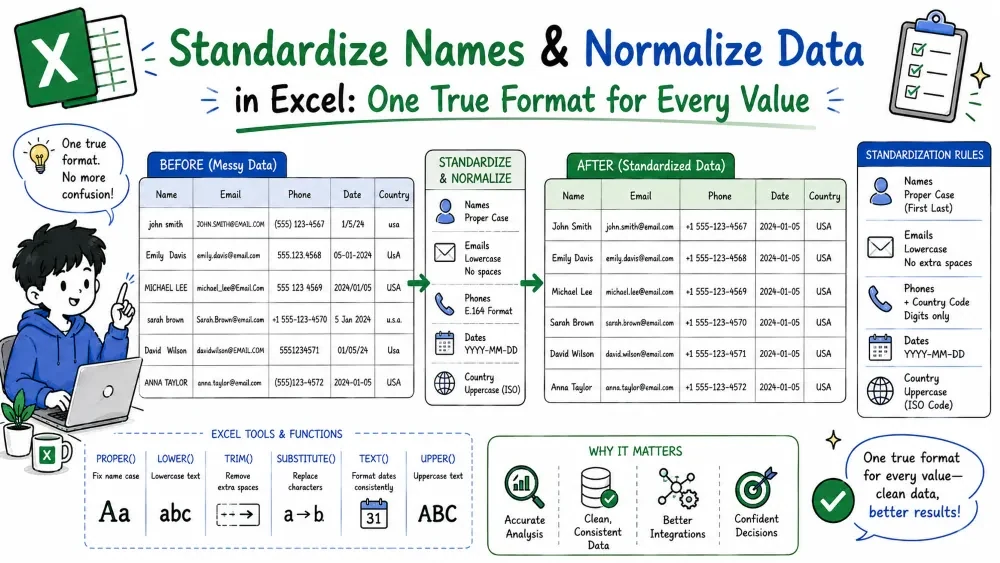
"JOHN SMITH", "John Smith", and "john smith" are the same person — but not to Excel. This tutorial makes every value follow one consistent format, using an AI prompt or Excel's own functions.
What it is. Reformatting every name to one consistent style — same casing, spacing, and order.
Why it is useful. Mixed formats split one person into many entries and break matching, mailing, and reports.
The prompts.
| Name |
|---|
| " jOHN smith " |
| SMITH, John |
Both rows become "John Smith".
=TRIM(PROPER(A2)) — TRIM clears spaces, PROPER capitalizes each word.=LOWER(A2) or =UPPER(A2).=C2 & " " & B2.Ask Copilot "Show me every name you changed" and check apostrophes ("O'Brien"), "Mc" names, and double-barreled names. Manually, scan the column for any two formats left behind.
Common mistake. Fixing casing but not the order — "John Smith" and "Smith, John" still won't match. Fix both.
Best practice. Decide one canonical format first ("First Last") and convert the whole column to it — never keep two formats in one column.
What it is. Bringing all variations of the same thing — city, product, status — to one standard value.
Why it is useful. "NYC", "New York", and "new york" are one city, but grouping them is impossible until they all read the same.
The prompts.
| City |
|---|
| NYC |
| new york |
| NY |
Every row becomes "New York".
=SUBSTITUTE(A2,"NYC","New York") for one alias at a time.| Alias | Standard |
|---|---|
| NYC | New York |
| NY | New York |
=XLOOKUP(UPPER(TRIM(A2)), D:D, E:E, TRIM(PROPER(A2))) — maps each alias to its standard, and cleanly-cases anything it can't find.
Ask Copilot "Show me the mapping you used" — this is where errors hide. Manually, check that "Lincoln" the city and "Lincoln" the car were NOT merged.
Common mistake. Trusting the AI's grouping blindly. Two genuinely different entries must not be merged — always review the mapping.
Best practice. Keep a master list of accepted values (your source of truth) and point every formula or prompt at it.
Save your progress and earn XP for completing tutorials.
3 questions · Pass with 70%+
1Turn " jOHN smith " into "John Smith":
2The reliable way to collapse "NYC", "NY", and "new york" all into "New York"?
3Best practice for standardizing a names column:
Technology
Excel with AI
Lesson group
AI Data Cleaning
Progress
60% complete

