Preparing your learning space...
80% through AI Engineering for FDEs tutorials
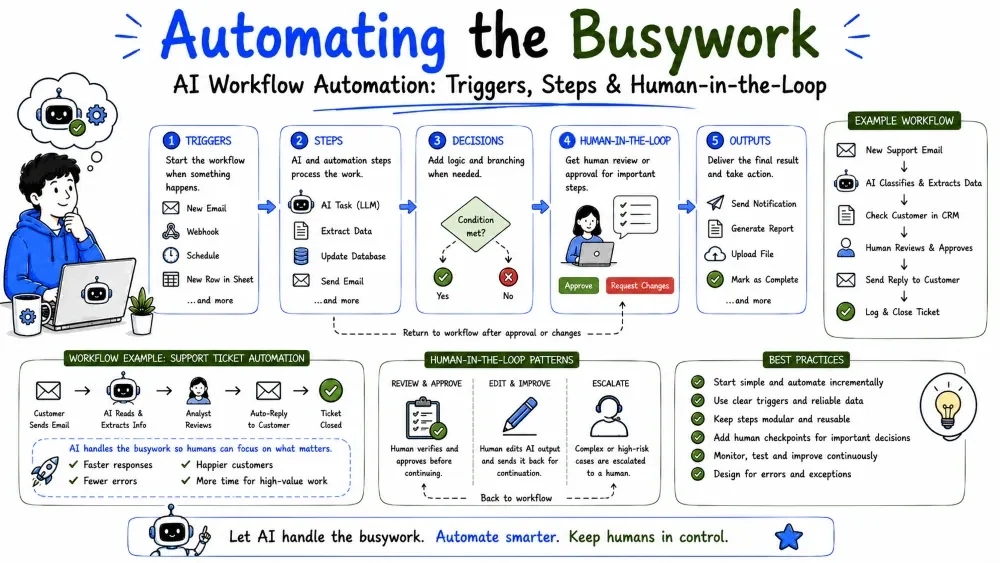
Automation means software does a task that a person used to do by hand. Add an LLM to that mix and you can automate the fuzzy, judgment-heavy steps that rules alone never could — reading a document, deciding what's urgent, drafting a reply. This tutorial covers how to turn a manual process into a reliable AI-driven workflow.
A workflow is a sequence of steps that turn an input into an outcome. AI workflow automation is a workflow where one or more of those steps is handled by an LLM — because it involves language, judgment, or content that rules can't express.
Why it's powerful: most business processes are 80% mechanical and 20% fuzzy. You automate the mechanical 80% with code and let the model handle the fuzzy 20%, dramatically shrinking manual work.
Not every step should use a model. The rule of thumb: use AI for language and judgment, use code for everything else.
| Step type | Best tool | Example |
|---|---|---|
| Read/understand free text | AI | Classify an email's intent |
| Extract named fields | AI | Pull a PO number and amount |
| Arithmetic / lookups | Code | Sum amounts, query the database |
| Decide a fixed rule | Code | if amount > 1000: escalate |
| Draft human-facing text | AI | Write a reply or summary |
| Write to a system | Code | Insert a row, send an API call |
Note: Mixing the two is the whole craft. A model is expensive, slow, and fallible — don't use it where a line of code works.
Every automated workflow has the same skeleton:
Trigger: new support email
Steps:   classify intent (AI) -> extract details (AI) -> find customer (code)
Action:  create ticket (API call)
Explanation: the trigger fires the workflow, the steps transform the input, and the action writes the result somewhere real. Design for each part separately so they stay testable.
Here's a small but complete automation: triage every incoming email, decide its category and priority, and route it.
def triage(subject, body):
    text = f"Subject: {subject}\n\n{body}"

    result = client.messages.create(
        model="claude-sonnet-5",
        max_tokens=200,
        system="Classify support email. Return ONLY JSON "
               "{category: billing|technical|other, priority: low|med|high}.",
        messages=[{"role": "user", "content": text}],
    )
    return json.loads(result.content[0].text)

# The workflow, triggered per email
category = triage(subject, body)["category"]
priority = triage(subject, body)["priority"]

if priority == "high":
    send_alert()                 # action: notify the team
create_ticket(category, priority, subject, body)   # action: write to the system
Explanation: one AI step turns the messy email into clean structured fields; the code then applies deterministic routing and writes the ticket. The model did the fuzzy part; the code did the reliable part.
Best Practice: Keep AI steps returning small structured data (Tutorial 4) so the rest of the workflow stays simple code.
The reliability of each step decides how you build the workflow:
The discipline is to push AI steps to the edge of the workflow — use the model to classify and extract up front, then let deterministic code handle the consequences. The more decisions you can push into code after the model, the more predictable the whole workflow becomes.
Weak:   AI decides the reply AND sends it (no validation)
Strong: AI drafts the reply -> code validates fields -> code sends
Explanation: the strong version lets code check the model's output before anything irreversible happens. Every check you add between the model and the action reduces risk.
AI steps fail differently than code. Plan for two kinds of failure:
Human-in-the-loop means a person reviews or approves the risky steps. It's not a sign of failure — it's the standard for anything with real consequences.
if result["priority"] == "high" or result["category"] == "other":
    queue_for_human_review(result)   # don't auto-send
else:
    create_ticket(...)               # safe path, automate
Explanation: uncertain classifications (other) and high-priority items go to a human for a final look; routine items are automated fully. You automate the confident majority and route the risky minority to a person.
Best Practice: Design the workflow so "ask a human" is a normal branch, not an afterthought. A reviewer queue is a feature, not a hack.
Save your progress and earn XP for completing tutorials.
4 questions · Pass with 70%+
1In an automated workflow, which steps should use AI?
2What is the correct shape of a workflow?
3Where should AI steps sit in the workflow?
4 Why route low-confidence or uncertain results to a human?
Technology
Forward Deployed Engineer
Lesson group
AI Engineering for FDEs
Progress
80% complete

