Preparing your learning space...
57% through Automation for FDEs tutorials
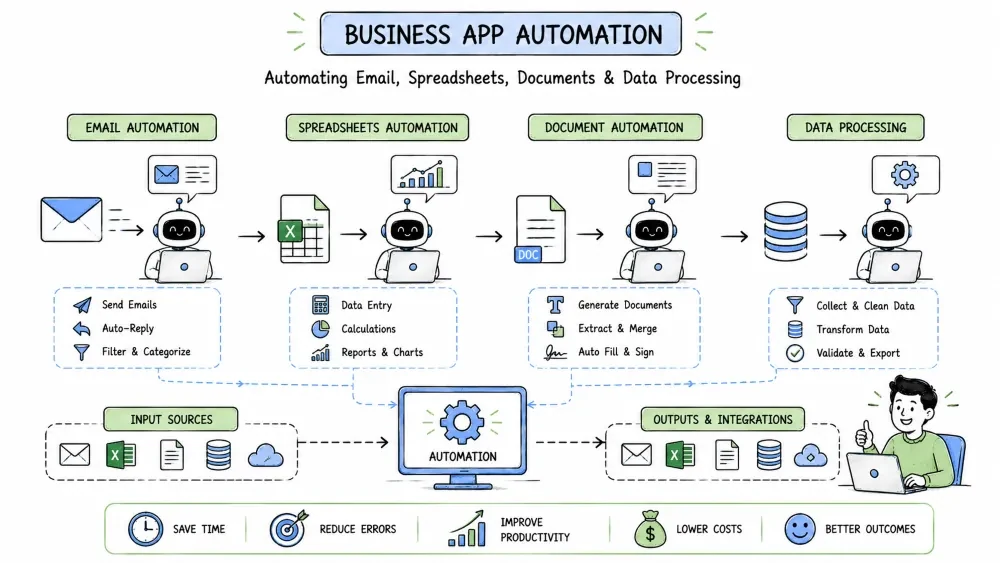
Business Application Automation focuses on automating common office and productivity tasks using specialized tools and techniques for email, spreadsheets, documents, and data processing—core activities in most business environments.
Email automation involves programmatically managing email communications—sending, receiving, filtering, and responding to emails based on predefined rules or triggers.
Why it is useful: Email automation saves significant time spent on routine email management, ensures timely responses, reduces human error, and enables personalized communication at scale.
import imaplib
import smtplib
import email
from email.mime.text import MIMEText
from email.mime.multipart import MIMEMultipart

class EmailAutomation:
    def __init__(self, email_address, password, imap_server, smtp_server):
        self.email_address = email_address
        self.password = password
        self.imap_server = imap_server
        self.smtp_server = smtp_server

    def connect_imap(self):
        self.mail = imaplib.IMAP4_SSL(self.imap_server)
        self.mail.login(self.email_address, self.password)
        self.mail.select('inbox')

    def connect_smtp(self):
        self.smtp = smtplib.SMTP(self.smtp_server, 587)
        self.smtp.starttls()
        self.smtp.login(self.email_address, self.password)

    def process_unread_emails(self):
        self.connect_imap()

        # Search for unread emails
        status, messages = self.mail.search(None, 'UNSEEN')
        email_ids = messages[0].split()

        for email_id in email_ids:
            # Fetch email
            status, msg_data = self.mail.fetch(email_id, '(RFC822)')
            raw_email = msg_data[0][1]
            email_message = email.message_from_bytes(raw_email)

            # Extract email details
            sender = email_message['From']
            subject = email_message['Subject']
            body = self.get_email_body(email_message)

            print(f"Processing email from {sender}: {subject}")

            # Check for common support queries
            if self.is_password_reset_request(subject, body):
                self.send_password_reset_instructions(sender)
            elif self.is_billing_inquiry(subject, body):
                self.send_billing_info(sender)
            else:
                # Forward to human agent for complex issues
                self.forward_to_support(sender, subject, body)

            # Mark as read
            self.mail.store(email_id, '+FLAGS', '\\Seen')

        self.mail.close()
        self.mail.logout()

    def get_email_body(self, email_message):
        if email_message.is_multipart():
            for part in email_message.walk():
                content_type = part.get_content_type()
                if content_type == "text/plain":
                    return part.get_payload(decode=True).decode()
        else:
            return email_message.get_payload(decode=True).decode()

    def is_password_reset_request(self, subject, body):
        keywords = ['reset', 'password', 'login', 'access']
        text = (subject + ' ' + body).lower()
        return any(keyword in text for keyword in keywords)

    def is_billing_inquiry(self, subject, body):
        keywords = ['invoice', 'bill', 'payment', 'charge', 'billing']
        text = (subject + ' ' + body).lower()
        return any(keyword in text for keyword in keywords)

    def send_password_reset_instructions(self, recipient):
        self.connect_smtp()
        msg = MIMEMultipart()
        msg['From'] = self.email_address
        msg['To'] = recipient
        msg['Subject'] = "Password Reset Instructions"

        body = """
        Hello,

        To reset your password, please visit:
        https://example.com/reset-password

        This link will expire in 24 hours.

        If you didn't request this reset, please ignore this email.

        Best regards,
        Support Team
        """
        msg.attach(MIMEText(body, 'plain'))

        text = msg.as_string()
        self.smtp.sendmail(self.email_address, recipient, text)
        self.smtp.quit()
        print(f"Password reset instructions sent to {recipient}")

    def send_billing_info(self, recipient):
        # Similar implementation for billing info
        pass

    def forward_to_support(self, original_sender, subject, body):
        # Forward complex issues to human support team
        pass

# Usage
# automation = EmailAutomation(
#     "support@company.com",
#     "your-app-password",
#     "imap.gmail.com",
#     "smtp.gmail.com"
# )
# automation.process_unread_emails()
Spreadsheet automation involves programmatically creating, reading, updating, and manipulating spreadsheet files (Excel, Google Sheets, CSV) to automate data entry, reporting, analysis, and distribution tasks.
Why it is useful: Spreadsheet automation eliminates manual data entry errors, ensures consistent formatting, enables real-time reporting, and allows complex data transformations that would be tedious or error-prone manually.
import pandas as pd
import openpyxl
from openpyxl.styles import Font, Alignment, PatternFill
from openpyxl.utils.dataframe import dataframe_to_rows

class SalesReportAutomator:
    def __init__(self, data_source):
        self.data_source = data_source

    def load_sales_data(self):
        # In practice, load from database, API, or CSV
        data = {
            'Region': ['North', 'South', 'East', 'West'] * 5,
            'Product': ['Widget A', 'Widget B', 'Widget C'] * 7,
            'Units_Sold': [10, 15, 8, 12, 20, 5, 25, 18] * 3,
            'Revenue': [250, 450, 160, 420, 500, 150, 500, 630] * 3
        }
        return pd.DataFrame(data)

    def generate_report(self, output_filename):
        df = self.load_sales_data()
        summary = df.groupby('Region')['Revenue'].sum().reset_index()

        # Create workbook
        wb = openpyxl.Workbook()
        ws = wb.active
        ws.title = "Sales Summary"

        # Write headers
        ws['A1'] = "Region"
        ws['B1'] = "Total Revenue"
        for cell in ['A1', 'B1']:
            ws[cell].font = Font(bold=True)
            ws[cell].fill = PatternFill(start_color="CCCCCC", end_color="CCCCCC", fill_type="solid")

        # Write data
        for i, row in enumerate(dataframe_to_rows(summary, index=False, header=False), start=2):
            ws.cell(row=i, column=1, value=row[0])
            ws.cell(row=i, column=2, value=row[1])

        wb.save(output_filename)
        print(f"Report saved: {output_filename}")

# Usage
# automator = SalesReportAutomator("sales_data")
# automator.generate_report("weekly_sales.xlsx")
Document automation involves programmatically creating, modifying, and managing documents (Word, PDF, HTML) to automate report generation, contract creation, form filling, and publishing tasks.
Why it is useful: Document automation ensures consistency, reduces manual formatting errors, enables personalized document generation at scale, and streamlines document-heavy business processes.
from docx import Document
from docx.shared import Pt
from docx.enum.text import WD_ALIGN_PARAGRAPH

class InvoiceAutomator:
    def create_invoice(self, client_name, items, invoice_number):
        doc = Document()

        # Title
        title = doc.add_paragraph()
        title.alignment = WD_ALIGN_PARAGRAPH.CENTER
        title_run = title.add_run("INVOICE")
        title_run.font.size = Pt(18)
        title_run.font.bold = True

        # Client info
        doc.add_paragraph(f"Bill To: {client_name}")
        doc.add_paragraph(f"Invoice Number: {invoice_number}")

        # Items table
        table = doc.add_table(rows=1, cols=3)
        table.style = 'Table Grid'
        header = table.rows[0].cells
        header[0].text = "Item"
        header[1].text = "Qty"
        header[2].text = "Price"

        total = 0
        for item in items:
            row = table.add_row().cells
            row[0].text = item['description']
            row[1].text = str(item['quantity'])
            row[2].text = f"${item['price']:.2f}"
            total += item['quantity'] * item['price']

        # Total
        doc.add_paragraph(f"Total: ${total:.2f}")

        filename = f"invoice_{invoice_number}.docx"
        doc.save(filename)
        print(f"Invoice generated: {filename}")

# Usage
# automator = InvoiceAutomator()
# automator.create_invoice(
#     "XYZ Corp",
#     [{'description': 'Consulting', 'quantity': 10, 'price': 150.00}],
#     "INV-001"
# )
Data processing automation involves programmatically collecting, cleaning, transforming, analyzing, and storing data to automate ETL (Extract, Transform, Load) processes, data pipelines, and analytical workflows.
Why it is useful: Data processing automation ensures data quality, enables timely insights, reduces manual effort in data preparation, and allows organizations to make data-driven decisions faster and more reliably.
import pandas as pd
import sqlite3
import re

class CustomerDataPipeline:
    def __init__(self, db_path="customers.db"):
        self.db_path = db_path
        self.init_database()

    def init_database(self):
        conn = sqlite3.connect(self.db_path)
        cursor = conn.cursor()
        cursor.execute('''
            CREATE TABLE IF NOT EXISTS customers (
                customer_id TEXT PRIMARY KEY,
                email TEXT,
                phone TEXT,
                city TEXT,
                state TEXT,
                signup_date DATE
            )
        ''')
        conn.commit()
        conn.close()

    def extract_from_csv(self, file_path):
        return pd.read_csv(file_path).to_dict('records')

    def transform_customer_data(self, raw_customers):
        processed = []
        for customer in raw_customers:
            email = str(customer.get('email', '')).strip().lower()
            if '@' not in email:
                continue
            processed.append({
                'customer_id': str(customer.get('customer_id', '')),
                'email': email,
                'phone': str(customer.get('phone', '')),
                'city': str(customer.get('city', '')),
                'state': str(customer.get('state', '')).upper(),
                'signup_date': str(customer.get('signup_date', ''))
            })
        return processed

    def load_to_database(self, customers):
        conn = sqlite3.connect(self.db_path)
        for c in customers:
            conn.execute('''
                INSERT OR REPLACE INTO customers
                (customer_id, email, phone, city, state, signup_date)
                VALUES (?, ?, ?, ?, ?, ?)
            ''', (c['customer_id'], c['email'], c['phone'], c['city'], c['state'], c['signup_date']))
        conn.commit()
        conn.close()
        print(f"Loaded {len(customers)} customers")

# Usage
# pipeline = CustomerDataPipeline()
# raw = pipeline.extract_from_csv("leads.csv")
# clean = pipeline.transform_customer_data(raw)
# pipeline.load_to_database(clean)
Save your progress and earn XP for completing tutorials.
4 questions · Pass with 70%+
1Which protocols are used for SENDING email in automation?
2In the spreadsheet example, what does openpyxl allow you to do?
3Why is a consistent document template important in document automation?
4What makes a data pipeline "idempotent"?
Technology
Forward Deployed Engineer
Lesson group
Automation for FDEs
Progress
57% complete

