Preparing your learning space...
67% through Customer Problem Discovery tutorials
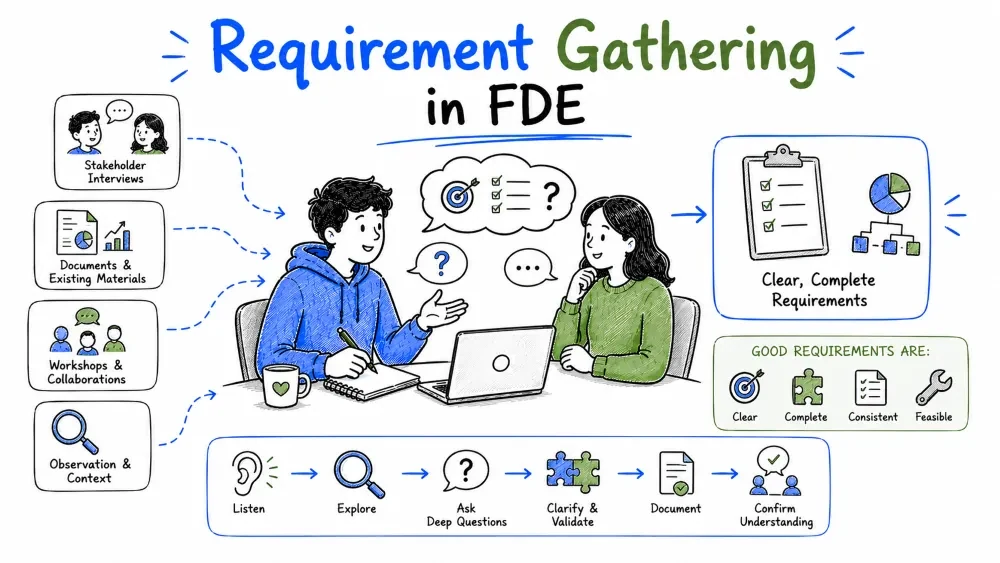
Once the problem is understood, the next step is turning it into requirements — a crisp list of what the solution must do, how well it must do it, and what lines it can't cross. This tutorial covers gathering requirements, the functional / non-functional split, and the success criteria and constraints that keep a project honest.
Requirements are clear, testable statements of what a solution must do and how well it must do it. Gathering means pulling those statements out of stakeholders, existing systems, and the discovery work you've already done — then converting wants into statements you could actually test.
Why it matters: the requirements list is the contract between you and the customer. When ambiguity strikes mid-build — and it will — this list is the tie-breaker everyone agreed to earlier, when it was cheap to fix.
Note: gathering is not transcription. You're not copying what people say; you're turning "make it faster" into a threshold, and "we want everything integrated" into a list of systems and what happens between them. Pushing back on vague requests is part of the job.
The usual sources, roughly in order of usefulness:
The pattern: you gather from people, cross-check against evidence, and the requirements list becomes the build's backbone.
A functional requirement describes behavior — something the system does. It's a sentence testable with yes/no: either the system does it or it doesn't.
Functional requirements usually take the form "The system shall ..." and each one should be checkable:
• The system shall display a unified customer view combining data from all three source systems.
• The system shall auto-assign incoming tickets by team-capacity ratio.
• The system shall send an email alert when a ticket is unassigned for more than 4 hours.
• The system shall flag a ticket as reopened when the customer replies after resolution.
Explanation: each of these is a behavior you could write a test for. The first one is a little soft, though — "unified customer view" could mean ten things. That's when you push it down: which fields, from which systems, how fresh? A good functional requirement is specific enough to test and to build against without guessing.
Common Mistake: writing solution-shaped requirements. "Use a chatbot" is a solution; "answer 80% of common questions without a human" is a requirement that leaves room for the right implementation. Requirements should say what, not how.
Non-functional requirements describe quality attributes — how well the system behaves. Nobody asks for them directly, but everyone notices when they're violated: the page that loads in nine seconds, the system that's down at the worst moment, the data leak.
| Category | Question it answers | Example statement |
|---|---|---|
| Performance | How fast? | Unified view loads in under 2 seconds |
| Reliability | How available? | 99.5% uptime during business hours |
| Security | Who can see what? | Admins see all; agents see only their team |
| Scalability | How much load? | Handles 10,000 tickets per month |
| Usability | How easy to learn? | New agent productive after 1 day of training |
| Compliance | What rules apply? | Customer data stored in EU region only |
A real project typically writes these as a short block:
• Performance:      p95 dashboard load < 2 seconds.
• Reliability:      99.5% availability during business hours.
• Security:         role-based access; API keys never written to logs.
• Compliance:       customer data stays in the EU region.
Explanation: these aren't behaviors, they're the standards behaviors must meet. Ship functional requirements alone and you get software that works but is unusably slow, unsafe, or illegal. They're not optional finishing touches.
One quick comparison to keep the split straight:
| Functional | Non-Functional | |
|---|---|---|
| Answers | What does it do? | How well does it do it? |
| Tested as | A behavior works or doesn't | A threshold is met or missed |
| Example | "Sends an alert when unassigned" | "Alert fires within 1 minute" |
| Forget it and... | A missing feature | Slow, fragile, or unsafe software |
Same feature, two requirements: "the system shall send an alert" (functional) and "the alert arrives within one minute" (non-functional). You need both sentences on the list.
A success criterion is a measurable condition that says the solution works. Typically one per major requirement, and it must connect back to the business numbers from discovery — otherwise you're measuring effort, not success.
The chain from business to success criterion:
| Business problem | Requirement | Success criterion |
|---|---|---|
| Proposals take a week | No copy-paste assembly | Median proposal prep ≤ 2 days over a month |
| 40% tickets reopen | Reopened-flag logic | Reopened tickets < 10% |
| Fragmented customer view | Unified view feature | All 3 systems loaded fresh within 15 minutes |
Each criterion is metric + threshold + timeframe. "The solution works if..." is a sentence you could run a test against:
The solution is successful when:
• 90% of tickets are first-answered within 4 business hours.
• Agent time per ticket drops from 45 minutes to 15 minutes.
• Reopened tickets stay below 10%.
• No manual copying between the three systems.
Common Mistake: accepting "users like it" as success. "Done" must be checkable. By the end, the customer should be able to look at the list and say "yes, if all four of those are true, we're done" — that agreement is the whole point.
Best Practice: agree success criteria before building and keep them on a single shared page. They double as your acceptance test and your demo script — the demo shows each criterion being met.
Constraints are the boundaries the solution must live inside — requirements you can't negotiate away. Budget, time, stack, data rules, who's available. They're not obstacles; they're the shape of the problem.
Example constraints from a real engagement look like this:
• Timeline: a usable prototype within 2 weeks.
• Budget: no new paid infrastructure.
• Stack: must integrate with existing Salesforce and the in-house warehouse; neither may be replaced.
• Data: PII must not leave the EU; logs retained 90 days.
• People: one engineer, half-time.
Note: map constraints to why where you can. "No cloud migration (because the security review takes six months)" is far more useful than a bare "no cloud" — if the reason ever changes, the constraint may lift, and knowing why shows you where the real boundary is.
Best Practice: surface constraints as early as the first requirement conversation. A constraint discovered mid-build is the most expensive kind: it can reshape the design, puncture a promise, or force a deliverable to be redone.
Save your progress and earn XP for completing tutorials.
4 questions · Pass with 70%+
1A functional requirement describes…
2"The dashboard loads in under 2 seconds" is a…
3A success criterion should be…
4Which best describes a constraint?
Technology
Forward Deployed Engineer
Lesson group
Customer Problem Discovery
Progress
67% complete

