Preparing your learning space...
71% through Data Engineering for FDEs tutorials
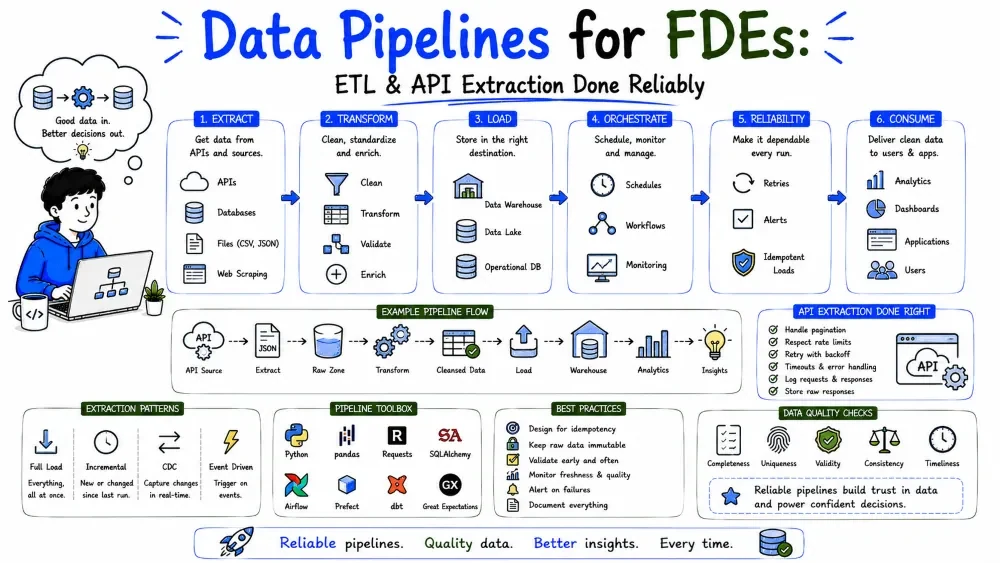
Data becomes useful only when it moves — and moves automatically. This tutorial covers the pipeline backbone of data engineering: building robust ETL (Extract–Transform–Load) code, extracting data from APIs, scheduling it, and hardening it against failure.
A pipeline is code that moves data on a schedule (or on an event) without a human clicking through it. Sources: a database, an API, a file drop. Destinations: a warehouse table, a report, another system.
The four stages from Solution Design Tutorial 5 map directly:
[ Extract ] → [ Transform ] → [ Load ] → (Serve)
   pull          clean/shape     write       read
ETL loads transformed data; the broader term "data pipeline" also covers ELT (load raw, transform later) and streaming.
Which order? Classic ETL transforms before load (destination stays clean). ELT loads raw, transforms in the warehouse (common with modern cloud warehouses). For most FDE builds, transform-then-load is simpler and safer.
import pandas as pd
from sqlalchemy import create_engine

def run_etl():
    # EXTRACT
    src = create_engine("postgresql://user:pass@host/src")
    raw = pd.read_sql("SELECT * FROM orders", src)

    # TRANSFORM
    clean = (raw
             .dropna(subset=["customer_id"])
             .drop_duplicates(subset=["order_id"], keep="last")
             .assign(net=lambda d: d["amount"] - d["discount"]))

    # LOAD
    dst = create_engine("postgresql://user:pass@host/dw")
    clean.to_sql("orders_clean", dst, if_exists="replace", index=False)

    return len(clean)

if __name__ == "__main__":
    n = run_etl()
    print(f"Loaded {n} rows")
Explanation: read_sql extracts; the chained methods transform; to_sql loads into the warehouse. if_exists="replace" rewrites the table each run — fine for a full refresh.
Note: keep secrets in environment variables, not the connection string (Tutorial 6).
import os, requests

API_KEY = os.getenv("API_KEY")
resp = requests.get(
    "https://api.crm.example.com/v1/contacts",
    headers={"Authorization": f"Bearer {API_KEY}"},
    timeout=30,
)
resp.raise_for_status()          # crash loudly on 4xx/5xx
data = resp.json()
print(data["contacts"][0])
Explanation: timeout=30 prevents hanging forever; raise_for_status() turns a bad status code into an exception you can catch. Never assume 200.
APIs rarely return everything at once. They page results — you must loop. The common patterns:
| Pattern | How to get the next page |
|---|---|
page / offset param | increment ?page=2 until empty |
cursor / next link | follow the next URL in the response |
limit | request ?limit=100 to reduce calls |
Cursor style (most robust):
def fetch_all(url, headers):
    results = []
    while url:
        resp = requests.get(url, headers=headers, timeout=30)
        resp.raise_for_status()
        body = resp.json()
        results.extend(body["items"])
        url = body.get("next")      # None when finished
    return results
Explanation: each response carries the URL for the next page; loop until it's None. This handles any page count without guessing.
Offset style:
def fetch_all_offset(base, headers):
    rows, page = [], 1
    while True:
        r = requests.get(base, headers=headers, params={"page": page, "limit": 100})
        r.raise_for_status()
        batch = r.json()["items"]
        if not batch:
            break
        rows.extend(batch)
        page += 1
    return rows
APIs cap how fast you call (e.g., 100 req/min). Exceed it and you get 429 Too Many Requests. Respect it with backoff.
import time

def get_json(url, headers, tries=4):
    for i in range(tries):
        r = requests.get(url, headers=headers, timeout=30)
        if r.status_code == 429:
            wait = int(r.headers.get("Retry-After", 2 ** i))
            time.sleep(wait)        # honor the server's hint
            continue
        r.raise_for_status()
        return r.json()
    raise RuntimeError("API unavailable after retries")
Explanation: on 429, sleep for the Retry-After value the server sends (falling back to exponential backoff). This keeps you a good API citizen and survives throttling.
Most business APIs use a Bearer token or API key (Programming Tutorial 3). Store it in an environment variable, never in code.
headers = {"Authorization": f"Bearer {os.getenv('API_KEY')}"}
Note: Some APIs use OAuth (a token that expires and must be refreshed). For those, fetch a fresh token before the run or use the SDK, which usually refreshes for you.
API JSON is nested and inconsistent. Flatten it into rows before loading (see Tutorial 4 json_normalize).
import pandas as pd

contacts = fetch_all("https://api.crm.example.com/v1/contacts", headers)
df = pd.json_normalize(contacts, record_path="items", meta=["page"])
df = df[["id", "email", "created_at"]]          # keep what you need
A pipeline will fail and be rerun at 3 a.m. Idempotent means running it twice produces the same result as once — no duplicates, no corruption.
# UPSERT by key instead of blind INSERT
clean.to_sql("orders_clean", dst,
             if_exists="append", index=False)
# better: use a key-based merge so reruns overwrite, not duplicate
For Postgres, do a real upsert:
from sqlalchemy import text

# Build parameter dicts from the cleaned frame
rows = [
    {"oid": r.order_id, "cid": r.customer_id, "net": r.net}
    for r in clean.itertuples()
]

with dst.begin() as con:
    con.execute(text("""
      INSERT INTO orders_clean (order_id, customer_id, net)
      VALUES (:oid, :cid, :net)
      ON CONFLICT (order_id) DO UPDATE
      SET net = EXCLUDED.net;
    """), rows)
Explanation: ON CONFLICT ... DO UPDATE makes a rerun overwrite the existing row instead of inserting a twin. That's idempotency in one clause.
Re-processing every row every night wastes time. Load only what changed since last run.
last_run = pd.read_sql("SELECT max(loaded_at) AS m FROM etl_state", dst)["m"][0]
new = pd.read_sql(f"SELECT * FROM orders WHERE updated_at > '{last_run}'", src)
# ... transform & upsert new ...
Explanation: a high-water mark (updated_at > last_run) pulls just the delta. Essential once tables grow past millions of rows.
Networks fail. Wrap fragile steps so one timeout doesn't kill the whole run.
import time

def extract_with_retry(url, tries=3):
    for i in range(tries):
        try:
            return pd.read_csv(url)
        except Exception as e:
            if i == tries - 1:
                raise
            time.sleep(2 ** i)   # backoff: 1s, 2s
Explanation: exponential backoff waits longer each retry — polite to the source and survives brief outages.
A pipeline that only runs when you remember is not a pipeline. Schedule it:
# crontab: run every day at 6am
0 6 * * * /usr/bin/python /opt/etl/run_etl.py >> /var/log/etl.log 2>&1
For richer needs (dependencies, retries, monitoring), use an orchestrator like Airflow or Prefect — but cron is enough for most single FDE pipelines.
A silent failure is worse than a loud one. Log counts and alert on zero rows:
import logging
logging.basicConfig(level=logging.INFO)
log = logging.getLogger("etl")

log.info("Extracted %d rows, loaded %d", len(raw), n)
if n == 0:
    log.warning("Loaded ZERO rows — check source")
Best Practice: log rows-in vs rows-out; alert (email/Slack) when output is zero or far below the rolling average. A pipeline nobody watches will quietly rot.
This tutorial is batch (scheduled chunks). Use streaming (per-event, e.g., Kafka) only when "within minutes" isn't good enough — live dashboards, fraud detection. Batch is simpler at every layer; default to it (Tutorial 1).
Pull contacts, normalize, and land them in the warehouse — the ETL "Extract + partial Transform + Load":
import os, requests, pandas as pd
from sqlalchemy import create_engine

def extract_contacts():
    headers = {"Authorization": f"Bearer {os.getenv('API_KEY')}"}
    items = fetch_all("https://api.crm.example.com/v1/contacts", headers)
    df = pd.json_normalize(items)
    df["extracted_at"] = pd.Timestamp.utcnow()
    return df

if __name__ == "__main__":
    df = extract_contacts()
    eng = create_engine(os.getenv("DW_URL"))
    df.to_sql("contacts_staging", eng, if_exists="replace", index=False)
    print(f"Extracted {len(df)} contacts")
Explanation: extracted_at stamps when we pulled — useful for incremental loads and audits. Landing in a *_staging table keeps raw extracted data separate from cleaned data.
If the API supports webhooks (it pushes events to you), prefer that over polling on a timer — you get changes the moment they happen and make fewer calls (Programming Tutorial 3). Use polling when the API has no webhook or you need a full refresh.
timeout and call raise_for_status(); page with cursors; honor 429 + Retry-After.Save your progress and earn XP for completing tutorials.
4 questions · Pass with 70%+
1The ETL order that transforms data before writing it to the destination is:
2A cursor-style pagination loop should stop when:
3When you get 429 Too Many Requests, you should:
4A pipeline is idempotent when:
Technology
Forward Deployed Engineer
Lesson group
Data Engineering for FDEs
Progress
71% complete

