Preparing your learning space...
33% through FDE with AI Coding Tools tutorials
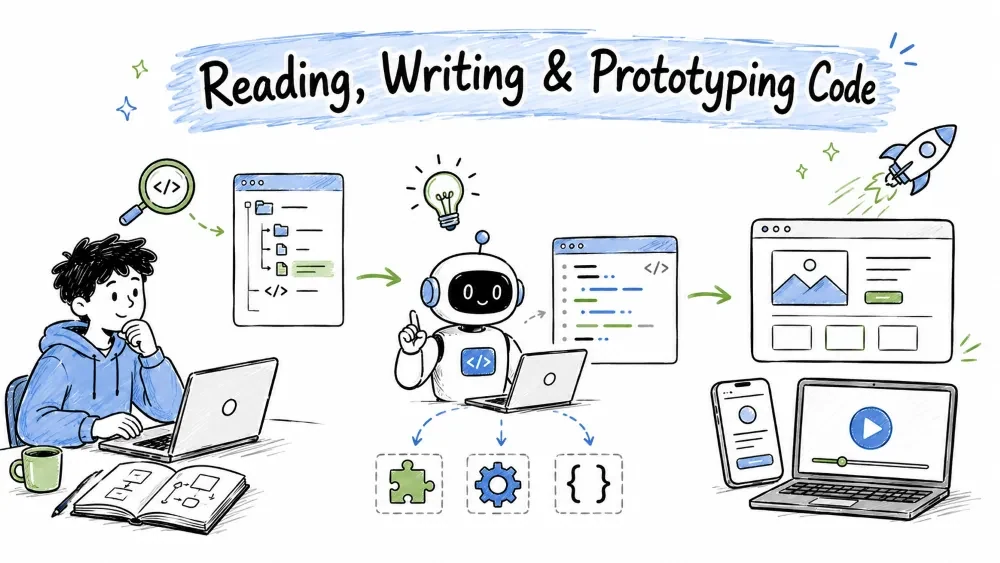
This tutorial covers the three core ways you produce code with AI: reading code you didn't write (so you can work in it), generating new code from a description, and prototyping ideas fast to test them. These skills make the difference between "staring at a blank screen" and "shipping something that works." All three follow the same simple loop from Tutorial AI Foundations: ask, get, verify, refine.
Reading a codebase you've never touched can feel overwhelming — dozens of files, functions calling other functions, unfamiliar libraries. An AI tool turns that from "read everything and hope" into "ask targeted questions and get instant answers." Instead of scanning hundreds of lines yourself, you paste a file or describe a folder and ask the AI to summarize the key ideas — it gives you the map, not the full atlas.
Start wide before going deep. Ask the AI to summarize a file or a whole folder at a glance.
Prompt:
Here is the file src/calculator.py. Give me a short overview of what
it does, its main functions, and the purpose of each. Assume I have
never seen this code.
Example file:
# src/calculator.py
def add(a, b):
    return a + b

def deduct(a, b):
    return a - b

def apply_discount(price, rate):
    return price * (1 - rate)
In seconds you know what the file is about and what each piece does — enough to work in it.
When you need to modify a specific piece, ask the AI to explain it line by line.
Prompt:
Explain this function line by line. Assume I'm a beginner.
def validate_password(password):
    if len(password) < 8:
        return False
    if not any(c.isdigit() for c in password):
        return False
    return True
It returns False if the password is shorter than 8 characters, or if it contains no digit at all; otherwise True. Taking it line by line teaches you the logic so you can safely change the rules later (for example, require a capital letter).
Real code barely lives in one file. Ask the AI to connect the dots across files.
Prompt:
These two functions are connected but in different files.
show_user():
   return {"name": "Sam", "role": "admin"}
print_user(u):
   print(u["role"].upper())
Explain the flow: what calls what, and what gets printed?
show_user() builds a dictionary (like a small data card); it's passed into print_user(u), which reads the role key and prints it uppercased — so it prints ADMIN. Understanding "function A produces data, function B consumes it" is the core skill for working in any real project.
Old or unfamiliar code can look like a foreign language. AI is great at translating and explaining it.
Prompt:
This is old PHP. Translate the logic into modern Python and explain
what each line was doing.
You'll get a clear "here's the original intent" plus a Python version you can actually read. You don't have to know the old language — the AI translates the idea into one you understand.
For really confusing sections, ask for a plain-English analogy.
Prompt:
Explain this "factory" design pattern using a real-world analogy,
then show it with simple code.
Analogies make abstract patterns concrete. Once you get the idea, the code that follows becomes much easier to read and modify.
Generating code is asking the AI to create new code for you — a function, a file, or a whole feature — from a plain-language description. It is not "click one button and the whole app appears." It produces a strong first draft for you to review, adjust, and test. It removes the blank-page problem: you go straight from "I want to do X" to "here's code that does X," then refine it.
The smallest unit of AI code generation is a single function.
Prompt:
Write a JavaScript function that takes an array of numbers and returns
the largest one. Show only the function and one usage example.
function largestNumber(numbers) {
    return Math.max(...numbers);
}

// usage
console.log(largestNumber([3, 7, 2, 9])); // -> 9
Math.max(...numbers) spreads the array into separate arguments so Math.max can compare them all.
When a single function isn't enough, ask for a whole module with multiple parts.
Prompt:
Create a Python module 'inventory.py' with these functions:
1. add_item(items, name, qty) - adds/updates item quantity in a dict
2. remove_item(items, name) - removes an item, returns False if missing
3. total_items(items) - returns total quantity of all items
Add a short docstring to each function.
# inventory.py
"""A simple in-memory inventory tracker."""

def add_item(items, name, qty):
    items[name] = items.get(name, 0) + qty

def remove_item(items, name):
    if name not in items:
        return False
    del items[name]
    return True

def total_items(items):
    return sum(items.values())
You specified the module's purpose, its functions, and the exact behavior of each. The AI wrote an organized, reusable file you can drop into your project.
Beyond a single file, AI can scaffold a small feature — the "skeleton" you then finish.
Prompt:
Build a small browser todo app: an HTML page with a text box, an
"Add" button, a list, and a "Delete" button next to each item.
Simple styling, no external libraries. Keep it in one HTML file.
<!DOCTYPE html>
<html>
<head>
  <style>
    body { font-family: sans-serif; }
    li { margin: 4px 0; }
  </style>
</head>
<body>
  <input id="task" placeholder="New task" />
  <button onclick="addTask()">Add</button>
  <ul id="list"></ul>
  <script>
    function addTask() {
      const text = document.getElementById('task').value.trim();
      if (!text) return;
      const li = document.createElement('li');
      li.textContent = text;
      const del = document.createElement('button');
      del.textContent = 'Delete';
      del.onclick = () => li.remove();
      li.appendChild(del);
      document.getElementById('list').appendChild(li);
      document.getElementById('task').value = '';
    }
  </script>
</body>
</html>
One prompt produced a runnable mini-app: add works, delete works, empty input is ignored — a foundation you can extend (edit items, save to localStorage, style it).
The more rules you give, the closer the result lands to production-ready.
Prompt:
Rewrite that todo app but:
- use async/await style only (no arrow-function assumptions)
- add a guard so the same task can't be added twice
- keep functions named in English
Each constraint narrows the output. The modified app now rejects duplicates and follows the style you asked for.
Prototyping means building a quick, rough version of an idea so you can test it before committing to the full build. It's how you answer "would this actually work?" in an afternoon instead of a month. A prototype is a throwaway made to answer a question — you build it rough and fast, not production-quality, because the goal is learning, not shipping.
Resist building everything. Ask the AI for the minimum version that shows your idea.
Prompt:
I want to prototype a habit tracker. What is the smallest useful
version I could build first? Suggest 1-3 core features only.
The AI helps you focus on the essential pair (add a habit, see a checkoff) instead of gold-plating. A prototype that's too big stops being "quick."
Once you know the scope, ask the AI to build the working demo.
Prompt:
Build a single-page web demo of a habit tracker: a text box to add a
habit, a list showing each habit, and a button to mark today's task
done. Simple inline styling. One HTML file.
You get a runnable page where you can add habits and check them off — enough to click around and feel the idea. Show it to others, note what's missing, and decide whether to invest in a real version. (The structure resembles the todo app from Part B, extended with a checkbox per habit.)
Prototyping lives on fast cycles — the Tutorial 01 loop is your engine:
Ask for an improvement → open/run it → see what's wrong → ask again.
Example follow-ups:
- "Add a reset button that clears all habits."
- "Make the checked habits show a strikethrough."
- "Count how many days in a row each habit is done."
Each turn is seconds of typing, minutes of value. You converge on something real without ever writing the whole thing yourself.
At some point you stop prototyping and start building for real. Recognize the shift:
Prompt at that moment:
I'm moving this prototype to a real app. What should I restructure so
it's clean and maintainable? Plan an upgrade without changing the UX.
This is where you transition from "make it work" (this tutorial) to "make it right" (Tutorials 03, 04, and 06).
Save your progress and earn XP for completing tutorials.
4 questions · Pass with 70%+
1When facing an unfamiliar codebase, the best first move is:
2What is the main goal of a prototype?
3What is the main goal of a prototype?
4You don't understand a confusing piece of code. Best prompt?
Technology
Forward Deployed Engineer
Lesson group
FDE with AI Coding Tools
Progress
33% complete

