Preparing your learning space...
88% through Rapid Prototyping tutorials
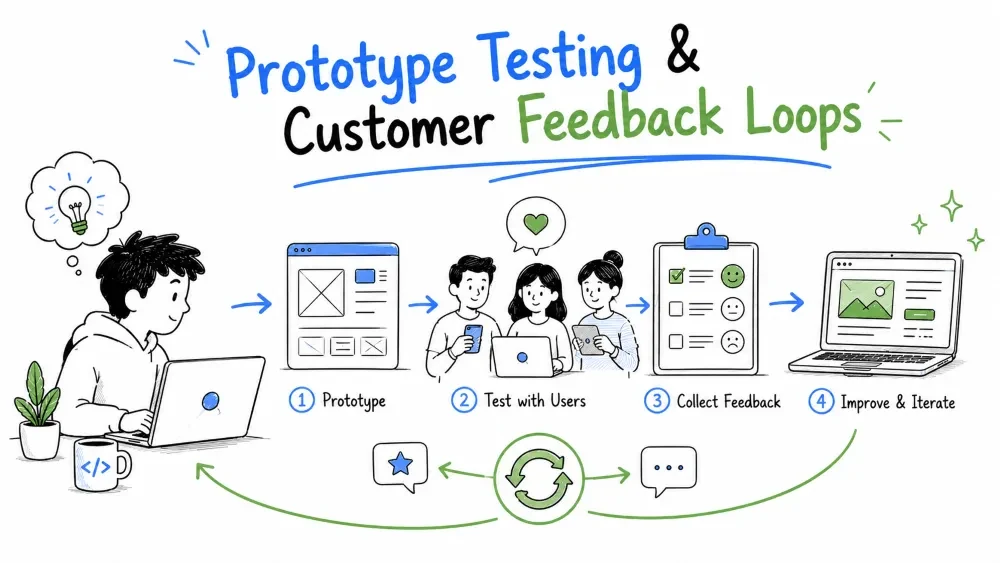
Building fast means little if you never find out what's working. Prototype testing is the step where you let reality push back on the prototype, and a feedback loop is the discipline that turns each round of criticism into a sharper product. This tutorial covers how to test a prototype without over-investing in formal QA, and how to close a customer feedback loop so every session teaches you something the prototype can act on.
"Testing" gets used for two different jobs, and untangling them keeps the prototype on track:
A prototype needs both, but in prototype mode you test the minimum to be safe — not the full production battery, which is Tutorial 8's job. Your goal is confidence the thing won't embarrass you, then quick honest learning from a live user.
Prototype testing has different targets than production testing:
| You're checking | In prototype mode | In production (Tutorial 8) |
|---|---|---|
| Does the critical path work? | Yes — smoke test it | Yes — always |
| Do edge cases crash it? | Only the important ones | All of them |
| Is it fast enough to demo? | Yes | Yes, under real load |
| Are risky inputs validated? | Just the risky ones | Every path |
| Does a user get it? | The main point | The main point, at scale |
The rule: protect the demo (no embarrassing crashes) and protect the user (no dangerous wrong answers) — but skip the rest. At this stage you're testing how people react, not certifying software.
A prototype's critical path is the highest-risk route your customer actually depends on — the core loop from Tutorial 2. Test exactly that path, and test the faults you deliberately built into your mock data (Tutorial 6): an empty record, a missing field, an absurd value, a duplicate. Those are the spots where wrong answers do real harm.
# A tiny, honest smoke test of one prototype's critical path
import requests

def confirm_critical_path():
    # the happy path: a valid payment goes through
    ok = requests.post(
        "http://localhost:8000/pay",
        json={"invoice_id": 7, "amount": 120.0}, timeout=10,
    )
    assert ok.status_code == 200, f"payment failed: {ok.status_code}"

    # the happy-adjacent path: the list still renders
    listing = requests.get("http://localhost:8000/invoices/1", timeout=10)
    assert listing.status_code == 200

    # the dangerous path: a nonsense amount must be refused, not recorded
    bad = requests.post(
        "http://localhost:8000/pay",
        json={"invoice_id": 7, "amount": -5}, timeout=10,
    )
    assert bad.status_code == 400, "a negative payment must be refused"

confirm_critical_path()
print("critical path ok")
Explanation: every call follows the real route the customer uses, and the test asserts three things — a valid payment works, the list still renders, and an invalid amount is refused rather than silently written. Fast, honest, and it covers the dangerous wrong-answer path on the critical flow.
Best Practice: a few asserts on the critical path beat a wall of boilerplate. The prototype test's only real job is catching the embarrassing crash and the dangerous wrong output.
Fake data earns you a fast loop, but the shape has to match reality or your tests prove nothing. Three habits keep a fake-tested prototype honest:
Note: the volume of data rarely matters for a prototype. A hundred believable rows prove a concept as well as a thousand. Real volume becomes a concern only in production (Tutorial 8).
A customer feedback loop is show → listen → change → show again. What makes it a loop is the discipline of turning each session into a next version. Show it once and never come back, and it's a one-off demo, not a loop:
SHOW   the prototype   → this is a test, not a pitch
OBSERVE how they use it → watch, don't narrate
CHANGE the prototype   → pick the cheapest corrections
SHOW again             → the next round
The loop's payoff: early, cheap iterations — while changes are still small — beat late, expensive ones. Every round pulls the prototype closer to the thing a customer would actually adopt.
The hardest part of testing your own prototype is shutting up. The rule is nerve-wracking and worth it: watch them use it; do not defend it.
Where they trip is the map. "Misuse" isn't a user failing; it's your design showing its seam. Their stumble is the lesson.
The best questions get honest disagreement and specific detail, not politeness:
The feedback you want is specific: not "it's nice" but "I kept looking for a way to filter by month and it isn't there." Specific corrections are what become next-action items.
A feedback loop earns its name by running repeatedly.
A prototype you never show teaches no one. A loop you run weekly builds, by month three, a thing that grew up with the customer instead of at them.
Don't let a good critique evaporate. Convert each round into a few built changes:
| The customer said… | The next action |
|---|---|
| "I was looking for the export button." | Add export — highest value, cheapest fix. |
| "The numbers didn't feel real." | Check the data source and label mock data clearly. |
| "This is too slow to bother with." | Not a bug to fix — probe the assumption instead. |
| "I don't know what this column means." | Add a label or tooltip — instant clarity win. |
And what the customer did not say matters: if nobody asked for a feature you assumed was core, it just slid down the list.
Best Practice: a prototype absorbs many feedback rounds. The trick is letting each correction actually change behavior — a prototype half-fixed on someone else's guess teaches worse than one rebuilt.
Save your progress and earn XP for completing tutorials.
4 questions · Pass with 70%+
1What are the two kinds of testing a prototype needs?
2What should a smoke test on the critical path cover?
3The rule "watch, don't defend" means:
4What makes a feedback loop a loop?
Technology
Forward Deployed Engineer
Lesson group
Rapid Prototyping
Progress
88% complete

