Preparing your learning space...
25% through Real-World Projects tutorials
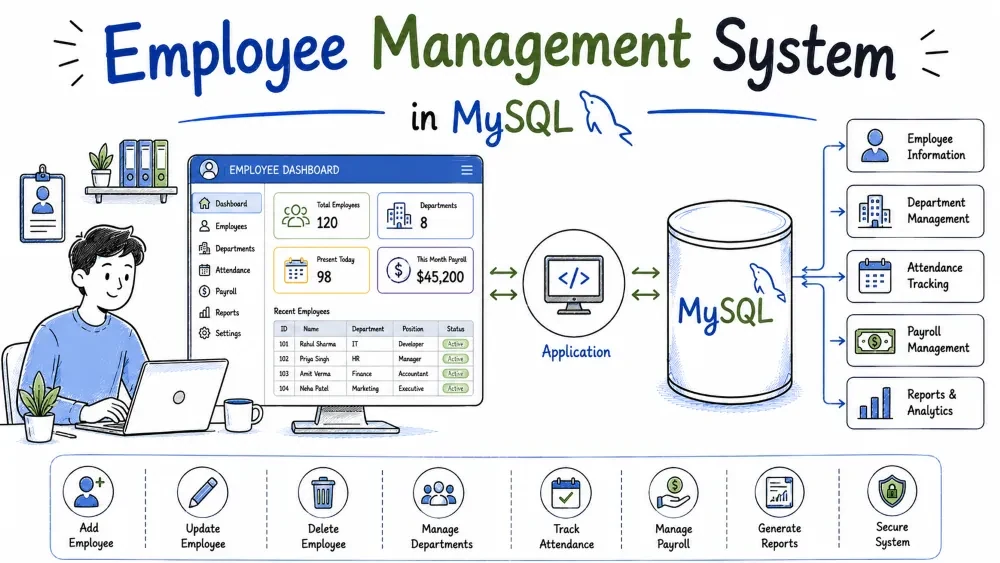
This tutorial builds a command-line Employee Management System in Python and MySQL. You will create the database, connect to it from Python, and build a menu-driven app that adds departments and employees, records salary payments, and produces payroll reports. By the end you will know how to design a small relational schema, write parameterized queries, and use transactions safely.
The Employee Management System is a small HR application that keeps employee information in a database and lets you work with it from the terminal. Companies need to track who works for them, which department each person belongs to, what they earn, and what was paid each month. This project stores all of that and answers everyday questions like "how much did IT pay this month?" or "which department has the most employees?"
The project uses three tables: departments, employees, and salaries. The salaries table stores a row for every monthly payment, so you keep a history instead of overwriting the current salary. You will learn foreign keys, JOIN queries, GROUP BY aggregation, and transactions.
salaries)mysql-connector-python package.input(), try/except, and a while loop.One-time setup:
pip install mysql-connector-pythonemployee_management folder and the five files described below.employee_management/
├── database.sql
├── db_connection.py
├── main.py
├── requirements.txt
└── README.md
database.sql — creates the database, the three tables, and the seed data. Run once with the mysql client.db_connection.py — provides get_connection(), a small helper every function uses to reach MySQL.main.py — the menu loop and every business operation.requirements.txt — lists the package needed to run the project.README.md — a short description plus the commands to run everything.The schema: three tables that model a real HR department. departments stores teams, employees stores people, and salaries stores one row per monthly payment.
A database with separate tables avoids repeating data. An employee is stored once, and their monthly payments live in a separate table keyed by employee_id. The foreign keys make sure you never attach an employee to a department that does not exist.
Create database.sql with the following content.
DROP DATABASE IF EXISTS employee_db;
CREATE DATABASE employee_db;
USE employee_db;

CREATE TABLE departments (
    id INT AUTO_INCREMENT PRIMARY KEY,
    name VARCHAR(100) NOT NULL UNIQUE,
    location VARCHAR(100) NOT NULL
);

CREATE TABLE employees (
    id INT AUTO_INCREMENT PRIMARY KEY,
    name VARCHAR(100) NOT NULL,
    designation VARCHAR(100) NOT NULL,
    salary DECIMAL(10,2) NOT NULL,
    department_id INT NOT NULL,
    joining_date DATE NOT NULL,
    FOREIGN KEY (department_id) REFERENCES departments(id) ON DELETE CASCADE
);

CREATE TABLE salaries (
    id INT AUTO_INCREMENT PRIMARY KEY,
    employee_id INT NOT NULL,
    amount DECIMAL(10,2) NOT NULL,
    payment_date DATE NOT NULL,
    FOREIGN KEY (employee_id) REFERENCES employees(id) ON DELETE CASCADE
);
DROP DATABASE IF EXISTS wipes any previous copy so you can re-run the file cleanly. Without it, re-running gives "database already exists" or "table already exists" errors. CREATE TABLE departments defines id as an auto-increment primary key, a unique name, and a location. UNIQUE means two departments cannot share a name.
employees holds personal and job data. The department_id column is a foreign key pointing at departments(id). ON DELETE CASCADE means that if a department is deleted, its employees are deleted with it, so no orphan rows remain. salaries records every payment: amount and payment_date capture what was paid and when. Its foreign key points at employees(id), also with CASCADE, so deleting an employee removes their salary history automatically.
DECIMAL(10,2) is the right type for money. It stores exact values up to 8 digits before the decimal point, unlike FLOAT, which can introduce rounding errors.
INSERT statements that fill the tables with believable sample data so the app has something to show on the first run.
An empty database makes it hard to test reports and joins. Seed data lets you run the app immediately and see realistic output, and it doubles as the data you query while developing.
Append these INSERT statements to database.sql.
INSERT INTO departments (name, location) VALUES
('IT', 'Mumbai'),
('HR', 'Delhi'),
('Finance', 'Bengaluru'),
('Sales', 'Pune'),
('Marketing', 'Chennai'),
('Operations', 'Kolkata');

INSERT INTO employees (name, designation, salary, department_id, joining_date) VALUES
('Arjun Sharma', 'Software Engineer', 85000.00, 1, '2021-06-15'),
('Priya Verma', 'Senior Software Engineer', 120000.00, 1, '2019-01-07'),
('Rahul Mehta', 'HR Manager', 95000.00, 2, '2018-08-20'),
('Sneha Iyer', 'Accountant', 60000.00, 3, '2022-03-01'),
('Vikram Singh', 'Sales Executive', 55000.00, 4, '2023-11-12'),
('Ananya Reddy', 'Database Administrator', 110000.00, 1, '2020-04-10'),
('Karan Patel', 'Finance Manager', 130000.00, 3, '2017-12-05'),
('Neha Gupta', 'Marketing Executive', 52000.00, 5, '2024-01-22');

INSERT INTO salaries (employee_id, amount, payment_date) VALUES
(1, 85000.00, '2026-06-30'),
(2, 120000.00, '2026-06-30'),
(3, 95000.00, '2026-06-30'),
(4, 60000.00, '2026-06-30'),
(5, 55000.00, '2026-06-30'),
(6, 110000.00, '2026-06-30'),
(7, 130000.00, '2026-06-30'),
(8, 52000.00, '2026-06-30');
Each INSERT lists the columns first, then one row per line. The employee rows reference department IDs 1 through 5, which were just inserted, so the foreign keys resolve correctly. The department_id values must exist in departments when the statement runs, otherwise MySQL rejects the row with a foreign key constraint error.
Every employee got a June 2026 payment row, which gives the payroll report real data to aggregate. Operations deliberately has no employees; later you will see why a LEFT JOIN still shows it in the per-department count.
db_connection.py, a single function that opens a connection to employee_db.
Every operation in main.py needs a connection. Putting the connection code in one helper means you write the host, user, and password once, and every function calls get_connection(). If your password changes, you update one file instead of ten.
Create db_connection.py.
import mysql.connector

def get_connection():
    return mysql.connector.connect(
        host="localhost",
        user="root",
        password="yourpassword",
        database="employee_db"
    )
mysql.connector.connect() returns a connection object using the four arguments every MySQL connection needs: the server address, your MySQL user, the password, and which database to use. Replace yourpassword with your real MySQL root password; if you are not using root, substitute a user that has access to employee_db. The function returns the connection to the caller, and each operation is responsible for opening it, using it, and closing it.
The start of main.py: a menu loop and the first operation, add_department().
A menu-driven app is the simplest way to expose database operations in the terminal. The loop shows choices, reads a number, and calls the matching function. add_department() is the natural first operation because every other feature depends on departments existing.
Create main.py with the menu and the department function.
import mysql.connector
from db_connection import get_connection

def show_menu():
    print("\n===== EMPLOYEE MANAGEMENT SYSTEM =====")
    print("1. Add department")
    print("2. Add employee")
    print("3. Update employee salary")
    print("4. Record monthly salary payment")
    print("5. Payroll report (total paid per department)")
    print("6. View employee details")
    print("7. Employee count per department")
    print("8. Delete employee")
    print("0. Exit")
    print("=====================================")

def add_department():
    name = input("Department name: ").strip()
    location = input("Location: ").strip()
    conn = get_connection()
    cursor = conn.cursor()
    try:
        cursor.execute(
            "INSERT INTO departments (name, location) VALUES (%s, %s)",
            (name, location)
        )
        conn.commit()
        print(f"Department '{name}' added with ID {cursor.lastrowid}.")
    except mysql.connector.Error as err:
        conn.rollback()
        print(f"Error: {err}")
    finally:
        cursor.close()
        conn.close()

def main():
    while True:
        show_menu()
        choice = input("Enter your choice: ").strip()
        if choice == "1":
            add_department()
        elif choice == "0":
            print("Goodbye!")
            break
        else:
            print("Invalid choice. Try again.")

if __name__ == "__main__":
    main()
from db_connection import get_connection imports the helper from Step 3; the import works because db_connection.py sits in the same folder as main.py. show_menu() prints the choices, and keeping it separate from the loop makes the main loop short and readable.
Inside add_department(), the try block runs the INSERT. The values are passed with %s placeholders plus a tuple. This is a parameterized query: the driver escapes the values, so a malicious input like '); DROP TABLE ... is treated as plain text. This is the standard way to stop SQL injection.
conn.commit() is what actually saves the change. MySQL keeps the insert in a transaction until commit, so if you forget it, the row silently disappears when the connection closes. The except mysql.connector.Error clause catches database problems, for example inserting a duplicate department name, and rolls back so a failed statement leaves no partial state. finally always runs, closing the cursor and connection even on errors, so you never leak connections. cursor.lastrowid gives the auto-generated ID of the row just inserted.
The main() loop dispatches on the user's choice; other options are wired in later steps. The if __name__ == "__main__": guard runs the menu only when this file is executed directly.
add_employee(), which inserts a row into employees, checking first that the department exists.
An employee must belong to a real department. The foreign key enforces this at the database level, but a friendly message beats a raw error. The function also demonstrates the "SELECT to verify, then INSERT" pattern you will reuse throughout the app.
Add this function to main.py, before main().
def add_employee():
    name = input("Employee name: ").strip()
    designation = input("Designation: ").strip()
    try:
        salary = float(input("Monthly salary: "))
        dept_id = int(input("Department ID: "))
        joining_date = input("Joining date (YYYY-MM-DD): ").strip()
    except ValueError:
        print("Salary, department ID and joining date must be numbers or valid values.")
        return
    conn = get_connection()
    cursor = conn.cursor()
    try:
        cursor.execute("SELECT id FROM departments WHERE id = %s", (dept_id,))
        if cursor.fetchone() is None:
            print(f"No department with ID {dept_id}. Add the department first.")
            return
        cursor.execute(
            "INSERT INTO employees (name, designation, salary, department_id, joining_date) "
            "VALUES (%s, %s, %s, %s, %s)",
            (name, designation, salary, dept_id, joining_date)
        )
        conn.commit()
        print(f"Employee '{name}' added with ID {cursor.lastrowid}.")
    except mysql.connector.Error as err:
        conn.rollback()
        print(f"Error: {err}")
    finally:
        cursor.close()
        conn.close()
input() always returns a string, so salary and IDs are converted with float() and int(). The conversion sits in its own try/except, so a bad entry prints a clear message and stops instead of crashing the whole program. The first cursor.execute() runs a SELECT; cursor.fetchone() returns None when no row matches, and the function returns early with a helpful message before the INSERT is even attempted.
The INSERT uses five %s placeholders matching the five values in the tuple. Column order in the statement and tuple order must match, since that is how each value lands in the right column. conn.commit() saves the row, and the finally block closes the cursor and connection as before.
Then wire it into the menu with an elif choice == "2": branch inside main().
        elif choice == "2":
            add_employee()
This branch sits before the elif choice == "0" branch. The menu prints "Add employee" as option 2, so the number matches the branch.
Two operations. update_employee_salary() changes the current salary on the employee row, and record_monthly_payment() inserts a new row into salaries.
A raise changes the amount the employee earns from now on, so the employees.salary column must be updated. A monthly payment is a historical event, so it must be inserted into salaries rather than overwriting anything. Keeping the two separate is the correct data model: current salary is state, payments are history.
Add both functions to main.py.
def update_employee_salary():
    try:
        emp_id = int(input("Employee ID: "))
        new_salary = float(input("New monthly salary: "))
    except ValueError:
        print("Please enter numbers.")
        return
    conn = get_connection()
    cursor = conn.cursor()
    try:
        cursor.execute("SELECT name FROM employees WHERE id = %s", (emp_id,))
        row = cursor.fetchone()
        if row is None:
            print(f"No employee found with ID {emp_id}.")
            return
        cursor.execute(
            "UPDATE employees SET salary = %s WHERE id = %s",
            (new_salary, emp_id)
        )
        conn.commit()
        print(f"Salary updated for {row[0]} (ID {emp_id}).")
    except mysql.connector.Error as err:
        conn.rollback()
        print(f"Error: {err}")
    finally:
        cursor.close()
        conn.close()

def record_monthly_payment():
    try:
        emp_id = int(input("Employee ID: "))
    except ValueError:
        print("Please enter a number.")
        return
    conn = get_connection()
    cursor = conn.cursor()
    try:
        cursor.execute("SELECT name, salary FROM employees WHERE id = %s", (emp_id,))
        row = cursor.fetchone()
        if row is None:
            print(f"No employee found with ID {emp_id}.")
            return
        name, salary = row
        cursor.execute(
            "INSERT INTO salaries (employee_id, amount, payment_date) VALUES (%s, %s, CURDATE())",
            (emp_id, salary)
        )
        conn.commit()
        print(f"Paid {salary:.2f} to {name} (ID {emp_id}).")
    except mysql.connector.Error as err:
        conn.rollback()
        print(f"Error: {err}")
    finally:
        cursor.close()
        conn.close()
Both functions start with a SELECT to confirm the employee exists; the payment function grabs the current salary in the same query. row[0] and row[1] index into the tuple returned by fetchone(). UPDATE employees SET salary = %s WHERE id = %s sets the new salary only on the matching row, with placeholders covering both the value and the ID.
record_monthly_payment() uses CURDATE() directly in the SQL, so MySQL writes today's date as the payment date. The amount inserted is the employee's current salary, which is the realistic behaviour of a payroll run. f"{salary:.2f}" formats the number with two decimals for tidy output. Because a payment is a fresh INSERT, older payments stay in salaries; that history is what the payroll report aggregates.
Wire both into the menu:
        elif choice == "3":
            update_employee_salary()
        elif choice == "4":
            record_monthly_payment()
These branches map menu options 3 and 4 to the new functions. Both use the same pattern of pre-check, execute, commit, rollback, and finally, which keeps the code consistent.
Two read-only reports. payroll_report() shows total paid per department by joining three tables and grouping. count_per_department() shows how many people work in each department, using a LEFT JOIN so empty departments still appear.
Payroll is the whole point of an HR system. Managers want total spending by team, and the department count answers headcount questions. The LEFT JOIN version teaches you how to keep rows that have no matches on the other side.
Add both report functions to main.py.
def payroll_report():
    conn = get_connection()
    cursor = conn.cursor()
    try:
        cursor.execute(
            """
            SELECT d.name, SUM(s.amount) AS total_paid
            FROM salaries s
            JOIN employees e ON s.employee_id = e.id
            JOIN departments d ON e.department_id = d.id
            GROUP BY d.name
            ORDER BY total_paid DESC
            """
        )
        rows = cursor.fetchall()
        if not rows:
            print("No salary payments recorded yet.")
            return
        print(f"{'Department':<15} {'Total Paid':>12}")
        print("-" * 30)
        for name, total in rows:
            print(f"{name:<15} {total:>12.2f}")
    except mysql.connector.Error as err:
        print(f"Error: {err}")
    finally:
        cursor.close()
        conn.close()

def count_per_department():
    conn = get_connection()
    cursor = conn.cursor()
    try:
        cursor.execute(
            """
            SELECT d.name, COUNT(e.id) AS employee_count
            FROM departments d
            LEFT JOIN employees e ON e.department_id = d.id
            GROUP BY d.id
            ORDER BY d.id
            """
        )
        rows = cursor.fetchall()
        print(f"{'Department':<15} {'Employees':>10}")
        print("-" * 28)
        for name, count in rows:
            print(f"{name:<15} {count:>10}")
    except mysql.connector.Error as err:
        print(f"Error: {err}")
    finally:
        cursor.close()
        conn.close()
payroll_report() joins salaries to employees on the employee ID, then to departments on the department ID. That chain is how a row in salaries reaches its department name. SUM(s.amount) adds up payments, GROUP BY d.name produces one row per department, and ORDER BY total_paid DESC puts the biggest spender first. The output uses f"{'Department':<15}" to left-pad the name to 15 characters and f"{total:>12.2f}" to right-align the total with two decimals, giving clean columns.
count_per_department() uses LEFT JOIN. Unlike an inner JOIN, it keeps every row from departments even when no employee matches, so Operations appears with a count of 0 instead of vanishing. COUNT(e.id) counts only non-null employee IDs; if you counted *, the left-joined NULL row would inflate the count to 1. Grouping by d.id keeps the grouping stable.
Wire both reports into the menu:
        elif choice == "5":
            payroll_report()
        elif choice == "7":
            count_per_department()
Option 5 runs the payroll report and option 7 runs the headcount report. Reports read the database with SELECT only, so no commit is needed, though the try/except and finally pattern still protects the connection.
The last two operations and the finished menu. view_employee_details() shows one employee joined with their department name, and delete_employee() removes an employee with a confirmation prompt.
Viewing a single record with its related data is the classic JOIN use case, and deletion with confirmation is what a real admin tool does before it destroys data. Because of ON DELETE CASCADE, removing the employee also removes their salary history without extra code.
Add the two final functions to main.py.
def view_employee_details():
    try:
        emp_id = int(input("Employee ID: "))
    except ValueError:
        print("Please enter a number.")
        return
    conn = get_connection()
    cursor = conn.cursor()
    try:
        cursor.execute(
            """
            SELECT e.id, e.name, e.designation, e.salary, d.name, e.joining_date
            FROM employees e
            JOIN departments d ON e.department_id = d.id
            WHERE e.id = %s
            """,
            (emp_id,)
        )
        row = cursor.fetchone()
        if row is None:
            print(f"No employee found with ID {emp_id}.")
            return
        print(f"ID:           {row[0]}")
        print(f"Name:         {row[1]}")
        print(f"Designation:  {row[2]}")
        print(f"Salary:       {row[3]:.2f}")
        print(f"Department:   {row[4]}")
        print(f"Joining date: {row[5]}")
    except mysql.connector.Error as err:
        print(f"Error: {err}")
    finally:
        cursor.close()
        conn.close()

def delete_employee():
    try:
        emp_id = int(input("Employee ID: "))
    except ValueError:
        print("Please enter a number.")
        return
    conn = get_connection()
    cursor = conn.cursor()
    try:
        cursor.execute("SELECT name FROM employees WHERE id = %s", (emp_id,))
        row = cursor.fetchone()
        if row is None:
            print(f"No employee found with ID {emp_id}.")
            return
        confirm = input(f"Delete {row[0]} (ID {emp_id})? Type 'yes' to confirm: ")
        if confirm.lower() != "yes":
            print("Delete cancelled.")
            return
        cursor.execute("DELETE FROM employees WHERE id = %s", (emp_id,))
        conn.commit()
        print(f"Employee {row[0]} deleted. Salary history removed too (CASCADE).")
    except mysql.connector.Error as err:
        conn.rollback()
        print(f"Error: {err}")
    finally:
        cursor.close()
        conn.close()
view_employee_details() joins employees to departments so the output shows the department name instead of a number. The aliases e and d shorten the query, the WHERE clause filters to the chosen employee, and each row[i] prints one column.
delete_employee() fetches the name first so the confirmation prompt can show who is being deleted. The input() prompt requires typing yes exactly (case-insensitive), so a stray Enter does not wipe a record. The DELETE is a single statement, but because the foreign key in salaries uses ON DELETE CASCADE, MySQL removes the employee's payment rows in the same operation, so no second DELETE is needed. conn.commit() persists the delete.
Now finish main() so every menu option is wired:
def main():
    while True:
        show_menu()
        choice = input("Enter your choice: ").strip()
        if choice == "1":
            add_department()
        elif choice == "2":
            add_employee()
        elif choice == "3":
            update_employee_salary()
        elif choice == "4":
            record_monthly_payment()
        elif choice == "5":
            payroll_report()
        elif choice == "6":
            view_employee_details()
        elif choice == "7":
            count_per_department()
        elif choice == "8":
            delete_employee()
        elif choice == "0":
            print("Goodbye!")
            break
        else:
            print("Invalid choice. Try again.")

if __name__ == "__main__":
    main()
Every menu number now maps to a function. The while True loop keeps the app alive until the user picks 0, which prints a goodbye and breaks out. if __name__ == "__main__": runs main() only when you execute this file directly; if another script imports it, the menu does not start automatically.
Finally, create requirements.txt and README.md.
mysql-connector-python
requirements.txt lists the one package this project depends on. pip install -r requirements.txt installs everything in it.
# Employee Management System

A menu-driven Python application that manages departments, employees, and monthly salary payments in MySQL.

## Setup

1. `pip install mysql-connector-python`
2. `mysql -u root -p < database.sql`
3. `python main.py`

Edit the password in `db_connection.py` before running.
The README repeats the three commands a new user needs and reminds them to set their own password in db_connection.py. Keep it short; the tutorial carries the detail.
Here is every file in its finished state. Copy them into the employee_management folder exactly as shown. main.py is split into two parts below for readability; copy both parts, in order, into a single file named main.py.
DROP DATABASE IF EXISTS employee_db;
CREATE DATABASE employee_db;
USE employee_db;

CREATE TABLE departments (
    id INT AUTO_INCREMENT PRIMARY KEY,
    name VARCHAR(100) NOT NULL UNIQUE,
    location VARCHAR(100) NOT NULL
);

CREATE TABLE employees (
    id INT AUTO_INCREMENT PRIMARY KEY,
    name VARCHAR(100) NOT NULL,
    designation VARCHAR(100) NOT NULL,
    salary DECIMAL(10,2) NOT NULL,
    department_id INT NOT NULL,
    joining_date DATE NOT NULL,
    FOREIGN KEY (department_id) REFERENCES departments(id) ON DELETE CASCADE
);

CREATE TABLE salaries (
    id INT AUTO_INCREMENT PRIMARY KEY,
    employee_id INT NOT NULL,
    amount DECIMAL(10,2) NOT NULL,
    payment_date DATE NOT NULL,
    FOREIGN KEY (employee_id) REFERENCES employees(id) ON DELETE CASCADE
);

INSERT INTO departments (name, location) VALUES
('IT', 'Mumbai'),
('HR', 'Delhi'),
('Finance', 'Bengaluru'),
('Sales', 'Pune'),
('Marketing', 'Chennai'),
('Operations', 'Kolkata');

INSERT INTO employees (name, designation, salary, department_id, joining_date) VALUES
('Arjun Sharma', 'Software Engineer', 85000.00, 1, '2021-06-15'),
('Priya Verma', 'Senior Software Engineer', 120000.00, 1, '2019-01-07'),
('Rahul Mehta', 'HR Manager', 95000.00, 2, '2018-08-20'),
('Sneha Iyer', 'Accountant', 60000.00, 3, '2022-03-01'),
('Vikram Singh', 'Sales Executive', 55000.00, 4, '2023-11-12'),
('Ananya Reddy', 'Database Administrator', 110000.00, 1, '2020-04-10'),
('Karan Patel', 'Finance Manager', 130000.00, 3, '2017-12-05'),
('Neha Gupta', 'Marketing Executive', 52000.00, 5, '2024-01-22');

INSERT INTO salaries (employee_id, amount, payment_date) VALUES
(1, 85000.00, '2026-06-30'),
(2, 120000.00, '2026-06-30'),
(3, 95000.00, '2026-06-30'),
(4, 60000.00, '2026-06-30'),
(5, 55000.00, '2026-06-30'),
(6, 110000.00, '2026-06-30'),
(7, 130000.00, '2026-06-30'),
(8, 52000.00, '2026-06-30');
import mysql.connector

def get_connection():
    return mysql.connector.connect(
        host="localhost",
        user="root",
        password="yourpassword",
        database="employee_db"
    )
import mysql.connector
from db_connection import get_connection

def add_department():
    name = input("Department name: ").strip()
    location = input("Location: ").strip()
    conn = get_connection()
    cursor = conn.cursor()
    try:
        cursor.execute(
            "INSERT INTO departments (name, location) VALUES (%s, %s)",
            (name, location)
        )
        conn.commit()
        print(f"Department '{name}' added with ID {cursor.lastrowid}.")
    except mysql.connector.Error as err:
        conn.rollback()
        print(f"Error: {err}")
    finally:
        cursor.close()
        conn.close()

def add_employee():
    name = input("Employee name: ").strip()
    designation = input("Designation: ").strip()
    try:
        salary = float(input("Monthly salary: "))
        dept_id = int(input("Department ID: "))
        joining_date = input("Joining date (YYYY-MM-DD): ").strip()
    except ValueError:
        print("Salary, department ID and joining date must be numbers or valid values.")
        return
    conn = get_connection()
    cursor = conn.cursor()
    try:
        cursor.execute("SELECT id FROM departments WHERE id = %s", (dept_id,))
        if cursor.fetchone() is None:
            print(f"No department with ID {dept_id}. Add the department first.")
            return
        cursor.execute(
            "INSERT INTO employees (name, designation, salary, department_id, joining_date) "
            "VALUES (%s, %s, %s, %s, %s)",
            (name, designation, salary, dept_id, joining_date)
        )
        conn.commit()
        print(f"Employee '{name}' added with ID {cursor.lastrowid}.")
    except mysql.connector.Error as err:
        conn.rollback()
        print(f"Error: {err}")
    finally:
        cursor.close()
        conn.close()

def update_employee_salary():
    try:
        emp_id = int(input("Employee ID: "))
        new_salary = float(input("New monthly salary: "))
    except ValueError:
        print("Please enter numbers.")
        return
    conn = get_connection()
    cursor = conn.cursor()
    try:
        cursor.execute("SELECT name FROM employees WHERE id = %s", (emp_id,))
        row = cursor.fetchone()
        if row is None:
            print(f"No employee found with ID {emp_id}.")
            return
        cursor.execute(
            "UPDATE employees SET salary = %s WHERE id = %s",
            (new_salary, emp_id)
        )
        conn.commit()
        print(f"Salary updated for {row[0]} (ID {emp_id}).")
    except mysql.connector.Error as err:
        conn.rollback()
        print(f"Error: {err}")
    finally:
        cursor.close()
        conn.close()

def record_monthly_payment():
    try:
        emp_id = int(input("Employee ID: "))
    except ValueError:
        print("Please enter a number.")
        return
    conn = get_connection()
    cursor = conn.cursor()
    try:
        cursor.execute("SELECT name, salary FROM employees WHERE id = %s", (emp_id,))
        row = cursor.fetchone()
        if row is None:
            print(f"No employee found with ID {emp_id}.")
            return
        name, salary = row
        cursor.execute(
            "INSERT INTO salaries (employee_id, amount, payment_date) VALUES (%s, %s, CURDATE())",
            (emp_id, salary)
        )
        conn.commit()
        print(f"Paid {salary:.2f} to {name} (ID {emp_id}).")
    except mysql.connector.Error as err:
        conn.rollback()
        print(f"Error: {err}")
    finally:
        cursor.close()
        conn.close()
def payroll_report():
    conn = get_connection()
    cursor = conn.cursor()
    try:
        cursor.execute(
            """
            SELECT d.name, SUM(s.amount) AS total_paid
            FROM salaries s
            JOIN employees e ON s.employee_id = e.id
            JOIN departments d ON e.department_id = d.id
            GROUP BY d.name
            ORDER BY total_paid DESC
            """
        )
        rows = cursor.fetchall()
        if not rows:
            print("No salary payments recorded yet.")
            return
        print(f"{'Department':<15} {'Total Paid':>12}")
        print("-" * 30)
        for name, total in rows:
            print(f"{name:<15} {total:>12.2f}")
    except mysql.connector.Error as err:
        print(f"Error: {err}")
    finally:
        cursor.close()
        conn.close()

def view_employee_details():
    try:
        emp_id = int(input("Employee ID: "))
    except ValueError:
        print("Please enter a number.")
        return
    conn = get_connection()
    cursor = conn.cursor()
    try:
        cursor.execute(
            """
            SELECT e.id, e.name, e.designation, e.salary, d.name, e.joining_date
            FROM employees e
            JOIN departments d ON e.department_id = d.id
            WHERE e.id = %s
            """,
            (emp_id,)
        )
        row = cursor.fetchone()
        if row is None:
            print(f"No employee found with ID {emp_id}.")
            return
        print(f"ID:           {row[0]}")
        print(f"Name:         {row[1]}")
        print(f"Designation:  {row[2]}")
        print(f"Salary:       {row[3]:.2f}")
        print(f"Department:   {row[4]}")
        print(f"Joining date: {row[5]}")
    except mysql.connector.Error as err:
        print(f"Error: {err}")
    finally:
        cursor.close()
        conn.close()

def count_per_department():
    conn = get_connection()
    cursor = conn.cursor()
    try:
        cursor.execute(
            """
            SELECT d.name, COUNT(e.id) AS employee_count
            FROM departments d
            LEFT JOIN employees e ON e.department_id = d.id
            GROUP BY d.id
            ORDER BY d.id
            """
        )
        rows = cursor.fetchall()
        print(f"{'Department':<15} {'Employees':>10}")
        print("-" * 28)
        for name, count in rows:
            print(f"{name:<15} {count:>10}")
    except mysql.connector.Error as err:
        print(f"Error: {err}")
    finally:
        cursor.close()
        conn.close()

def delete_employee():
    try:
        emp_id = int(input("Employee ID: "))
    except ValueError:
        print("Please enter a number.")
        return
    conn = get_connection()
    cursor = conn.cursor()
    try:
        cursor.execute("SELECT name FROM employees WHERE id = %s", (emp_id,))
        row = cursor.fetchone()
        if row is None:
            print(f"No employee found with ID {emp_id}.")
            return
        confirm = input(f"Delete {row[0]} (ID {emp_id})? Type 'yes' to confirm: ")
        if confirm.lower() != "yes":
            print("Delete cancelled.")
            return
        cursor.execute("DELETE FROM employees WHERE id = %s", (emp_id,))
        conn.commit()
        print(f"Employee {row[0]} deleted. Salary history removed too (CASCADE).")
    except mysql.connector.Error as err:
        conn.rollback()
        print(f"Error: {err}")
    finally:
        cursor.close()
        conn.close()

def show_menu():
    print("\n===== EMPLOYEE MANAGEMENT SYSTEM =====")
    print("1. Add department")
    print("2. Add employee")
    print("3. Update employee salary")
    print("4. Record monthly salary payment")
    print("5. Payroll report (total paid per department)")
    print("6. View employee details")
    print("7. Employee count per department")
    print("8. Delete employee")
    print("0. Exit")
    print("=====================================")

def main():
    while True:
        show_menu()
        choice = input("Enter your choice: ").strip()
        if choice == "1":
            add_department()
        elif choice == "2":
            add_employee()
        elif choice == "3":
            update_employee_salary()
        elif choice == "4":
            record_monthly_payment()
        elif choice == "5":
            payroll_report()
        elif choice == "6":
            view_employee_details()
        elif choice == "7":
            count_per_department()
        elif choice == "8":
            delete_employee()
        elif choice == "0":
            print("Goodbye!")
            break
        else:
            print("Invalid choice. Try again.")

if __name__ == "__main__":
    main()
mysql-connector-python
# Employee Management System

A menu-driven Python application that manages departments, employees, and monthly salary payments in MySQL.

## Setup

1. `pip install mysql-connector-python`
2. `mysql -u root -p < database.sql`
3. `python main.py`

Edit the password in `db_connection.py` before running.
Install the connector if you have not yet:
pip install mysql-connector-python
Load the schema and seed data. The -p flag makes mysql prompt for the root password:
mysql -u root -p < database.sql
Run the app:
python main.py
The first run should print the menu. If you then choose option 5, you see the payroll report built from the seed data:
===== EMPLOYEE MANAGEMENT SYSTEM =====
1. Add department
2. Add employee
3. Update employee salary
4. Record monthly salary payment
5. Payroll report (total paid per department)
6. View employee details
7. Employee count per department
8. Delete employee
0. Exit
=====================================
Enter your choice: 5

Department     Total Paid
------------------------------
IT                315000.00
Finance           190000.00
HR                 95000.00
Sales              55000.00
Marketing          52000.00
Enter your choice:
That output assumes you chose option 5 right after the seed data loaded. The totals come straight from the salaries table: IT paid three employees (85000 + 120000 + 110000), Finance paid two, and HR, Sales, and Marketing paid one each. Operations does not appear because it has no payments.
Here are four realistic test cases. Run them against a freshly loaded database to match the expected output exactly.
Input
Enter your choice: 5
Expected Output
Department     Total Paid
------------------------------
IT                315000.00
Finance           190000.00
HR                 95000.00
Sales              55000.00
Marketing          52000.00
Enter your choice:
Explanation
The report joins salaries to employees and departments, then sums by department. IT has three payment rows, so its total is 85000 + 120000 + 110000 = 315000. Ordering by total desc puts IT first. Operations does not appear because it has no payments, which is correct for an inner join on payment data.
Input
Enter your choice: 4
Employee ID: 5
Expected Output
Paid 55000.00 to Vikram Singh (ID 5).
Explanation
The function looks up employee 5, reads the current salary of 55000, and inserts a new salaries row with today's date. The salaries table now has two rows for employee 5, which is the intended behaviour: payments accumulate as history. Running option 5 again would show the Sales total as 110000.00 because both payment rows are summed.
Input
Enter your choice: 3
Employee ID: 4
New monthly salary: 70000
Expected Output
Salary updated for Sneha Iyer (ID 4).
Explanation
The UPDATE changes the salary column on the employee row from 60000 to 70000. This affects future payments recorded via option 4, because the payment function reads the current salary. The already-recorded June payment stays at 60000, which shows why history lives in a separate table from the current salary.
Input
Enter your choice: 8
Employee ID: 8
Delete Neha Gupta (ID 8)? Type 'yes' to confirm: yes
Expected Output
Employee Neha Gupta deleted. Salary history removed too (CASCADE).
Explanation
The delete removes employee 8 from employees. The foreign key on salaries.employee_id with ON DELETE CASCADE deletes her payment rows in the same statement, so no orphan history remains. A SELECT COUNT(*) FROM salaries WHERE employee_id = 8 would now return 0.
ModuleNotFoundError: No module named 'mysql.connector'Reason: The mysql-connector-python package is not installed, or it is installed for a different Python than the one running the script.
Solution: Run pip install mysql-connector-python. If you use multiple Python versions, install with the matching one, for example python -m pip install mysql-connector-python.
Reason: commit() was not called. MySQL starts a transaction for data changes, and nothing is written until you call conn.commit().
Solution: Call conn.commit() after each successful INSERT, UPDATE, or DELETE. Every write function in this project calls it inside the try block.
1452 (23000): Cannot add or update a child row: a foreign key constraint failsReason: The insert references a department or employee ID that does not exist, for example adding an employee with department_id = 99.
Solution: Add the parent row first, or look up a valid ID. The app's pre-check SELECT gives a friendly message, but the same error appears if you insert directly in the mysql client without the check.
Table 'employee_db.departments' already exists when re-running database.sqlReason: The file was created without the DROP DATABASE IF EXISTS line, or the database already contains the tables.
Solution: Keep the first line DROP DATABASE IF EXISTS employee_db; in the file. It drops the whole database before recreating it, so the file is always safe to re-run.
ERROR 1045 (28000): Access denied for user 'root'@'localhost'Reason: The password in db_connection.py does not match the MySQL root password, or the server is not running.
Solution: Verify the password with mysql -u root -p in the terminal first. If that works, copy the same password into db_connection.py. If the server is down, start the MySQL service.
Duplicate entry 'IT' for key 'departments.name'Reason: The name column is UNIQUE and the department already exists.
Solution: This is expected protection against duplicate departments. Choose a different name. The app prints the error message instead of crashing, thanks to the except mysql.connector.Error handler.
WHERE name LIKE %s so partial names work.department_heads table that maps a manager to each department.leave_records table and check remaining leave before granting new leave.ROW_NUMBER().users table so only authorized people can run the app.joined_in_year(year) function that shows employees who joined in a given year, and wire it into the menu.record_monthly_payment() that prevents paying the same employee twice in the same month.audit_log table that records every salary change with the old value and the new value, and display it in the app.Save your progress and earn XP for completing tutorials.
Technology
MySQL
Lesson group
Real-World Projects
Progress
25% complete

