Preparing your learning space...
45% through Mini Projects tutorials
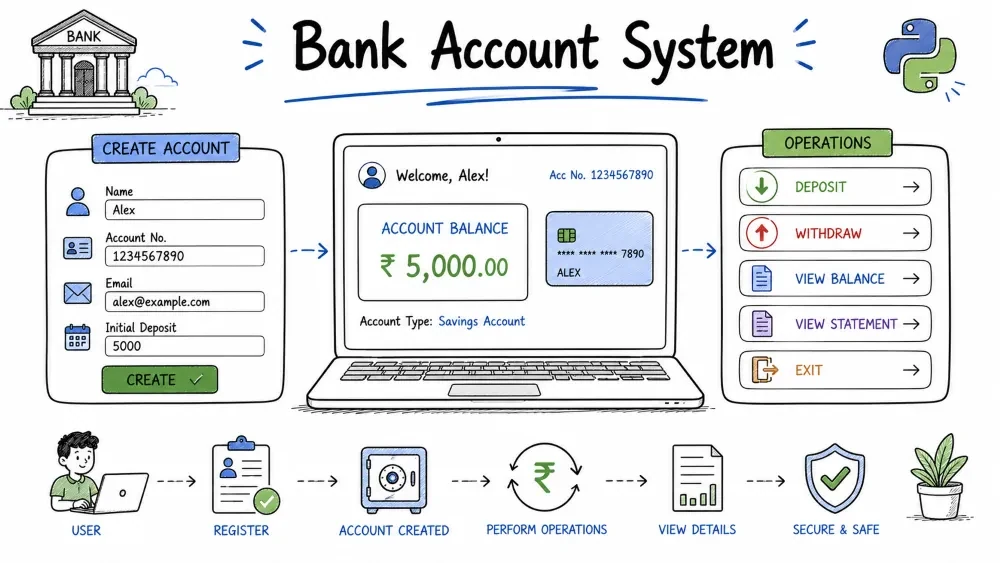
A terminal-based bank account manager that handles deposits, withdrawals, balance checks, and transaction history. This project teaches you how to model real-world objects with classes, validate inputs with business rules, and build a menu-driven interface. The same patterns are used in every financial application — from banking apps to payment gateways.
This project builds a simple banking system that runs in the terminal. A user can create an account, deposit money, withdraw money (if they have sufficient balance), view their current balance, and see a history of all transactions. Everything is wrapped in a BankAccount class so the code is organized and reusable.
Where this is used in the real world: Every bank uses this exact pattern — an account object with a balance and rules about what operations are allowed. Payment gateways (Stripe, PayPal), wallets, and accounting software all use similar class structures.
Knowledge needed
while loopsif/elif/else conditionalsSoftware needed
BankAccountSystem/
│
├── main.py      # The complete banking program
└── README.md    # This tutorial
mkdir BankAccountSystem
cd BankAccountSystem
Create main.py.
Before writing code, understand the concept of a class. A class is a blueprint. An object is a specific instance built from that blueprint.
Real-world analogy:
Blueprint (Class): BankAccount
  - Every account has: holder_name, balance, transactions
  - Every account can: deposit(), withdraw(), check_balance()

Actual objects created from the blueprint:
  Object 1: alice_account → holder_name="Alice", balance=500
  Object 2: bob_account   → holder_name="Bob",   balance=1000
Both alice_account and bob_account are separate objects. Depositing into Alice's account does not affect Bob's. The class defines the structure and behavior; each object has its own data.
Start with an empty class definition.
class BankAccount:
    pass
pass is a placeholder. Python requires at least one indented line inside a block. pass means "do nothing" — we replace it with actual code in the next steps.
The __init__ method (short for "initialize") runs automatically when we create a new account. It sets up the initial state of each object.
class BankAccount:
    def __init__(self, holder_name, initial_balance=0):
        self.holder_name = holder_name
        self.balance = initial_balance
        self.transactions = []
self explained: When Python calls account.deposit(100), it actually calls BankAccount.deposit(account, 100). The self parameter receives account automatically. self is the object itself — it lets each method access that specific object's data.
Parameter vs Attribute:
def __init__(self, holder_name, initial_balance=0):
    # holder_name (parameter)  →  the value passed in
    # self.holder_name (attribute)  →  stored on the object

    self.holder_name = holder_name  # store parameter as attribute
    self.balance = initial_balance
    self.transactions = []
initial_balance=0 — This is a default parameter value. If the caller does not provide an initial balance, it starts at 0. The account is created with no money but is still valid.
Creating an account:
alice = BankAccount("Alice", 500)   # Alice starts with $500
bob = BankAccount("Bob")            # Bob starts with $0 (default)
A method that adds money to the balance and records the transaction.
def deposit(self, amount):
    if amount > 0:
        self.balance += amount
        self.transactions.append({
            "type": "Deposit",
            "amount": amount,
            "balance_after": self.balance
        })
        print(f"Deposited ${amount:.2f}. New balance: ${self.balance:.2f}")
    else:
        print("Deposit amount must be positive.")
if amount > 0 — This is a business rule. Banks do not allow zero or negative deposits. The validation runs first, before anything changes. This is called a "guard clause."
self.balance += amount — Increases the balance by the deposit amount. Equivalent to self.balance = self.balance + amount.
self.transactions.append({...}) — Each transaction is a dictionary with three keys: type ("Deposit" or "Withdrawal"), amount (how much), and balance_after (the balance after this operation). Storing balance_after means we can show the running balance without recalculating from scratch.
${amount:.2f} — The :.2f format specifier rounds to 2 decimal places. 500 becomes 500.00. 12.5 becomes 12.50. This is the standard currency format.
Subtract money only if the balance is sufficient.
def withdraw(self, amount):
    if amount <= 0:
        print("Withdrawal amount must be positive.")
    elif amount > self.balance:
        print(f"Insufficient funds. Balance: ${self.balance:.2f}")
    else:
        self.balance -= amount
        self.transactions.append({
            "type": "Withdrawal",
            "amount": amount,
            "balance_after": self.balance
        })
        print(f"Withdrew ${amount:.2f}. New balance: ${self.balance:.2f}")
Three paths through this method:
withdraw(50)
  │
  ├── amount <= 0?  (No, 50 > 0)
  ├── amount > balance?  (Depends)
  │     │
  │     ├── Yes → "Insufficient funds. Balance: $X.XX"
  │     │         (Nothing changes, no transaction recorded)
  │     │
  │     └── No  → balance -= 50
  │                Record transaction
  │                "Withdrew $50.00. New balance: $X.XX"
  │
  └── (If amount <= 0: "Withdrawal amount must be positive.")
elif amount > self.balance — This checks for overdraft. The account balance cannot go negative. In a real banking system, this is where "Overdraft Protection" or "Insufficient Funds Fee" logic would go.
self.balance -= amount — Only runs if both checks pass. The transaction is recorded with the updated balance.
The order of the if/elif/else checks matters. Here is why amount <= 0 comes first:
# This order is WRONG:
if amount > self.balance:
    print("Insufficient funds.")
elif amount <= 0:
    print("Amount must be positive.")
else:
    # withdraw...

# Problem: What if amount = -50 and balance = 100?
#   amount > balance? → -50 > 100? → False (skips)
#   amount <= 0? → -50 <= 0? → True → "Amount must be positive."
#   Works correctly in this case, but what about amount = -50 and balance = -200?

# This order is CORRECT (check validity first, then affordability):
if amount <= 0:
    print("Withdrawal amount must be positive.")
elif amount > self.balance:
    print("Insufficient funds.")
else:
    # withdraw...
Rule: Check validity first (is the amount itself valid?), then check affordability (can they afford it?). This separates two different concerns: "is this a real transaction?" and "can this account cover it?"
A simple method that prints the current account state.
def check_balance(self):
    print(f"\nAccount Holder: {self.holder_name}")
    print(f"Current Balance: ${self.balance:.2f}")
Why a separate method: Even though this is just a print statement, wrapping it in a method means the user interacts with a consistent interface (account.check_balance()) rather than having to remember how the data is stored internally. This is called "encapsulation" — the method hides the implementation details.
A method that loops through the transactions list and prints each one with a running balance.
def show_transactions(self):
    if not self.transactions:
        print("No transactions yet.")
        return

    print(f"\nTransaction History for {self.holder_name}:")
    print("-" * 45)
    for i, t in enumerate(self.transactions, 1):
        print(f"{i}. {t['type']:>9}: ${t['amount']:.2f}  →  ${t['balance_after']:.2f}")
    print("-" * 45)
if not self.transactions: — In Python, an empty list is "falsy." not [] is True, so this condition catches empty transaction lists and prints a message instead of showing nothing.
enumerate(self.transactions, 1) — enumerate() takes a list and returns pairs of (index, element). The 1 means start counting at 1 instead of 0.
{t['type']:>9} — The :>9 right-aligns the type string in a 9-character-wide column. "Deposit" and "Withdrawal" line up neatly:
1.   Deposit: $500.00  →  $500.00
2. Withdrawal: $100.00  →  $400.00
3.   Deposit: $200.00  →  $600.00
Here is the complete BankAccount class working without the menu interface:
class BankAccount:
    def __init__(self, holder_name, initial_balance=0):
        self.holder_name = holder_name
        self.balance = initial_balance
        self.transactions = []

    def deposit(self, amount):
        if amount > 0:
            self.balance += amount
            self.transactions.append({
                "type": "Deposit",
                "amount": amount,
                "balance_after": self.balance
            })
            print(f"Deposited ${amount:.2f}. New balance: ${self.balance:.2f}")
        else:
            print("Deposit amount must be positive.")

    def withdraw(self, amount):
        if amount <= 0:
            print("Withdrawal amount must be positive.")
        elif amount > self.balance:
            print(f"Insufficient funds. Balance: ${self.balance:.2f}")
        else:
            self.balance -= amount
            self.transactions.append({
                "type": "Withdrawal",
                "amount": amount,
                "balance_after": self.balance
            })
            print(f"Withdrew ${amount:.2f}. New balance: ${self.balance:.2f}")

    def check_balance(self):
        print(f"\nAccount Holder: {self.holder_name}")
        print(f"Current Balance: ${self.balance:.2f}")

    def show_transactions(self):
        if not self.transactions:
            print("No transactions yet.")
            return
        print(f"\nTransaction History for {self.holder_name}:")
        print("-" * 45)
        for i, t in enumerate(self.transactions, 1):
            print(f"{i}. {t['type']:>9}: ${t['amount']:.2f}  →  ${t['balance_after']:.2f}")
        print("-" * 45)

# Test the class
account = BankAccount("Alice", 500)
account.deposit(150)
account.withdraw(100)
account.check_balance()
account.show_transactions()
Create an interactive menu that keeps asking the user what to do until they choose "Exit".
def main():
    print("=== Bank Account System ===\n")

    name = input("Enter account holder name: ")
    try:
        initial = float(input("Enter initial deposit: $"))
    except ValueError:
        print("Invalid amount. Starting with $0.00.")
        initial = 0

    account = BankAccount(name, initial)

    while True:
        print("\n--- Menu ---")
        print("1. Deposit")
        print("2. Withdraw")
        print("3. Check Balance")
        print("4. Transaction History")
        print("5. Exit")

        choice = input("\nChoose an option (1-5): ")

        if choice == "1":
            try:
                amt = float(input("Enter deposit amount: $"))
                account.deposit(amt)
            except ValueError:
                print("Invalid amount.")

        elif choice == "2":
            try:
                amt = float(input("Enter withdrawal amount: $"))
                account.withdraw(amt)
            except ValueError:
                print("Invalid amount.")

        elif choice == "3":
            account.check_balance()

        elif choice == "4":
            account.show_transactions()

        elif choice == "5":
            print("Thank you for using the bank system. Goodbye!")
            break

        else:
            print("Invalid choice. Please enter 1-5.")

if __name__ == "__main__":
    main()
if __name__ == "__main__": — Every Python file has a built-in __name__ variable. When you run the file directly (python main.py), __name__ is set to "__main__". When the file is imported from another file, __name__ is set to the module name ("main"). This guard ensures main() only runs when you execute the file directly, not when you import it.
try/except around float(input(...)): If the user types non-numeric input like "abc" or "ten", float() raises a ValueError. The except block prints a message instead of crashing the program. Execution continues to the next menu iteration.
while True loop with break: The menu keeps showing until the user picks option 5. break exits the loop and the program ends.
Prevent accidental exits by confirming with the user before quitting.
elif choice == "5":
    confirm = input("Are you sure you want to exit? (yes/no): ").lower()
    if confirm == "yes":
        print("Thank you for using the bank system. Goodbye!")
        break
    else:
        print("Exit cancelled.")
Why confirm: Users sometimes select the wrong menu option by accident. The confirmation check prevents data loss if the user meant to check their balance but hit "5" instead.
class BankAccount:
    def __init__(self, holder_name, initial_balance=0):
        self.holder_name = holder_name
        self.balance = initial_balance
        self.transactions = []

    def deposit(self, amount):
        if amount > 0:
            self.balance += amount
            self.transactions.append({
                "type": "Deposit",
                "amount": amount,
                "balance_after": self.balance
            })
            print(f"Deposited ${amount:.2f}. New balance: ${self.balance:.2f}")
        else:
            print("Deposit amount must be positive.")

    def withdraw(self, amount):
        if amount <= 0:
            print("Withdrawal amount must be positive.")
        elif amount > self.balance:
            print(f"Insufficient funds. Balance: ${self.balance:.2f}")
        else:
            self.balance -= amount
            self.transactions.append({
                "type": "Withdrawal",
                "amount": amount,
                "balance_after": self.balance
            })
            print(f"Withdrew ${amount:.2f}. New balance: ${self.balance:.2f}")

    def check_balance(self):
        print(f"\nAccount Holder: {self.holder_name}")
        print(f"Current Balance: ${self.balance:.2f}")

    def show_transactions(self):
        if not self.transactions:
            print("No transactions yet.")
            return

        print(f"\nTransaction History for {self.holder_name}:")
        print("-" * 45)
        for i, t in enumerate(self.transactions, 1):
            print(f"{i}. {t['type']:>9}: ${t['amount']:.2f}  →  ${t['balance_after']:.2f}")
        print("-" * 45)

def main():
    print("=== Bank Account System ===\n")

    name = input("Enter account holder name: ")
    try:
        initial = float(input("Enter initial deposit: $"))
    except ValueError:
        print("Invalid amount. Starting with $0.00.")
        initial = 0

    account = BankAccount(name, initial)

    while True:
        print("\n--- Menu ---")
        print("1. Deposit")
        print("2. Withdraw")
        print("3. Check Balance")
        print("4. Transaction History")
        print("5. Exit")

        choice = input("\nChoose an option (1-5): ")

        if choice == "1":
            try:
                amt = float(input("Enter deposit amount: $"))
                account.deposit(amt)
            except ValueError:
                print("Invalid amount.")

        elif choice == "2":
            try:
                amt = float(input("Enter withdrawal amount: $"))
                account.withdraw(amt)
            except ValueError:
                print("Invalid amount.")

        elif choice == "3":
            account.check_balance()

        elif choice == "4":
            account.show_transactions()

        elif choice == "5":
            confirm = input("Are you sure you want to exit? (yes/no): ").lower()
            if confirm == "yes":
                print("Thank you for using the bank system. Goodbye!")
                break
            else:
                print("Exit cancelled.")

        else:
            print("Invalid choice. Please enter 1-5.")

if __name__ == "__main__":
    main()
Run the file:
python main.py
Test 1 – Create account and check balance
Input: Name = "Alice", Initial deposit = 500
Select: Option 3
Expected: "Account Holder: Alice, Current Balance: $500.00"
Test 2 – Deposit money
Select: Option 1, Amount = 150
Expected: "Deposited $150.00. New balance: $650.00"
Check: Option 3 shows $650.00
Test 3 – Withdraw with sufficient funds
Select: Option 2, Amount = 100
Expected: "Withdrew $100.00. New balance: $550.00"
Test 4 – Overdraft attempt
Select: Option 2, Amount = 1000
Expected: "Insufficient funds. Balance: $550.00"
Balance should remain $550.00.
Test 5 – Invalid deposit
Select: Option 1, Amount = -50
Expected: "Deposit amount must be positive."
Balance unchanged.
Test 6 – Transaction history
Select: Option 4
Expected: Shows Deposit $500, Deposit $150, Withdrawal $100 with running balances.
Test 7 – Exit confirmation
Select: Option 5
Input: "no"
Expected: "Exit cancelled." Returns to menu.
Select: Option 5 again, Input: "yes"
Expected: "Thank you!" and program ends.
AttributeError: 'BankAccount' object has no attribute 'balance'
Trigger: Calling `account.withdraw(50)` before `self.balance` is set.
Why: Forgot to define `self.balance = initial_balance` inside `__init__`.
Fix: Every attribute must be created in `__init__`. Add `self.balance = initial_balance`.
NameError: name 'BankAccount' is not defined
Trigger: The class definition appears AFTER the code that uses it.
Why: Python reads files top-to-bottom. You cannot use a class before it is defined.
Fix: Put the `class BankAccount:` definition at the top of the file, before `main()`.
IndentationError: expected an indented block
Trigger: Method bodies are not indented consistently.
Why: Python uses indentation to define blocks. A method body must be indented 4 spaces inside the class.
Fix: Make sure every method inside the class has exactly 4 spaces of indentation.
Check: Convert tabs to spaces — mixing tabs and spaces causes confusing errors.
TypeError: deposit() takes 2 positional arguments but 3 were given
Trigger: Calling `account.deposit()` without `self` parameter in the method definition.
Why: When you call `account.deposit(100)`, Python translates it to `BankAccount.deposit(account, 100)`. So the method needs 2 parameters: `self` and `amount`.
Fix: Always include `self` as the first parameter in every method.
transfer(amount, other_account)Monthly Interest – Add a method add_interest(rate) that multiplies the balance by (1 + rate/100) and records it as a transaction. Rate is annual percentage, so divide by 12 for monthly.
Multiple Accounts – Let the user create multiple BankAccount objects and switch between them by account number. Store them in a list: accounts = [].
PIN Protection – Add a pin attribute to __init__. Create a verify_pin() method. Require PIN entry before any withdrawal.
Transfer Between Accounts – Write a transfer(amount, other_account) method that withdraws from the current account and deposits into other_account in one step. Make sure both succeed or both fail (atomic transaction).
CSV Export – Add menu option 6 that writes the transaction history to a CSV file with import csv and csv.writer(). Columns: Number, Type, Amount, Balance After.
Save your progress and earn XP for completing tutorials.
Technology
Python
Lesson group
Mini Projects
Progress
45% complete

