Preparing your learning space...
55% through Mini Projects tutorials
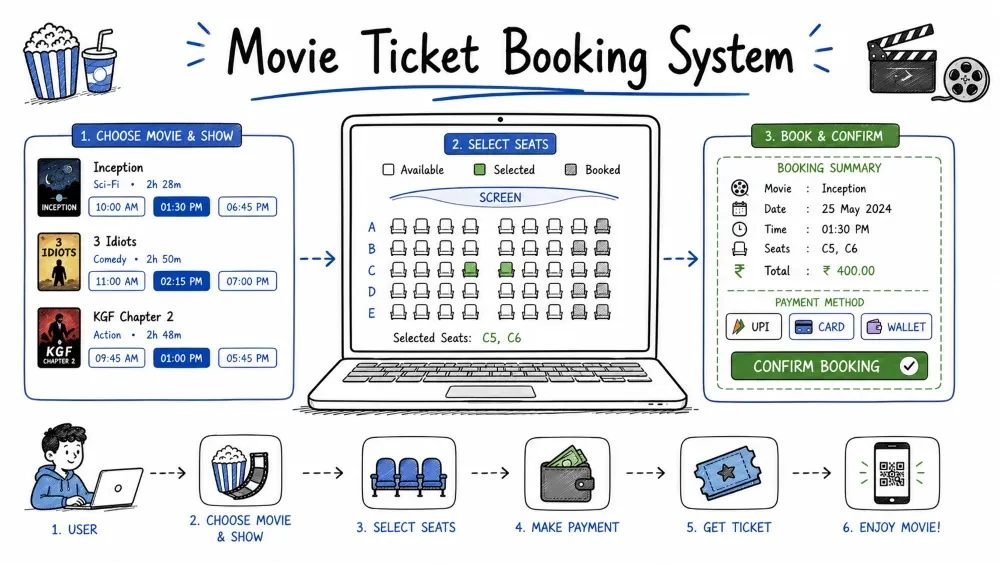
A command-line ticket booking system for a cinema. Users can view available movies, select seats, calculate the total price, and print a receipt. This project teaches you how to work with nested data structures (lists of dictionaries), manage a 2D seating grid, validate seat availability, and build a multi-step booking flow. The same logic powers every online ticket platform — BookMyShow, Ticketmaster, Fandango.
This system simulates a cinema ticket counter. The program stores a list of movies with showtimes and prices, maintains a seating grid for each show, lets the user pick a movie and seats, calculates the cost, and prints a receipt. The seat grid updates after each booking so no seat is double-booked.
Where this is used in the real world: Every cinema booking website uses the same pattern — movie list → seat selection → payment → receipt. The 2D grid approach here is identical to what you see on BookMyShow, INOX, or PVR ticket pages.
Knowledge needed
for loops with range()returnSoftware needed
MovieTicketBooking/
│
├── main.py      # Complete booking system
└── README.md    # This tutorial
mkdir MovieTicketBooking
cd MovieTicketBooking
Create main.py.
Before writing code, map out the booking process:
        ┌─────────────────────────┐
        │    Display movies       │
        │   (numbered list)       │
        └─────────┬───────────────┘
                  ↓
        ┌─────────────────────────┐
        │   User picks movie      │
        │   (validated input)     │
        └─────────┬───────────────┘
                  ↓
        ┌─────────────────────────┐
        │   How many tickets?     │
        └─────────┬───────────────┘
                  ↓
        ┌─────────────────────────┐
        │  Show seating chart     │
        │  O = available          │
        │  X = booked             │
        └─────────┬───────────────┘
                  ↓
        ┌─────────────────────────┐
        │  User picks row & seat  │
        │  (validated)            │
        └─────────┬───────────────┘
                  ↓
        ┌─────────────────────────┐
        │  Mark seat as X         │
        │  More seats to book?    │
        │  Yes → back to chart    │
        │  No  → print receipt    │
        └─────────┬───────────────┘
                  ↓
        ┌─────────────────────────┐
        │     Print receipt       │
        └─────────────────────────┘
Every feature you build will implement one box in this flow.
Store each movie as a dictionary inside a list. Each dictionary holds the movie title, showtime, and ticket price.
movies = [
    {"title": "The Matrix Reloaded",        "time": "14:30", "price": 12.50},
    {"title": "Interstellar",               "time": "17:00", "price": 15.00},
    {"title": "Spider-Man: No Way Home",    "time": "19:45", "price": 14.00},
    {"title": "Dune: Part Two",             "time": "22:15", "price": 16.50}
]
Why a list of dictionaries instead of separate lists:
# Without dictionaries — 3 parallel lists:
titles = ["The Matrix Reloaded", "Interstellar", ...]
times = ["14:30", "17:00", ...]
prices = [12.50, 15.00, ...]
# Problem: What if you sort one list but not the others? Data gets mismatched.

# With dictionaries — all data for one movie is grouped:
# movies[1] → {"title": "Interstellar", "time": "17:00", "price": 15.00}
# Everything about movie 2 is in one place.
Data structure diagram:
movies list
├── [0] → {"title": "The Matrix Reloaded",   "time": "14:30", "price": 12.50}
├── [1] → {"title": "Interstellar",          "time": "17:00", "price": 15.00}
├── [2] → {"title": "Spider-Man: No Way Home","time": "19:45", "price": 14.00}
└── [3] → {"title": "Dune: Part Two",        "time": "22:15", "price": 16.50}
Each screen has a grid of seats. We store seats as a 2D list (a list of rows, where each row is a list of seats). "O" means available, "X" means booked.
Write a function that builds a fresh seating chart.
ROWS = 5
COLS = 8

def create_seating():
    seating = []
    for r in range(ROWS):
        row = []
        for c in range(COLS):
            row.append("O")
        seating.append(row)
    return seating
How the nested loops build the grid:
Outer loop (r=0):  row = ["O","O","O","O","O","O","O","O"]
                   seating = [row]

Outer loop (r=1):  row = ["O","O","O","O","O","O","O","O"]
                   seating = [row0, row1]

... continues for r=2, 3, 4 ...

Final result:
seating = [
    ["O", "O", "O", "O", "O", "O", "O", "O"],   # Row 1
    ["O", "O", "O", "O", "O", "O", "O", "O"],   # Row 2
    ["O", "O", "O", "O", "O", "O", "O", "O"],   # Row 3
    ["O", "O", "O", "O", "O", "O", "O", "O"],   # Row 4
    ["O", "O", "O", "O", "O", "O", "O", "O"]    # Row 5
]
To access a seat: seating[row][col] where row is 0-4 and col is 0-7.
Write a function that prints the movie list with numbers so the user can choose.
def show_movies(movies):
    print("\nNow Showing:\n")
    for i, movie in enumerate(movies, 1):
        print(f"{i}. {movie['title']}  ({movie['time']})  ${movie['price']:.2f}")
enumerate(movies, 1) — takes the movies list and returns pairs (1, movie[0]), (2, movie[1]), etc. The 1 means start counting from 1 instead of 0, so the numbering matches what humans expect.
Output:
Now Showing:

1. The Matrix Reloaded  (14:30)  $12.50
2. Interstellar  (17:00)  $15.00
3. Spider-Man: No Way Home  (19:45)  $14.00
4. Dune: Part Two  (22:15)  $16.50
Ask the user to pick a movie by number. Validate the input so they cannot pick a number that does not exist.
def pick_movie(movies):
    show_movies(movies)
    try:
        choice = int(input(f"\nSelect a movie (1-{len(movies)}): "))
        if 1 <= choice <= len(movies):
            return movies[choice - 1]
        else:
            print("Invalid selection. Choose a number between 1 and 4.")
            return None
    except ValueError:
        print("Please enter a number.")
        return None
movies[choice - 1] explained:
User sees:   1    2    3    4
List index:  0    1    2    3

User chooses "2" → choice = 2 → choice - 1 = 1 → movies[1] = Interstellar
Returns None on invalid input. The caller uses a while loop to keep asking:
movie = None
while movie is None:
    movie = pick_movie(movies)
This loop keeps running pick_movie() until the user provides a valid selection that returns a movie dictionary (not None).
Print the seating grid with row and column labels. Use string repetition to align columns.
def show_seating(seating):
    print("\nSeating Chart (O = Available, X = Booked):\n")

    # Print column headers (1 to 8)
    print("     ", end="")
    for c in range(COLS):
        print(f"  {c+1} ", end="")
    print()

    # Print each row
    for r in range(ROWS):
        print(f"Row {r+1}: ", end="")
        for seat in seating[r]:
            print(f"  {seat} ", end="")
        print()  # newline after each row
end="" overrides print()'s default newline character with an empty string. This lets us build each row on one line by calling print() multiple times without breaking to a new line.
Output:
Seating Chart (O = Available, X = Booked):

        1   2   3   4   5   6   7   8
Row 1:   O   O   O   O   O   O   O   O
Row 2:   O   O   O   O   O   O   O   O
Row 3:   O   O   O   O   O   O   O   O
Row 4:   O   O   O   O   O   O   O   O
Row 5:   O   O   O   O   O   O   O   O
After some seats are booked:
        1   2   3   4   5   6   7   8
Row 1:   O   X   O   O   X   O   O   O
Row 2:   O   O   O   X   O   O   O   O
Row 3:   O   O   O   O   O   O   O   O
Row 4:   O   O   O   O   X   O   O   O
Row 5:   X   O   O   O   O   O   O   O
Ask the user for row and column. Check three things before booking:
def book_seat(seating):
    show_seating(seating)

    try:
        row = int(input("\nEnter row number: ")) - 1
        col = int(input("Enter seat number: ")) - 1

        # Bounds check: is this seat inside the grid?
        if row < 0 or row >= ROWS or col < 0 or col >= COLS:
            print("Invalid seat location. Row must be 1-5, Seat 1-8.")
            return False

        # Availability check: is this seat free?
        if seating[row][col] == "X":
            print("That seat is already booked. Choose another.")
            return False

        # Book the seat
        seating[row][col] = "X"
        print(f"Seat booked! Row {row+1}, Seat {col+1}")
        return True

    except ValueError:
        print("Please enter valid numbers.")
        return False
Validation order matters:
# 1. Is it a number?                 (try/except ValueError)
# 2. Is it inside the grid?          (bounds check)
# 3. Is it available?                (availability check)
# 4. Book it!                        (mark as X)
Each check narrows the problem. First we ensure the input is parseable, then that it is in range, then that the seat is free. Only then do we modify the grid.
Why row = int(...) - 1: The user sees rows numbered 1-5, but Python list indices are 0-4. Subtracting 1 converts between the two numbering systems.
seating[row][col] = "X" — Because lists are mutable (changeable), this modification persists. The next time show_seating() is called, that seat shows as "X". If the grid were an immutable data type, we could not change it in place.
Simple multiplication: ticket price × number of tickets.
def calculate_total(price, num_seats):
    return price * num_seats
Why a separate function for one line of math: Consistency and readability. In the main code, total = calculate_total(price, count) is clearer than total = price * count. If the pricing logic ever gets more complex (discounts, taxes, service fees), you change it in one place.
Show a formatted receipt with movie details, number of seats, price per ticket, and total.
def print_receipt(movie, num_seats, total):
    print("\n" + "=" * 40)
    print("         TICKET RECEIPT")
    print("=" * 40)
    print(f"Movie:   {movie['title']}")
    print(f"Time:    {movie['time']}")
    print(f"Seats:   {num_seats}")
    print(f"Price:   ${movie['price']:.2f} each")
    print("-" * 40)
    print(f"TOTAL:   ${total:.2f}")
    print("=" * 40)
    print("Thank you! Enjoy the show!\n")
"=" * 40 creates a string of 40 equals signs. This is the simplest way to draw a horizontal line in the terminal.
Output:
========================================
              TICKET RECEIPT
========================================
Movie:   Interstellar
Time:    17:00
Seats:   2
Price:   $15.00 each
----------------------------------------
TOTAL:   $30.00
========================================
Thank you! Enjoy the show!
Screenshot Suggestion: Terminal showing the seating chart with booked seats and the receipt below it.
Here is the complete booking flow without the main() function wrapper:
ROWS = 5
COLS = 8

movies = [
    {"title": "The Matrix Reloaded",        "time": "14:30", "price": 12.50},
    {"title": "Interstellar",               "time": "17:00", "price": 15.00},
    {"title": "Spider-Man: No Way Home",    "time": "19:45", "price": 14.00},
    {"title": "Dune: Part Two",             "time": "22:15", "price": 16.50}
]

def create_seating():
    seating = []
    for r in range(ROWS):
        row = ["O"] * COLS  # faster way to create a row
        seating.append(row)
    return seating

def show_movies(movies):
    print("\nNow Showing:\n")
    for i, movie in enumerate(movies, 1):
        print(f"{i}. {movie['title']}  ({movie['time']})  ${movie['price']:.2f}")

def show_seating(seating):
    print("\n     ", end="")
    for c in range(COLS):
        print(f"  {c+1} ", end="")
    print()
    for r in range(ROWS):
        print(f"Row {r+1}: ", end="")
        for seat in seating[r]:
            print(f"  {seat} ", end="")
        print()

def pick_movie(movies):
    show_movies(movies)
    try:
        choice = int(input(f"\nSelect a movie (1-{len(movies)}): "))
        if 1 <= choice <= len(movies):
            return movies[choice - 1]
        print("Invalid selection.")
        return None
    except ValueError:
        print("Please enter a number.")
        return None

def book_seat(seating):
    show_seating(seating)
    try:
        row = int(input("\nRow number: ")) - 1
        col = int(input("Seat number: ")) - 1
        if row < 0 or row >= ROWS or col < 0 or col >= COLS:
            print("Invalid seat location.")
            return False
        if seating[row][col] == "X":
            print("Already booked.")
            return False
        seating[row][col] = "X"
        print(f"Booked! Row {row+1}, Seat {col+1}")
        return True
    except ValueError:
        print("Invalid numbers.")
        return False

def calculate_total(price, num_seats):
    return price * num_seats

def print_receipt(movie, num_seats, total):
    print("\n" + "=" * 40)
    print("         TICKET RECEIPT")
    print("=" * 40)
    print(f"Movie:   {movie['title']}")
    print(f"Time:    {movie['time']}")
    print(f"Seats:   {num_seats}")
    print(f"Price:   ${movie['price']:.2f} each")
    print("-" * 40)
    print(f"TOTAL:   ${total:.2f}")
    print("=" * 40)
    print("Thank you! Enjoy the show!\n")
All the individual functions are ready. Now we need a main() function to orchestrate the booking flow. The main() function:
create_seating().The if __name__ == "__main__": guard at the bottom ensures main() runs only when the script is executed directly, not when imported from another file. This is a standard Python pattern for making code both runnable and importable.
ROWS = 5
COLS = 8

movies = [
    {"title": "The Matrix Reloaded",        "time": "14:30", "price": 12.50},
    {"title": "Interstellar",               "time": "17:00", "price": 15.00},
    {"title": "Spider-Man: No Way Home",    "time": "19:45", "price": 14.00},
    {"title": "Dune: Part Two",             "time": "22:15", "price": 16.50}
]

def create_seating():
    seating = []
    for r in range(ROWS):
        seating.append(["O"] * COLS)
    return seating

def show_movies(movies):
    print("\nNow Showing:\n")
    for i, movie in enumerate(movies, 1):
        print(f"{i}. {movie['title']}  ({movie['time']})  ${movie['price']:.2f}")

def show_seating(seating):
    print("\nSeating Chart (O = Available, X = Booked):\n")
    print("     ", end="")
    for c in range(COLS):
        print(f"  {c+1} ", end="")
    print()
    for r in range(ROWS):
        print(f"Row {r+1}: ", end="")
        for seat in seating[r]:
            print(f"  {seat} ", end="")
        print()

def pick_movie(movies):
    show_movies(movies)
    try:
        choice = int(input(f"\nSelect a movie (1-{len(movies)}): "))
        if 1 <= choice <= len(movies):
            return movies[choice - 1]
        print("Invalid selection.")
        return None
    except ValueError:
        print("Please enter a number.")
        return None

def book_seat(seating):
    show_seating(seating)
    try:
        row = int(input("\nEnter row number: ")) - 1
        col = int(input("Enter seat number: ")) - 1
        if row < 0 or row >= ROWS or col < 0 or col >= COLS:
            print("Invalid seat location.")
            return False
        if seating[row][col] == "X":
            print("That seat is already booked.")
            return False
        seating[row][col] = "X"
        print(f"Seat booked! Row {row+1}, Seat {col+1}")
        return True
    except ValueError:
        print("Please enter valid numbers.")
        return False

def calculate_total(price, num_seats):
    return price * num_seats

def print_receipt(movie, num_seats, total):
    print("\n" + "=" * 40)
    print("         TICKET RECEIPT")
    print("=" * 40)
    print(f"Movie:   {movie['title']}")
    print(f"Time:    {movie['time']}")
    print(f"Seats:   {num_seats}")
    print(f"Price:   ${movie['price']:.2f} each")
    print("-" * 40)
    print(f"TOTAL:   ${total:.2f}")
    print("=" * 40)
    print("Thank you! Enjoy the show!\n")

def main():
    print("=== Movie Ticket Booking System ===\n")

    seating = create_seating()

    movie = None
    while movie is None:
        movie = pick_movie(movies)

    print(f"\nYou selected: {movie['title']} at {movie['time']}")

    try:
        num_tickets = int(input("How many tickets? "))
    except ValueError:
        print("Invalid number. Setting to 1.")
        num_tickets = 1

    if num_tickets <= 0:
        print("Must book at least 1 ticket. Setting to 1.")
        num_tickets = 1

    booked = 0
    while booked < num_tickets:
        if book_seat(seating):
            booked += 1
            print(f"Progress: {booked}/{num_tickets} seats booked.")

    total = calculate_total(movie["price"], num_tickets)
    print_receipt(movie, num_tickets, total)

if __name__ == "__main__":
    main()
Run the file:
python main.py
Test 1 – Book one seat
Input: Movie 2, 1 ticket, Row 3, Seat 5
Expected: Seat marked X on seating chart, receipt shows 1 seat, total $15.00.
Test 2 – Book multiple seats
Input: 3 tickets. Book Row 1 Seats 1, 2, 3 one at a time.
Expected: Three seats marked X, receipt shows 3 seats, total $45.00.
Test 3 – Double booking attempt
Try to book Row 1 Seat 1 (already booked from Test 2).
Expected: "That seat is already booked." Prompt returns to choose another.
Test 4 – Invalid seat (out of range)
Input: Row 10, Seat 1
Expected: "Invalid seat location."
Test 5 – Invalid movie choice
Input: 7
Expected: "Invalid selection." Prompted again until valid choice.
Test 6 – Text instead of number
Input at row prompt: "abc"
Expected: "Please enter valid numbers." Prompt returns.
IndexError: list index out of range
Trigger: Row or column number is outside the grid dimensions (row > 5 or col > 8).
Why: Accessing seating[10][0] when seating only has 5 rows (indices 0-4).
Fix: The bounds check `if row < 0 or row >= ROWS` catches this before the access.
Seats reset after booking (all O again)
Trigger: `create_seating()` is called inside `book_seat()` instead of once at the start.
Why: Every time `book_seat()` runs, it creates a fresh grid, wiping previous bookings.
Fix: Call `seating = create_seating()` once in `main()`. Pass `seating` to functions.
Receipt shows $0.00
Trigger: Forgot to call `total = calculate_total(movie["price"], num_tickets)`.
Why: The receipt function prints the `total` parameter, which was never calculated.
Fix: Calculate `total` before calling `print_receipt()`.
Receipt shows the wrong movie price
Trigger: Using a hardcoded price like `12.50` instead of `movie["price"]`.
Why: If prices change, the hardcoded number does not update.
Fix: Always use `movie["price"]` — the value comes from the movie dictionary.
Seat Categories – Add three price tiers: Standard ($12), Premium ($18), VIP ($25). Assign them to different rows. Calculate total using the correct tier price per seat.
Booking Reference – Generate a random 6-character booking reference code using random.choices(string.ascii_uppercase + string.digits, k=6) and print it on the receipt.
Cancel Booking – Add a menu option that lets the user free a booked seat by entering row and column numbers. Change "X" back to "O".
Movie Schedule – Support multiple showtimes per movie with separate seating grids. Use a dictionary: showtimes["Interstellar"] = {"17:00": create_seating(), "20:00": create_seating()}.
Booking History – Keep a list of all completed bookings. Each booking stores movie title, time, number of seats, and total. Let the user view the history from a menu option.
Save your progress and earn XP for completing tutorials.
Technology
Python
Lesson group
Mini Projects
Progress
55% complete

