Preparing your learning space...
27% through Mini Projects tutorials
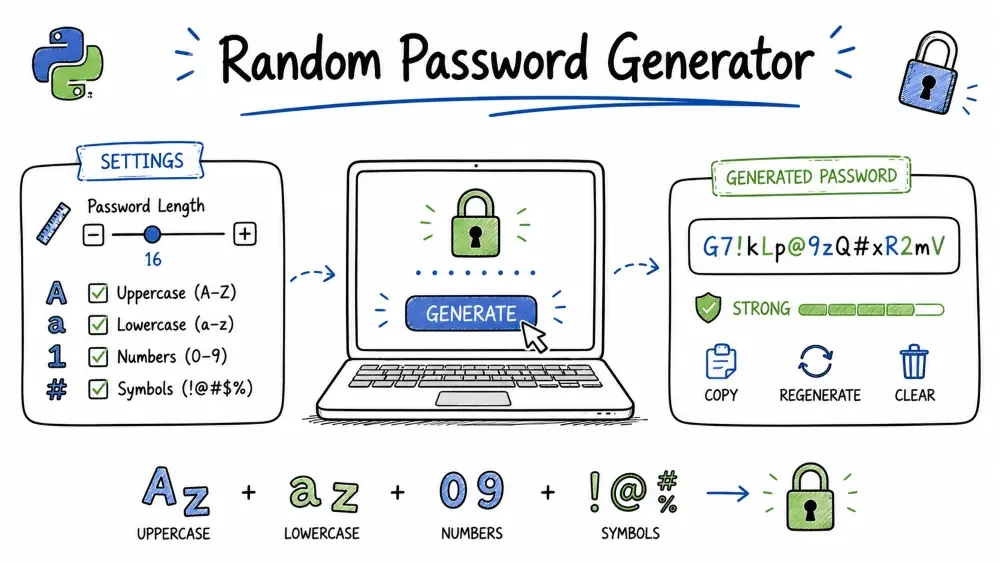
A program that generates strong, secure passwords using a mix of uppercase letters, lowercase letters, digits, and special characters. You will learn how to work with multiple character sets, shuffle selections, classify password strength, and build a command-line tool that respects common password security rules. This is the same kind of tool built into password managers like Bitwarden, 1Password, and LastPass.
A strong password contains a mix of different character types. This generator asks the user how long the password should be and how many passwords to create. It then builds random passwords, guaranteeing each one contains at least one uppercase letter, one lowercase letter, one digit, and one special character. The program also rates each password as weak, medium, or strong.
Real-world relevance: Password generators are built into every password manager. Websites use similar logic for "suggest a strong password" features. System administrators use them to generate temporary credentials. Understanding how they work helps you evaluate password security.
random and string modulesKnowledge needed
"".join()returnfor loopsimport and module usageSoftware needed
PasswordGenerator/
│
├── main.py      # The password generator program
└── README.md    # This tutorial
mkdir PasswordGenerator
cd PasswordGenerator
Create main.py.
Python's string module contains pre-defined character sets. The random module handles shuffling and random selection.
import random
import string
What each module gives us:
| Function / Constant | Source | What it does |
|---|---|---|
random.choice(seq) | random | Picks one random element from a sequence |
random.shuffle(lst) | random | Rearranges a list in-place (shuffles) |
string.ascii_lowercase | string | "abcdefghijklmnopqrstuvwxyz" |
string.ascii_uppercase | string | "ABCDEFGHIJKLMNOPQRSTUVWXYZ" |
string.digits | string | "0123456789" |
string.punctuation | string | !"#$%&'()*+,-./:;<=>?@[\]^_`{|}~ |
Before we combine these sets, it helps to see what each one contains. Add this temporary code to inspect them:
import string

print("Lowercase:", string.ascii_lowercase)
print("Uppercase:", string.ascii_uppercase)
print("Digits:", string.digits)
print("Punctuation:", string.punctuation)
Output:
Lowercase: abcdefghijklmnopqrstuvwxyz
Uppercase: ABCDEFGHIJKLMNOPQRSTUVWXYZ
Digits: 0123456789
Punctuation: !"#$%&'()*+,-./:;<=>?@[\]^_`{|}~
Count them up: 26 lowercase + 26 uppercase + 10 digits + 32 punctuation = 94 characters in the total pool. For an 8-character password, that is 94⁸ ≈ 6 × 10¹⁵ possible combinations.
Store each set in a variable, then combine them into one big pool.
lower = string.ascii_lowercase
upper = string.ascii_uppercase
digits = string.digits
symbols = string.punctuation

all_characters = lower + upper + digits + symbols
lower + upper + digits + symbols — The + operator on strings concatenates them. This creates one long string with all 94 characters. This is our drawing pool.
ASCII diagram of the pool composition:
all_characters = lower (26) + upper (26) + digits (10) + symbols (32) = 94 chars

Each random pick draws from all 94:
    ↓
a b c d ... z A B C D ... Z 0 1 2 ... 9 ! @ # $ ... ~
├───── 26 ────┤├───── 26 ───┤├── 10 ─┤├──── 32 ────┤
   lowercase     uppercase     digits    symbols
Write a simple function that builds a password by picking random characters from the pool.
def generate_password(length=12):
    password = []
    for _ in range(length):
        password.append(random.choice(all_characters))
    return "".join(password)
How "".join(password) works:
password = ['a', 'B', '3', '@']   # list of characters
"".join(password)                  # → "aB3@"
The join() method is called on a separator string ("" — empty string). It "glues" the list elements together using the separator between each one. With an empty separator, the characters are joined with nothing between them.
Why build a list then join? Strings are immutable in Python — you cannot change a string after it is created. password += "a" creates a new string every time, which is slow for many iterations. Lists are mutable — password.append("a") adds to the existing list. Then "".join() converts once at the end. This is the standard Python pattern for building strings in a loop.
Testing the naive version:
print(generate_password(8))   # e.g., "aB3@xY9#"
print(generate_password(16))  # e.g., "kL7$mN2@pQ5!rS3%"
The function above might produce a password without digits or symbols. Pure randomness does not guarantee variety.
Example problem passwords the naive function could generate:
"abcQrstXYZ"     ← no digits, no symbols (only lowercase + uppercase)
"1234567890"     ← no letters, no symbols (only digits)
"!@#$%^&*()"     ← no letters, no digits (only symbols)
"AbcdefGhijk"    ← no digits, no symbols
Why this happens: Each character is picked independently. There is a ~55% chance (52/94) of picking a letter, ~11% (10/94) of a digit, and ~34% (32/94) of a symbol. For an 8-character password, the probability of getting zero digits is (84/94)⁸ ≈ 42%. That means nearly half of all generated passwords would have no digits.
Real-world requirement: Most websites enforce "must contain at least one digit and one special character." Our generator must guarantee this.
The fix: pick one character from each required set first, then fill the rest randomly. This guarantees every required type appears at least once.
def generate_password(length=12):
    if length < 4:
        print("Password length must be at least 4.")
        return None

    # Step 1: Pick one from each required set
    pw_list = [
        random.choice(lower),
        random.choice(upper),
        random.choice(digits),
        random.choice(symbols)
    ]

    # Step 2: Fill the remaining length with random choices
    for _ in range(length - 4):
        pw_list.append(random.choice(all_characters))

    # Step 3: Shuffle so the guaranteed chars aren't predictable
    random.shuffle(pw_list)

    return "".join(pw_list)
Visual breakdown for length=8:
Before shuffle:
pw_list = [lower, upper, digits, symbols, random, random, random, random]
           │─────── guaranteed ───────││────────── filler ───────────│
           Index: 0      1      2      3         4    5    6    7

After shuffle (random.shuffle):
pw_list = [random, digits, random, lower, random, symbols, random, upper]
           positions of the 4 guaranteed types are now unpredictable
if length < 4:
None as a signal that generation failed. The caller checks if pwd: before using the result.Without the shuffle, every password would follow this exact pattern:
Position:  0     1      2      3     4    5    6    7
Content:  lower upper digits symbol rand rand rand rand
Example:  a     B     3      @     x    Y    9    #
An attacker who knows we use this pattern can reduce the search space. With shuffling:
Example:  x    K     @     9     m    R    #    2
Position: 0    1     2     3     4    5    6    7
          rand lower symbol digits rand rand rand upper
No pattern. All positions are equally likely to contain any character type.
random.shuffle(pw_list) — This shuffles the list in-place. It modifies the existing list rather than creating a new one. The function does not return anything (None). This is different from random.sample(), which returns a new shuffled list without modifying the original.
Here is the core password generator working with guaranteed diversity:
import random
import string

lower = string.ascii_lowercase
upper = string.ascii_uppercase
digits = string.digits
symbols = string.punctuation
all_characters = lower + upper + digits + symbols

def generate_password(length=12):
    if length < 4:
        print("Password length must be at least 4.")
        return None

    pw_list = [
        random.choice(lower),
        random.choice(upper),
        random.choice(digits),
        random.choice(symbols)
    ]

    for _ in range(length - 4):
        pw_list.append(random.choice(all_characters))

    random.shuffle(pw_list)
    return "".join(pw_list)

# Test
for i in range(5):
    pwd = generate_password(12)
    print(f"{pwd}  (len={len(pwd)})")
Run this. You should see 5 passwords like xK@9mR#2pL$q — each with mixed case, a digit, and a symbol.
Add user input with error handling. If the user types something invalid, we fall back to a default instead of crashing.
print("=== Random Password Generator ===\n")

try:
    length = int(input("Enter password length (minimum 4): "))
except ValueError:
    print("That's not a valid number. Using default length 12.")
    length = 12
try/except flow:
User types: "16"
  → int("16") → 16  →  length = 16  →  continues normally

User types: "abc"
  → int("abc") raises ValueError
  → except block runs:  length = 12  →  continues normally

User types: ""  (empty, just pressed Enter)
  → int("") raises ValueError
  → except block runs:  length = 12
Why try/except instead of isdigit(): Both work. try/except is more "Pythonic" for this case — it follows the principle "ask for forgiveness, not permission." We try to convert, and only handle the error if it happens. isdigit() checks first, then converts — that is "look before you leap." Use whichever makes sense to you.
Write a function that examines a password and rates its strength.
def check_strength(password):
    has_lower = any(c.islower() for c in password)
    has_upper = any(c.isupper() for c in password)
    has_digit = any(c.isdigit() for c in password)
    has_symbol = any(c in string.punctuation for c in password)

    score = sum([has_lower, has_upper, has_digit, has_symbol])

    if len(password) < 8:
        return "Weak"
    elif score == 4 and len(password) >= 12:
        return "Strong"
    elif score >= 3:
        return "Medium"
    else:
        return "Weak"
How any() works:
password = "aB3@xyz"

# This loop comprehension:
[c.isupper() for c in password]
# Produces: [False, True, False, False, False, False, False]
#            ('a')  ('B')  ('3')  ('@')  ('x')  ('y')  ('z')

any([False, True, False, False, False, False, False])
# → True  (because at least one element is True)
any() returns True if at least one element in the iterable is truthy. The generator expression (c.islower() for c in password) evaluates lazily — it stops as soon as it finds a True value, without checking the rest.
Score logic table:
| Score | Meaning | Strength (if ≥ 8 chars) | Strength (if < 8 chars) |
|---|---|---|---|
| 4 | All 4 types present | Strong (if ≥ 12 chars) or Medium | Weak |
| 3 | 3 of 4 types | Medium | Weak |
| 2 | 2 of 4 types | Weak | Weak |
| 1 | 1 of 4 types | Weak | Weak |
| 0 | Empty or no known type | Weak | Weak |
Let the user request several passwords at once. Loop and display each one with its strength rating.
print("=== Random Password Generator ===\n")

try:
    length = int(input("Enter password length (minimum 4): "))
except ValueError:
    print("That's not a valid number. Using default length 12.")
    length = 12

try:
    count = int(input("How many passwords? "))
except ValueError:
    print("That's not a valid number. Generating 1 password.")
    count = 1

print(f"\nGenerated Passwords:\n")

for i in range(count):
    pwd = generate_password(length)
    if pwd:  # skip if generate_password returned None (length < 4)
        strength = check_strength(pwd)
        print(f"{i+1}. {pwd}  ({strength})")
Output when run:
=== Random Password Generator ===

Enter password length (minimum 4): 16
How many passwords? 3

Generated Passwords:

1. xK@9mR#2pL$qW5vN  (Strong)
2. A!bC7dEfGhIjK3Lm  (Strong)
3. pQrS1tUvWxYz2!@#  (Strong)
Note on if pwd:: generate_password() returns None if length < 4. None is falsy, so if pwd: skips printing for invalid lengths. Only valid password strings (which are always truthy) get displayed.
import random
import string

lower = string.ascii_lowercase
upper = string.ascii_uppercase
digits = string.digits
symbols = string.punctuation
all_characters = lower + upper + digits + symbols

def generate_password(length=12):
    if length < 4:
        print("Password length must be at least 4.")
        return None

    pw_list = [
        random.choice(lower),
        random.choice(upper),
        random.choice(digits),
        random.choice(symbols)
    ]

    for _ in range(length - 4):
        pw_list.append(random.choice(all_characters))

    random.shuffle(pw_list)
    return "".join(pw_list)

def check_strength(password):
    has_lower = any(c.islower() for c in password)
    has_upper = any(c.isupper() for c in password)
    has_digit = any(c.isdigit() for c in password)
    has_symbol = any(c in string.punctuation for c in password)

    score = sum([has_lower, has_upper, has_digit, has_symbol])

    if len(password) < 8:
        return "Weak"
    elif score == 4 and len(password) >= 12:
        return "Strong"
    elif score >= 3:
        return "Medium"
    else:
        return "Weak"

print("=== Random Password Generator ===\n")

try:
    length = int(input("Enter password length (minimum 4): "))
except ValueError:
    print("That's not a valid number. Using default length 12.")
    length = 12

try:
    count = int(input("How many passwords? "))
except ValueError:
    print("That's not a valid number. Generating 1 password.")
    count = 1

print(f"\nGenerated Passwords:\n")

for i in range(count):
    pwd = generate_password(length)
    if pwd:
        strength = check_strength(pwd)
        print(f"{i+1}. {pwd}  ({strength})")
Run the file:
python main.py
Test 1 – Strong password (length ≥ 12, all 4 types)
Input: length = 16, count = 1
Expected: 16-character password with at least one of each type, labeled "Strong"
Test 2 – Minimum valid length (4 chars)
Input: length = 4, count = 1
Expected: 4-character password, one of each type. Strength = "Weak" (under 8 chars)
Test 3 – Invalid length (too short)
Input: length = 2
Expected: "Password length must be at least 4." No password shown.
Test 4 – Invalid input (text instead of number)
Input: length = "abc"
Expected: "That's not a valid number. Using default length 12."
Test 5 – Medium strength (5 chars, all 4 types)
Input: length = 5, count = 1
Expected: 5-char password with all types, classed "Weak" (under 8).
Test 6 – Multiple passwords
Input: length = 12, count = 5
Expected: 5 different passwords, each on its own line with strength.
IndexError: cannot choose from an empty sequence
Trigger: One of the character set variables is an empty string.
Why: If you accidentally wrote `digits = ""` instead of `string.digits`, `random.choice("")` fails.
Fix: Verify each variable with `print(len(digits))` — should be 10 for digits, 26 for letters, 32 for symbols.
Password always starts with a lowercase letter
Trigger: Forgot to call `random.shuffle(pw_list)`.
Why: The guaranteed characters are always at indices 0-3 (lower, upper, digit, symbol).
Fix: Add `random.shuffle(pw_list)` before the return statement.
Random module seems predictable (same-ish passwords)
Trigger: Computer-generated randomness is deterministic — it uses a seed.
Why: Python's `random` module uses a pseudo-random number generator. For cryptographic security, use `secrets`.
Fix: For this project, it is fine. For production password generators, replace `random` with `secrets`:
  - `secrets.choice(seq)` instead of `random.choice()`
  - `secrets.SystemRandom().shuffle(lst)` instead of `random.shuffle()`
Password contains ambiguous characters (1, l, I, 0, O)
Trigger: These characters are visually confusable — "l" and "I" look similar in some fonts.
Why: By design, we include all characters. Some systems reject ambiguous ones.
Fix (optional): Define custom strings that exclude ambiguous chars:
  lower = "abcdefghjkmnpqrstuvwxyz"  (removed l, i)
  upper = "ABCDEFGHJKMNPQRSTUVWXYZ"  (removed I, O)
  digits = "23456789"                 (removed 0, 1)
random with secrets for cryptographically secure passwordspyperclipExclude Ambiguous Characters – Add a parameter exclude_ambiguous=True that removes characters like 1, l, I, 0, O from the pools before generating.
Pronounceable Password – Generate passwords based on syllables (consonant-vowel pairs) instead of pure random characters. Use lists like consonants = "bcdfghjklmnpqrstvwxyz" and vowels = "aeiou".
Password Expiry Label – Add a timestamp to each generated password so the user knows when it was created. Use from datetime import datetime and datetime.now().strftime("%Y-%m-%d %H:%M").
Blacklist Common Patterns – Reject any generated password that contains sequential digits like "1234" or "567", or repeated characters like "aaa" or "111".
Bulk CSV Export – Generate 100 passwords and export them to a CSV file with columns: Number, Password, Strength, Created Date. Write the file using the csv module.
Save your progress and earn XP for completing tutorials.
Technology
Python
Lesson group
Mini Projects
Progress
27% complete

